
A Command Line Interface to the TGBOX

Project description
A Command Line Interface to the TGBOX
This is a CLI implementation of the TGBOX — an encrypted cloud storage built around the Telegram.
TGBOX-CLI supports all features of the tgbox protocol, adding additional ones
like basic Encrypted Chat and support for unlimited file size (4GB+) uploads.
Installation
To build the TGBOX-CLI you will need to have at least Python 3.9.
Windows builds (.EXE)
You can use already created executable builds if you're on Windows.
See Releases GitHub page or navigate to the official TGBOX dev.channel
Build the TGBOX-CLI
To make all features work, you will also need the FFmpeg installed in your system (it should
be also accessible by the simple ffmpeg command from your Terminal, in other words: in PATH).
Install with PIP
You can install latest stable release of the tgbox-cli from PyPI:
# Drop [fast] to obtain *slow*, pure-Python build
pip install -U tgbox-cli[fast]
Clone & Install
Alternatively, you can clone this repository and build from the source. This may give you more control over the code:
python -m venv tgbox-cli-env
cd tgbox-cli-env && . bin/activate

git clone https://github.com/NotStatilko/tgbox-cli
pip install ./tgbox-cli[fast]
PyInstaller
If you want to make your own .EXE build with FFmpeg, you will need to download
it and place inside the tgbox/other directory (on Windows only). See this:
python -m venv tgbox-cli-env
cd tgbox-cli-env && . bin/activate

pip install pyinstaller

git clone https://github.com/NonProjects/tgbox
cd tgbox/tgbox/other # Make sure to place here ffmpeg.exe
(after you dropped the ffmpeg.exe to the tgbox/other):
cd ../../.. # Move back
pip install ./tgbox[fast]

git clone https://github.com/NotStatilko/tgbox-cli
pip install ./tgbox-cli[fast]

cd tgbox-cli/pyinstaller
pyinstaller tgbox_cli.spec

# Run the executable and show info
dist/tgbox-cli.exe cli-info
Please note that You can also set TGBOX_CLI_NON_ONEFILE env variable to build without packing
into one executable file & feel free to remove the tgbox-cli-env folder after work was done.
Usage
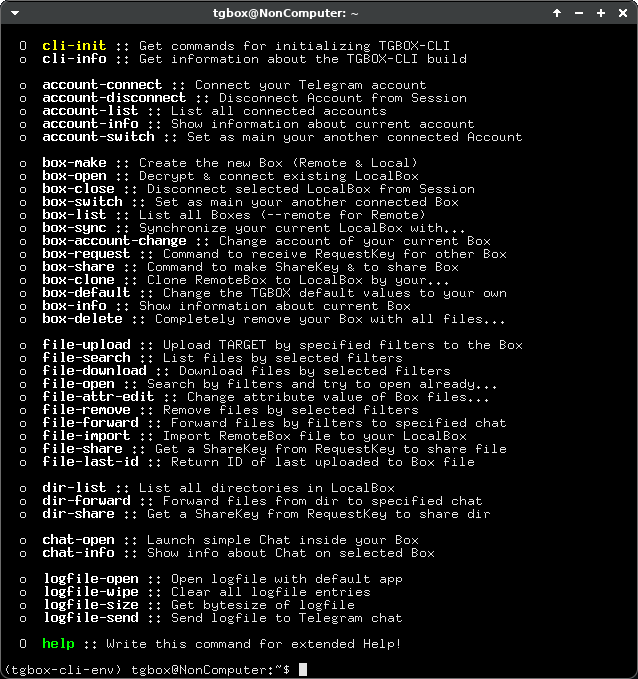
The TGBOX-CLI is a typical Command-Line application. After install, it can be ran as follows:
tgbox-cli
This should output you a list of commands. The help command will give you a full course over TGBOX-CLI.
Use it (as well as --help option on every command) if you don't know anything about this application:
tgbox-cli help
Bug reports
Feel free to report some problems (i believe there can be many) on the GitHub Issue tab. Any encountered error should be
written to the logfile. Use the logfile-open command and attach its contents to the bug report.
Thanks.
Release history Release notifications | RSS feed


Download files
Download the file for your platform. If you're not sure which to choose, learn more about installing packages.
Source Distribution
Built Distribution
Filter files by name, interpreter, ABI, and platform.
If you're not sure about the file name format, learn more about wheel file names.
Copy a direct link to the current filters
File details
Details for the file tgbox_cli-1.5.tar.gz.
File metadata
- Download URL: tgbox_cli-1.5.tar.gz
- Upload date:
- Size: 81.5 kB
- Tags: Source
- Uploaded using Trusted Publishing? No
- Uploaded via: twine/6.2.0 CPython/3.13.5
File hashes
| Algorithm | Hash digest | |
|---|---|---|
| SHA256 |
6c1fc47d613f188717fc2af271222f724d25e6eb61a4314ce0bd21fc5268810d
|
|
| MD5 |
9a93a508d3b5ea0f3b71abd59f8115e4
|
|
| BLAKE2b-256 |
e67aeb6eb0be23cc0ce9ed584cd111bd1447f0f410141f9ccf12539b15f720ba
|
File details
Details for the file tgbox_cli-1.5-py3-none-any.whl.
File metadata
- Download URL: tgbox_cli-1.5-py3-none-any.whl
- Upload date:
- Size: 108.3 kB
- Tags: Python 3
- Uploaded using Trusted Publishing? No
- Uploaded via: twine/6.2.0 CPython/3.13.5
File hashes
| Algorithm | Hash digest | |
|---|---|---|
| SHA256 |
ae781b4f4b2d41b9c9a64ad3b72e5a5fffac03705924d12a3f3b098d204037ff
|
|
| MD5 |
b6743e4c9ce2f75fdd828eecfcf7498b
|
|
| BLAKE2b-256 |
bec44221bdddbf6f9f6b07cb8cc99ff45d3d3a71caba8ca2ba8f75056e3e369b
|






