
A framework for empirically determining maximum sequence length capabilities of LLM models deployed via TGI

Project description
TGI Memory Profiler
A framework for empirically determining the maximum sequence length capabilities of Large Language Models (LLMs) deployed via Text Generation Inference (TGI). This tool helps prevent out-of-memory (OOM) errors by identifying safe operating boundaries for maximum input and output sequence lengths.
Launching TGI server:
# Optimal values provided by TGI Memory Profiler
MAX_INPUT_TOKENS=??? <-- Want to know
MAX_OUTPUT_TOKENS=??? <-- Want to know

MAX_TOTAL_TOKENS=$((MAX_INPUT_TOKENS + MAX_OUTPUT_TOKENS))
MAX_PREFILL_TOKENS=$((MAX_INPUT_TOKENS + 50))

docker run --gpus all --shm-size 64g -p 8080:80 -v $volume:/data \
    ghcr.io/huggingface/text-generation-inference:3.0.2 \
    --model-id $model \
    --max-input-length $MAX_INPUT_TOKENS \
    --max-total-tokens $MAX_TOTAL_TOKENS \
    --max-batch-prefill-tokens $MAX_PREFILL_TOKENS \
    ...
Consuming TGI server:
# Optimal value provided by TGI Memory Profiler
MAX_OUTPUT_TOKENS=??? <-- Want to know

output = client.chat.completions.create(
    model="tgi",
    messages=[
        {"role": "system", "content": "You are a helpful assistant."},
        {"role": "user", "content": "Count to 10"},
    ],
    stream=True,
    max_tokens=MAX_OUTPUT_TOKENS,
)
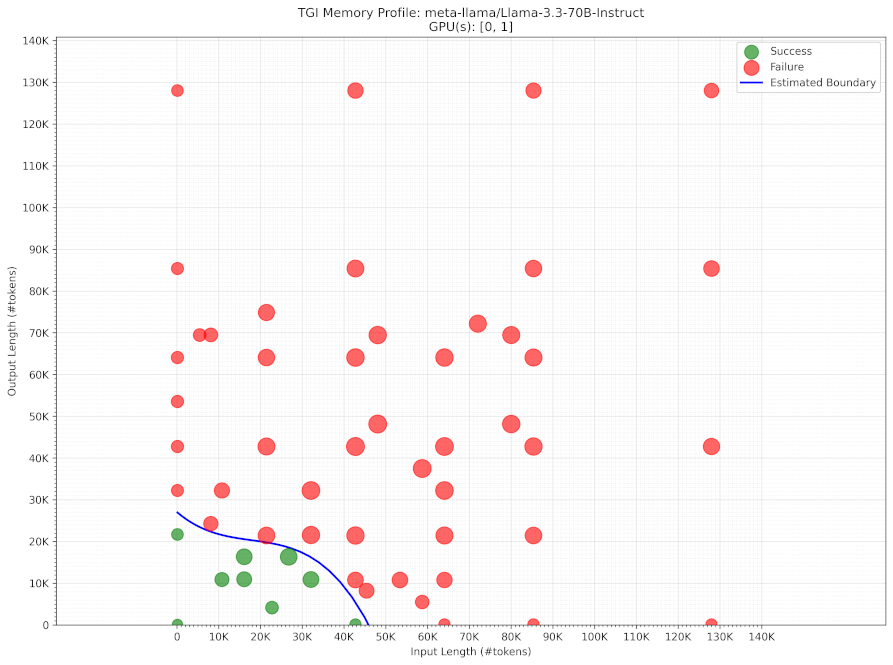
Example visualization of the discovered memory profile for Llama 3.2 70B on a 2x H100 GPU server:
Key Features
- Adaptive Grid Search: Systematically explores viable combinations of input and output sequence lengths
- Intelligent Boundary Detection: Uses KNN and spatial analysis to identify and refine the boundary between successful and failed memory configurations
- Automated Container Management: Handles TGI Docker container lifecycle with robust health checks and cleanup
- Token-Exact Testing: Ensures precise sequence length validation using model-specific tokenizers
- Multimodal Support: Optional testing for multimodal models with image inputs
- Resumable Profiling: Save and resume profiling sessions from previous results
- Visualization Tools: Built-in plotting utilities for analyzing memory boundaries
- Progress Tracking: Detailed logging with colored console output
- Configurable Retries: Robust error handling with configurable retry attempts
Prerequisites
- Docker with NVIDIA Container Toolkit
- Python 3.7+
- HuggingFace account and API token (for accessing models)
- NVIDIA GPU(s) with compatible drivers
Installation
pip install tgi-profiler
Development Installation
Clone the repository:
git clone https://github.com/robin-karlsson0/tgi_profiler
cd tgi_profiler
Install in development mode
pip install -e .
Environment Setup
# Add to ~/.bashrc or equivalent
export HF_TOKEN="your-huggingface-token"  # Required for accessing models
export HF_DIR="/path/to/cache"  # Optional: HuggingFace cache directory
Quick Start
Command Line Usage
Basic profiling:
tgi-profiler meta-llama/Llama-3.1-8B-Instruct \
    --gpu-ids 0 \
    --min-input-length 128 \
    --max-input-length 32768 \
    --min-output-length 128 \
    --max-output-length 32768 \
    --grid-size 4 \
    --refinement-rounds 6
    --output-dir profiler_result_llama3_1_8b
Multimodal model profiling:
tgi-profiler meta-llama/Llama-3.2-11B-Vision-Instruct \
    --multimodal \
    --dummy-image PATH/TO/IMG \
    --gpu-ids 0 1 \
    --min-input-length 128 \
    --max-input-length 32768 \
    --min-output-length 128 \
    --max-output-length 32768 \
    --grid-size 4 \
    --refinement-rounds 6 \
    --output-dir profiler_results_llama3_2_8b
Run tgi-profiler --help for full list of input arguments
Python API Usage
from tgi_profiler import ProfilerConfig, profile_model, plot_results

# Configure profiling parameters
config = ProfilerConfig(
    model_id="meta-llama/Llama-3.1-8B-Instruct",
    gpu_ids=[0],
    min_input_length=2048,
    max_input_length=32768,
    min_output_length=2048,
    max_output_length=32768,
    grid_size=4,                # Initial grid resolution
    refinement_rounds=6,        # Boundary refinement passes
    retries_per_point=3,        # Retries for each test point
    output_tolerance_pct=0.05,  # Tolerance for output length variation
)

# Run profiling
results = profile_model(config)

# Visualize results
plot_results("profiler_results/profile_res_20240130_120000.json")
Advanced Configuration
Boundary Detection Parameters
Fine-tune the boundary detection algorithm:
config = ProfilerConfig(
    # ... basic settings ...
    k_neighbors=5,              # Neighbors for local boundary detection
    m_random=3,                 # Random samples for global exploration
    distance_scale=1000,        # Scale factor for distance-based scoring
    consistency_radius=1000,    # Maximum distance for consistency
    redundancy_weight=0.5,      # Weight for penalizing redundant pairs
    min_refinement_dist=50,     # Minimum distance between refinement points
)
Resuming Previous Runs
config = ProfilerConfig(
    # ... other settings ...
    resume_from_file="profiler_results/previous_run.json"
)
results = profile_model(config)
Output Format
Results are saved as JSON files containing:
- Model and hardware configuration
- Test point results (input length, output length, success/failure)
- Error messages and container logs
- Timestamps for tracking
- Boundary detection parameters
Example result output JSON file:
{
  "config": {
    "model_id": "meta-llama/Llama-3.3-70B-Instruct",
    "gpu_ids": [
      0,
      1
    ],
    "base_url": "http://localhost:8080/v1",
    "min_input_length": 128,
    "max_input_length": 128000,
    "min_output_length": 128,
    "max_output_length": 128000,
    "grid_size": 4,
    "refinement_rounds": 10,
    "output_tolerance_pct": 0.05,
    "temp": 1.5,
    "multimodal": false,
    "dummy_image_path": null,
    "k_neighbors": 5,
    "m_random": 3,
    "distance_scale": 1000,
    "consistency_radius": 1000,
    "redundancy_weight": 0.5,
    "max_pair_distance": 1000000000000.0,
    "min_refinement_dist": 50
  },
  "results": [
    {
      "input_length": 128,
      "output_length": 128,
      "success": true,
      "error_type": null,
      "error_msg": null,
      "container_logs": "",
      "timestamp": "2025-01-30T20:03:00.706655"
    },
    ...
  ]
}
Visualization
The included visualization tool creates plots showing:
- Success/failure regions
- Estimated memory boundary curve
- Point density heatmap
Contributing
Contributions are welcome! Please see our contributing guidelines (CONTRIBUTING.md) for details on:
- Code style and formatting
- Testing requirements
- Pull request process
License
This project is licensed under the GNU General Public License v3 - see the LICENSE file for details.
Citation
If you use this tool in your research, please cite:
@software{tgi_profiler,
    title = {TGI Memory Profiler},
    year = {2024},
    author = {Karlsson, Robin},
    description = {A framework for empirically determining LLM memory limits in TGI deployments},
    url = {https://github.com/robin-karlsson0/tgi_profiler}
}
Release history Release notifications | RSS feed

Download files
Download the file for your platform. If you're not sure which to choose, learn more about installing packages.
Source Distribution
Built Distribution
Filter files by name, interpreter, ABI, and platform.
If you're not sure about the file name format, learn more about wheel file names.
Copy a direct link to the current filters
File details
Details for the file tgi_profiler-1.0.0.tar.gz.
File metadata
- Download URL: tgi_profiler-1.0.0.tar.gz
- Upload date:
- Size: 53.7 kB
- Tags: Source
- Uploaded using Trusted Publishing? No
- Uploaded via: twine/6.1.0 CPython/3.10.12
File hashes
| Algorithm | Hash digest | |
|---|---|---|
| SHA256 |
aea487b8d62d2c035bc4b079fbc6fdb5083b6a2977da6639ecd70a59a5f1e6b8
|
|
| MD5 |
d0a262cd88e0dda491ea7c2c5e38522f
|
|
| BLAKE2b-256 |
1f3c74e36089d7bd97b67c1533fd3ad88c52ca82a01cf8cdab3e8f96c86b7c05
|
File details
Details for the file tgi_profiler-1.0.0-py3-none-any.whl.
File metadata
- Download URL: tgi_profiler-1.0.0-py3-none-any.whl
- Upload date:
- Size: 56.6 kB
- Tags: Python 3
- Uploaded using Trusted Publishing? No
- Uploaded via: twine/6.1.0 CPython/3.10.12
File hashes
| Algorithm | Hash digest | |
|---|---|---|
| SHA256 |
309fee07118d177b58c44db2afbcf8273819e3ba610f8fb847c16f739ab1a73c
|
|
| MD5 |
b5c9a1c42978dcdeba7a856bb155231e
|
|
| BLAKE2b-256 |
ac0d481a597b28d3db01233c65411eff862dd8fb9cc16d3ba705f8203e52b371
|






