
tgju-rates
Live Iranian rial exchange rates from tgju.org in your terminal.
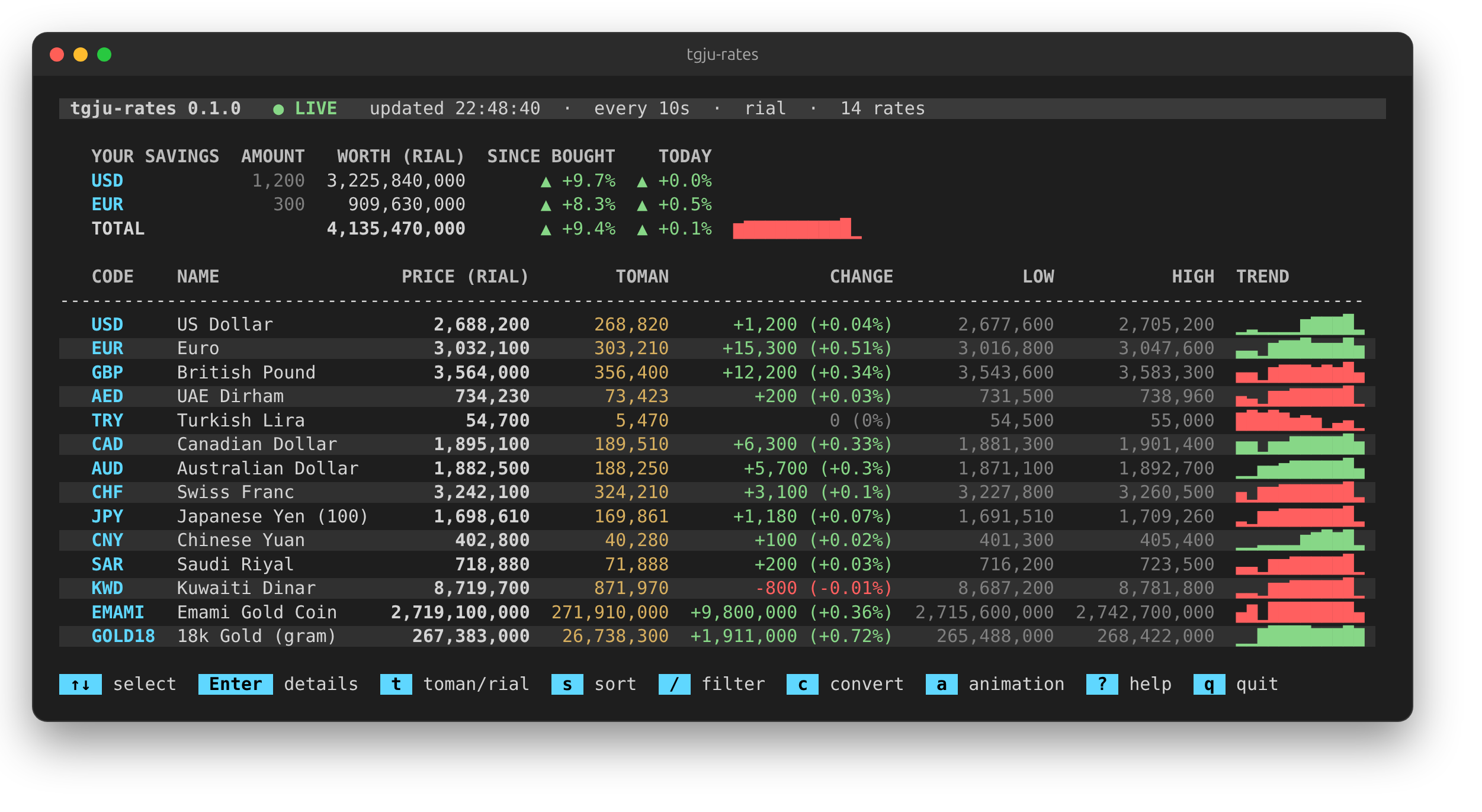
- Updates in place: only the rows whose prices changed are redrawn, so the screen doesn't flicker.
- Prices in rial and toman, daily change, low and high.
- ▲/▼ markers on prices that just moved, and a sparkline of each currency's recent changes.
- A short trading-screen animation on every price change: flash, glow, rolling digits or both. Or none.
- A watchlist, and price alerts with desktop notifications.
- Toman mode (
--toman) and JSON output (--json) for scripts. - A settings file for the options you always use.
- Price history saved to a local SQLite file, so sparklines survive restarts and past prices can be listed.
- No dependencies. Only the Python standard library is used.
Installation
Requires Python 3.9 or newer.
pipx install tgju-rates # or: pip install tgju-rates
On distributions that mark the system Python as externally managed (recent Ubuntu, Debian, Fedora), plain pip install refuses to run. Use pipx, or a virtual environment.
To install from a clone instead:
git clone https://github.com/moxart/tgju-rates.git
cd tgju-rates
pipx install .
You can also run it from the source tree without installing: PYTHONPATH=src python3 -m tgju_rates.
Usage
tgju-rates                       # live, refresh every 10 seconds
tgju-rates -i 5                  # refresh every 5 seconds (minimum 3)
tgju-rates --once                # print the table once and exit
tgju-rates --persian             # add a column with the Persian names
tgju-rates --animation roll      # flash (default), glow, roll, board or off
tgju-rates --watch usd,eur,gbp   # show only these currencies, in this order
tgju-rates --market coin,gold    # gold coins and gold instead of currencies (currency, coin, gold, crypto, all)
tgju-rates --watch usd,emami,btc # mix markets; each code's market is fetched as needed
tgju-rates --dashboard           # currencies, coins, gold and crypto as panels on one screen
tgju-rates --alert "usd>2600000" --alert "eur<=2,850,000"
tgju-rates --toman               # prices in toman; --alert limits are read as toman too
tgju-rates --hold usd=1200@2,450,000 --hold eur=300   # what your savings are worth
tgju-rates --alert "total>5,000,000,000"              # alert on your savings' total
tgju-rates --once --json         # one JSON object; live mode with --json prints one per update (JSON Lines)
tgju-rates --history usd         # saved USD prices from the last day
tgju-rates --history eur --days 7 --toman
tgju-rates --history usd --days 30 --chart   # a chart and a daily open/low/high/close table
tgju-rates --history usd --days 30 --csv > usd.csv
tgju-rates --history usd --chart --jalali    # dates in the Persian calendar
tgju-rates --convert "250 usd"                # 250 USD in rial and toman
tgju-rates --convert "50,000,000 toman to btc"
tgju-rates --jewelry "12.5g wage 18%"         # what an 18k gold piece should cost
tgju-rates --doctor              # check that tgju.org still works with this program
tgju-rates --help lists every option, grouped, with examples.
Currency codes are the site's codes in lower case (eur, gbp, aed, ...). usd is accepted for the
US dollar. An unknown code prints the list of valid ones.
Gold coins, gold and crypto
--market picks what the table shows: currency (the default), coin, gold, crypto, or a
comma-separated mix, or all. Their codes work everywhere a currency code does: --watch, --alert,
--hold, --history and --convert.
| Market | Codes |
|---|---|
coin |
emami (Emami), bahar (Bahar Azadi), nim (half), rob (quarter), gerami (gram coin) |
gold |
gold18, gold24 (per gram), mesghal (mithqal), usedgold, silver (999), silver925 |
crypto |
btc, eth, usdt, bnb, xrp, usdc, sol, trx, doge, ada, ton, link, xlm, ltc, bch, avax, dot, xmr, shib |
All prices are in rial (toman with --toman), so a coin or a gram of gold can go in your savings:
--hold emami=2@2,400,000,000 --hold gold18=15.5. tgju-rates --help lists the codes too.
Dashboard
--dashboard shows one panel per market (currencies, gold coins, gold & silver, crypto) with the
main codes of each: price, today's change in percent and, when live, the trend. The panels go side
by side as far as the terminal is wide, so four panels sit 2×2 at about 130 columns and in a single
row at about 150. --watch picks your own codes, which are grouped into panels by market, and
--market limits which panels appear:
tgju-rates --dashboard --toman
tgju-rates --dashboard --watch usd,eur,try,emami,rob,btc,usdt
tgju-rates --dashboard --market coin,gold
The keys, animations, alerts and savings panel work the same as in the table view.
Converter
--convert turns an amount into rial and toman, or into another code, using live prices, then exits:
$ tgju-rates --convert "250 usd eur"
250 USD = 221.38 EUR
  1 USD (US Dollar) = 2,679,000 rial
  1 EUR (Euro) = 3,025,400 rial
Write AMOUNT CODE, AMOUNT CODE CODE, or put rial/toman on either side ("50,000,000 toman to btc"); to and in are optional. --json prints the result as JSON. Yen is priced per 100 on the site,
and the converter accounts for that. If the feed can't be reached, the last prices saved in the history
file are used and the output says so.
Alert limits are in rial. An alert fires once when its condition becomes true and fires again only
after the condition has stopped holding in between. Fired alerts are listed above the table and sent as a
desktop notification when notify-send is available. Alerts work on any currency, including ones not
in --watch.
To turn alerts off, press m while it runs: no notifications, and the ALERT lines go away, until you
press m again. Alerts that come true while muted aren't replayed when you unmute. --no-alerts
starts without any alerts, including the ones in the settings file.
Jewelry calculator
--jewelry works out what a piece of 18k gold jewelry should cost at the live price of a gram of
18k gold, using the formula gold shops use:
- gold = weight × price per gram
- making charge (اجرت) = a percent of the gold
- seller's profit = a percent of gold plus making charge (7% unless you give
profit) - VAT = a percent of making charge plus profit, not of the gold (10% unless you give
tax)
tgju-rates --jewelry "12.5g wage 18%"
tgju-rates --jewelry "8 grams wage 20% profit 5%" --toman
tgju-rates --jewelry "3.2g wage 15% tax 9%" --json
Each part is shown in rial and toman. When the feed can't be reached, the last saved gold price is used and a note says so.
Your savings
List the currencies you hold, and a panel above the table shows what each is worth now, how much it has gained since you bought it, and today's move, with a TOTAL row and a sparkline of your total:
   YOUR SAVINGS  AMOUNT   WORTH (RIAL)  SINCE BOUGHT    TODAY
   USD            1,200  3,101,580,000     ▲ +26.6%   ▲ +0.8%
   EUR              300    877,050,000                ▼ -0.5%
   TOTAL                 3,978,630,000     ▲ +26.6%   ▲ +0.5%  ▁▃▂▆█
Write each holding as code=amount, or code=amount@price with the price you paid per unit. Put them in
~/.config/tgju-rates/holdings.txt (or --holdings PATH), one per line:
# code=amount@price paid per unit
usd=1200@2,450,000
eur=300                 # no price: shows worth and today's move, but no gain
gbp=0.5@330,000 toman
or pass them with --hold, which replaces the file's line for the same currency. Prices in the file are
rial unless you write toman after them; --hold prices follow --toman, like --alert limits. SINCE
BOUGHT on the TOTAL row covers only the holdings with a price. --alert "total>LIMIT" fires when your
total crosses the limit, and --json adds a holdings object.
Settings file
Options you'd otherwise type every time can go in ~/.config/tgju-rates/config.ini (or
$XDG_CONFIG_HOME/tgju-rates/, or any file with --config PATH). Name each option like the long
option without its dashes:
[defaults]
toman = yes
watch = usd,eur,gbp,emami,gold18,btc
interval = 15
animation = roll
alert = usd>2,700,000
        total>5,000,000,000
The file can set interval, toman, jalali, persian, dashboard, animation, market, watch,
alert, color, days, db, holdings and no-record. Flags take yes or no. A repeatable option
like alert takes one value per line.
The command line wins over the file: --no-toman turns off a toman = yes, and -i 5 replaces the
interval. --alert values on the command line are added to the file's. A value the program can't
read stops it with the file, option and reason. --doctor also checks the file.
Colours
Colours are on in a terminal and off when the output is piped. --color always or --color never
overrides that, and so do the NO_COLOR and FORCE_COLOR environment
variables.
The live screen
The top line shows the connection state: ● LIVE while prices come in, ● OFFLINE after a failed
poll (with the error on the next line, while it retries), and ❚❚ PAUSED. Then the time of the last
update, the interval, the unit, and how many rates and alerts there are. The bottom line lists the keys
that work in the current view; press ? for all of them.
Keys
In live mode in a terminal, single keys change the view without restarting:
| Key | Does |
|---|---|
↑ ↓ |
select a row (in the table or the dashboard) |
Enter |
open the selected row's details: price, change, low/high, its alerts, a chart and the last 7 days |
d |
in the details, show the last 1, 7 or 30 days |
t |
switch between toman and rial |
s |
sort: site order, biggest move today, highest price |
/ |
filter by code or English name as you type; Enter keeps it, Esc clears it |
c |
convert, e.g. 250 usd eur; the result updates as you type and with each new price |
a |
next price animation: flash, glow, roll, board, off |
Esc |
leave the details; otherwise clear the filter, the converter and the selection |
m |
mute alerts: no notifications and the ALERT lines are cleared; m again unmutes |
p |
pause and resume updates |
? |
show or hide the help screen |
q |
quit (Ctrl+C works too) |
t only changes the display. --alert limits stay in the unit they were given in.
The details chart comes from the history file, so it's empty with --no-record and fills in as prices
are saved.
c takes the same input as --convert but uses the prices already on screen, so it works only for loaded
markets (--market coin for emami, for example). Enter keeps the line above the table; c edits it
again.
Animations
When a price changes, its price and second-unit cells play a short effect (1.5 seconds) in green for a rise or red for a fall:
--animation |
Effect |
|---|---|
flash |
the cell lights up and fades back into the row (default) |
glow |
the digits flare white, then cool from bright green or red to normal |
roll |
only the digits that changed spin and land on the new value, left to right |
board |
roll and flash together |
off |
no animation; the ▲/▼ marker and coloured price still show the move |
Press a to try them while it runs. Animations only play in a colour terminal; piped output and
--json never animate.
Piped output (tgju-rates > rates.log) has no colours, ignores keys and appends a full table on every update.
JSON
--json prints numbers instead of formatted text: price, change, low and high are integers in
the unit given by "unit" ("rial", or "toman" with --toman), and change_percent is a float. Fields
the site didn't fill are null. Alerts that fired on that update are listed under "alerts".
tgju-rates --once --json --watch usd | jq '.rates[0].price'
tgju-rates --json --watch usd,eur > rates.jsonl
History
Every run saves prices to ~/.local/share/tgju-rates/history.db (or $XDG_DATA_HOME/tgju-rates/). A row
is written only when a price changes. Live mode starts its TREND sparklines from this file, and
--history CODE lists what was saved. Add --chart for a chart over the --days window with a table of
each day's open, low, high and close, --csv for a spreadsheet, or --json for scripts. Use --db PATH
for a different file and --no-record to not save anything. If the file can't be opened, the program
warns and runs without it.
USD (US Dollar), last 7 day(s), in rial

2,685,000 ┤                                                    ███▂▂
          │                                                  ▇▇█████
2,634,825 ┤                                                  ███████
          │                                                  ███████
2,584,650 ┤                                         ▁▁▁▁▁▁▁▁▁███████
          └─────────────────────────────────────────────────────────
           2026-09-27 01:32                         2026-10-04 01:32

DATE             OPEN        LOW       HIGH      CLOSE           CHANGE
2026-10-02  2,584,650  2,584,650  2,584,650  2,584,650
2026-10-03  2,669,700  2,666,750  2,685,200  2,679,000  +94,350 (+3.7%)
Prices are only saved while the program runs, so gaps in the chart are times it wasn't running.
--jalali shows dates in the Persian calendar (1405/07/12 instead of 2026-10-04) in --history,
--chart, the live status line and the details view. With --csv it adds a jalali_time column and
keeps the ISO time column for spreadsheets. JSON output keeps ISO times.
Shell completion
--completion bash|zsh|fish prints a completion script for options and codes:
tgju-rates --completion bash > ~/.local/share/bash-completion/completions/tgju-rates
tgju-rates --completion fish > ~/.config/fish/completions/tgju-rates.fish
echo 'eval "$(tgju-rates --completion zsh)"' >> ~/.zshrc   # after compinit
Troubleshooting
tgju-rates --doctor checks each part: the currency page parses, the feed answers, every currency and
every coin, gold and crypto entry is in the feed, and the history and holdings files can be read. It
exits with status 1 if anything failed, which makes its output a good start for a bug report.
If the program stops with "unexpected error", run the same command with --debug to see the full
traceback, and please open an issue with it and the
--doctor output.
Exit statuses: 0 success, 1 an error (no connection and nothing saved, unreadable file, ...), 2 a
mistake in the options or the settings file, 130 stopped with Ctrl+C.
How it works
- At startup, the currency page is scraped once to find which
currencies to show and their Persian names. Coins, gold and crypto aren't scraped: the feed already
has them, and
markets.pylists which entries to show. - While running, prices are polled from
https://call1.tgju.org/ajax.json, the feed the site uses for its own live updates. A unique query string gets around its 5-minute CDN cache. After a failed poll the wait doubles each time (up to 2 minutes) and goes back to normal on the next success.
If tgju.org changes its page markup, the scraper is the part that breaks. The program then starts from
the list of currencies saved in the history file, says so above the table, and keeps updating prices from
the feed if that still works. With nothing saved, it exits with the error. --doctor shows which part
broke.
Project layout
src/tgju_rates/
├── cli.py         argument parsing and the entry point
├── config.py      the settings file
├── app.py         --once mode and the live polling loop
├── source.py      scraping the page and reading the JSON feed
├── markets.py     the coin, gold and crypto entries taken from the feed
├── currencies.py  currency codes, English names, rial/toman formatting
├── convert.py     --convert
├── jewelry.py     --jewelry
├── chart.py       --history --chart
├── dates.py       Gregorian or Jalali dates for display
├── doctor.py      --doctor
├── completion.py  shell completion scripts
├── tracking.py    price moves between polls and trend history
├── history.py     the SQLite price history
├── export.py      JSON output
├── alerts.py      alert rules and desktop notifications
├── controls.py    live-mode keys, key bar and help screen
├── table.py       rendering the table, sparklines and colours
├── dashboard.py   --dashboard: one panel per market, laid out in a grid
├── screen.py      flicker-free in-place terminal updates
└── ansi.py        terminal escape codes and the colour palette
tests/             unit tests (offline, no network needed)
Development
python3 -m venv .venv && . .venv/bin/activate
pip install -e . ruff
python -m unittest discover -s tests   # tests
ruff check . && ruff format --check .  # lint and formatting
See CONTRIBUTING.md for the conventions and how releases are made, and CHANGELOG.md for what changed.
A currency the site adds later shows - as its name until it gets an entry in ENGLISH_NAMES in
currencies.py.
Disclaimer
This is an unofficial tool and is not affiliated with tgju.org. All data belongs to tgju.org. Please keep the refresh interval reasonable.
License
1 maintainer

Metadata
1 maintainer
Release files for tgju-rates 0.2.0
For a detailed explanation of source distributions (sdists) and built distributions (wheels), please see the package formats documentation.
Source distribution (sdist)
| File | Size | Uploaded | Provenance | |
|---|---|---|---|---|
| tgju_rates-0.2.0.tar.gz | 83.6 kB | With provenance | Details |
Built distribution (wheel)
| File | Interpreter | ABI | Platform | Reset |
|---|---|---|---|---|
| tgju_rates-0.2.0-py3-none-any.whl | Python 3 | none | any | Details |
Total release size: 149.3 kB
Release files / tgju_rates-0.2.0.tar.gz
| Download URL | tgju_rates-0.2.0.tar.gz |
|---|---|
| Size | 83.6 kB |
| Tags | Source |
|
SHA-256 checksum How to use checksums |
1cd6436f39d15c43e7baccadfa75019e23ea8af28577ecd793c69828cdeb9f2d
|
|
BLAKE2b-256 checksum How to use checksums |
ca0794d8b0a1221bc0c15f36f7435ac64c09286f16b544ad1795df49eb18ee8c
|
| Upload date | |
|
Uploaded using Trusted Publishing? What is trusted publishing? |
Yes |
| Uploaded via |
twine/7.0.0 CPython/3.13.14
|
Provenance
Provenance describes where a file came from. On PyPI, provenance is shared via attestations, which provide a verifiable record of the build or publishing details. View details, limitations and caveats.


PyPI Publish Attestation
PyPI verified that this artifact, at this checksum, originated from the publisher listed below.
Signed by GitHub Actions, verified by PyPI on Oct 20, 2026.
Transparency logRelease files / tgju_rates-0.2.0-py3-none-any.whl
| Download URL | tgju_rates-0.2.0-py3-none-any.whl |
|---|---|
| Size | 65.7 kB |
| Tags | Python 3 |
|
SHA-256 checksum How to use checksums |
216947cf5163af4f5404eb7d6758326ecd8734862a055d03b45d9e6e48c99237
|
|
BLAKE2b-256 checksum How to use checksums |
3b09e84707dd4525778abaf7050f8cd132e2131a6b9cd02fae96bb3e6c4eb55b
|
| Upload date | |
|
Uploaded using Trusted Publishing? What is trusted publishing? |
Yes |
| Uploaded via |
twine/7.0.0 CPython/3.13.14
|
Provenance
Provenance describes where a file came from. On PyPI, provenance is shared via attestations, which provide a verifiable record of the build or publishing details. View details, limitations and caveats.
PyPI Publish Attestation
PyPI verified that this artifact, at this checksum, originated from the publisher listed below.
Signed by GitHub Actions, verified by PyPI on Oct 20, 2026.
Transparency logSecurity for tgju-rates 0.2.0
Provenance
Provenance describes where a file came from. On PyPI, provenance is shared via attestations, which provide a verifiable record of the build or publishing details. View details, limitations and caveats.
Full provenance
All 2 files in this release have been uploaded with provenance metadata.
Attestation for tgju_rates-0.2.0.tar.gz
PyPI Publish Attestation
PyPI verified that this artifact, at this checksum, originated from the publisher listed below.
Signed by GitHub Actions, verified by PyPI on Oct 20, 2026.
Transparency logA note on package security
PyPI is a repository for distributing packages, not a service for auditing them. While third-party security researchers and our staff do their best to detect and remove malicious packages, PyPI cannot guarantee the quality, security or suitability of any given package.













