
tg-stickers-ascii-art

Overview
tg-stickers-ascii-art allows you to convert Telegram stickers into their ASCII Art version.
You can represent them as string , .txt , .png , .wepb.
Requirements
Installation
This package requires Python 3.7+ and can be installed with pip:
pip install tgsart
Examples
Convert sticker to colored ASCII Art .webp file you can upload to Telegam as a sticker:
import tgsart

sticker = tgsart.WebPASCII()
sticker.load_image('banana.webp')
sticker.process_image(cols=60)
sticker.save('banana60C.webp')
Or if you prefer a grayscale version:
import tgsart

sticker_gs = tgsart.WebPASCII()
sticker_gs.load_image('banana.webp')
sticker_gs.process_image(cols=60, add_color=False)
sticker_gs.save('banana60gray.webp')

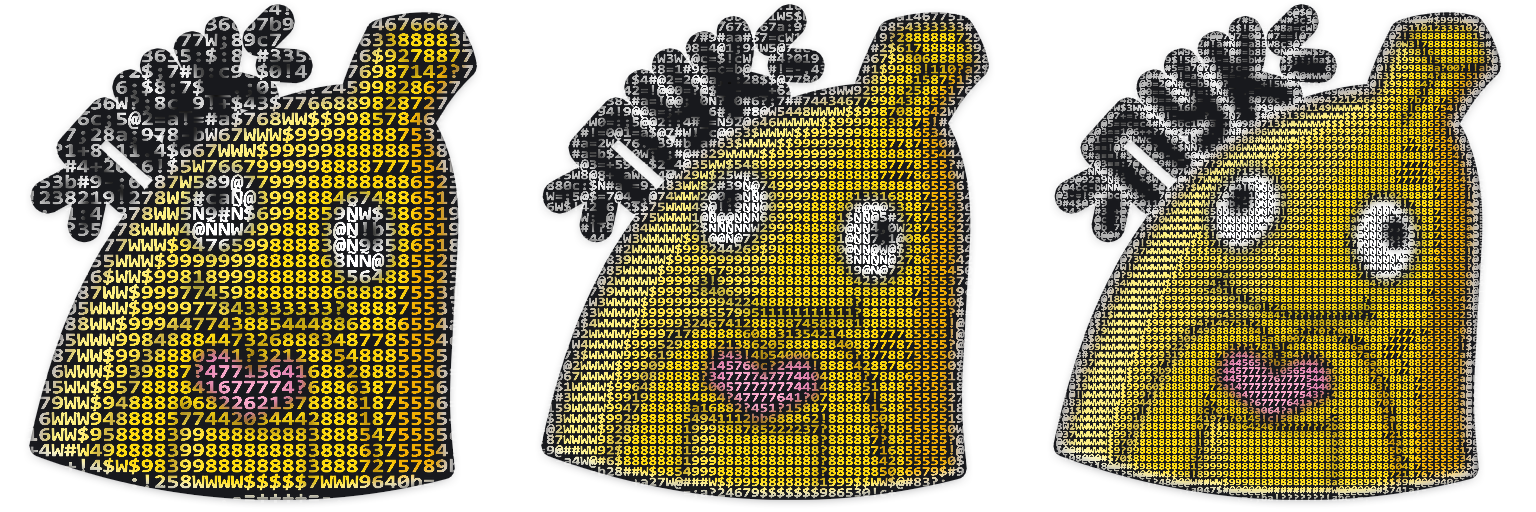
You can adjust the cols number:
import tgsart

sticker = tgsart.WebPASCII()
sticker.load_image('banana.webp')
sticker.process_image(cols=40, add_color=True)
sticker.save('banana40C.webp')
sticker.process_image(cols=60, add_color=True)
sticker.save('banana60C.webp')
sticker.process_image(cols=80, add_color=True)
sticker.save('banana80C.webp')
You can specify symbols string:
import tgsart
from tgsart import SymbolsPool

sticker = tgsart.WebPASCII()
sticker.load_image('banana.webp')
sticker.process_image(cols=60, symbols=SymbolsPool.gscale29, add_color=True)
sticker.save('banana60C.webp')
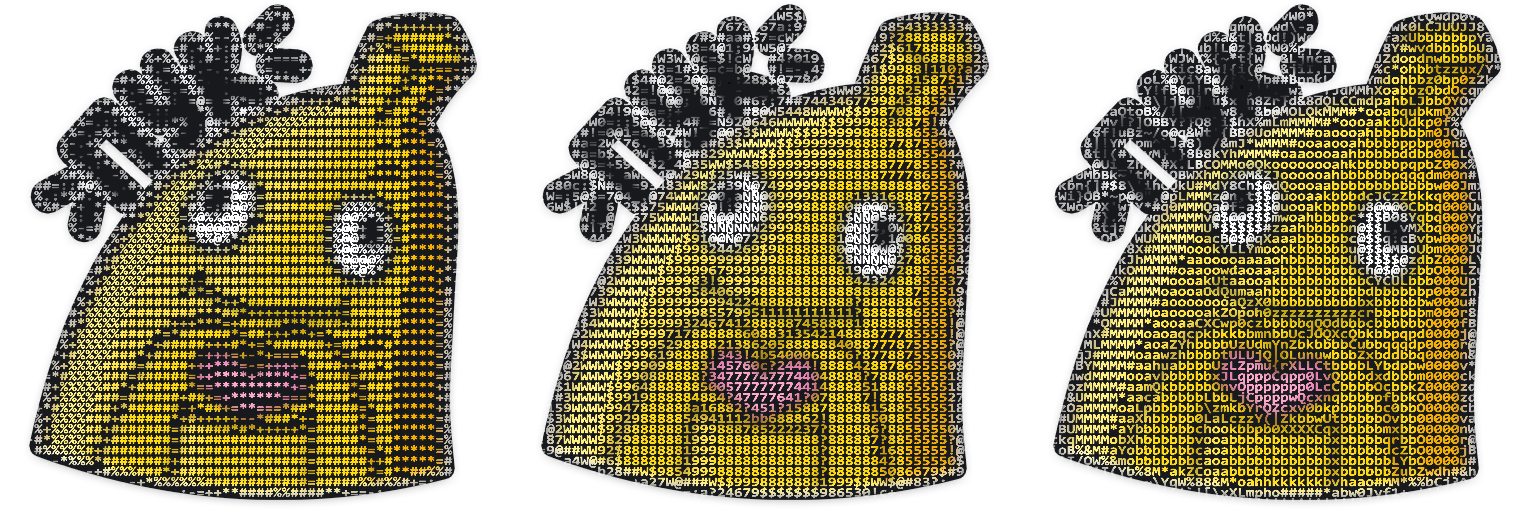
There are 3 predefined symbols strings (SymbolsPool.gscale29 is default):
class SymbolsPool:
    gscale69 = """' ."`^",:;Il!i~+_-?][}{1)(|\\/tfjrxnuvczXYUJCLQ0OZmwqpdbkhao*#MW&8%B@$"""
    gscale10 = " .:-=+*#%@"
    gscale29 = " _.,-=+:;cba!?0123456789$W#@Ñ"
From left: gscale10, gscale29, gscale69
Add your own string:
SymbolsPool.my_gs_string = " .:-=+ca*#RT%234@"
sticker.process_image(cols=60, symbols=SymbolsPool.my_gs_string)
Or:
my_gs_string = " .:-=+ca*#RT%234@"
sticker.process_image(cols=60, symbols=my_gs_string)
You can save result as .webp, .png, .txt and get it as str and as list:
import tgsart

sticker = tgsart.WebPASCII()
sticker.load_image('banana.webp')
sticker.save_inp_as_png('banana.png')
sticker.save_inp_as_webp('banana_copy.webp')
sticker.process_image(cols=60)
sticker.save('banana60C.webp')
sticker.save_as_png('banana60C.png')
sticker.save_as_txt('banana60.txt')
sticker_as_string = sticker.asstring
sticker_as_list = sticker.aslist

print(sticker_as_string)
Output:
Click to see sticker as string (equals to `.txt` file)
"""
                                          :!:
                                        .6@$@2               _=;a!!ac=
                                =7#9c  +W#3c3@_           b4W@@#$999W@@1
                              _ 8$!8@=c#8a=cW8           2@511012333102@a
                           _4@@7W7=0@2#7==!@7.          =@2!388888888815#,
                           2#!a#Ñ#=a88W8c3@3            8$0W3!788888888a#3
                      -5W9a3#:=?@#=b88+9Ñ@@@W$92.      ?@0$$98!6888888863@.
                      9$!5@0@4-=86=bW4  $$;:;ba$6     .#83$9998!58888888?@a
                   ,;,#5=a7@7@;=;c=a@a  #7_    6$     ?@!$999888a?00?!!ab@?
                  3@#@W@!=a9@@8==-.4@@826@Ñ@#WW@c     W63$998884?8885510@6_
                 ;@0=2@Ñ#c=b9@@?_   _+!5W@Wc;cc,  -;a3@!$998884?8885503@2
                 +@0==3@ÑW;=:$Ñ#. .=     =@0 +!49@@@$842999886!8886513@0
              -4815@b==4@Ñ$= =@Ñ2  8@70c,;@W@@942212464999887b7887530@?
             +W$3WW@#a==16b   b@@- +@99@@@W41149WWWWW$$99988!688754!@3
            c@7+=?8@Ñ@!-_  _?_ 2Ñ7  $#@$3139WWWWWW$$99999883288855a$9_
           !@5==c=c4#Ñ@5bc1W@a +Ñ@98@713$WWWWWW$$$99999988828886530@c
          2@3==1@6++?7@@$#@@3. bÑ#@406WWWWWWW$$9999999888888888555!99
         3@1==3@4WWc  ?@51Ñ+  :W@508#WWWWWW$$9999999988888887886554?@a
         @3==!@8_.6@?  +$ÑÑ?;5@806WWWWWWW$9999999999888888877787555089
         6#a==!#$= ?@8- _6@Ñ@#03WWWWWWW$9999999999988888888888885554?@+
         _7@3==:7@! =9#b ,@@7?9WWWW88$$99999999999888888888777786555a#3
        :5ÑÑ@8;, ?@5_ 2@7W@23WWW8?155108999999999888888888777778655515W
      b9@92a9Ñ#c  +$W; a@W?7WWW21#@@Ñ@W!999999999888888888777778755541@-
     7@4cc-bWÑÑ@4. .5@2W9?$WWW?7@4!WÑÑÑ809999999888888888888888875555?@b
    ,@3-=!9@@bc@Ñ$+  7@80WWWW37@4.,1ÑÑÑ@a9999998888886?11028888875555!@0
     9#4$@389  @66@11@70WWWWW?@@b,-$ÑÑÑ@a9999988888821@@@@8!788885555a@3
     _?4?, #3 +@a a$@81WWWWW65ÑÑ819ÑÑÑÑW!999988888860@ÑÑÑÑ@#b88875555a@5
          :@c ?@, -#70WWWWWW47ÑÑÑÑÑÑÑÑ@279999888888aW@ÑÑÑ52@8?8875555a#5
          ;@b 78 .$90WWWWWWW63ÑÑÑÑÑÑÑ@7199998888888a@ÑÑÑ9,,4@b8875555a@5
           4@@#: 7#?WWWWWWW$$!@ÑÑÑÑÑ@509999888888870@ÑÑÑ8,,2@!8875555a@5
            -+_ 2@!9WWWWWW$997!9@Ñ@9?39999888888887?@ÑÑÑ@?:$@a8875555a@3
               a@27WWWWWW$9$$9920102999$99888888888aÑÑÑÑÑ@@@@b8865555!@1
              -@73WWWWWW$99999$$9999999998888888888?9ÑÑÑÑÑÑ@618865555?@?
              7W!WWWWWWW$999999999999999888888888888!#ÑÑÑÑ@#b88855555?@b
             a@?9WWWWWW$9999999a699999998888888888887!5@@@9a6888555550@;
            ,#54WWWWWW$9999994;199999998888888888888884?0?288888555550@+
            3@?WWWWWWW9999995491!6999988888888888888888888888887555551@-
           =@18WWWWWW$999999999991!289888888888888888?8888888886555542@_
           7$0WWWWWW$9999999999999960!?26888888888888b8888888885555534@
          c@1$WWWWWW999999999964358998841????????????;7888888885555525W
          $$1WWWWWW$99999994?146751?2888888888888888860888888885555516$
         c@?9WWWWWW9999996!4988888884!88886???0??0688888887778755555088
         6$0WWWWWW$9999930988888888885a88007888887?!7888877778655555?96
        -@09WWWWWW999992298888881??17813!48888888886a688777788655555!$4
        3#?WWWWWW$9999319888887b2442a28:384???3888887a68777888555555a#2
       _@37WWWWWW99997?$888888a244565??b3a0444??888886a8888788555555b@0
       a@0WWWWWW$9999b98888888c44577771:0565444a68888820887788555555b@!
       6$2WWWWWW$999?698888886c445777776777754403888887a788887555555a@b
      .@19WWWWW$99960$888888872a147777777777544028888883?88887555555a@c
      !@!WWWWWW$999?$888888878880a477777777543?;48888886b88887555555a@c
      883WWWWWW9994498888888b78886a?67777641a?5888888887038886555555a@c
     -@1$WWWWW$999!$88888888c?068883a064?a!38888688888884!8886555555a@b
     ?@0WWWWWW$99188888888841971?0145!c!58888885c88888885a8886555555b@a
     8W2WWWWWW9980$8888888807$$98864246????????2b88888886!6886555555b@0
    .@37WWWWW$99?8888888888!9$998888888888888888a8888888721886555555aW3
    ;@0WWWWWW$970$888888888!9$998888888888888888b888888884a886555555?96
    ,$@@#WWWW$9?99888888888?99998888888888888888b888888885b886555555179
      +08@@@#$70$8888888885299998888888888888888b888888885a78655555534@
         _;18@@##$988888881599998888888888888888b888888886048755555565@_
             _:?5W@@#W$$98!899998888888888888888b8888888872187678$W@@W0
                  ,;?48@@@W##WW$9998888888888888a888899$$$$9#@@@940c,
                        ,:a047$#@@@@@@##########W@@@@@@#$741a;-
                                _,=:;ba!???????!abc:=,_

"""
If you want to upload the processed sticker back to Telegram, you should know that the maximum size of the uploaded sticker is limited to 512 kilobytes.
You can adjust the size of the processed sticker automatically setting quality parameter as auto:
sticker.save('banana60C.webp', quality='auto')
sticker.save_inp_as_webp('banana.webp', quality='auto')
Or set it as you wish (default quality=100):
sticker.save('banana60C.webp')  # Using default quality=100
sticker.save('banana60C.webp', quality=80)
sticker.save('banana60C.webp', quality=50)
sticker.save_inp_as_webp('banana.webp')  # Using default quality=100
sticker.save_inp_as_webp('banana.webp', quality=70)
sticker.save_inp_as_webp('banana.webp', quality=60)
1 maintainer

Metadata
1 maintainer
Release files for tgsart 0.1.3
For a detailed explanation of source distributions (sdists) and built distributions (wheels), please see the package formats documentation.
Source distribution (sdist)
| File | Size | Uploaded | |
|---|---|---|---|
| tgsart-0.1.3.tar.gz | 492.4 kB | Details |
Built distribution (wheel)
| File | Interpreter | ABI | Platform | Reset |
|---|---|---|---|---|
| tgsart-0.1.3-py3-none-any.whl | Python 3 | none | any | Details |
Total release size: 500.4 kB
Release files / tgsart-0.1.3.tar.gz
| Download URL | tgsart-0.1.3.tar.gz |
|---|---|
| Size | 492.4 kB |
| Tags | Source |
|
SHA-256 checksum How to use checksums |
09609d57408928d0db7f70b9e36054ea8e7ce2e5b777f15f7445153b65a55bc6
|
|
BLAKE2b-256 checksum How to use checksums |
ae73acd32cea897cacf1942b24212fb047bf158628878ebad080ed89c2b84a36
|
| Upload date | |
|
Uploaded using Trusted Publishing? What is trusted publishing? |
No |
| Uploaded via |
twine/4.0.0 CPython/3.9.1
|
Release files / tgsart-0.1.3-py3-none-any.whl
| Download URL | tgsart-0.1.3-py3-none-any.whl |
|---|---|
| Size | 8.0 kB |
| Tags | Python 3 |
|
SHA-256 checksum How to use checksums |
ff75c19a8cb62d7109c8d89fc1260b3efad8b787bd1d75ff8960aea7e45b92c7
|
|
BLAKE2b-256 checksum How to use checksums |
c09fb565dfe56ceca5edf740af0a1f6cb4c7cb54435fd0951d76cf133abeb90f
|
| Upload date | |
|
Uploaded using Trusted Publishing? What is trusted publishing? |
No |
| Uploaded via |
twine/4.0.0 CPython/3.9.1
|














