

TGSherlock
Telegram OSINT in a local web panel: live monitoring, alerts, user tracking and keyword sweeps.
Install
pipx install tgsherlock
Latest from GitHub: pipx install git+https://github.com/emrekybs/tgsherlock.git (if tgsherlock is not found afterwards, run pipx ensurepath and open a new terminal).
Run
tgsherlock
The panel opens in your browser at http://127.0.0.1:8765. On Linux, the first run also adds TGSherlock to your application menu, so you can start it with a click.
First run: create an app at my.telegram.org → API development tools, enter your API ID and API Hash, then scan the QR code with Telegram (Settings → Devices → Link Desktop Device). Phone-number login is available too.
Features
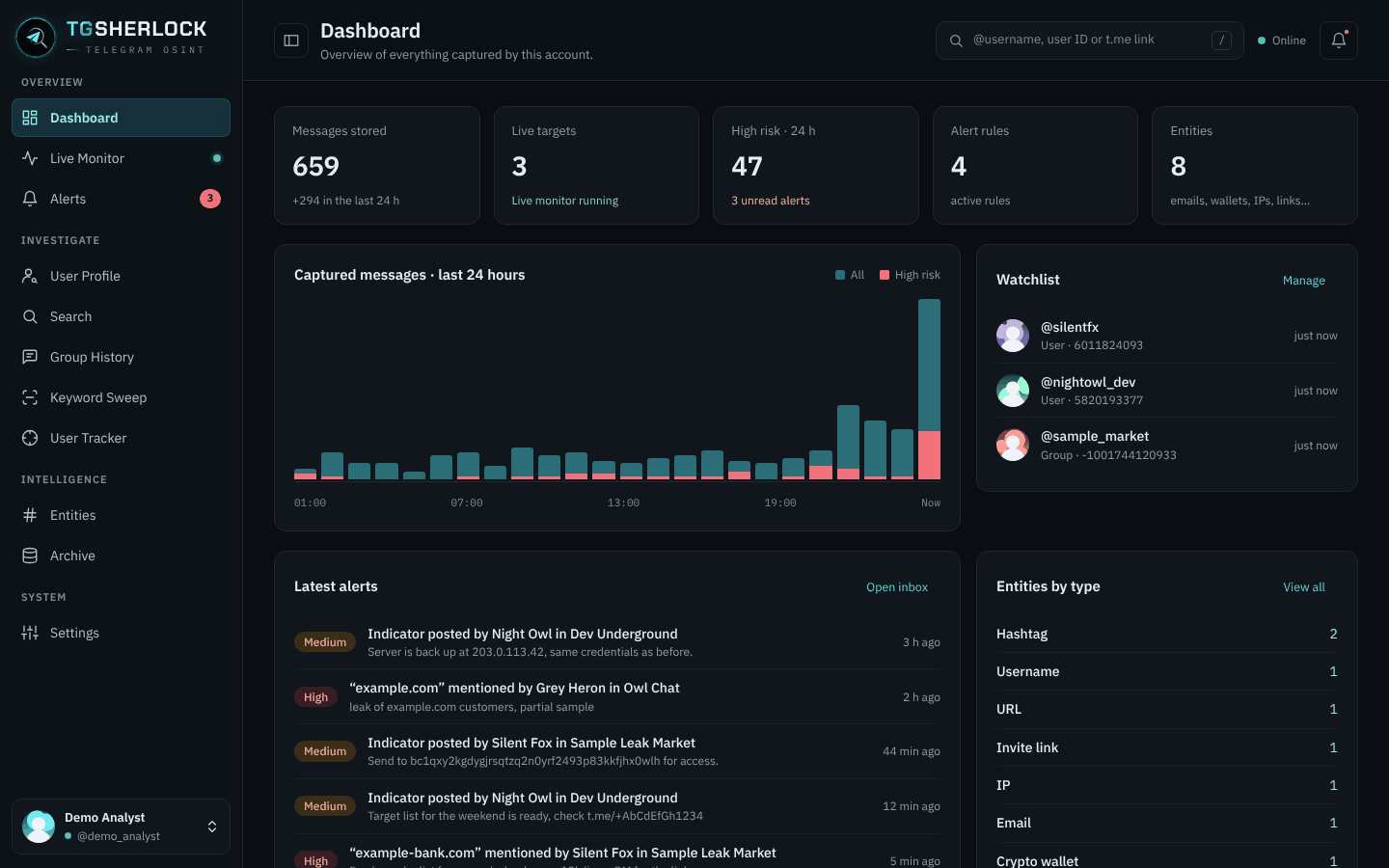
- Live Monitor: real-time messages from chosen users, groups and channels, with optional media download.
- Alerts: watch a user, a group or every chat for any message, keywords, regex, media or indicators. Get notified in-app, on the desktop, by email (SMTP) or by webhook, with digest throttling.
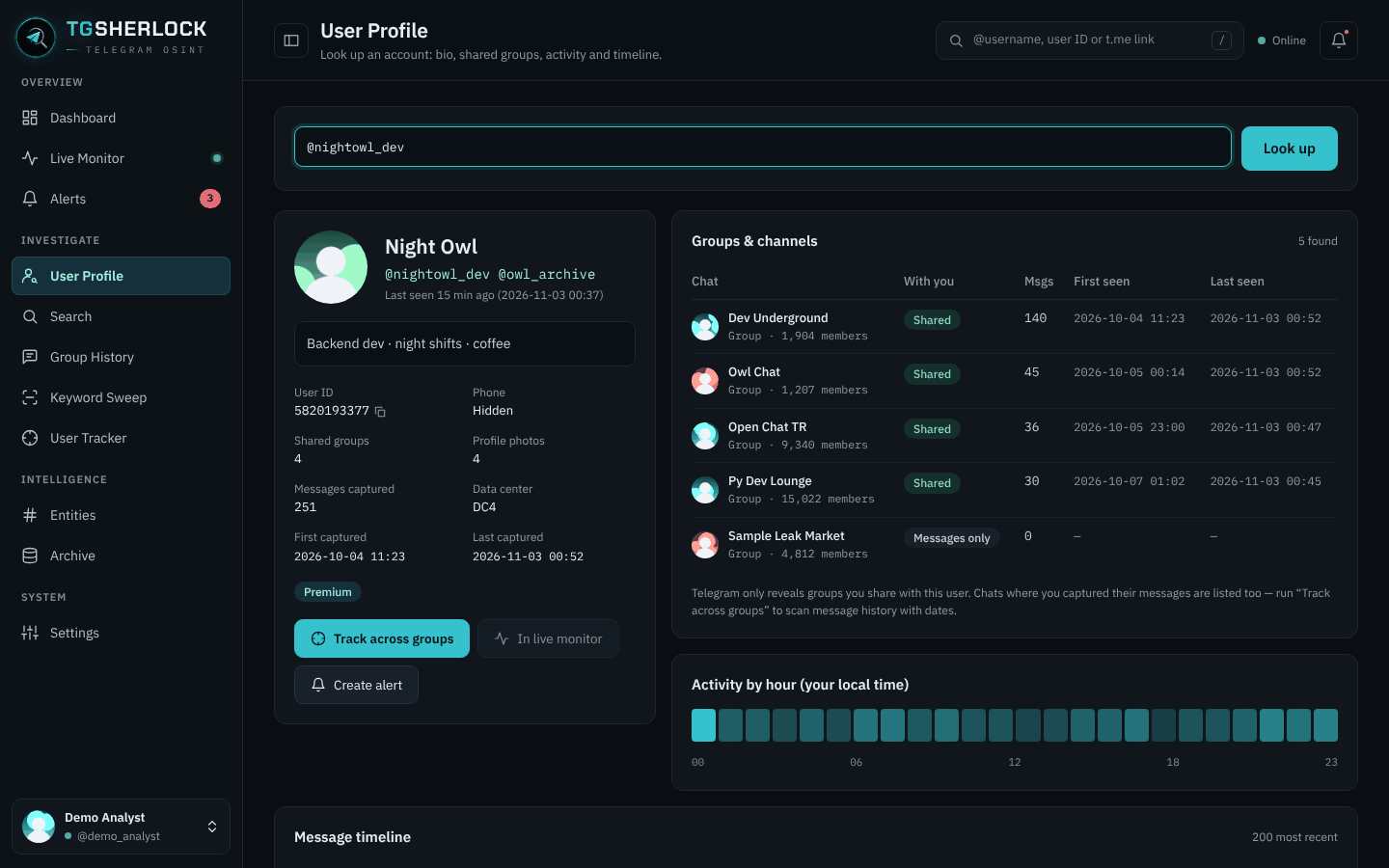
- User Profile: bio, usernames, flags, shared groups, first and last seen per group, hourly activity and a dated message timeline.
- Search: users, groups and channels, shown with their profile photos.
- Group History · Keyword Sweep · User Tracker: background jobs with progress and automatic FloodWait handling.
- Entities: emails, phones, URLs, IPs, crypto wallets, invite links and hashtags, extracted automatically.
- Archive & export: filter everything you collected and export it as CSV, JSON or an HTML report.
- Multiple accounts: add, switch and sign out from the sidebar.
Update: pipx upgrade tgsherlock
Options: --port 8790, --no-browser, --install-desktop, --uninstall-desktop.
Data stays local: ~/.config/tgsherlock (settings, sessions) and ~/.local/share/tgsherlock (databases, media).
Responsible use
Built for defensive OSINT and threat intelligence. TGSherlock only sees what your own Telegram account can see. Follow local law and Telegram's Terms of Service.
License
MIT
1 maintainer

Metadata
1 maintainer
Release files for tgsherlock 2026.11.3.144
For a detailed explanation of source distributions (sdists) and built distributions (wheels), please see the package formats documentation.
Source distribution (sdist)
| File | Size | Uploaded | Provenance | Actions |
|---|---|---|---|---|
| tgsherlock-2026.11.3.144.tar.gz | 898.9 kB | Without provenance | Details for tgsherlock-2026.11.3.144.tar.gz |
Built distribution (wheel)
| File | Interpreter | ABI | Platform | Actions Reset |
|---|---|---|---|---|
| tgsherlock-2026.11.3.144-py3-none-any.whl | Python 3 | none | any | Details for tgsherlock-2026.11.3.144-py3-none-any.whl |
Total release size: 1.8 MB
Release files / tgsherlock-2026.11.3.144.tar.gz
| Download URL | tgsherlock-2026.11.3.144.tar.gz |
|---|---|
| Size | 898.9 kB |
| Tags | Source |
|
SHA-256 checksum How to use checksums |
f75ecdc24c4ab3409ba3125ac51105a049018bf036b7ee8b0cb6176855e7f20b
|
|
BLAKE2b-256 checksum How to use checksums |
e441a31bacba017ffa5ff15f3fba05a9ea7ea760dcc164733d91283ae83a5957
|
| Upload date | |
|
Uploaded using Trusted Publishing? What is trusted publishing? |
No |
| Uploaded via |
twine/7.0.0 CPython/3.12.3
|
Release files / tgsherlock-2026.11.3.144-py3-none-any.whl
| Download URL | tgsherlock-2026.11.3.144-py3-none-any.whl |
|---|---|
| Size | 896.9 kB |
| Tags | Python 3 |
|
SHA-256 checksum How to use checksums |
7a3b47e0aea7be8d27e08210df0e782b8f6f4cb3261711e9504ac4be3c7e2623
|
|
BLAKE2b-256 checksum How to use checksums |
1f8cc481a47e45999997612ae827e7edd5ad2a497845d6f24c5a721407039bf7
|
| Upload date | |
|
Uploaded using Trusted Publishing? What is trusted publishing? |
No |
| Uploaded via |
twine/7.0.0 CPython/3.12.3
|
Security for tgsherlock 2026.11.3.144
Provenance
Provenance describes where a file came from. On PyPI, provenance is shared via attestations, which provide a verifiable record of the build or publishing details. View details, limitations and caveats.
No provenance found
None of the files in this release were uploaded with provenance metadata.
A note on package security
PyPI is a repository for distributing packages, not a service for auditing them. While third-party security researchers and our staff do their best to detect and remove malicious packages, PyPI cannot guarantee the quality, security or suitability of any given package.
To learn more about protecting yourself from malicious actors, visit our package security documentation.














