
Nod
Nod is a decision queue for agent-driven development: agents move the project, you only decide.
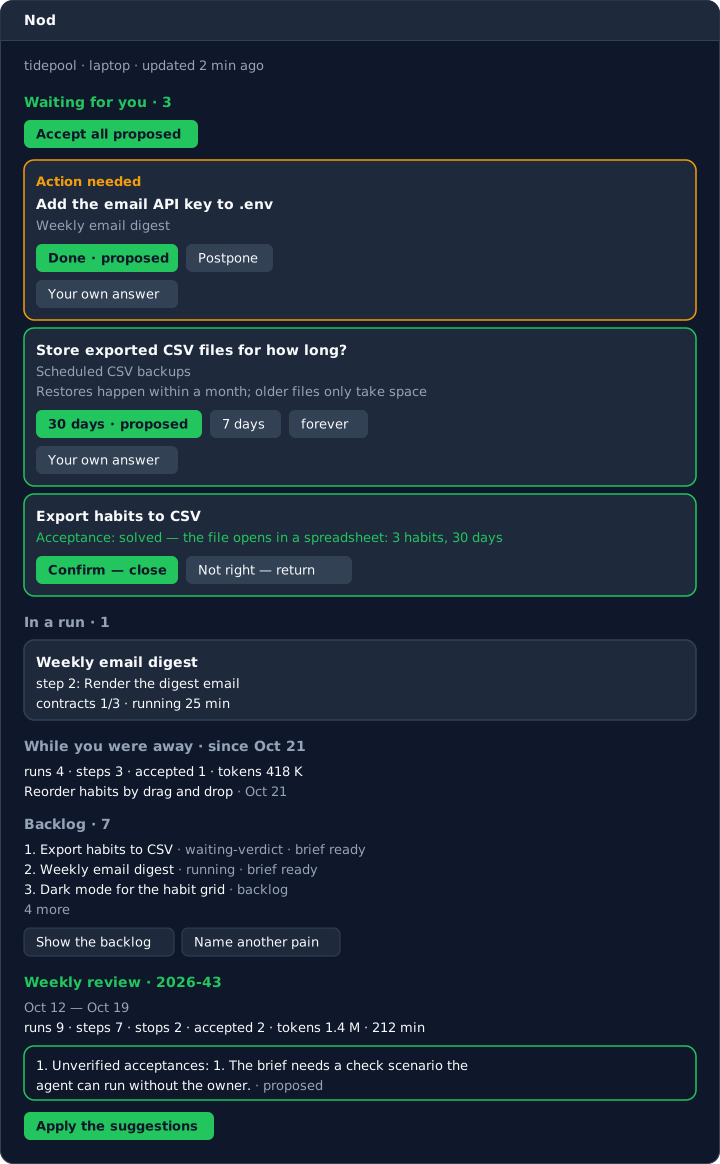
Nod keeps the backlog, your decisions, the agent runs and the acceptance results as files in .nod/ inside your git repository. A driver process takes the next card and has Claude Code write a brief for it. The open questions of the brief come to you as decisions with a proposed answer. Then the driver runs the steps and has an agent check the result. The pane in Claude Code shows what is waiting for you, and one click records an answer.
Install
You need Claude Code, git, and Python 3.13 or newer on PATH as python (on macOS and Linux see Limitations). Nod uses only the Python standard library.
claude plugin install nod --marketplace maksim9980/the_nod
In a Claude Code terminal session the same command is /plugin install nod --marketplace maksim9980/the_nod. In Claude Desktop (the Code tab) /plugin does not work: click "+" next to the prompt, open Plugins, add the marketplace maksim9980/the_nod, then add the nod plugin. Restart Desktop afterwards, because a session loads plugins when it starts.
The plugin brings the pane, the /nod command, the MCP server nod and the core. The core runs as a file from the plugin folder, so neither the pane nor the driver's agents need pip.
To have nod in a terminal, install the package too. This step is optional:
pipx install the-nod
Without it, type /nod in a session. The second line of the answer is the command that runs the core, nod: python -P <plugin folder>/the_nod/__main__.py. Use it in place of nod in the commands below.
5-minute start
The steps below are the ones that took a card from the backlog to done in the field test, on a small project Nod had never seen. The field test ran them in a terminal with the CLI; the pane was not used.
- Nod commits its state on a work branch and refuses
mainandmaster. Every state change is a commit, so git needsuser.nameanduser.email. In your repository:git switch -c nod-work nod init git add .gitignore git commit -m "chore: ignore Nod local files"nod initcreates.nod/and commits it asstate: init. It also adds the local files of Nod to.gitignorebut does not commit that change, hence the last two lines. In a Claude Code session,/nod initdoes the same and opens the pane. - Add a card. A title and a few lines on what you want are enough:
nod card add "Export habits to CSV" --body "People want their habit data in a spreadsheet." - Run one pass of the driver:
A pass does one thing and prints one line. The first pass has an agent write the brief and printsnod driver oncebrief: brief c-4vmp. In the field test a pass took about 20 to 50 seconds. - Answer the questions of the brief, if it has any. They show up on the pane under "Waiting for you", the proposed answer marked. In a terminal,
nod decision listprints them andnod decision answer <id> "<option>"answers one; add--freefor an answer of your own. - Run
nod driver onceagain, pass after pass, until the card waits for your verdict. If you changed a proposed answer, the next pass rewrites the brief. Then each pass runs one step, and the last pass checks the result.nod driverrepeats the passes for you until Ctrl+C. - Give the verdict: "Confirm — close" on the pane, or
nod decision answer <id> accept. The card isdone.
If a step stops, you get a return decision. nod decision answer <id> rerun --note "<what to change>" has the brief written again with your note and the reason the step stopped. If claude is not logged in, a decision marked "Action needed" asks you to run claude /login in a terminal.
To start the driver at login instead, use /nod install or nod install. On Windows that job first runs at the next login.
How it works
Every piece of work is a card, and a card goes through the same cycle:
- Brief. An agent writes a brief for the card: the pain, the decisions, the cost, the risks, how to check the result, and numbered steps. The brief is committed to
docs/briefs/. - Forks. Each open question of the brief becomes a decision with a proposed answer. If you take every proposal, the card is ready. If not, the brief is rewritten with your answers.
- Runs. The driver runs the steps one at a time. A run is one
claude -pcommand, and it commits code to your branch. - Acceptance. After the last step an agent follows the "How we check" section of the brief and reports the card as solved, not solved or not verified.
- Verdict. You close the card or return it. A returned card is briefed again with your note, or goes back to the backlog.
You also get a decision when only you can do something ("Action needed": a login, an API key, a test environment), when a run hangs, when a batch of imported cards may start, and when the backlog is empty ("What hurts?").
The driver never answers a decision for you, and the agents it starts cannot answer either. The rest happens without you. The state is Markdown files with TOML headers, committed to git, so git log shows the history of the project.
More: how it works, commands, the manifest, the driver, the state format, the weekly review, doctor and install, the MCP server, owner actions for your agents, security.
Languages
Nod speaks English by default and Russian as its second language: the CLI, the driver log, the agent prompts and the pane. Set lang = "ru" in .nod/harness.toml, or set the environment variable NOD_LANG=ru; the variable wins over the manifest. The values stored in .nod/, such as answers and statuses, are English identifiers in both languages.
FAQ
What does the agent see? The driver starts claude -p at the repository root, under your user. The agent reads the repository and gets a prompt with the card title, the card text and your earlier answers. With the default commands it may edit files, commit, run nod, read git in a few fixed forms, and run python -m pytest or python3 -m pytest during runs and acceptance. It cannot push, edit .git/, .claude/ or the state files, or answer a decision. The agent session also loads your own Claude Code setup: your global CLAUDE.md, plugins and hooks. It sends to Anthropic what any Claude Code session sends. SECURITY.md has the full list and the ways to narrow it.
How much does it cost? Each brief, run and acceptance is one claude -p call, counted against your Claude Code plan or API account. The default commands use the sonnet model and cap each call with --max-budget-usd: 5 USD for a brief, 30 for a run, 10 for an acceptance. In the field test, a --version flag for a library of about 500 lines took 15 agent commands (4 briefs, 10 step runs, 1 acceptance) and 3.27 USD, between 0.18 and 0.30 USD per command. That sum includes two reruns after stopped steps and one brief started by accident. The driver log, .nod/driver.log, has the dollar cost of every command. The tokens go into the run files, and for briefs and acceptances into .nod/usage/ together with the cost. nod review week sums up the tokens and minutes. Your own Claude Code plugins and hooks also run inside the agent sessions, and their spend is not in these numbers: in the field test a global security-review plugin started 4 extra sessions on another model, about 70,000 tokens. --setting-sources project in your own commands keeps them out. Lower caps or another model also go into your own commands in the manifest.
Does it work without the pane? Yes. nod status prints "Waiting for you", "In a run", "While you were away" and "Backlog" in a terminal, and nod decision answer <id> <answer> records an answer. Agents can use the MCP tools. The pane only shows the files in .nod/ and writes through the same commands.
Can I use two machines? Yes, with a shared git remote and [git] push = true in the manifest. Nod then pulls before each write and pushes after it. The driver lock travels through git, so one machine at a time runs agent commands, and driver_host can pin the driver to one machine. Without push, Nod never talks to a git remote. See the driver.
Why a separate branch? Each state change is a commit, and the agents commit code. A work branch keeps all of it out of main until you review and merge it.
How do I stop it? Ctrl+C stops nod driver together with the agent command it started. nod card return <id> --note "<why>" takes a card out of the queue; for a card in a run it also stops the run, and Ctrl+C in the driver is needed only to kill the agent command at once (details). The answer "Postpone" on an owner action sends the card back to the backlog. nod driver uninstall removes the login job.
Limitations
- The pane uses the Claude Code mod API, the hooks modules that draw panes. The API is new and may change between Claude Code versions.
- The first click on the pane only moves the keyboard focus to it; the second click presses the button. This is a Claude Code bug, described in docs/bugs/2026-10-21-pane-first-click-focus.md.
- Nod has been run on Windows 11. On Linux, two things were checked live under WSL with Ubuntu 24.04: the core test suite, on Python 3.12 (below the 3.13 that Nod requires), and installing and removing the autostart (a
systemd --userunit started withenable --now, and a crontab line written and removed). Starting the driver at login or after a reboot was not tested. On macOS Nod is covered by the test suite only. - On macOS and Linux the MCP server of the plugin needs a command named
python, and most of those systems have onlypython3. The pane does not need it: it triespython3as well. The driver and its login job run under the interpreter that started them, and the default commands let the agents runpython3 -m pytestandpython3 -m the_nodas well as thepythonforms.nod doctorshows the missing command and the fix; see the MCP server. - The default acceptance can run
python -m pytestorpython3 -m pytestbut not the project's own command. When the brief's check asks to run the program, the acceptance falls back to the tests. Write your ownacceptcommand in the manifest to allow more. - Only Claude Code: the driver runs
claude -p, and the pane is a Claude Code mod. The MCP server is plain stdio, but a setup for Codex has not been tested. claude -pprints nothing until its command ends, so the driver cannot tell a slow brief or acceptance from a hung one. A brief or acceptance with no output for 40 minutes is stopped. A run stays alive while the agent records its progress withnod run progress.
License
1 maintainer

Metadata
1 maintainer
Release files for the-nod 0.1.0
For a detailed explanation of source distributions (sdists) and built distributions (wheels), please see the package formats documentation.
Source distribution (sdist)
| File | Size | Uploaded | Provenance | |
|---|---|---|---|---|
| the_nod-0.1.0.tar.gz | 266.1 kB | With provenance | Details |
Built distribution (wheel)
| File | Interpreter | ABI | Platform | Reset |
|---|---|---|---|---|
| the_nod-0.1.0-py3-none-any.whl | Python 3 | none | any | Details |
Total release size: 452.5 kB
Release files / the_nod-0.1.0.tar.gz
| Download URL | the_nod-0.1.0.tar.gz |
|---|---|
| Size | 266.1 kB |
| Tags | Source |
|
SHA-256 checksum How to use checksums |
11daac9aed20006fd4b33d92dd1acd02031e34578564c0ba430941aea7d8a104
|
|
BLAKE2b-256 checksum How to use checksums |
85cffe45811e86f10993bf51c83114570e66c5e03c5220c4d45f6ab199556d1a
|
| Upload date | |
|
Uploaded using Trusted Publishing? What is trusted publishing? |
Yes |
| Uploaded via |
twine/7.0.0 CPython/3.13.16
|
Provenance
Provenance describes where a file came from. On PyPI, provenance is shared via attestations, which provide a verifiable record of the build or publishing details. View details, limitations and caveats.


PyPI Publish Attestation
PyPI verified that this artifact, at this checksum, originated from the publisher listed below.
Signed by GitHub Actions, verified by PyPI on Oct 23, 2026.
Transparency logRelease files / the_nod-0.1.0-py3-none-any.whl
| Download URL | the_nod-0.1.0-py3-none-any.whl |
|---|---|
| Size | 186.4 kB |
| Tags | Python 3 |
|
SHA-256 checksum How to use checksums |
3859c2ba83c16cafae46ab67302cd1f8282dab1a8cc64a5e4ca1398db16b4c66
|
|
BLAKE2b-256 checksum How to use checksums |
09fa7f21ee1e9f9e1b361ba71cec8e02066b1619eebad90b5d8ed1c40d797406
|
| Upload date | |
|
Uploaded using Trusted Publishing? What is trusted publishing? |
Yes |
| Uploaded via |
twine/7.0.0 CPython/3.13.16
|
Provenance
Provenance describes where a file came from. On PyPI, provenance is shared via attestations, which provide a verifiable record of the build or publishing details. View details, limitations and caveats.
PyPI Publish Attestation
PyPI verified that this artifact, at this checksum, originated from the publisher listed below.
Signed by GitHub Actions, verified by PyPI on Oct 23, 2026.
Transparency logSecurity for the-nod 0.1.0
Provenance
Provenance describes where a file came from. On PyPI, provenance is shared via attestations, which provide a verifiable record of the build or publishing details. View details, limitations and caveats.
Full provenance
All 2 files in this release have been uploaded with provenance metadata.
Attestation for the_nod-0.1.0.tar.gz
PyPI Publish Attestation
PyPI verified that this artifact, at this checksum, originated from the publisher listed below.
Signed by GitHub Actions, verified by PyPI on Oct 23, 2026.
Transparency logA note on package security
PyPI is a repository for distributing packages, not a service for auditing them. While third-party security researchers and our staff do their best to detect and remove malicious packages, PyPI cannot guarantee the quality, security or suitability of any given package.
To learn more about protecting yourself from malicious actors, visit our package security documentation.














