
⚓ Theia
Please cite: https://www.biorxiv.org/content/10.1101/2023.01.28.526009v1
@article{10.1101/2023.01.28.526009,
  year = {2023},
  title = {{Explainable prediction of catalysing enzymes from reactions using multilayer perceptrons}},
  author = {Probst, Daniel},
  doi = {10.1101/2023.01.28.526009},
  note = {bioRxiv 2023.01.28.526009},
}
Quickstart
As you need at least Python 3.9 to get started, I suggest you use conda to create an environment with an up-to-date Python versions (3.11 is really, really fast, so I suggest using this as soon as rdkit supports it). For now, let's go with Python 3.10: conda create -n theia python==3.10 && conda activate theia is all you need (ha). Then you can go ahead and install theia using pip (theia was taken, so make sure to install theia-pypi, except if you want to parse log files):
pip install theia-pypi
Next, download the models using the CLI command:
theia-download
Thats pretty much it, now you can start theia by simply typing:
theia
and open the url http://127.0.0.1:5000/ in your web browser.
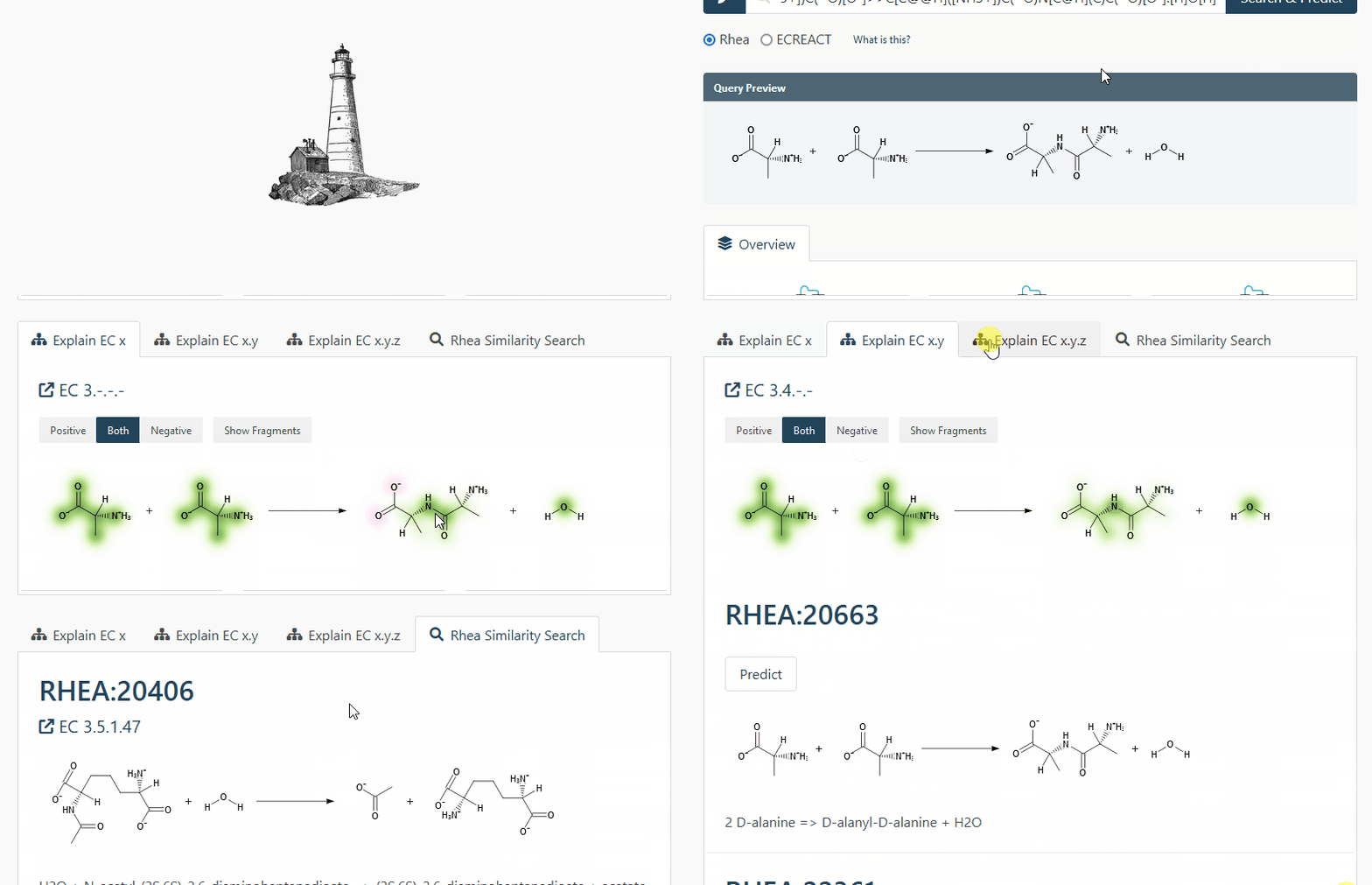
In case you don't want or need an UI, you can also use the cli to simply predict an EC number from an arbitrary reaction:
theia-cli "rheadb.ec123" "S=C=NCC1=CC=CC=C1>>N#CSCC1=CC=CC=C1"
If you want a bit more information than just the predicted EC class, you can also get the top-5 probabilities:
theia-cli "rheadb.ec123" "S=C=NCC1=CC=CC=C1>>N#CSCC1=CC=CC=C1" --probs
Or, if you want human-readable output, you can make it pretty:
theia-cli "rheadb.ec123" "S=C=NCC1=CC=CC=C1>>N#CSCC1=CC=CC=C1" --probs --pretty
and you'll get a neat table...
┏━━━━━━━━━━━━┳━━━━━━━━━━━━━━━━━┓
┃ Prediction ┃ Probability [%] ┃
┡━━━━━━━━━━━━╇━━━━━━━━━━━━━━━━━┩
│ 2.7.4      │           14.22 │
│ 2.3.2      │           11.03 │
│ 2.3.1      │            7.15 │
│ 2.7.8      │            4.62 │
│ 2.6.1      │            4.05 │
└────────────┴─────────────────┘
Of course, there are more models than rhea.ec123, which we used in the previous examples. Here's a complete list of all the included models:
| Model | Trained on | Name |
|---|---|---|
| Rhea ECX | Rhea | rheadb.ec1 |
| Rhea ECXY | Rhea | rheadb.ec12 |
| Rhea ECXYZ | Rhea | rheadb.ec123 |
| ECREACT ECX | ECREACT 1.0 | ecreact.ec1 |
| ECREACT ECXY | ECREACT 1.0 | ecreact.ec12 |
| ECREACT ECXYZ | ECREACT 1.0 | ecreact.ec123 |
Colab
You can also give the API a spin in this Google colab notebook. Keep in mind that Colab has old and slow CPUs with outdated instruction sets, so you might want to turn the GPU on. On a modern CPU both training and inference is fairly fast.
Web
A demo of the web application can be found here. Keep in mind that this service has limited resources and that a locally installed version (even on your laptop) will be much, much faster.
Docker
A docker image is available on the docker hub here. After running the docker image, the app will be available at https://localhost:8000/theia.
Reproduction / Custom Models
To get started, install the reproduction requirements with:
pip install .
pip install -r reproduction_requirements.txt
The training, validation, and test sets used in the manuscript can be recreated using the following two commands (of course, you can plug in your own data sets here to get a custom model):
mkdir experiments/data
python scripts/encode_split_data.py data/rheadb.csv.gz experiments/data/rheadb
python scripts/encode_split_data.py data/ecreact-nofilter-1.0.csv.gz experiments/data/ecreact
The training of the models can be started with:
mkdir experiments/models
chmod +x train_all.sh
./train_all.sh
If you want to train the 6 additional models for cross-validation, you can run the following:
chmod +x train_all_cross.sh
./train_all_cross.sh
Finally, to reproduce the figures, you first have to run some additional data crunching scripts:
python scripts/class_counts.py data/ecreact-nofilter-1.0.csv.gz experiments/data/ecreact_counts.csv
python scripts/class_counts.py data/rheadb.csv.gz experiments/data/rheadb_counts.csv
Then it's time to draw:
cd figures
chmod +x generate_figures.sh
./generate_figures.sh
As a bonus, the ablation studies, where a fraction of the training set labels are randomised can be run using an additional script:
chmod +x train_rhea_ablation.sh
./train_rhea_ablation.sh
fin.
1 maintainer

Metadata
1 maintainer
Release files for theia-pypi 0.7.1
For a detailed explanation of source distributions (sdists) and built distributions (wheels), please see the package formats documentation.
Source distribution (sdist)
| File | Size | Uploaded | |
|---|---|---|---|
| theia-pypi-0.7.1.tar.gz | 11.4 MB | Details |
Built distribution (wheel)
| File | Interpreter | ABI | Platform | Reset |
|---|---|---|---|---|
| theia_pypi-0.7.1-py3-none-any.whl | Python 3 | none | any | Details |
Total release size: 22.8 MB
Release files / theia-pypi-0.7.1.tar.gz
| Download URL | theia-pypi-0.7.1.tar.gz |
|---|---|
| Size | 11.4 MB |
| Tags | Source |
|
SHA-256 checksum How to use checksums |
38f563f66fa113cf9a1a080822450900d8a5fce24b8f8e3418a40ab5a360d1b7
|
|
BLAKE2b-256 checksum How to use checksums |
7fe5328c1352a3a8c65d234ac14bc96c5deb14dfedfa08b4a90640b399631ccc
|
| Upload date | |
|
Uploaded using Trusted Publishing? What is trusted publishing? |
No |
| Uploaded via |
twine/5.1.1 CPython/3.10.0
|
Release files / theia_pypi-0.7.1-py3-none-any.whl
| Download URL | theia_pypi-0.7.1-py3-none-any.whl |
|---|---|
| Size | 11.4 MB |
| Tags | Python 3 |
|
SHA-256 checksum How to use checksums |
31bf8ec74c247ca663546adf53ebb93ab443328ac17c083746a23db6b127be3b
|
|
BLAKE2b-256 checksum How to use checksums |
9ac84e95344756c6ca106c01c19df20dcf43d4db8ac15c1a421b223bd34cb10b
|
| Upload date | |
|
Uploaded using Trusted Publishing? What is trusted publishing? |
No |
| Uploaded via |
twine/5.1.1 CPython/3.10.0
|














