
a library full of small utilities for you to use in your code

Project description
thelittlethings
a library full of small utilities for you to use in your code
contents
installation
make sure that you have python3 and pip installed and run the following command:
pip install thelittlethings
if that doesn't work, try the following command:
pip3 install thelittlethings
to update, run the following command:
pip install --upgrade thelittlethings
to uninstall, run the following command:
pip uninstall thelittlethings
auto_reload
➜ usage
in run.py:
from thelittlethings import auto_reload

auto_reload.run("file_to_auto_reload.py", refresh_interval=0.1)
in file_to_auto_reload.py:
while True:
    print("hello world")
    time.sleep(1)
now, when you run run.py, "hello world" will be printed every second. if you modify file_to_auto_reload.py and save it, you will see the changes reflected in the output.
⛭ technical details
the script checks for changes in the file in set intervals. you can change the interval by modifying the refresh_interval variable. The refresh interval is in seconds and defaults to 0.1.
if an error occurs, auto reload will not terminate.
if your script (file_to_auto_reload.py) stops without errors, auto reload will terminate.
taking inputs currently doesn't work as multiprocessing throws an end of file error.
debug.Log
➜ usage
import:
from thelittlethings import Log
from thelittlethings.debug import Log
Log is used to both print to the console and log to a file:
Log("hello world")
By default it will only print to the console. To load a file, do:
Log.load_file("log.txt")
from now on, all Log statements will be printed to the console and also to the file.
only one file can be loaded at a time.
to close the file, do:
Log.close_file()
to use a different file for one statement, do:
Log("hello world", file_path="other_log.txt")
to disable printing to the console, do:
Log.print = False
or, to disable it for only one statement, do:
Log("hello world", print=False)
Log uses custom formatting for color and style. To change the text color, do:
Log("[Text: Red]hello world")
to change the background color, do:
Log("[Background: Red]hello world")
to change the text style, do:
Log("[Style: Bright]hello world")
color, background and style can be combined:
Log("[Text: Red, Background: Green, Style: Bright]hello world")
to access the color code parser, do:
from thelittlethings import translate_color_codes

translate_color_codes("your_text_here", console=True)
where the console argument says whether to apply the codes or ignore them.
by default, Log seperates the values with a space and appends a newline. to change this, do:
Log.sep = "my_seperator"
Log.end = "my_end_of_line"
to change it for only one statement, do:
Log("hello world", sep="my_seperator", end="my_end_of_line")
⛭ technical details
Log uses sys.stdout.write instead of print and will flush the buffer after each statement.
when the script exits, the file is closed automatically and all styles are reset.
To make the parser ignore an opening square bracket, follow it with a backslash.
debug.Timer
➜ usage
import:
from thelittlethings import Timer
from thelittlethings.debug import Timer
Timer is used to time the execution of a block of code:
Timer.start("timer 1")
# do something
Timer.stop("timer 1")

Timer("timer 2")
# do something
Timer.stop("timer 2")

timer_3 = Timer()
# do something
timer_3.stop()

timer_4 = Timer()
# do something
Timer.stop("timer_4")
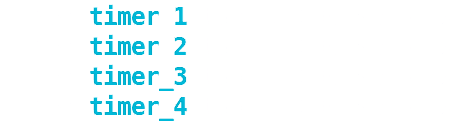
when a timer is stopped, the elapsed time is logged:
to manually log the elapsed time, do:
Timer.log("timer 1")

timer_3.log()
to get the elapsed time, do:
Timer.get("timer 1")

timer_3.get()
⛭ technical details
a timer is not automatically restarted after it is stopped.
Timer uses Log for logging. color codes in timer names will therefore be applied.
extended_list
➜ usage
import:
from thelittlethings import EList
from thelittlethings.extended_list import EList
EList adds some useful funcionality to the list class.
it allows you to merge two lists, ignoring duplicates:
list_1 = EList([1, 2, 3, 4])
list_2 = EList([3, 4, 5, 6])

list1.merge(list_2)
list_1 is now [1, 2, 3, 4, 5, 6]. the same effect can be achieved by using the bitwise or operator |.
The operators & and ^ are also implemented and behave like they do on sets.
you can remove all instances of one or multiple values from a list:
my_list = EList([1, 2, 2, 3, 4, 4, 5, 6])

my_list.clear_from(2, 4)
my_list is now [1, 3, 5, 6].
Using unpack operations this can be used to remove all values in an iterable from the list:
my_list = EList([1, 2, 2, 3, 4, 4, 5, 6])

my_list.clear_from(*[2, 4])
this can also be achieved using the - operator:
my_list = EList([1, 2, 2, 3, 4, 4, 5, 6])

my_list -= [2, 4]
you can clear an EList of all duplicates using clear_duplicates:
my_list = EList([1, 2, 2, 3, 4, 4, 5, 6])

my_list.clear_duplicates()
my_list is now [1, 2, 3, 4, 5, 6].
EList also implements methods that allow you to get a new list with some operation applied. these methods are:
withoutforclear_frommergedformergewithout_duplicatesforclear_duplicatesextendedforextend
many methods that mutate the list are modified to return self to allow method chaining.
iteration over an EList is slightly different than with a normal list. the EList ensures that the iterator iterates over every single item in the list, even if some items are removed in the process.
e_list = EList([1, 2, 3, 4, 5, 6])

builtin_list = list(e_list)


for item in e_list:
    if item % 3 != 0:
        e_list.remove(item)

for item in builtin_list:
    if item % 3 != 0:
        builtin_list.remove(item)
e_list is now [3, 6] while builtin_list is [2, 3, 5, 6].
as the builtin enumerate function will give incorrect indices, EList provides an enumerate function that will return a proper iterator.
another feature is joining the elements of an EList into a string with a separator.
e_list = EList([1, "hello", [2, 3]])

joined_string = e_list.join("-")
joined_string is "1-hello-[2, 3]".
the seperator defaults to a space if no other separator is specified.
⛭ technical details
EList inherits from list.
the way iteration is handled means that the EList class needs to keep track of all iterators that are currently active and update their indices whenever a modification is made. this can be costly when doing large operations.
files.load_file
➜ usage
import:
from thelittlethings import load_file
from thelittlethings.files import load_file
the load_file function will create a file if it does not exist or load the file if it does.
my_file = load_file("my_file.txt")
whether the file existed before or not, it now does and is loaded in the my_file variable.
if the input is not a string or the file could not be loaded, the function will throw an error unless given a default value.
⛭ technical details
the file is loaded in the write mode.
mutable.Mutable
➜ usage
import:
from thelittlethings import Mutable
from thelittlethings.mutable import Mutable
Mutable is a class to make any object mutable. it redirects most magic methods to the value and implements the __setattr__ and __getattr__ methods.
my_mutable = Mutable(1)
other_variable = my_mutable

my_mutable += 1
other_variable is now 2.
⛭ technical details
the __i.*__ magic methods (__iadd__, __isub__ etc.) use the value's __.*__ (__add__, __sub__ etc.) methods if it does not implement the __i.*__ method itself. this way they can work on immutable objects as well.
linked_values
➜ usage
import:
from thelittlethings import linked_values
linked_values is a class that allows you to link values together using operators:
from thelittlethings import Value
a = Value(1)
b = Value(2)
c = a + b
a, b and c are now 1, 2 and 3 respectively. continuing the example:
a += 1
a, b and c are now 2, 2 and 4 respectively.
b -= 2
a, b and c are now 2, 0 and 2 respectively.
c += 3
a, b and c are now 5, 0 and 5 respectively.
basically, whenever a or b is changed, c will be updated. if c is changed, a will be updated so that c will be equal to a + b. to have b be updated instead of a, switch the a and b values in the expression. for positional operators (-, /, ** etc.), linked_values provides backwards links that will update the second value in the expression. all operators are subclasses of Link.
the most basic Links are Var, Attr and Func. Var simply holds an object, Attr refers to an object's attribute and Func holds getter and setter functions that will be called when the value is accessed or modified. Var and Attr can be marked as immutable and can then only be modified by passing a function to the set method.
available general operators are:
Eq(a, b)⟺a == bGt(a, b)⟺a > bGe(a, b)⟺a >= bLt(a, b)⟺a < bLe(a, b)⟺a <= b
available number operators are:
Add(a, b)⟺a + bSub(a, b⟺a - bRSub(a, b)⟺b - aMul(a, b)⟺a * bDiv(a, b)⟺a / bRDiv(a, b)⟺b / aPow(a, b)⟺a ** bRPow(a, b)⟺b ** aRoot(a, b)⟺a ** (1 / b)RRoot(a, b)⟺b ** (1 / a)Mod(a, b)⟺a % bAbs(a)⟺abs(a)Ln(a)LogB(a, b)RLogB(a, b)
available boolean operators are:
And(a, b)⟺a & bOr(a, b)⟺a | bXor(a, b)⟺a ^ bNot(a)⟺~a
the equivalence is only true if a is already a Link and (for reverse operators) if b is not.
some additional info on Attr:
you can input strings in the format of "a.b.c" to access attributes of attributes of attributes etc. for Links, Attr will get the value's attribute.
⛭ technical details
custom operations can be added by inheriting from linked_values.Operator and implementing the class methods _eval and optionally _eval_reverse. the has_reverse method should work without any changes but if it does not, override it.
Operator has the subclasses NumberOperator and BooleanOperator that the corresponding operators inherit from.
backwards operators are only implemented for operators for which the position of the arguments is relevant and for which the _eval_reverse method is implemented.
XorOperator and NotOperator are the only BooleanOperators that support _eval_reverse for all values. all other BooleanOperators have cases in which one of the input values is irrelevant. in these cases the input is not modified.
inplace operators do not create Link objects but modify the value directly.
progress_bar
➜ usage
import:
from thelittlethings import ProgressBar
ProgressBar is a class that allows you to easily create a progress bar.
import time

progress_bar = ProgressBar()

for i in range(100):
    progress_bar.progress = i
    time.sleep(0.1)

progress_bar.finish()
the progress bar will be shown in the console. it will automatically provide a heuristic for the time it will take to finish the operation.
optional arguments:
max_value: the maximum value of the progress bar. defaults to100.width: the width of the progress bar. defaults to20.log_interval: the interval in seconds between each log. defaults to0.1.display_percentage: whether to display the percentage of the progress. defaults toTrue.display_time_passed: whether to display the time that has passed since the progress bar was created. defaults toTrue.display_time_remaining: whether to display an estimate for time that is remaining until the progress bar is finished. defaults toTrue.draw_function: the function that draws the progress bar. defaults toProgressBar.draw_bar.
⛭ technical details
the ProgressBar supports with statements.
the ProgressBar uses multiprocessing for printing and estimating the time remaining.
the time remaining heuristic currently assumes a linear progression.
assertion
➜ usage
the assertion module helps in testing and checking if arguments are of the right type. it provides the following functions:
assert_closeassert_equalassert_falseassert_greaterassert_greater_equalassert_isassert_lessassert_less_equalassert_not_equalassert_trueassert_typeassert_types
assert_type and assert_types are intended to be used in type checking for functions:
from thelittlethings import assert_types

def my_func(string: str, integer: int, m_list: list)
    assert_types((string, integer, m_list), (str, int, list))
with all assert functions you can pass the error_message_appendix keyword argument. the given string will be shown if an error is thrown.
⛭ technical details
all assert functions will throw an AssertionError if they fail and otherwise return True.
testing
➜ usage
import:
from thelittlethings import testing
the testing module helps you to test your code.
from thelittlethings import assert_equal
from random import random

def function_to_test(a, b):
    return a + b

def test_addition(function_to_test):
    a = random() * 100 - 50
    b = random() * 100 - 50
    assert_equal(function_to_test(a, b), a + b)
    return f"Passed on {a} + {b}"

testing.test([function_to_test], test_addition, iterations=1)
the first argument is the list of functions / classes / etc. to test, all other positional arguments will be used to test them. test will print the results of each individual test as well as a summary of the results per object to test.
if you have multiple seperate tests to run you can use the multi_test function:
from thelittlethings import assert_equal
from random import random

def function_to_test(a, b):
    return a + b

def test_addition(function_to_test):
    a = random() * 100 - 50
    b = random() * 100 - 50
    assert_equal(function_to_test(a, b), a + b)
    return f"Passed on {a} + {b}"

def other_function_to_test(a, b):
    return a - b

def test_subtraction(function_to_test):
    a = random() * 100 - 50
    b = random() * 100 - 50
    assert_equal(function_to_test(a, b), a + b)
    return f"Passed on {a} + {b}"

testing.multi_test(
    ([function_to_test], test_addition, {'iterations': 1}),
    ([other_function_to_test], test_subtraction)
)
another way to run tests is to use the test_from_class function:
from thelittlethings import assert_equal

class TestFunctions:
    def test_something():
        assert_equal(1, 1)

testing.test_from_class(TestFunctions, iterations=1)
this will test all the functions in the class that start with test_.
⛭ technical details
test uses Log for outputting the results. therefore, color codes can be used in the testing functions' feedback.
iterations defaults to 1.
test and test_from_class return TestSummary objects. multi_test returns a list of TestSummary objects.
to_string
➜ usage
import:
from thelittlethings import to_string
currently, to_string only has a function to convert a list to a string in a more human like way.
from thelittlethings import to_string

list_string = to_string.list([1, 2, 3], final_sep="and", empty_str="nothing")
list_string is now "1, 2 and 3". final_sep and empty_str are optional and default to the values shown in the example.
⛭ technical details
to_string converts every element of the list to a string. this way, any type of object will work as long as it has a str representation.
constants
➜ usage
import:
from thelittlethings import constants
constants is a module that contains some useful constants, some of which are used in the other modules.
currently, constants contains an UNDEFINED constant , the color submodule for color constants and the math submodule for math constants.
⛭ technical details
UNDEFINED is part of a custom singleton NoneType class that will always return UNDEFINED. it supports str and bool evaluation.
``
all colors in the color submodule are tuples of integers from 0 to 255.
the math submodule uses constants from the builtin math module.
variables.get_all_subclasses
➜ usage
import:
from thelittlethings import get_all_subclasses
get_all_subclasses is a function that returns all subclasses of a given class including subclasses of subclasses.
from thelittlethings import get_all_subclasses, Operator

operator_subclasses = get_all_subclasses(Operator)
operation_subclasses is now a list of all subclasses of Operation including NumberOperator and BooleanOperator.
⛭ technical details
get_all_subclasses works by recursively searching through the inheritance tree of the given class. it supports multiple inheritance.
variables.get_instances
➜ usage
import:
from thelittlethings import get_instances
get_instances is a function that returns all instances of a given class.
from thelittlethings import get_instances

class A:
    def __init__(self, value):
        self.value = value

    def __repr__(self):
        return f"A({self.value})"

a1 = A(1)
a2 = A(2)
a3 = A(3)

all_instances = get_instances(A)
all_instances is now [A(1), A(2), A(3)].
⛭ technical details
get_instances usus gc to search all objects in the memory. therefore, it is quite slow and it is recommended to handle instances in your class itself like this:
class A:
    instances = []

    def __init__(self):
        type(self).instances.append(self)
this will be much faster and is therefore recommended in situations where performance is an issue.
variables.get_names
➜ usage
import:
from thelittlethings import get_names
get_names is a function that returns all names of a given object.
a = list()
b = a
c = a

names_of_a = get_names(a)
names_of_a is now ["a", "b", "c"].
if you want to get the object's names in a different frame, use the frame keyword argument and pass an inspect.frame object.
⛭ technical details
get_names uses inspect and will only scan the frame's locals and globals for names. if a name has been assigned in a different frame, it will not be returned.
variables.get_types
➜ usage
import:
from thelittlethings import get_types
get_types is a function that returns all types of a given objects.
a = list()
b = set()

types = get_types(a, b)
types is now (list, set).
⛭ technical details
get_types returns a tuple of the type returned by the type function for each object.
variables.get_first_shared_inheritance
➜ usage
import:
from thelittlethings import get_first_shared_inheritance
get_first_shared_inheritance is a function that returns the first class that all given objects inherit from.
from thelittlethings import get_first_shared_inheritance

class A:
    pass

class B(A):
    pass

class C(A):
    pass

first_shared_inheritance = get_first_shared_inheritance(B(), C())
first_shared_inheritance is now A.
⛭ technical details
get_first_shared_inheritance recursively scans all objects from the inheritance tree. it supports multiple inheritance.
Release history Release notifications | RSS feed


Download files
Download the file for your platform. If you're not sure which to choose, learn more about installing packages.
Source Distribution
Built Distribution
Filter files by name, interpreter, ABI, and platform.
If you're not sure about the file name format, learn more about wheel file names.
Copy a direct link to the current filters
File details
Details for the file thelittlethings-1.0.8.tar.gz.
File metadata
- Download URL: thelittlethings-1.0.8.tar.gz
- Upload date:
- Size: 44.0 kB
- Tags: Source
- Uploaded using Trusted Publishing? No
- Uploaded via: twine/4.0.0 CPython/3.8.10
File hashes
| Algorithm | Hash digest | |
|---|---|---|
| SHA256 |
a33ddb13dcf45eabf8a3c95386d2e3c2597454346e6d468e469db8cc41ae1ca4
|
|
| MD5 |
3c7d50f0db6ba8d190a329d7de8473dd
|
|
| BLAKE2b-256 |
db89532121b48ce9715b14985c4d83f7f2e4892f3c993accbf6ae702b9ffe60d
|
File details
Details for the file thelittlethings-1.0.8-py3-none-any.whl.
File metadata
- Download URL: thelittlethings-1.0.8-py3-none-any.whl
- Upload date:
- Size: 43.6 kB
- Tags: Python 3
- Uploaded using Trusted Publishing? No
- Uploaded via: twine/4.0.0 CPython/3.8.10
File hashes
| Algorithm | Hash digest | |
|---|---|---|
| SHA256 |
d9bf6eed35c8a2e25c075c28b268bcbf6810628c62c21b1a5acfe177cab1f3b4
|
|
| MD5 |
f6e4beb2082a1574f0de24df2b9a304f
|
|
| BLAKE2b-256 |
29d8ebdf49a15937b3360644e1edae889917101bc732f5af13775e4f6cde941b
|






