

THEMISim
Similarity search over THEMIS all-sky imager (ASI) auroral imagery. A SimCLR-trained ResNet-18 encoder turns each 256×256 frame into a 512-D feature vector where proximity as measured by cosine similarity corresponds to visual and morphological similarity rather than pixel-level identity; ~1 billion of these are indexed with FAISS (OPQ-IVF-PQ). Given any indexed frame, the library quickly and efficiently returns the most visually similar frames across the whole archive.
This software does three things:
- Download THEMIS ASI CDFs from the Berkeley archive and encoder weights from HuggingFace.
- Build a FAISS index from the pretrained encoder weights.
- Query the index by
(site, datetime, frame), returning a tidyDataFrame/CSV.
Architecture
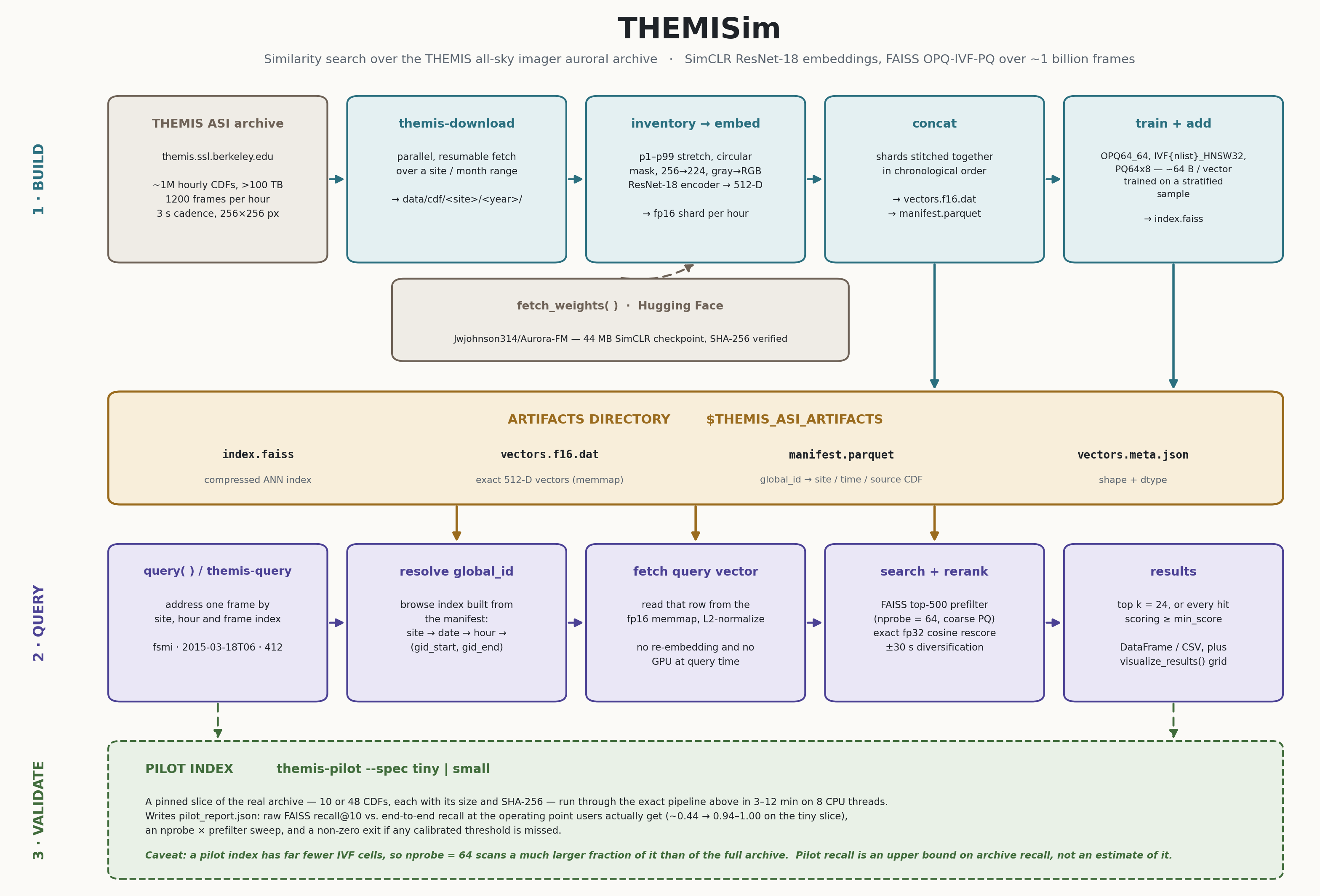
Three lanes, corresponding to the three things above.
Build crawls the Berkeley archive, embeds every 256×256 frame through a
SimCLR-trained ResNet-18 — p1–p99 contrast stretch, circular mask, 224×224,
green channel — into a 512-D vector, stitches the per-hour fp16 shards into one
memmap in chronological order, and trains an OPQ64_64,IVF{nlist}_HNSW32,PQ64x8
index on a stratified sample. That compresses each vector to about 64 bytes.
Artifacts are the four files every query needs: the compressed index, the
exact fp16 vectors, a manifest mapping global_id back to site / time / source
CDF, and a shape-and-dtype header. Because global_id is the memmap row index
and shards are concatenated in site-then-time order, each site occupies one
contiguous block — the property the filtered-query fast path relies on.
Query addresses a frame by (site, hour, frame) and reads its stored vector
straight out of the memmap, so nothing is re-embedded and no GPU is needed. It
pulls a coarse candidate pool from the compressed index, then rescores those
candidates exactly in fp32. The approximate step decides what can be found;
the exact step decides the order — which is why prefilter governs recall and
nprobe barely does.
Validate is the pilot path: a pinned slice of the real archive, run through
the identical pipeline in minutes, reporting its own recall against exhaustive
search. Read the caveat on the diagram carefully — a pilot index has far fewer
IVF cells, so the same nprobe scans a much larger fraction of it, and pilot
recall is an upper bound on archive recall rather than an estimate of it.
Install
pip install themisim
faiss-cpu (>= 1.9, the first release built against the NumPy 2 ABI) is pulled
in as a dependency; the query path is CPU-only. If you already have a GPU
faiss from conda, install with --no-deps to keep it — note that a conda
faiss older than 1.9 also pins you to NumPy 1.x.
A CUDA-enabled PyTorch makes index building much faster but is optional — every
stage falls back to CPU.
Quick start — querying an existing index
from themisim import query

df = query("fsmi", "2015-03-18T06", 412, artifacts="data/artifacts")
df.head()
#    site             datetime     score                                         source_cdf
# 0  fsmi  2015-03-18 06:20:36  1.000000  http://themis.ssl.berkeley.edu/.../thg_l1_asf_fsmi_2015031806_v01.cdf
# ...
datetimenames the hourly CDF (YYYY-MM-DDTHH); sub-hour fields are ignored.2015-03-18 06,2015031806, and adatetimeobject also work.frameis the 0-based frame index within that hour (THEMIS runs at a 3-second cadence, ~1200 frames/hour).- The top result is normally the query frame itself (
score ≈ 1.0).
Search parameters:
| arg | default | meaning |
|---|---|---|
results |
24 | count mode: number of results to return |
min_score |
None |
threshold mode: return every match scoring ≥ this cutoff (overrides results) |
prefilter |
500 | FAISS candidates pulled before exact cosine rerank |
nprobe |
64 | IVF cells inspected per query |
diversify_seconds |
30 | drop near-duplicate frames within ±N s at the same site (0 disables) |
What prefilter buys. The search pulls prefilter candidates from the
compressed index, then rescores them exactly in fp32. Because the rerank is
exact, the fraction of the true top-10 that reaches the candidate pool is also
the recall@10 of the results: a genuine neighbour that reaches the pool cannot
be displaced by a worse one. Measured over 500 queries against an exhaustive
scan of the full 1,009,488,343-vector index, with nprobe=64 and
diversify_seconds=0:
prefilter |
recall@10 vs exhaustive |
|---|---|
| 100 | 0.797 |
| 500 (default) | 0.937 |
| 1000 | 0.961 |
| 2000 | 0.973 |
Recall depends on the (nprobe, prefilter) pair rather than on prefilter
alone, but prefilter dominates and nprobe saturates early: going from
nprobe=8 to nprobe=256 at prefilter=2000 gains 0.0008 for 32x the
cells scanned, while dropping to nprobe=1 costs 0.131.
⚠️ Those figures require diversify_seconds=0. At the default of 30, recall@10
against an exhaustive top-10 is 0.238 rather than 0.937 (same 500 queries) —
by design, because the near-duplicate frames diversification removes are most
of the exhaustive top-10. That is a
presentation choice applied after retrieval, not a retrieval failure, but it
means any recall benchmark must disable it. See the performance report.
Bounding the result set: count vs. threshold
There are two ways to decide how many results come back:
- Count (default) — return the top
resultsmatches. - Threshold — pass
min_score(a cosine similarity in[0, 1]) and the search ignoresresults, returning every (temporally diversified) match scoring at or above the cutoff, best first. The result set is capped at 2000 for safety. Because the candidate pool is the topprefilterFAISS matches, raiseprefilterto surface more low-cutoff hits.
# every frame at least 0.9 cosine-similar to the query, not just the top 24
df = query("fsmi", "2015-03-18T06", 412, artifacts="data/artifacts",
           min_score=0.9)
From the command line
themis-query --site fsmi --datetime 2015-03-18T06 --frame 412 \
    --artifacts data/artifacts --output results.csv

# threshold mode: every match scoring >= 0.9, instead of a fixed --results count
themis-query --site fsmi --datetime 2015-03-18T06 --frame 412 \
    --artifacts data/artifacts --min-score 0.9 --output results.csv
Output columns are site, datetime, score, source_cdf — identical to the
dashboard's CSV export.
Build an index from scratch
Note that the full THEMIS ASI archive is ~1M CDFs (over 100 TB) and building the index takes on the order of GPU-days; the prebuilt index (about 72 GB) is not currently downloadable. If you are interested in obtaining it please email me to discuss.
# 1. fetch the encoder weights (44 MB)
python -c "from themisim import fetch_weights; print(fetch_weights())"

# 2. one-shot pipeline (download + build)
SITES=fsmi START=2015-03 END=2015-03 ./scripts/run_pipeline.sh
or step by step:
themis-download   --data-root data/cdf --sites fsmi --start 2015-03 --end 2015-03
themis-build-index --data-root data/cdf --artifacts data/artifacts \
                   --checkpoint weights/aurora-fm-no-finetune.tar
The equivalent Python API:
from themisim import download_archive, build_index

download_archive("data/cdf", sites=["fsmi"], start="2015-03", end="2015-03")
build_index("data/cdf", "data/artifacts",
            "weights/aurora-fm-no-finetune.tar")
build_index runs inventory → embed → concat → train/build, resuming cleanly
if interrupted (already-embedded hours are skipped). --nlist auto scales the
IVF cell count to the dataset size.
Testing the software
The full archive is ~1M CDFs and a full build is GPU-days. If you would like to test THEMISim without committing to thr full build, you can build a pilot index — a pinned slice of the real archive that runs through exactly the same pipeline and then measures its own retrieval quality:
themis-pilot --list          # what is available and what it costs
themis-pilot --spec small    # download, build, validate
| spec | CDFs | vectors | download | build (8 CPU threads) |
|---|---|---|---|---|
tiny |
10 | 11,457 | 1.2 GB | 3 min |
small |
48 | 56,955 | 6.0 GB | 12 min |
Build times are measured, not estimated, with the CDFs already on disk; add your download time (the archive serves ~17 MB/s on a good link, so roughly 1 min and 6 min respectively). A GPU is not required — the encoder forward pass runs at ~90 frames/s on 8 CPU threads. The command is idempotent: downloads resume, already-embedded hours are skipped, and it is safe to re-run after a dropped connection.
Each slice pins an explicit list of CDFs with each file's size and SHA-256, and reconstructs their URLs directly rather than crawling, so the inputs are identical for everyone regardless of how the archive's directory listings change. The slices are chosen to reach code a naive subset would miss: two storms (2015-03-18 and 2024-03-25), four sites, both THEMIS CDF layouts, overlapping UT hours so cross-station retrieval is possible, and partial hours with non-nominal frame counts.
Every build writes pilot_report.json and exits non-zero if any calibrated
threshold is missed. It reports recall at the operating point users actually
get — SearchEngine.search pulls the top prefilter candidates from the
compressed index and then rescores them exactly in fp32, so raw FAISS recall is
not what anyone experiences. On the tiny slice raw FAISS recall@10 is ~0.44
while the full pipeline reaches 0.94–1.00. The report shows both, sweeps
nprobe and prefilter together (they interact), and states plainly what a
pilot-scale index cannot demonstrate — most importantly that its recall is an
upper bound on the full archive's, not an estimate of it.
Everything else is offline. The test suite builds a working index from synthetic frames and queries it, so the whole pipeline can be verified without obtaining any THEMIS data:
pytest                    # full suite, no network
pytest -m "not slow"      # skip the encoder/index-building tests
pytest -m pilot           # plus a real tiny-slice build from the archive
tests/test_end_to_end.py writes THEMIS-format CDFs (both the legacy and the
2024+ on-disk layouts), serves them over localhost, and runs the genuine chain —
download → inventory → CDF read → preprocess → SimCLR encoder → shards → concat
→ OPQ-IVF-PQ train/add → query — asserting that a frame retrieves itself at
cosine 1.0 and that the exported table agrees with the manifest.
See the pilot documentation for the full description of what is checked and what is out of reach at this scale.
Model weights
fetch_weights() downloads and SHA-256-verifies the ~44 MB SimCLR checkpoint
into ./weights (override with $THEMIS_ASI_WEIGHTS). It is pulled from the
public Hugging Face repo
Jwjohnson314/Aurora-FM; override
the URL via $THEMIS_ASI_WEIGHTS_URL or pass url=. If you already have the
.tar, drop it in the weights directory and it will be verified and reused
without a network call.
Paths / configuration
Resolved from explicit arguments, then environment variables, then defaults:
| what | env var | default |
|---|---|---|
| downloaded CDFs | THEMIS_ASI_DATA_ROOT |
./data/cdf |
| index artifacts | THEMIS_ASI_ARTIFACTS |
./data/artifacts |
| model weights | THEMIS_ASI_WEIGHTS |
./weights |
An artifacts directory contains index.faiss, manifest.parquet,
vectors.f16.dat, and vectors.meta.json.
License, data & citation
The code in this repository is MIT-licensed — see LICENSE.
The assets this tool downloads carry their own terms, which you must honor when publishing results:
- Model weights (
Jwjohnson314/Aurora-FM) are released under CC-BY-4.0 — attribution required. - THEMIS ASI data is provided by the THEMIS mission (UC Berkeley / NASA) and is subject to the THEMIS data use & citation policy. Acknowledge the mission and instrument teams in any publication.
1 maintainer

Metadata
1 maintainer
Release files for themisim 0.2.0
For a detailed explanation of source distributions (sdists) and built distributions (wheels), please see the package formats documentation.
Source distribution (sdist)
| File | Size | Uploaded | |
|---|---|---|---|
| themisim-0.2.0.tar.gz | 196.8 kB | Details |
Built distribution (wheel)
| File | Interpreter | ABI | Platform | Reset |
|---|---|---|---|---|
| themisim-0.2.0-py3-none-any.whl | Python 3 | none | any | Details |
Total release size: 365.3 kB
Release files / themisim-0.2.0.tar.gz
| Download URL | themisim-0.2.0.tar.gz |
|---|---|
| Size | 196.8 kB |
| Tags | Source |
|
SHA-256 checksum How to use checksums |
1283ecea85257a04b57a49e485545118de75f8ab5857f5bbd454fc709be381df
|
|
BLAKE2b-256 checksum How to use checksums |
723246edb0e04ff2cd266b84dedead481db57f9e7fbd19d30e303505bdb8f7d5
|
| Upload date | |
|
Uploaded using Trusted Publishing? What is trusted publishing? |
Yes |
| Uploaded via |
twine/7.0.0 CPython/3.13.14
|
Provenance
Provenance describes where a file came from. On PyPI, provenance is shared via attestations, which provide a verifiable record of the build or publishing details. View details, limitations and caveats.


PyPI Publish Attestation
PyPI verified that this artifact, at this checksum, originated from the publisher listed below.
Signed by GitHub Actions, verified by PyPI on Sep 16, 2026.
Transparency logRelease files / themisim-0.2.0-py3-none-any.whl
| Download URL | themisim-0.2.0-py3-none-any.whl |
|---|---|
| Size | 168.5 kB |
| Tags | Python 3 |
|
SHA-256 checksum How to use checksums |
a25341ade7f1ba096a7efe8c3fd18b5058b3e345bec98e6c163156af72580d46
|
|
BLAKE2b-256 checksum How to use checksums |
65e0eff9ab07c6250fab910358d1727bd51a581cef3f02d7ce82c7ae14aa2564
|
| Upload date | |
|
Uploaded using Trusted Publishing? What is trusted publishing? |
Yes |
| Uploaded via |
twine/7.0.0 CPython/3.13.14
|
Provenance
Provenance describes where a file came from. On PyPI, provenance is shared via attestations, which provide a verifiable record of the build or publishing details. View details, limitations and caveats.
PyPI Publish Attestation
PyPI verified that this artifact, at this checksum, originated from the publisher listed below.
Signed by GitHub Actions, verified by PyPI on Sep 16, 2026.
Transparency log













