

The right BibTeX for any paper, checked against every source.





Why
Google Scholar hands you the arXiv preprint of a paper published at ICLR two years ago, cuts the author list at
and others, lowercases BERT and invents a venue name. Fixing it means opening DBLP, OpenReview and the
proceedings site, one paper at a time.
therightbibtex does that cross-check for you, in a few seconds: it asks every relevant source at once, groups the versions of the same paper, and gives you the BibTeX of the version you should cite, with the origin of every field. It runs on your computer, from the terminal or in your browser.
Install
pipx install therightbibtex # or: uv tool install therightbibtex, or: pip install therightbibtex
Python 3.10 or newer, on Linux, macOS and Windows.
Command line
$ therightbibtex "An image is worth 16x16 words"
@inproceedings{dosovitskiy2021image,
  author    = {Dosovitskiy, Alexey and Beyer, Lucas and Kolesnikov, Alexander and Weissenborn, Dirk and ...},
  title     = {An Image is Worth 16x16 Words: Transformers for Image Recognition at Scale},
  booktitle = {International Conference on Learning Representations},
  year      = {2021},
  publisher = {OpenReview.net},
  url       = {https://openreview.net/forum?id=YicbFdNTTy}
}
ICLR 2021 (published), high confidence; other versions: arXiv 2010.11929v2 (--all shows them)
The BibTeX goes to stdout and the notes to stderr, so therightbibtex "..." > paper.bib or | pbcopy just works.
therightbibtex 2010.11929 --all                 # every version: published, preprint, submission
therightbibtex "https://openreview.net/forum?id=YicbFdNTTy"
therightbibtex paper.pdf                        # title, DOI and arXiv ID read from the PDF
therightbibtex refs.bib -o refs-checked.bib     # check a whole .bib, citation keys are kept
therightbibtex batch titles.txt                 # one reference per line (or - for stdin)
therightbibtex "attention is all you need" -s key_style=dblp -s venue_style=short
therightbibtex "..." --json                     # every version and the source of each field
--refresh skips the local cache, -q prints only BibTeX, -v logs what each source does.
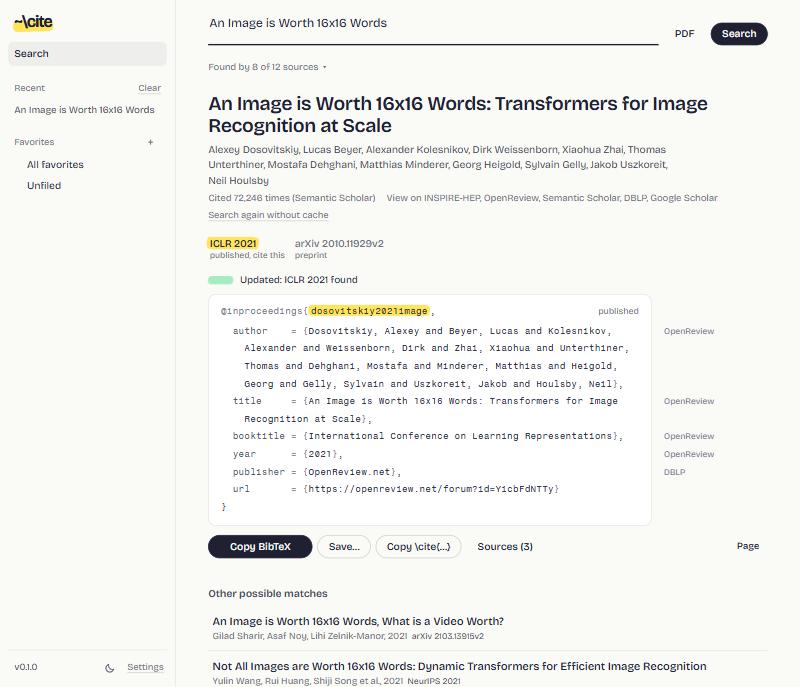
Web interface
therightbibtex serve # opens http://localhost:8137
The same search with live results, plus a library: favorites in colored, nested folders, .bib and CSL-JSON
import and export, and one click to re-check every preprint of a folder and upgrade it to its published version,
keeping the citation keys your paper already uses. Light and dark themes, and it works on a phone too:
--host 0.0.0.0 makes it reachable from your local network, without a password, so only on a network you trust.
What you can type
| You type | You get |
|---|---|
When Foundation Models are One-Liners |
the ICLR 2026 entry from OpenReview (no need for the subtitle) |
mTSBench |
the TMLR 2026 version: found on arXiv, confirmed on OpenReview and DBLP |
Atention is all you ned |
NeurIPS 2017, after fixing the typos |
dosovitskiy image worth words |
an author name and a few title words are enough |
2010.11929, a DOI, an OpenReview or proceedings link |
the published version, not only the preprint |
| a reference copied from a PDF, a BibTeX entry, or the PDF itself | the clean, checked entry |
Features
- Published version first. Preprint, submission and published versions are kept apart, and the one to cite is
recommended. In the web interface, the entry stays greyed with a highlighted
?while sources are still answering. - Provenance everywhere. Each field shows where it comes from. Disagreements between sources, retractions and suspicious copies (re-uploads, foreign DOIs) are flagged instead of silently merged.
- BibTeX your way. Citation key style (
vaswani2017attention,Vaswani2017, DBLP keys), full or short venue names, arXiv as@articleor@misc, LaTeX or Unicode accents, protected capitals, max authors. - Your own API keys, optional. Several keys per service: if one is rejected or out of quota, the next one takes over.
Sources
| Kind | Sources |
|---|---|
| DOI registries | Crossref, doi.org, DataCite, OpenAlex |
| Computer science | DBLP, OpenReview, ACL Anthology, official proceedings (NeurIPS, PMLR, CVF, JMLR) |
| Preprints | arXiv, HAL |
| Aggregators | Semantic Scholar, Google Scholar (through SerpAPI) |
| Other fields | Europe PMC, INSPIRE-HEP, zbMATH |
No key is needed. Keys raise the rate limits and enable Google Scholar:
therightbibtex keys add s2          # Semantic Scholar: https://www.semanticscholar.org/product/api
therightbibtex keys add openalex    # OpenAlex: https://openalex.org/settings/api
therightbibtex keys add serpapi     # Google Scholar through SerpAPI: https://serpapi.com
therightbibtex keys list
The key is asked for without echo, checked with the service, then stored in your config file. Keys can also be managed from the settings of the web interface.
Configuration
Everything stays in one folder on your computer: config.json (settings and keys, readable by you only),
library.db (favorites and history), cache.db (source answers) and daily backups of the library.
| System | Folder |
|---|---|
| Linux | $XDG_CONFIG_HOME/therightbibtex (default ~/.config/therightbibtex) |
| macOS | ~/Library/Application Support/therightbibtex |
| Windows | %APPDATA%\therightbibtex |
Set THERIGHTBIBTEX_HOME to use another folder.
therightbibtex config                       # print config.json
therightbibtex config set key_style dblp
therightbibtex config set contact_email you@example.org
therightbibtex config unset key_style       # back to the default
| Setting | Default | Values |
|---|---|---|
key_style |
scholar |
scholar (vaswani2017attention), AuthorYear, AuthorYearWord, dblp |
venue_style |
full |
full, short (ICML), short_year (ICML 2021) |
arxiv_style |
article |
article (journal = arXiv preprint ...), misc (eprint fields) |
accents |
latex |
latex, unicode |
protect_caps |
true |
wrap acronyms in braces ({BERT}) |
url |
auto |
auto (only without DOI), always, never |
doi, month, abstract |
true, false, false |
include these fields |
max_authors |
100 |
longer lists end with and others |
contact_email |
none | sent to Crossref and OpenAlex for their faster "polite" pool |
port |
8137 |
port of therightbibtex serve |
scholar_direct |
false |
query Google Scholar without SerpAPI (see below) |
Google Scholar has no API: without a SerpAPI key it is skipped. scholar_direct scrapes it instead, which Google
may block (captcha) and which its terms of service do not allow; it is off unless you turn it on.
How it works
flowchart LR
  A["Input<br/>title, ID, link,<br/>reference, PDF"] --> B["Ask every source<br/>in parallel"]
  B --> C["Group the records<br/>of the same paper"]
  C --> D["Second pass<br/>full title, DOI, arXiv,<br/>OpenReview, DBLP"]
  D --> E["Split into versions,<br/>merge each field from<br/>its most reliable source"]
  E --> F["Recommended BibTeX<br/>with provenance"]
Records are only grouped when their titles or authors agree, so a wrong identifier from one source cannot drag in another paper. Answers are cached locally, so a repeated search takes a second or two.
Privacy and security
Your queries go to the sources above and nowhere else; there is no account, no telemetry, no server of ours. The
web interface listens on 127.0.0.1 only, refuses requests addressed to any other host name (DNS rebinding) and
writes coming from other sites, and runs under a strict Content Security Policy. PDFs are parsed in a separate
process, and API keys are never sent back to the browser.
Development
git clone https://github.com/marcpinet/therightbibtex
cd therightbibtex
pip install -e .
python -m unittest discover -s tests
The tests are fully offline: real searches are recorded once (tests/record_fixtures.py) and replayed, so the
whole pipeline is tested against what the sources actually return, edge cases included (short names, typos,
foreign DOIs, dataset records).
therightbibtex/
  cli.py         command line
  web.py         local web server: streamed search, library, exports
  engine.py      search pipeline: phases, grouping, versions, scoring, recommendation
  sources/       one module per source
  bibtex.py      parsing, rendering, citation keys
  venues.py      venue names and abbreviations (NIPS is NeurIPS, ISO 4 forms)
  query.py       what the input is: title, identifiers, reference, BibTeX
  pdfinfo.py     title, DOI and arXiv ID from a PDF
  config.py      config.json: settings, options, API keys
  store.py       SQLite library: folders, favorites, history
  static/        the web interface: vanilla JS, no build step, self-hosted fonts
tests/           unittest suite and recorded fixtures
Releases are automatic: bump __version__ in therightbibtex/__init__.py and push to main. The pypi
workflow runs the tests, publishes the new version to PyPI and creates the matching GitHub release.
License
AGPL-3.0-or-later. © 2026 Marc Pinet.
1 maintainer

Metadata
1 maintainer
Release files for therightbibtex 0.1.0
For a detailed explanation of source distributions (sdists) and built distributions (wheels), please see the package formats documentation.
Source distribution (sdist)
| File | Size | Uploaded | Provenance | |
|---|---|---|---|---|
| therightbibtex-0.1.0.tar.gz | 1.7 MB | Without provenance | Details |
Built distribution (wheel)
| File | Interpreter | ABI | Platform | Reset |
|---|---|---|---|---|
| therightbibtex-0.1.0-py3-none-any.whl | Python 3 | none | any | Details |
Total release size: 2.0 MB
Release files / therightbibtex-0.1.0.tar.gz
| Download URL | therightbibtex-0.1.0.tar.gz |
|---|---|
| Size | 1.7 MB |
| Tags | Source |
|
SHA-256 checksum How to use checksums |
678034695f291c632b6c57943695b2edbfe73fd2e50ec61df788147dd6e00f64
|
|
BLAKE2b-256 checksum How to use checksums |
e28ffcb5523f5de709c604ec8324c252882904ee931dc5505bcb0a7b7b553184
|
| Upload date | |
|
Uploaded using Trusted Publishing? What is trusted publishing? |
No |
| Uploaded via |
twine/7.0.0 CPython/3.13.16
|
Release files / therightbibtex-0.1.0-py3-none-any.whl
| Download URL | therightbibtex-0.1.0-py3-none-any.whl |
|---|---|
| Size | 356.2 kB |
| Tags | Python 3 |
|
SHA-256 checksum How to use checksums |
11b2eed672980d2669bb7ee2090b6ccf39464aa2c91a93eea63e5356df934f93
|
|
BLAKE2b-256 checksum How to use checksums |
6c80ea8265c5309ff8ab8489f635907f1573c1acbbf0be94c5cf6fc90c91e115
|
| Upload date | |
|
Uploaded using Trusted Publishing? What is trusted publishing? |
No |
| Uploaded via |
twine/7.0.0 CPython/3.13.16
|
Security for therightbibtex 0.1.0
Provenance
Provenance describes where a file came from. On PyPI, provenance is shared via attestations, which provide a verifiable record of the build or publishing details. View details, limitations and caveats.
No provenance found
None of the files in this release were uploaded with provenance metadata.
A note on package security
PyPI is a repository for distributing packages, not a service for auditing them. While third-party security researchers and our staff do their best to detect and remove malicious packages, PyPI cannot guarantee the quality, security or suitability of any given package.
To learn more about protecting yourself from malicious actors, visit our package security documentation.













