
implementation and weights for facial landmarks in thermal images trained with the dataset described in 'T-FAKE: Synthesizing Thermal Images for Facial Landmarking'.


Project description




Thermal-facial-alignment network (TFAN) trained on the T-FAKE dataset
Using the landmarker
Install and run:
pip install thermal-face-alignment
import cv2
from tfan import ThermalLandmarks

# Read a thermal image (grayscale)
image = cv2.imread("thermal.png", cv2.IMREAD_GRAYSCALE)

# Initialize landmarker (downloads weights on first use)
landmarker = ThermalLandmarks(device="cpu", n_landmarks=70)

landmarks, confidences = landmarker.process(image)
Practical Usage
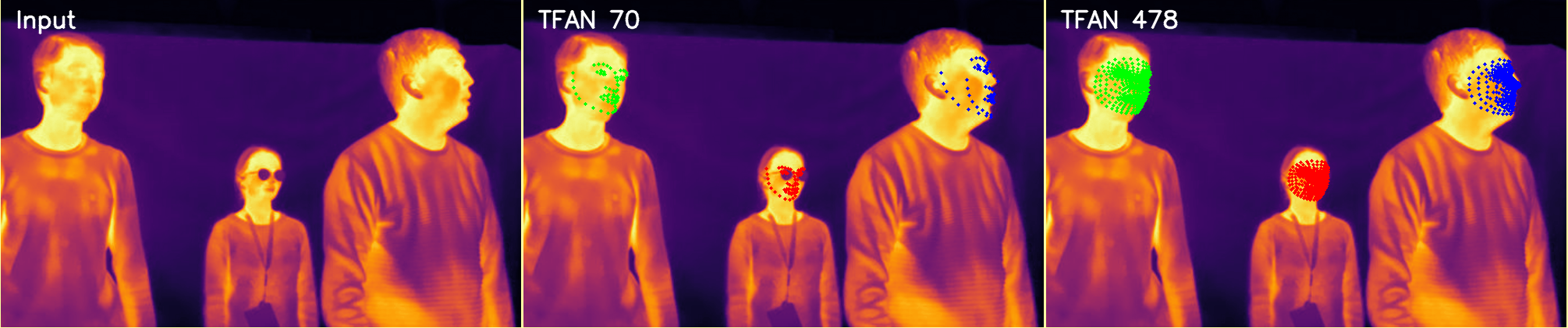
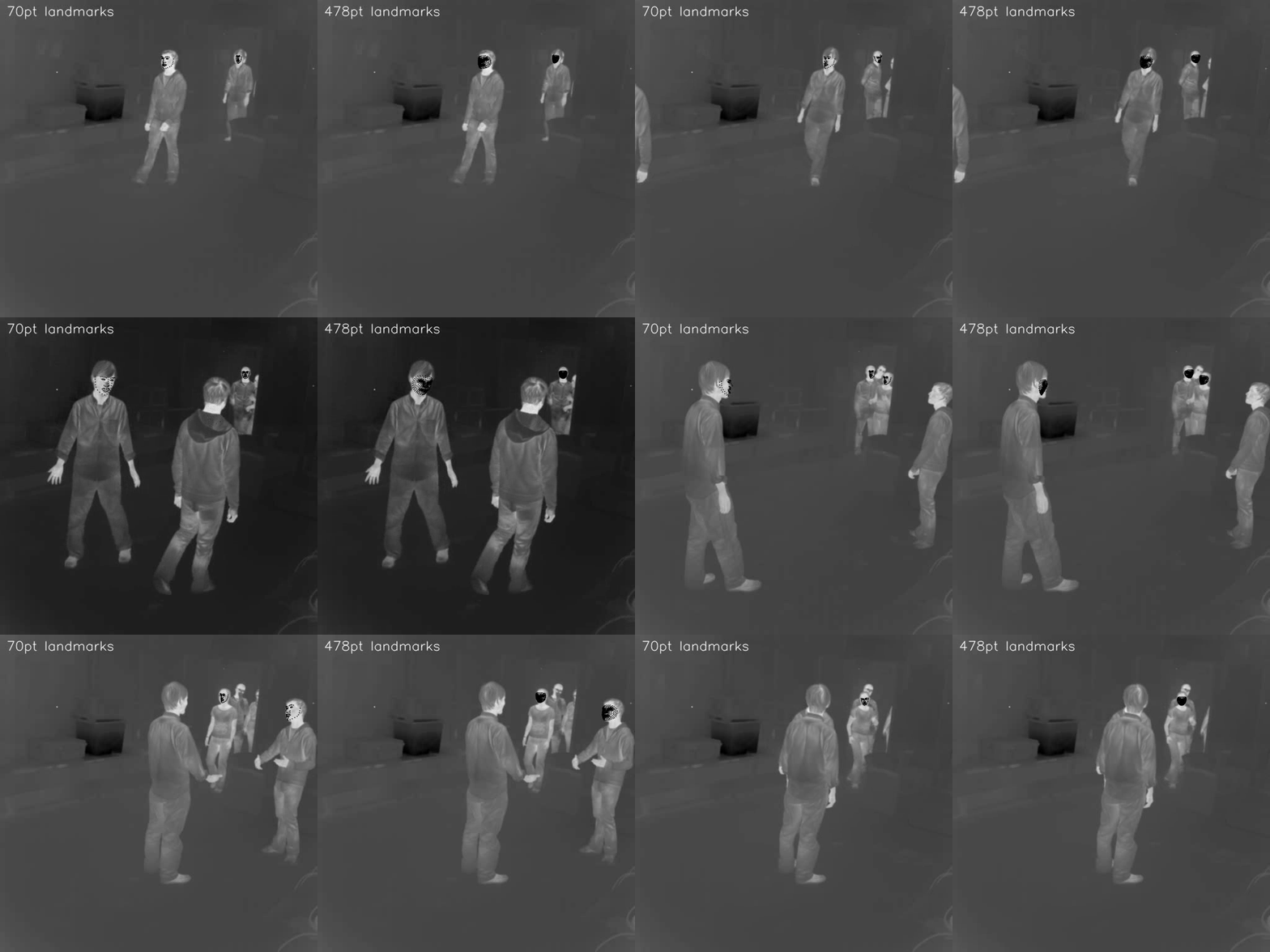
The ThermalLandmarks wraps a landmarker trained on T-FAKE either with sliding window selecting the face with highest confidence or via a bbox computed with a smaller model.
Please note that we trained our network with temperature value range of 20°C to 40°C. While our implementation performs an automatic rescaling, please make sure that you adapt our landmarker options based on the input pixel values.
Initialization options
ThermalLandmarks(
    model_path=None,
    device="cpu",
    gpus=[0, 1],
    eta=0.75,
    max_lvl=0,
    stride=100,
    n_landmarks=478, # 478 or 70 point landmarks are supported
    normalize=True,
)
-
model_path(strorPath, optional) Path to a pretrained DMMv2 model (state_dict). If omitted, pretrained weights matchingn_landmarksare downloaded automatically. -
device("cpu"or"cuda", default"cpu") Torch device used for inference. When using"cuda", the model may be wrapped inDataParallel. -
gpus(list[int], default[0, 1]) GPU device IDs used whendevice="cuda". -
n_landmarks(int, default478) Number of facial landmarks predicted per face. Choices:70— sparse landmarks following the Face Synthetic convention of (Wood et al., 2021).478— dense landmarks following the MediaPipe face mesh convention.
-
normalize(bool, defaultTrue) Apply ImageNet normalization to cropped face patches before inference. Assumes inputs are scaled to[0, 255]. -
eta(float, default0.75) Pyramid scale factor used in sliding-window mode. -
max_lvl(int, default0) Maximum pyramid level for multi-scale sliding-window inference. -
stride(int, default100) Pixel stride used during sliding-window scanning.
Inference options
landmarks, confidences = landmarker.process(
    image,
    sliding_window=False,
    multi=False,
    mode="auto",
)
-
image(numpy.ndarray) Input frame:H×W: thermal or grayscale imageH×W×3: RGB/BGR image
-
mode("auto" | "temperature" | "pixel", default"auto") Controls how numeric values are interpreted:"temperature": 2D thermal image in °C"pixel": pixel intensities in[0, 255]or[0, 1]"auto": inferred from dtype and value range
-
multi(bool, defaultFalse) IfTrue, return landmarks for all detected faces. IfFalse, only the first face is returned. -
sliding_window(bool, defaultFalse) Enable multi-scale sliding-window inference. Note: currently only supported whenmulti=False.
Outputs
-
landmarksPixel coordinates in the original image:- List of
(n_landmarks, 2)arrays (multi-face) - Single
(n_landmarks, 2)array (sliding window)
- List of
-
confidencesPer-landmark confidence scores of shape(n_landmarks,)
Background
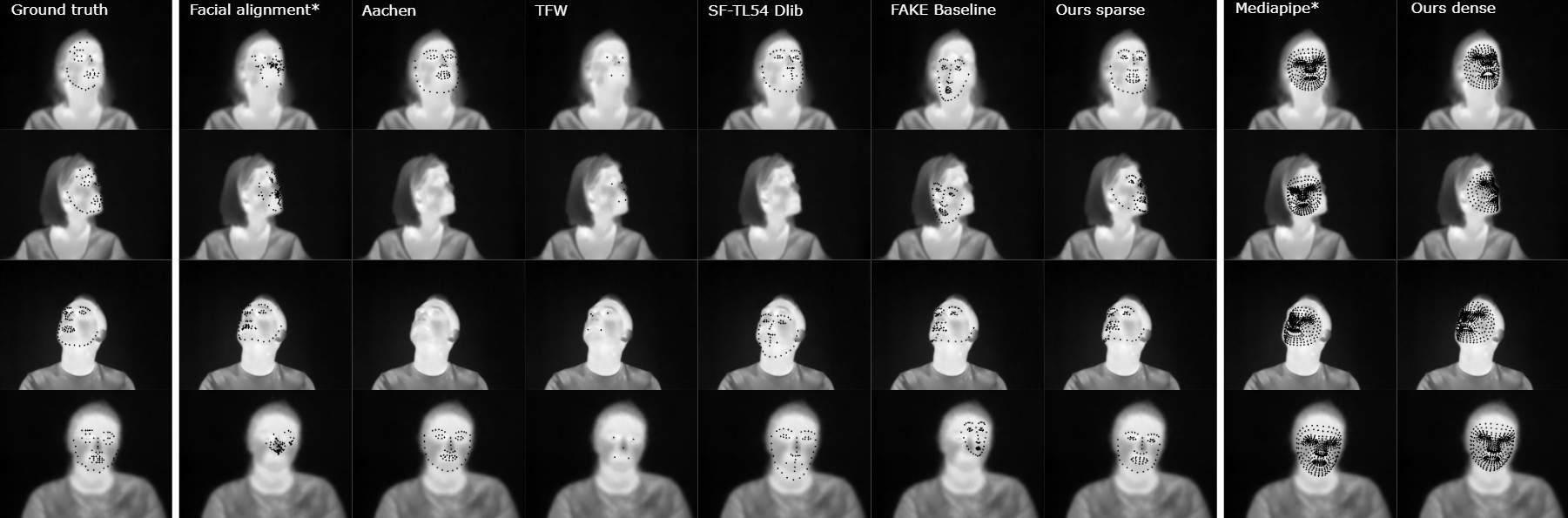
This landmarker is an implementation of our work presented in our CVPR paper on thermal landmarking (Main GitHub). We employed the TFW face detector for our inital face detection as it performed very well in our benchmark. Please note that this library is meant for research purposes only.
Landmarker Performance on our Charlotte Benchmark
Training Dataset
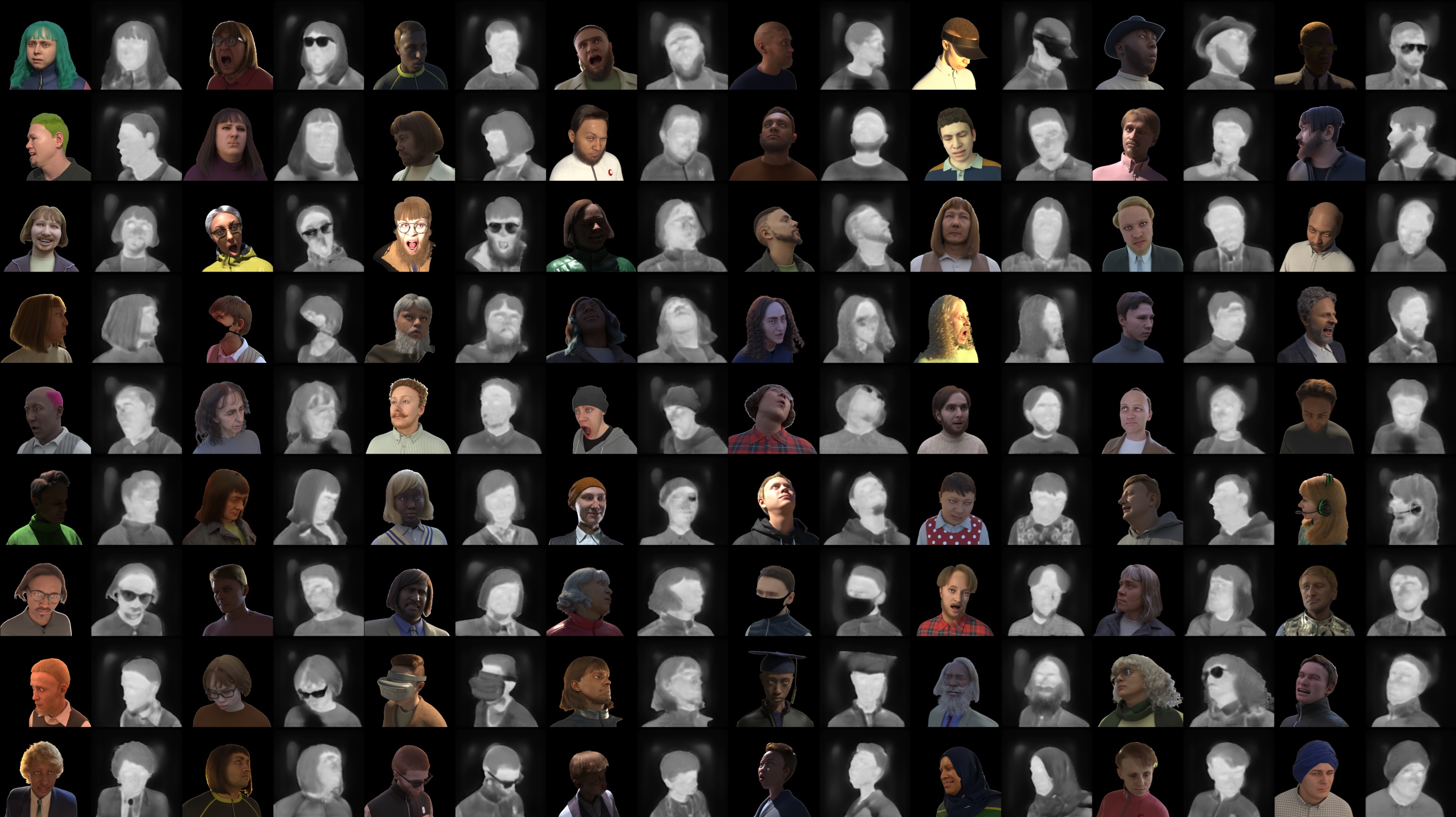
We trained our landmarker on our custom-made T-FAKE dataset consisting of synthetic thermal images. To download the original color images, sparse annotations, and segmentation masks for the dataset, please use the links in the FaceSynthetics repository.
Our dataset has been generated for a warm and for a cold condition. Each dataset can be downloaded separately as
- A small sample with 100 images from here warm and here cold
- A medium sample with 1,000 images from here warm and here cold
- The full dataset with 100,000 images from here warm and here cold
- The dense annotations are available from here
Pre-trained models
The models for the thermalization as well as the landmarkers can be downloaded from here.
License
Our landmarking methods and the training dataset are licensed under the Attribution-NonCommercial-ShareAlike 4.0 International license as it is derived from the FaceSynthetics dataset.
Citation
If you use this code for your own work, please cite our paper:
P. Flotho, M. Piening, A. Kukleva and G. Steidl, “T-FAKE: Synthesizing Thermal Images for Facial Landmarking,” Proceedings of the Computer Vision and Pattern Recognition Conference (CVPR), 2025. CVF Open Access
BibTeX entry
@InProceedings{tfake2025_CVPR,
    author    = {Flotho, Philipp and Piening, Moritz and Kukleva, Anna and Steidl, Gabriele},
    title     = {T-FAKE: Synthesizing Thermal Images for Facial Landmarking},
    booktitle = {Proceedings of the Computer Vision and Pattern Recognition Conference (CVPR)},
    month     = {June},
    year      = {2025},
    pages     = {26356-26366}
}
The thermal face bounding box detection in this repo uses the TFW landmarker model, please additionally cite:
Kuzdeuov, A., Aubakirova, D., Koishigarina, D., & Varol, H. A. (2022). TFW: Annotated Thermal Faces in the Wild Dataset. IEEE Transactions on Information Forensics and Security, 17, 2084–2094. https://doi.org/10.1109/TIFS.2022.3177949
@article{9781417,
    author={Kuzdeuov, Askat and Aubakirova, Dana and Koishigarina, Darina and Varol, Huseyin Atakan},
    journal={IEEE Transactions on Information Forensics and Security},
    title={TFW: Annotated Thermal Faces in the Wild Dataset},
    year={2022},
    volume={17},
    pages={2084-2094},
    doi={10.1109/TIFS.2022.3177949}
}
Release history Release notifications | RSS feed


Download files
Download the file for your platform. If you're not sure which to choose, learn more about installing packages.
Source Distribution
Built Distribution
Filter files by name, interpreter, ABI, and platform.
If you're not sure about the file name format, learn more about wheel file names.
Copy a direct link to the current filters
File details
Details for the file thermal_face_alignment-1.0.0a5.tar.gz.
File metadata
- Download URL: thermal_face_alignment-1.0.0a5.tar.gz
- Upload date:
- Size: 19.7 MB
- Tags: Source
- Uploaded using Trusted Publishing? Yes
- Uploaded via: twine/6.1.0 CPython/3.13.7
File hashes
| Algorithm | Hash digest | |
|---|---|---|
| SHA256 |
e319131cfba6ce522f011dab3f4c7ffe1c185063a6bef4efffe1226af367556e
|
|
| MD5 |
f8f0ee633c5864438f58610cf6e40948
|
|
| BLAKE2b-256 |
a2fdb6661e38475236f75bc607e3d114f14c2b96cc9ff95f901e19c9520f2b01
|
Provenance
The following attestation bundles were made for thermal_face_alignment-1.0.0a5.tar.gz:
Publisher:
pypi-release.yml on openscivision/thermal-face-alignment
-
Statement:
-
Statement type:
https://in-toto.io/Statement/v1 -
Predicate type:
https://docs.pypi.org/attestations/publish/v1 -
Subject name:
thermal_face_alignment-1.0.0a5.tar.gz -
Subject digest:
e319131cfba6ce522f011dab3f4c7ffe1c185063a6bef4efffe1226af367556e - Sigstore transparency entry: 774449072
- Sigstore integration time:
-
Permalink:
openscivision/thermal-face-alignment@fbda756f840348da7ffd6ac59daa344bcd568d12 -
Branch / Tag:
refs/tags/v1.0.0a5 - Owner: https://github.com/openscivision
-
Access:
public
-
Token Issuer:
https://token.actions.githubusercontent.com -
Runner Environment:
github-hosted -
Publication workflow:
pypi-release.yml@fbda756f840348da7ffd6ac59daa344bcd568d12 -
Trigger Event:
push
-
Statement type:
File details
Details for the file thermal_face_alignment-1.0.0a5-py3-none-any.whl.
File metadata
- Download URL: thermal_face_alignment-1.0.0a5-py3-none-any.whl
- Upload date:
- Size: 14.1 kB
- Tags: Python 3
- Uploaded using Trusted Publishing? Yes
- Uploaded via: twine/6.1.0 CPython/3.13.7
File hashes
| Algorithm | Hash digest | |
|---|---|---|
| SHA256 |
c0f0156f4172aea0e22ffe617e04f7adf2f5a727cb150ee0742a1741236dcd1a
|
|
| MD5 |
71d2d748fc287b0f36f72b6fb1d61b61
|
|
| BLAKE2b-256 |
a0eeab7d605f39755a5c1d83ab54671754f72a10e6d980178037a36b1366f1a5
|
Provenance
The following attestation bundles were made for thermal_face_alignment-1.0.0a5-py3-none-any.whl:
Publisher:
pypi-release.yml on openscivision/thermal-face-alignment
-
Statement:
-
Statement type:
https://in-toto.io/Statement/v1 -
Predicate type:
https://docs.pypi.org/attestations/publish/v1 -
Subject name:
thermal_face_alignment-1.0.0a5-py3-none-any.whl -
Subject digest:
c0f0156f4172aea0e22ffe617e04f7adf2f5a727cb150ee0742a1741236dcd1a - Sigstore transparency entry: 774449078
- Sigstore integration time:
-
Permalink:
openscivision/thermal-face-alignment@fbda756f840348da7ffd6ac59daa344bcd568d12 -
Branch / Tag:
refs/tags/v1.0.0a5 - Owner: https://github.com/openscivision
-
Access:
public
-
Token Issuer:
https://token.actions.githubusercontent.com -
Runner Environment:
github-hosted -
Publication workflow:
pypi-release.yml@fbda756f840348da7ffd6ac59daa344bcd568d12 -
Trigger Event:
push
-
Statement type:






