
MCP server for datacenter GPU liquid cooling thermal analysis

Project description



thermal-mcp-server
An NVL72 rack dissipates 120 kW through liquid cooling. Choosing the wrong flow rate, coolant, or manifold configuration means thermal throttling (lost compute revenue) or overprovisioned cooling (wasted capex). thermal-mcp-server quantifies these tradeoffs using a first-principles thermal resistance model exposed as an MCP server.
GPU Thermal Specs
| Chip | TDP (cold plate sizing) | Tj Design Ceiling | Source |
|---|---|---|---|
| NVIDIA H100 SXM | 700 W | 83°C (throttle onset) | NVIDIA H100 Datasheet |
| NVIDIA B200 (NVL72) | 1,200 W | ~75°C (not NVIDIA-published) | NVIDIA GB200 NVL72, SemiAnalysis |
| NVIDIA B200 (HGX standalone) | 1,000 W | Not published | Lenovo ThinkSystem HGX B200 Product Guide |
| AMD MI300X | 750 W | Not published | AMD MI300X Data Sheet (PDF) |
| Intel Gaudi 3 OAM | 900 W (air) / 1,200 W (liquid) | Not published | Intel Gaudi 3 Product Brief (PDF) |
Note: TDP values are for cold plate thermal sizing, not electrical nameplate. The GB200 1,200 W figure reflects per-GPU heat dissipation in the NVL72 liquid-cooled configuration — not 120 kW / 72 amortized (which would include CPUs, NVSwitches, NICs, and VRM losses).
Demo
Single H100 SXM cold plate analysis — 700 W, water, 10 LPM, 35°C inlet:
from thermal_mcp_server.physics import analyze
from thermal_mcp_server.schemas import AnalyzeColdplateInput

result = analyze(AnalyzeColdplateInput(
    heat_load_w=700, flow_rate_lpm=10, inlet_temp_c=35.0, coolant="water"
))
{
  "coolant": "water",
  "regime": "turbulent",
  "reynolds": 4667.6,
  "nusselt": 41.11,
  "heat_transfer_coeff_w_m2k": 24667.2,
  "pressure_drop_pa": 26503.0,
  "pump_power_w": 8.83,
  "coolant_rise_c": 1.01,
  "junction_temp_c": 80.69,
  "resistances_k_per_w": {
    "junction_to_case": 0.04,
    "tim": 0.02,
    "base_conduction": 0.00052,
    "convection": 0.00403,
    "total": 0.06455
  },
  "warnings": []
}
At 10 LPM water with 35°C inlet, the H100 runs at 80.7°C junction — 2.3°C of margin below the 83°C throttle point. This is a tight operating point at these inlet conditions; reducing inlet temperature to 25°C or increasing flow rate would add margin.
How It Works
The physics engine models a single cold plate as a 1D thermal resistance network: junction-to-case (R_jc), thermal interface material (R_tim), copper base conduction, and forced convection to the coolant. Convective heat transfer uses the Dittus-Boelter correlation for turbulent flow and a constant Nu = 4.36 for laminar flow, with linear blending in the transition regime (Re 2300–4000). Pressure drop uses Darcy-Weisbach with Blasius friction factor, also blended through the transition regime. All assumptions — pump efficiency, channel geometry, property values — are documented inline in the source.
flowchart LR
    A["Input\nchip power, flow rate,\ncoolant, geometry"] --> B["Physics Engine\nDittus-Boelter, Darcy-Weisbach,\nR_total network"]
    B --> C["Output\nT_junction, ΔP,\nthermal margin, pump power"]
Quick Start
Install from PyPI:
python -m venv thermal-venv
source thermal-venv/bin/activate
pip install thermal-mcp-server
Configure in your MCP client (e.g., Claude Desktop claude_desktop_config.json):
{
  "mcpServers": {
    "thermal": {
      "command": "/absolute/path/to/thermal-venv/bin/python",
      "args": ["-m", "thermal_mcp_server"]
    }
  }
}
Important: Use the absolute path to your venv's Python binary. Claude Desktop does not inherit your shell's PATH, so bare
pythonwill fail with "No such file or directory."
Install from source (for development):
git clone https://github.com/riccardovietri/thermal-mcp-server.git
cd thermal-mcp-server
python -m venv venv && source venv/bin/activate
pip install -e .
See the MCP documentation for client setup details.
Usage with Claude
Once configured, ask Claude natural-language questions about liquid cooling:
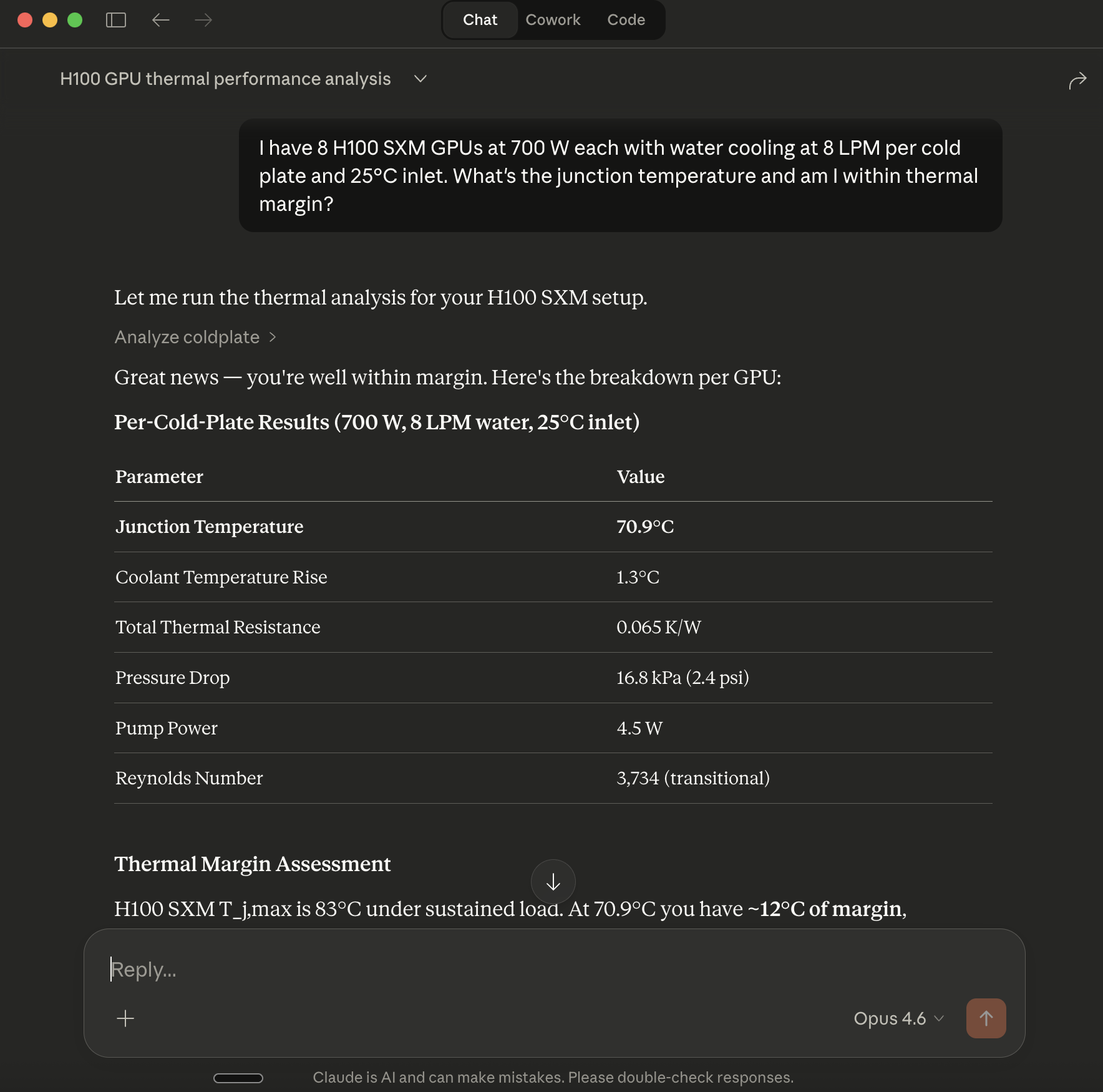
"I have 8 H100 SXM GPUs at 700 W each with water cooling at 8 LPM per cold plate and 25°C inlet. What's the junction temperature and am I within thermal margin?"
Claude calls analyze_coldplate and interprets the result:
"At 8 LPM with 25°C inlet water, each H100 runs at 70.9°C junction — 12.1°C below the 83°C throttle onset. Convective resistance (0.004 K/W) is small relative to the package resistances (R_jc + R_tim = 0.06 K/W), so increasing flow rate has diminishing returns. You have room to reduce flow to ~5.5 LPM before hitting margin, which would cut pump power roughly in half."
This works in Claude Desktop, Claude.ai with MCP, or any MCP-compatible client.
Tools
-
analyze_coldplate— Single-point thermal and hydraulic analysis. Takes heat load, flow rate, inlet temperature, coolant type, and geometry. Returns junction temperature, thermal resistances, pressure drop, and pump power. -
compare_coolants— Runsanalyze_coldplatefor water and 50/50 glycol under identical conditions. Returns side-by-side junction temperature, pressure drop, and pump power for each coolant. -
optimize_flow_rate— Binary search for the minimum flow rate that keeps junction temperature at or below a target. Returns the minimum flow rate and the full thermal analysis at that operating point.
See docs/mcp.md for full input/output schemas.
Scope
This tool models steady-state, single-cold-plate performance. Rack-level manifold modeling and transient thermal response are on the roadmap.
Roadmap:
- Rack-level series/parallel manifold model (NVL72 validation target: 80 LPM, 120 kW, 1.5 bar max ΔP)
- Transient thermal response (power-on ramp, workload spikes)
- Coolant cost-performance comparison (water vs. glycol vs. engineered fluids)
- Flow maldistribution sensitivity analysis
Release history Release notifications | RSS feed


Download files
Download the file for your platform. If you're not sure which to choose, learn more about installing packages.
Source Distributions
Built Distribution
Filter files by name, interpreter, ABI, and platform.
If you're not sure about the file name format, learn more about wheel file names.
Copy a direct link to the current filters
File details
Details for the file thermal_mcp_server-0.2.1-py3-none-any.whl.
File metadata
- Download URL: thermal_mcp_server-0.2.1-py3-none-any.whl
- Upload date:
- Size: 12.4 kB
- Tags: Python 3
- Uploaded using Trusted Publishing? No
- Uploaded via: twine/6.2.0 CPython/3.11.5
File hashes
| Algorithm | Hash digest | |
|---|---|---|
| SHA256 |
50cf23120a17a230526d8555cde29542d451ee4aa2ffcc5c98ac14fee4a9a853
|
|
| MD5 |
9e6f79530d8118f357a49d39e08f6c4f
|
|
| BLAKE2b-256 |
42598e3fdb25c58de2a050db752662ed3c207ada79eb25b9d8619b19be3f0d61
|






