
A simple read-only CLI, API and Web Service for Things 3

Project description







CLI, API, Web Service and Kanban for Things 3
This repository contains a simple read-only CLI, API and Web Service for Things3. It further includes an example web application to create a visual task-level overview (Kanban) of what is on your plate.

Installation
To support the development, consider to buy the pre-compiled binary from the AppStore:

Besides this, you've different options:
- Download a release.
- Install the library and command line tools:
pip3 install things3-api - Star, fork and contribute to the lastest code:
git clone https://github.com/AlexanderWillner/KanbanView.git
Application
The Kanban Application allows you to visualize the Things3 database following the Kanban approach (focused on tasks or on projects). It also includes some visualizations. There are different implementations of the application available.
The static version creates a snapshot of the current status and writes an HTML file to kanban-static.html: make run.
The dynamic version runs a web application at http://localhost:15000/kanban.html and updates the GUI via JavaScript automatically using the Web Service: make run-api.
The app version runs a macOS application via make run-app. You can also create a compiled bundle KanbanView.app version that encapsulates the scripts into an easy to use standalone macOS application.
Dark mode with project mode enabled:

Types of tasks:

History of task actions:

Universe view on the projects:

How many minutes are scheduled for today:

Commands
After downloading the command line tools or downloading the sources and executing make install, you've the tools things-cli, things-api and things-kanban in your path. Other available make commands are listed by executing make:
$ make
CLI, API and Web Service for Things3.

Configuration:
 * Static Kanban : kanban-static.html
 * Dynamic Kanban: http://localhost:15000/kanban.html

Avaliable environment variables:
 * THINGSDB    - Path to database
 * TAG_WAITING - Tag for tasks you are waiting for
 * TAG_MIT     - Tag for most important tassk

Available commands:
 * run          - Run code in static mode.
 * open         - Open GUI in static mode.
 * run-api      - Run code in api mode.
 * open-api     - Open GUI in api mode in the browser.
 * kill-api     - Kill code in api mode.
 * run-app      - Run code in app mode.
 * cli          - Run code in cli mode (use 'args' for arguments).
 * app          - Create KanbanView App.
 * install      - Install the library and command line tools.
 * uninstall    - Remove the library and command line tools.
 * test         - Run unit tests and test coverage.
 * doc          - Document code (pydoc).
 * clean        - Cleanup (e.g. pyc files).
 * auto-style   - Automatially style code (autopep8).
 * code-style   - Check code style (pycodestyle).
 * code-lint    - Check code lints (pyflakes, pyline, flake8).
 * css-lint     - Check CSS styke lints (csslint).
 * js-lint      - Check JS code lints (jslint).
 * html-lint    - Check HTML file lints (tidy).
 * code-count   - Count code lines (cloc).
 * deps-install - Install dependencies (see requirements.txt).
 * feedback     - Create a GitHub issue.
Command Line Interface (CLI)
The CLI allows you to access the Things3 database via the comand line:
$ things-cli inbox
 -  Inbox Todo  ( None )
It is also possible to get the information formatted as json strings:
$ things-cli --json next | jq
[
  {
    "uuid": "9CD92553-95D7-4CF2-B554-F1DE9F563018",
    "title": "Due Todo",
    "context": "Next Project",
   "context_uuid": "DED787E0-874A-4783-8F0F-0A02F87F8419",
    "due": "2152-08-28"
  },
  {
    "uuid": "4C5D620C-165C-41D2-BC5B-A34065348D92",
    "title": "Today Project Todo",
    "context": "Today Project",
    "context_uuid": "52ADBAB5-A0EC-4D3F-BF83-2D578DAE3AF3",
    "due": null
  },
  {
    "uuid": "2ECBE4AA-2E3F-49CC-AA38-CBFFBFD2B1FD",
    "title": "Todo with Checklist",
    "context": "Next Project",
    "context_uuid": "DED787E0-874A-4783-8F0F-0A02F87F8419",
    "due": null
  },
  {
    "uuid": "709794DA-EB89-4A1B-BBE5-2BF8424BBA28",
    "title": "Waiting for Todo",
    "context": "Next Project",
    "context_uuid": "DED787E0-874A-4783-8F0F-0A02F87F8419",
    "due": null
  }
]
Further, you can export data as csv via $ things-cli --csv all > tasks.csv and import the file into Excel via File > Import > CSV file > Delimited / UTF-8 > Comma:
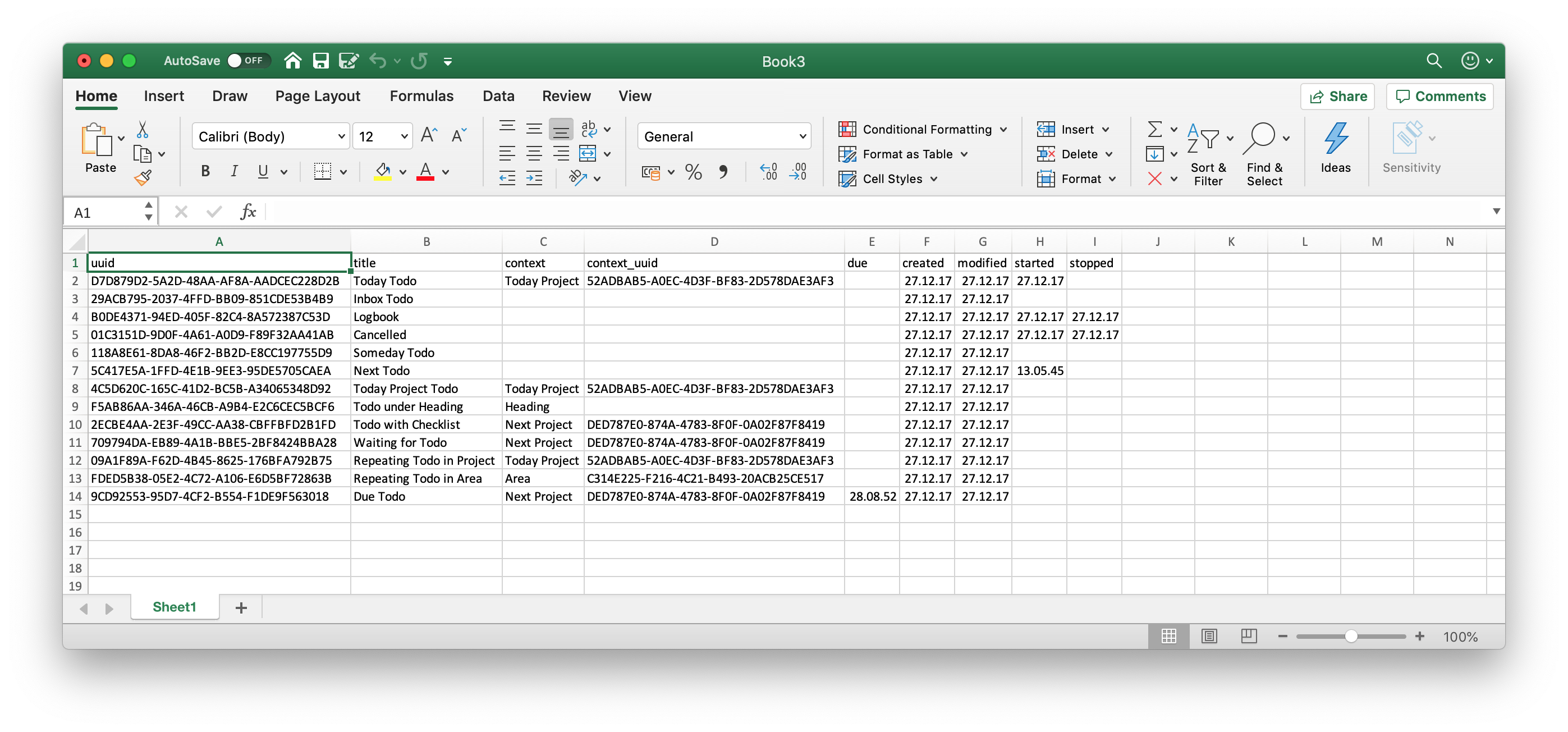
However, the CLI is only in a beginning state. The original bash based version can be found at another GitHub repo. Overall commands are:
$ things-cli -h
usage: things3_cli.py [-h] [-j] [-c] [--version] command ...

Simple read-only Thing 3 CLI.

positional arguments:
  command         One of the following commands:
    inbox         Shows all inbox tasks
    today         Shows all todays tasks
    upcoming      Shows all upcoming tasks
    next          Shows all next tasks
    someday       Shows all someday tasks
    completed     Shows all completed tasks
    cancelled     Shows all cancelled tasks
    trashed       Shows all trashed tasks
    feedback      Give feedback
    all           Shows all tasks
    csv           Exports all tasks as CSV
    due           Shows all tasks with due dates
    headings      Shows all headings
    hours         Shows how many hours have been planned today
    ical          Shows all tasks ordered by due date as iCal
    logbook       Shows all tasks completed today
    mostClosed    Shows days on which most tasks were closed
    mostCancelled
                  Shows days on which most tasks were cancelled
    mostTrashed   Shows days on which most tasks were trashed
    mostCreated   Shows days on which most tasks were created
    mostTasks     Shows projects that have most tasks
    mostCharacters
                  Shows tasks that have most characters
    nextish       Shows all nextish tasks
    old           Shows all old tasks
    projects      Shows all projects
    repeating     Shows all repeating tasks
    schedule      Schedules an event using a template
    search        Searches for a specific task
    stat          Provides a number of statistics
    statcsv       Exports some statistics as CSV
    subtasks      Shows all subtasks
    tag           Shows all tasks with the waiting for tag
    tags          Shows all tags ordered by their usage
    waiting       Shows all tasks with the waiting for tag

optional arguments:
  -h, --help      show this help message and exit
  -j, --json      output as JSON
  -c, --csv       output as CSV
  --version       show program's version number and exit
Application Programming Interface (API)
The API allows you to access the Things3 todos within other Python scripts:
$ make doc
...
class Things3(builtins.object)
     |  Things3()
     |
     |  Simple read-only API for Things 3.
     |
     |  Methods defined here:
     |
     |  get_anytime(self)
     |      Get anytime tasks.
     |
     |  get_inbox(self)
     |      Get all tasks from the inbox.
...
Web Service
The web service allows you to access the Things3 database via a web service:
$ make run-server
Starting up...
Serving API at http://localhost:15000/api/{command}
Via curl you can browse the json data via command line:
$ curl -s http://localhost:15000/api/today | jq
[
  {
    "uuid": "D7D879D2-5A2D-48AA-AF8A-AADCEC228D2B",
    "title": "Today Todo",
    "context": "Today Project",
    "context_uuid": "52ADBAB5-A0EC-4D3F-BF83-2D578DAE3AF3",
    "due": null
  }
]
Release history Release notifications | RSS feed


Download files
Download the file for your platform. If you're not sure which to choose, learn more about installing packages.
Source Distribution
Built Distribution
Filter files by name, interpreter, ABI, and platform.
If you're not sure about the file name format, learn more about wheel file names.
Copy a direct link to the current filters
File details
Details for the file things3-api-2.5.0.tar.gz.
File metadata
- Download URL: things3-api-2.5.0.tar.gz
- Upload date:
- Size: 140.6 kB
- Tags: Source
- Uploaded using Trusted Publishing? No
- Uploaded via: twine/3.1.1 pkginfo/1.5.0.1 requests/2.22.0 setuptools/46.1.3 requests-toolbelt/0.9.1 tqdm/4.45.0 CPython/3.7.7
File hashes
| Algorithm | Hash digest | |
|---|---|---|
| SHA256 |
d75801ea0c00fc8d66dcd94ce9ab8777cce394736e0c8ed0885e3c04ac7bf028
|
|
| MD5 |
a13ada18ba3b9b3f5f14d51b354cac38
|
|
| BLAKE2b-256 |
74cf89960e93a3c2e3cd407b04740c7085e35d3e3fe476a853f82bb996d3476c
|
File details
Details for the file things3_api-2.5.0-py3-none-any.whl.
File metadata
- Download URL: things3_api-2.5.0-py3-none-any.whl
- Upload date:
- Size: 145.3 kB
- Tags: Python 3
- Uploaded using Trusted Publishing? No
- Uploaded via: twine/3.1.1 pkginfo/1.5.0.1 requests/2.22.0 setuptools/46.1.3 requests-toolbelt/0.9.1 tqdm/4.45.0 CPython/3.7.7
File hashes
| Algorithm | Hash digest | |
|---|---|---|
| SHA256 |
4b9fc661ee45e27bd3f97ea245a21e180d2764741422e3595ab04e2b134dcfb0
|
|
| MD5 |
7d86c6830dd43e7c30a29562e4e1fa6a
|
|
| BLAKE2b-256 |
0f2dd443c0bc1a88af2376a8f0f4258da2a999e84a8d7da64cd765bd57f72b05
|






