
thinkcell 📊







thinkcell is a simple unofficial python library that helps you generate presentations in a quick and automated way.
In order to use it you will need a valid and working think-cell license and installation.
Installation
thinkcell is available on PyPi.
$ pip install thinkcell
Tutorial and usage
Let us say you have generated a template according to think-cell's automation guidelines called simple-template.pptx with the following chart called Chart1:
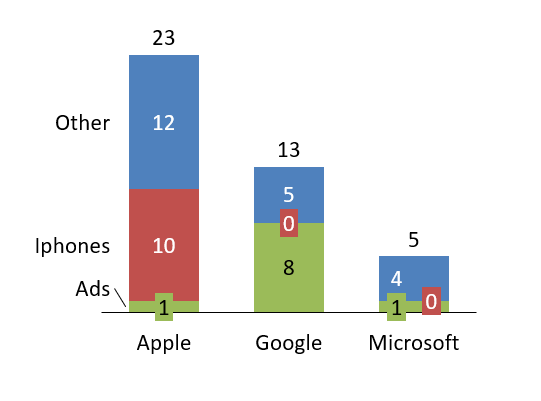
The thinkcell library helps you generate a .ppttc file so that you can generate presentations based on that template using python:
from thinkcell import Thinkcell

template_name = "simple-template.pptx"
categories = ["Ads", "Revenue", "Losses"]
chart_name = "Chart1"
field_name = "chart_caption"
text = "Some relevant KPIs"
filename = "simple-example.ppttc"

data = [["Amazon", 1, 11, 14], ["Slack", 8, 2, 15], ["Ford", 1, 2, 12]]

tc = Thinkcell() # create thinkcell object
tc.add_template(template_name) # add your template
tc.add_textfield(
    template_name=template_name,
    field_name=field_name,
    text=text,
) # add your text field
tc.add_chart(
    template_name=template_name,
    chart_name=chart_name,
    categories=categories,
    data=data,
) # add you categories and data

tc.save_ppttc(filename=filename)
Once done, go ahead and double click the generated simple-example.ppttc file, and your chart will open. Save it and you are done!
You can also derive your chart from a Pandas dataframe.
Make sure you have pandas installed (e.g., pip install pandas)
from thinkcell import Thinkcell
import pandas

template_name = "simple-template.pptx"
chart_name = "Chart1"
filename = "simple-example.ppttc"
dataframe = pandas.DataFrame(
    columns=["Company", "Ads", "Revenue", "Losses"],
    data=[["Amazon", 1, 11, 14], ["Slack", 8, 2, 15], ["Ford", 1, 2, 12]],
)

tc = Thinkcell() # create thinkcell object
tc.add_template(template_name) # add your template
tc.add_chart_from_dataframe(
    template_name=template_name,
    chart_name=chart_name,
    dataframe=dataframe,
) # add your dataframe

tc.save_ppttc(filename=filename)
Visit the examples folder for more examples and source files.
If you wish to learn more about this process, visit the think-cell automation documentation.
Contributing
Start by forking this repo.
Install the development dependencies (you probably want to do this in a virtual environment):
$ pip install -r requirements-dev.txt
Make sure the tests run:
$ pytest
Then you can create a branch and submit a pull request.
To-dos
- Create docstrings.
- Handle duplicate template names.
- Produce documentation.
- Pandas dataframe support.
Note: This project is in no way affiliated with think-cell Sales GmbH & Co. KG. I just wanted to make my (and hopefully your) life easier.
1 maintainer

Metadata
1 maintainer
Release files for thinkcell 21.10.12
For a detailed explanation of source distributions (sdists) and built distributions (wheels), please see the package formats documentation.
Source distribution (sdist)
| File | Size | Uploaded | |
|---|---|---|---|
| thinkcell-21.10.12.tar.gz | 9.6 kB | Details |
Built distribution (wheel)
| File | Interpreter | ABI | Platform | Reset |
|---|---|---|---|---|
| thinkcell-21.10.12-py3-none-any.whl | Python 3 | none | any | Details |
Total release size: 18.1 kB
Release files / thinkcell-21.10.12.tar.gz
| Download URL | thinkcell-21.10.12.tar.gz |
|---|---|
| Size | 9.6 kB |
| Tags | Source |
|
SHA-256 checksum How to use checksums |
8ee807969728f9748ffbf94319b871f98cbb5c42d7e19abcff3fce2bbfacac76
|
|
BLAKE2b-256 checksum How to use checksums |
7305b7d72ea0621fa8afbd29e66555c4059d16b6615391b9bce4705df157a1d1
|
| Upload date | |
|
Uploaded using Trusted Publishing? What is trusted publishing? |
No |
| Uploaded via |
twine/3.4.2 importlib_metadata/4.8.1 pkginfo/1.7.1 requests/2.26.0 requests-toolbelt/0.9.1 tqdm/4.62.3 CPython/3.9.7
|
Release files / thinkcell-21.10.12-py3-none-any.whl
| Download URL | thinkcell-21.10.12-py3-none-any.whl |
|---|---|
| Size | 8.6 kB |
| Tags | Python 3 |
|
SHA-256 checksum How to use checksums |
3741edd62ef700eb6d58ea9fb7840e21b0544814735b9b11ac97dded7d4dff59
|
|
BLAKE2b-256 checksum How to use checksums |
80c148841ca8f8e082b61522d0fa19a605f93bdae4a9b4cc9752e24f603b0b95
|
| Upload date | |
|
Uploaded using Trusted Publishing? What is trusted publishing? |
No |
| Uploaded via |
twine/3.4.2 importlib_metadata/4.8.1 pkginfo/1.7.1 requests/2.26.0 requests-toolbelt/0.9.1 tqdm/4.62.3 CPython/3.9.7
|














