
Diagramming tools for the Thinking Processes from the Theory of Constraints

Project description
Thinking Processes
This Python package helps you to draw diagrams used in the Thinking Processes from the Theory of Constraints. For more information, see https://en.wikipedia.org/wiki/Thinking_processes_(theory_of_constraints)
Prerequisites
-
Python 3.11+
-
Ensure Graphviz is installed and available in your PATH.
Installing
pip install thinking-processes
Current Reality Tree
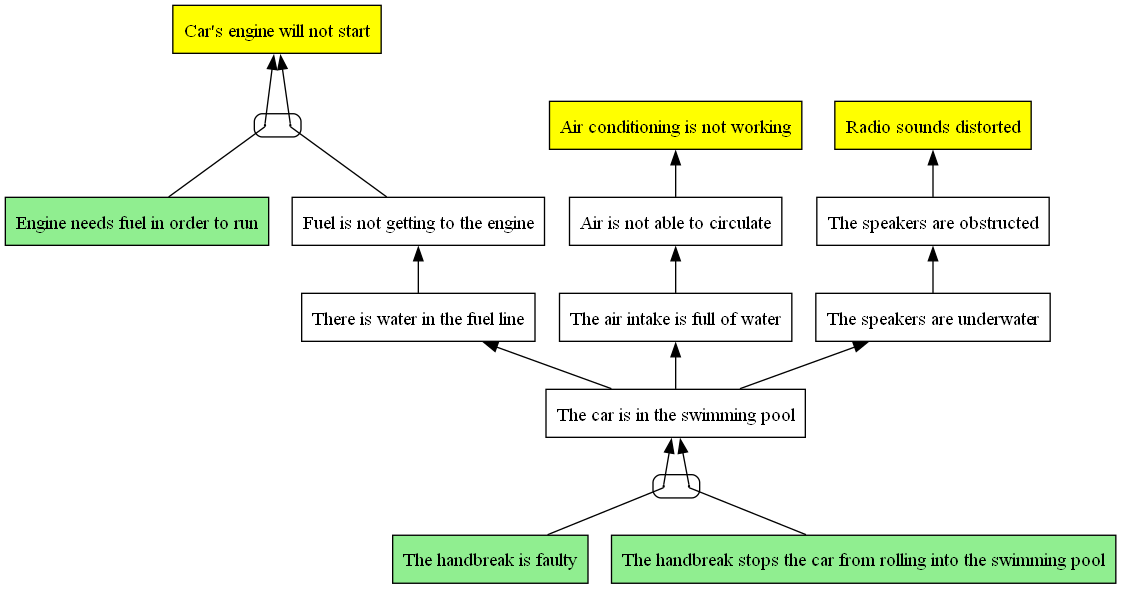
In this example, we find root causes for undesired effects by drawing a Current Reality Tree:
from thinking_processes import CurrentRealityTree

crt = CurrentRealityTree()

engine_not_start = crt.add_node("Car's engine will not start")
engine_needs_fuel = crt.add_node('Engine needs fuel in order to run')
no_fuel_to_engine = crt.add_node('Fuel is not getting to the engine')
water_in_fuel_line = crt.add_node('There is water in the fuel line')
crt.add_causal_relation([engine_needs_fuel, no_fuel_to_engine], engine_not_start)
crt.add_causal_relation([water_in_fuel_line], no_fuel_to_engine)

air_conditioning_not_working = crt.add_node('Air conditioning is not working')
air_not_circulating = crt.add_node('Air is not able to circulate')
air_intake_full_of_water = crt.add_node('The air intake is full of water')
crt.add_causal_relation([air_not_circulating], air_conditioning_not_working)
crt.add_causal_relation([air_intake_full_of_water], air_not_circulating)

radio_distorted = crt.add_node('Radio sounds distorted')
speakers_obstructed = crt.add_node('The speakers are obstructed')
speakers_underwater = crt.add_node('The speakers are underwater')
crt.add_causal_relation([speakers_obstructed], radio_distorted)
crt.add_causal_relation([speakers_underwater], speakers_obstructed)

car_in_pool = crt.add_node('The car is in the swimming pool')
crt.add_causal_relation([car_in_pool], speakers_underwater)
crt.add_causal_relation([car_in_pool], air_intake_full_of_water)
crt.add_causal_relation([car_in_pool], water_in_fuel_line)

handbreak_faulty = crt.add_node('The handbreak is faulty')
handbreak_stops_car = crt.add_node('The handbreak stops the car from rolling into the swimming pool')
crt.add_causal_relation([handbreak_faulty, handbreak_stops_car], car_in_pool)

crt.plot(view=True, filepath='crt.png')
The resulting tree looks like this:
To save some effort in typing, you can create the same diagram using a string representation of the tree:
from thinking_processes import CurrentRealityTree
crt = CurrentRealityTree.from_string("""
1: Car's engine will not start
2: Engine needs fuel in order to run
3: Fuel is not getting to the engine
4: There is water in the fuel line
5: Air conditioning is not working
6: Air is not able to circulate
7: The air intake is full of water
8: Radio sounds distorted
9: The speakers are obstructed
10: The speakers are underwater
11: The car is in the swimming pool
12: The handbreak is faulty
13: The handbreak stops the car\nfrom rolling into the swimming pool

2,3 -> 1
4 -> 3
6 => 5
7 -> 6
9 -> 8
10 -> 9
10 <= 11
11 <- 12 13
11 -> 7
11 -> 4
""")
Evaporating Cloud (Conflict Resolution Diagram)
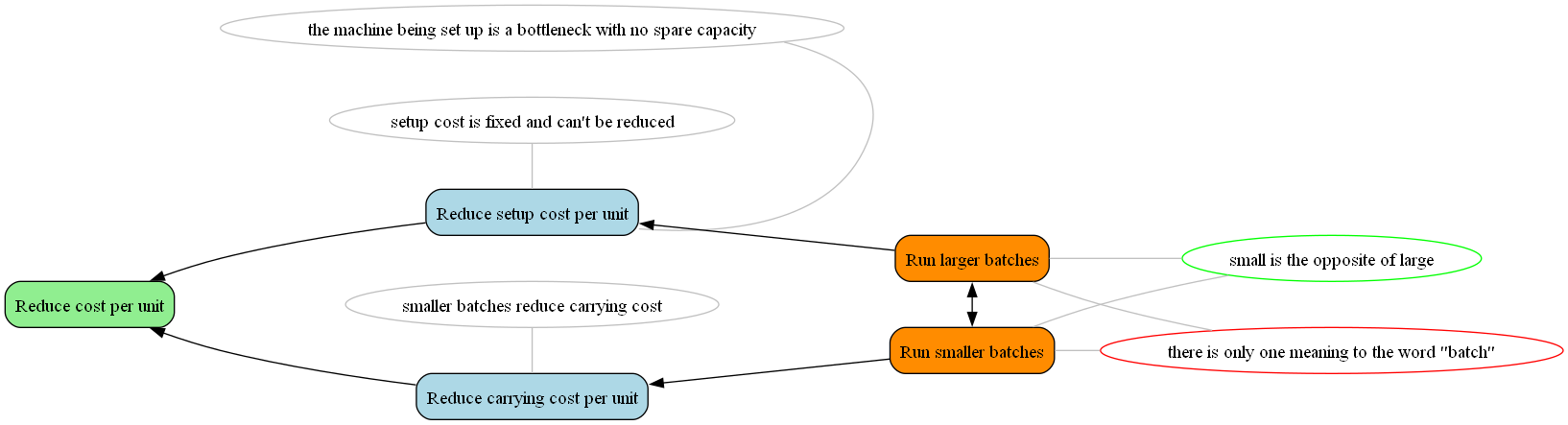
In this example, we resolve a conflict by identifying wrong assumptions behind the conflict:
from thinking_processes import EvaporatingCloud

ec = EvaporatingCloud(
    objective='Reduce cost per unit',
    need_a='Reduce setup cost per unit',
    need_b='Reduce carrying cost per unit',
    conflict_part_a='Run larger batches',
    conflict_part_b='Run smaller batches'
)

ec.add_assumption_on_the_conflict('small is the opposite of large', is_true=True)
ec.add_assumption_on_the_conflict('there is only one meaning to the word "batch"', is_true=False)
ec.add_assumption_on_need_a("setup cost is fixed and can't be reduced")
ec.add_assumption_on_need_a("the machine being set up is a bottleneck with no spare capacity")
ec.add_assumption_on_need_b("smaller batches reduce carrying cost")

ec.plot(view=True, filepath='ec.png')
The resulting diagram looks like this:
Prerequisite Tree
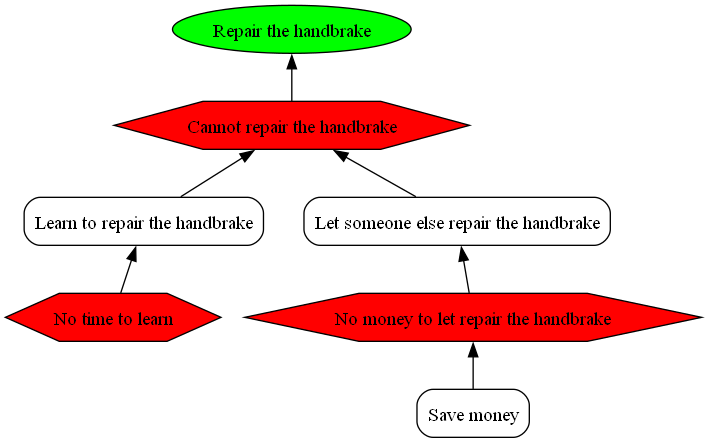
In this example, we identify and overcome obstacles to achieve a goal:
from thinking_processes import PrerequisiteTree
prt = PrerequisiteTree(objective='Repair the handbrake')

missing_knowledge = prt.add_obstacle('Cannot repair the handbrake')

learn = missing_knowledge.add_solution('Learn to repair the handbrake')
learn.add_obstacle('No time to learn')

let_repair = missing_knowledge.add_solution('Let someone else repair the handbrake')
no_money = let_repair.add_obstacle('No money to let repair the handbrake')
no_money.add_solution('Save money')

prt.plot(view=True, filepath='prt.png')
The resulting diagram looks like this:
Alternatively, you can create the same diagram using a string representation of the tree:
from thinking_processes import PrerequisiteTree
prt = PrerequisiteTree.from_string("""
Repair the handbreak
    Cannot repair the handbreak
        Learn to repair the handbreak
            No time to learn
        Let someone repair the handbreak
            No money
                Save money
""")
Development
These instructions will get you a copy of the project up and running on your local machine for development and testing purposes.
Running the tests
All tests in the "tests" directory are based on the unittest package.
Deployment
rm -R dist thinking_processes.egg-info
python -m build && twine upload --skip-existing --verbose dist/*
You should also create a tag for the current version
git tag -a [version] -m "describe what has changed"
git push --tags
Versioning
We use SemVer for versioning.
Authors
If you have any questions, feel free to ask one of our authors:
- Boris Wiegand - boris.wiegand@stahl-holding-saar.de
Release history Release notifications | RSS feed


Download files
Download the file for your platform. If you're not sure which to choose, learn more about installing packages.
Source Distribution
Built Distribution
Filter files by name, interpreter, ABI, and platform.
If you're not sure about the file name format, learn more about wheel file names.
Copy a direct link to the current filters
File details
Details for the file thinking_processes-1.6.0.tar.gz.
File metadata
- Download URL: thinking_processes-1.6.0.tar.gz
- Upload date:
- Size: 52.4 kB
- Tags: Source
- Uploaded using Trusted Publishing? No
- Uploaded via: twine/6.0.1 CPython/3.12.3
File hashes
| Algorithm | Hash digest | |
|---|---|---|
| SHA256 |
dca093b1b66a3ba1aa9cd5a38d621ddc63724b0d368f6b31908a1a951ab97351
|
|
| MD5 |
5663a43f50bb2cd7b2f145999033d4ad
|
|
| BLAKE2b-256 |
6736dcaffd5bf636627250a42dd704a61f375e9737d0c19823877890e1a607ca
|
File details
Details for the file thinking_processes-1.6.0-py3-none-any.whl.
File metadata
- Download URL: thinking_processes-1.6.0-py3-none-any.whl
- Upload date:
- Size: 47.9 kB
- Tags: Python 3
- Uploaded using Trusted Publishing? No
- Uploaded via: twine/6.0.1 CPython/3.12.3
File hashes
| Algorithm | Hash digest | |
|---|---|---|
| SHA256 |
8b77f15f07c4d846c5c5cd5389c138237b0e447b457a360d9bab92c91c029b56
|
|
| MD5 |
736217e3d74f9f4c983b517a924a01a2
|
|
| BLAKE2b-256 |
c5bdae07ba48f9af407fa56106691a3ae9128b56cb5334b9ec1172e41d6b8cfc
|






