
ThinQ Connect MCP

Project description

ThinQ Connect MCP Server (Beta)
This is the official MCP (Model Context Protocol) server for LG ThinQ devices. This server provides integrated control capabilities including status monitoring, device control, and profile information for various LG ThinQ devices, built on the LG ThinQ API and Python Open SDK. MCP connection method is stdio.
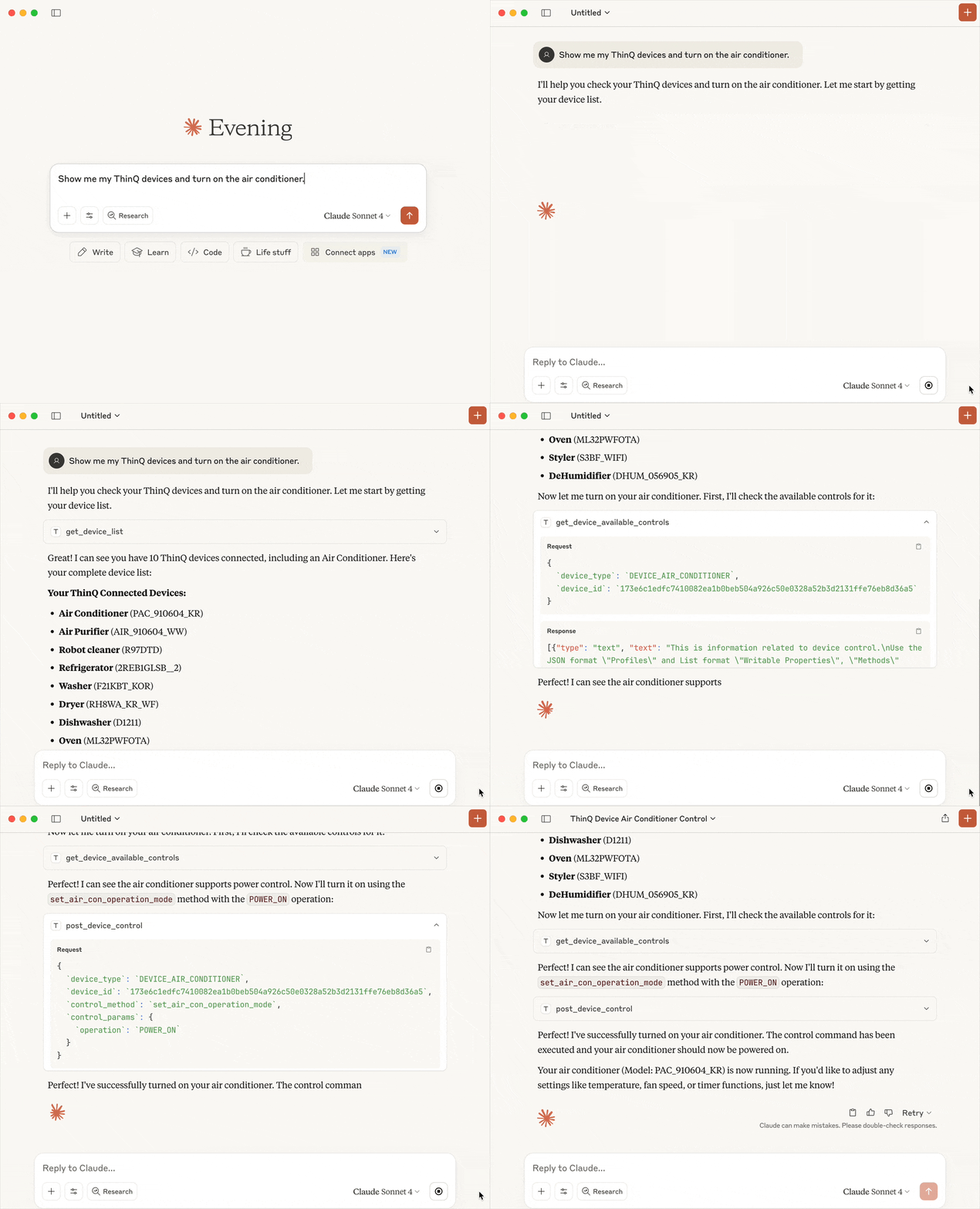
Table of Contents
Features
-
Device List Query
Retrieve a list of all registered LG ThinQ devices. -
Device Status Monitoring
Get real-time status information for specific devices. -
Device Control
Execute control commands defined in each device's profile.
(e.g., turn air conditioner on/off, set temperature, etc.) -
Device Control Capabilities Query
Provide detailed information about controllable properties, methods information for each device.
Prerequisites
- Prepare a Personal Access Token for ThinQ Open API calls
- Verify your ThinQ account's country code. You can find it in the Country Codes section.
- Python 3.11 or higher
- Install uv - A fast Python package installer and resolver for Python projects
- MCP client (Claude Desktop, etc.)
Quick Start
Claude Desktop
Open up the configuration file, and add ThinQ Connect MCP config.
- macOS: ~/Library/Application Support/Claude/claude_desktop_config.json
- Windows: %APPDATA%\Claude\claude_desktop_config.json
{
  "mcpServers": {
    "thinqconnect-mcp": {
      "command": "uvx",
      "args": [
        "thinqconnect-mcp"
      ],
      "env": {
          "THINQ_PAT": "your_personal_access_token_here",
          "THINQ_COUNTRY": "your_country_code_here"
      }
    }
  }
}
Detailed Usage
After setting up the configuration file as shown in the Quick Start section, you can use the ThinQ Connect MCP Server directly in your conversations with Claude.
Examples of prompts you can use:
- "Please provide a list of all devices"
- "Please check the status of the robot vacuum device"
- "Please set the temperature of the air conditioner device to 24 degrees"
Tool Reference
Available Tools
-
get_device_list
- Description: Retrieves a list of all devices connected to the ThinQ Connect platform
- Parameters: None
- Returns: String containing connected device list information
-
get_device_available_controls
- Description: Retrieves available control commands and parameter information for a specific device
- Parameters: device_type (string), device_id (string)
- Returns: String containing device control commands and parameter information
-
get_device_status
- Description: Retrieves status information for a specific device
- Parameters: device_id (string)
- Returns: String containing device status information
-
post_device_control
- Description: Send control commands to a specific device on the ThinQ Connect platform to change its settings or state
- Parameters: device_type (string), device_id (string), control_method (string), control_params (dict)
- Returns: String containing device control result message


Download files
Download the file for your platform. If you're not sure which to choose, learn more about installing packages.
Source Distribution
Built Distribution
Filter files by name, interpreter, ABI, and platform.
If you're not sure about the file name format, learn more about wheel file names.
Copy a direct link to the current filters
File details
Details for the file thinqconnect_mcp-0.0.2.tar.gz.
File metadata
- Download URL: thinqconnect_mcp-0.0.2.tar.gz
- Upload date:
- Size: 18.5 kB
- Tags: Source
- Uploaded using Trusted Publishing? No
- Uploaded via: uv/0.6.9
File hashes
| Algorithm | Hash digest | |
|---|---|---|
| SHA256 |
bacdbd3449abb38c5adfbe8f48a878bbcccbab3088ab6f7a1723fbd2aedb3b5e
|
|
| MD5 |
d4617fda9dc69504c50595e9b56e1454
|
|
| BLAKE2b-256 |
ecab855360902ee1174d7d47eae235f17e543b0b0329f79caf57559b79851b68
|
File details
Details for the file thinqconnect_mcp-0.0.2-py3-none-any.whl.
File metadata
- Download URL: thinqconnect_mcp-0.0.2-py3-none-any.whl
- Upload date:
- Size: 17.8 kB
- Tags: Python 3
- Uploaded using Trusted Publishing? No
- Uploaded via: uv/0.6.9
File hashes
| Algorithm | Hash digest | |
|---|---|---|
| SHA256 |
b504fad1d24d76221246860644d0a27ae84ccaf19ab5e812631838d237ba442d
|
|
| MD5 |
eed50136f1b977e718a98daf4a749858
|
|
| BLAKE2b-256 |
1094bbe898cc367a41af49ab20b10cbee6a405b2409f4039c92a57d636f75abd
|






