
ThinTensor
thintensor is a unified, high-performance command-line engine for pulling, converting, running, benchmarking, and validating causal language models. It compiles a high-speed Rust-based archive core with an optimized PyTorch/Triton GPU execution runtime.
Fast-Path: Setting Up thintensor
Follow these steps to set up thintensor from scratch on a new development machine:
1. Install Prerequisites
Ensure you have the following installed on your host system:
- Python (>= 3.10)
- Rust Compiler (
cargo): Install via rustup.rs if missing. - NVIDIA CUDA Toolkit: Required for GPU acceleration (ensure
nvccis available).
2. Set Up a Virtual Environment & Install PyTorch
Create a fresh python environment and install PyTorch with CUDA support:
python3 -m venv venv
source venv/bin/activate
pip install --upgrade pip

# Install PyTorch with CUDA (matching your system's CUDA version)
pip install torch --index-url https://download.pytorch.org/whl/cu121
3. Clone and Build ThinTensor
Clone the repository and install it in editable mode along with all optional dependencies:
git clone https://github.com/random-unknown-username/Thintensor.git
cd Thintensor
pip install -e '.[all]'
Note: Installing the package automatically compiles the internal Rust core binaries using setup.py.
4. Verify the Installation
Run the doctor command to ensure the GPU runtime and kernel dependencies are fully operational:
thintensor doctor --strict
Quickstart: Downloading & Running a Sample Model (Qwen-0.8B)
Follow this fast-path to pull, convert, and execute a lightweight model (Qwen-0.8B):
-
Download the Hugging Face weights:
thintensor pull Qwen/Qwen3.5-0.8B
-
Convert the weights into a
.thinarchive:thintensor convert ~/.cache/thintensor/models/Qwen--Qwen3.5-0.8B --out ~/.cache/thintensor/models/Qwen--Qwen3.5-0.8B/Qwen3.5-0.8B.thin
-
Run a prompt through the native GPU runtime:
thintensor run ~/.cache/thintensor/models/Qwen--Qwen3.5-0.8B/Qwen3.5-0.8B.thin --prompt "Explain quantum computing in one sentence."
-
Verify correctness similarity metrics:
thintensor validate Qwen3.5-0.8B.thin --hf-model ~/.cache/thintensor/models/Qwen--Qwen3.5-0.8B --profile max-max-perf --suite quick
[!NOTE] Base Model vs. Chat Model Behavior: The sample
Qwen3.5-0.8Bis a raw base model trained only for next-token document completion. It does not engage in interactive conversation.
- Leading Punctuation: It completes prompts naturally (e.g.
Hello->, I am working with...orWhat is gravity->, and how does it affect...).- Greedy Decoding Only: To maximize speed and compile highly optimized fused Triton argmax kernels, the runtime is strictly greedy-only (temperature=0, top_p=1, top_k=0).
- Avoiding Loops: Because there is no stochastic sampling to escape repetition loops, tiny base models (0.8B) may repeat sentences under greedy decoding. To avoid loops and get proper interactive chat responses, always use fine-tuned instruct models (e.g.,
Qwen/Qwen2.5-3B-Instruct). Bassically right now, we cannot change model parameters like temperature, top_p and top_k, I would try my best to get this fixed in future
Code Architecture & Core Modules
The engine is split into a Rust Archive & Conversion Core and a Python/Triton GPU Execution Runtime. Below is a detailed map of the codebase architecture:
graph TD
    CLI[cli.py: User Commands] --> |Load Archive| Archive[archive.py / archive.rs]
    CLI --> |Deduce Fit/Streaming| Plan[plan.rs: Budget Planning]
    CLI --> |Execute Runtime| Runtime[gpu_runtime.py: ThinGpuCausalLMRuntime]
    Runtime --> |Fused Math| Triton[triton_kernels.py: Fused Kernels]
    Runtime --> |Zero-Copy Views| Archive
    Runtime --> |Causal GQA/MHA| SDPA[PyTorch C++ SDPA Kernel]
1. CLI Entrypoint & Routing
- CLI Handler: thinruntime/cli.py manages subcommands like
run,pull,convert,bench, andvalidate. - Routing Engine: The CLI inspects model metadata via
auto_fit.pyand routes to the native high-performance runtime for compatible models, falling back to Hugging Face transformers for incompatible architectures.
2. Rust Core (Archive & Conversion)
The Rust modules under src/ handle disk-to-memory layouts and weight packing:
- Archive Reader/Writer: src/archive.rs and src/manifest.rs define the binary format of
.thinpackages. - Model Converter: src/convert_hf.rs parses Hugging Face safetensors, mapping weights and transforming shapes into contiguous memory layouts.
- VRAM Budget & Fit Planner: src/plan.rs inspects available VRAM and maps which weight layers must be streamed or pinned to VRAM.
3. High-Performance GPU Runtime
The Python runtime classes coordinate host-device memory mapping and layer execution:
- ThinGpuCausalLMRuntime: thinruntime/gpu_runtime.py#L2490 is the execution engine.
- Memory-Mapped Zero-Copy Views: thinruntime/archive.py exposes binary pages as PyTorch tensor views directly from mmap.
- Forward Causal Decode:
forward_token(line 4828+) coordinates prefetch pipelines and sequential layer dispatch. - Gated Mixture-of-Experts (MoE):
_forward_token_moe(line 6095+) runs MoE routing. When weights exceed VRAM, experts are streamed dynamically using page-pool overlays (line 6260+). - Optimized Eager RoPE:
_apply_rope(line 5804+) applies rotary positional embeddings. Eager position embeddings are applied in-place to avoid allocations while matching Hugging Face precision perfectly. - Scaled Dot-Product Attention:
_attention(line 5948+) leverages PyTorch's native C++scaled_dot_product_attentionfor fast GQA/MHA execution.
4. Triton Custom Kernels
- Fused Normalization: thinruntime/triton_kernels.py implements fused
add_rms_normand SwiGLU operations to bypass PyTorch intermediate launch overheads.
Profiles & Configuration
Profiles are intent-based presets defined in thinruntime/profile_presets.py:
safe: Preserves full precision (BF16) weights and KV history with the broadest compatibility.balanced: Enables native matvec and GQA/MHA attention kernels without weight compression.max-performance: Opt-in profile targeting INT8 body and tensor-core quantization.max-max-perf: The most aggressive execution preset combining fused projection caches, fast C++ SDPA, and custom in-place memory optimizations.
Verification & Correctness Testing
Logit parity is validated step-by-step against Hugging Face references:
thintensor validate google--gemma-4-E2B.thin \
  --hf-model /path/to/original-gemma-4 \
  --profile max-max-perf \
  --suite quick
Validation execution isolates processes: it runs the Hugging Face trajectory first, caches reference logits, unloads it from VRAM, and then loads the .thin model to calculate the exact minimum cosine similarity across all tokens.
Benchmark results
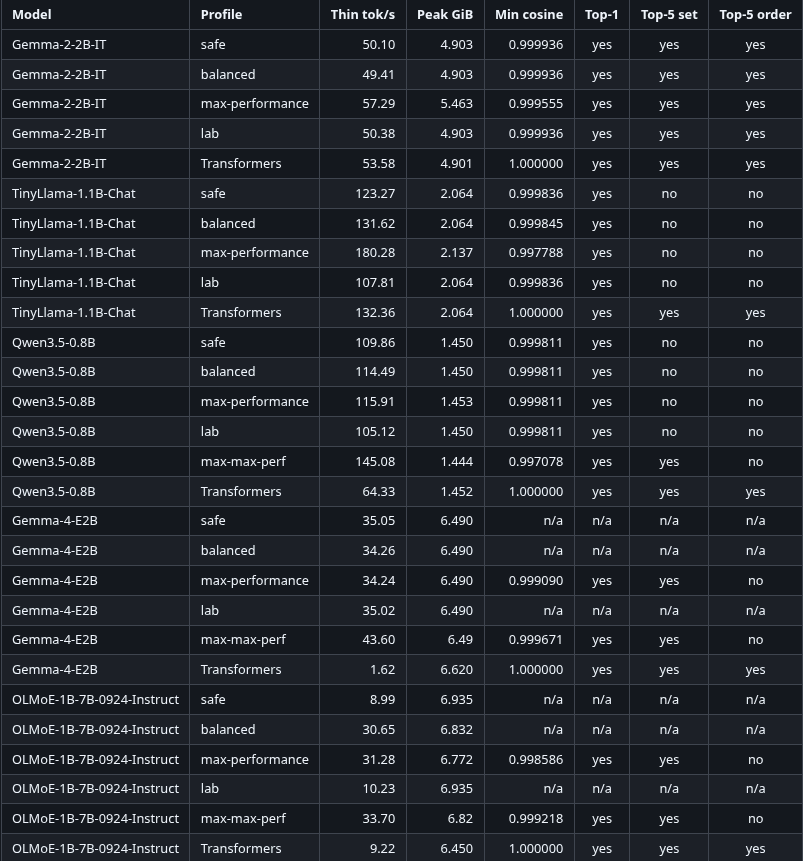
N/A because the models didnt load my 8gb vram gpu without thintensors!
1 maintainer

Download files
Download the file for your platform. If you're not sure which to choose, learn more about installing packages.
Source Distribution
Built Distribution
Filter files by name, interpreter, ABI, and platform.
If you're not sure about the file name format, learn more about wheel file names.
Copy a direct link to the current filters
File details
Details for the file thintensor-1.0.1.tar.gz.
File metadata
- Download URL: thintensor-1.0.1.tar.gz
- Upload date:
- Size: 262.5 kB
- Tags: Source
- Uploaded using Trusted Publishing? No
- Uploaded via: twine/7.0.0 CPython/3.14.6
File hashes
| Algorithm | Hash digest | |
|---|---|---|
| SHA256 |
d580cf58a9b13289e31aa0ebb0edc8d6326a17a08bb23f1b292f506949697f3f
|
|
| MD5 |
4f7d2e8c73d6b4843425a502c89eca8f
|
|
| BLAKE2b-256 |
7c743866893f1cd039d3ef70ab16403271e53300737211e8b5bba408009b40ac
|
File details
Details for the file thintensor-1.0.1-py3-none-any.whl.
File metadata
- Download URL: thintensor-1.0.1-py3-none-any.whl
- Upload date:
- Size: 274.1 kB
- Tags: Python 3
- Uploaded using Trusted Publishing? No
- Uploaded via: twine/7.0.0 CPython/3.14.6
File hashes
| Algorithm | Hash digest | |
|---|---|---|
| SHA256 |
475af490fcc9c60f09a1baefd11c714c89238b31ea79cc341fc7cb797e4c61cb
|
|
| MD5 |
ce7679c04919a61ee2c0df1629a9b0c8
|
|
| BLAKE2b-256 |
7c2a675bdd2882f27bfb1c7064bd978f7d2e57d427eb581f7ae29c23b1a674f7
|







