
A Thonny IDE plugin that provides an AI chat interface.
Verified details
These details have been verified by PyPIProject links
GitHub Statistics
Maintainers

Project description
Thonny AI Chat 外掛程式 (thonny-chatbot-plugin)



一個在 Thonny IDE 中提供 AI 聊天介面的外掛程式。它允許您直接在 Thonny 中與大型語言模型 (LLM) 互動,獲取程式碼解釋、建議或進行一般對話。
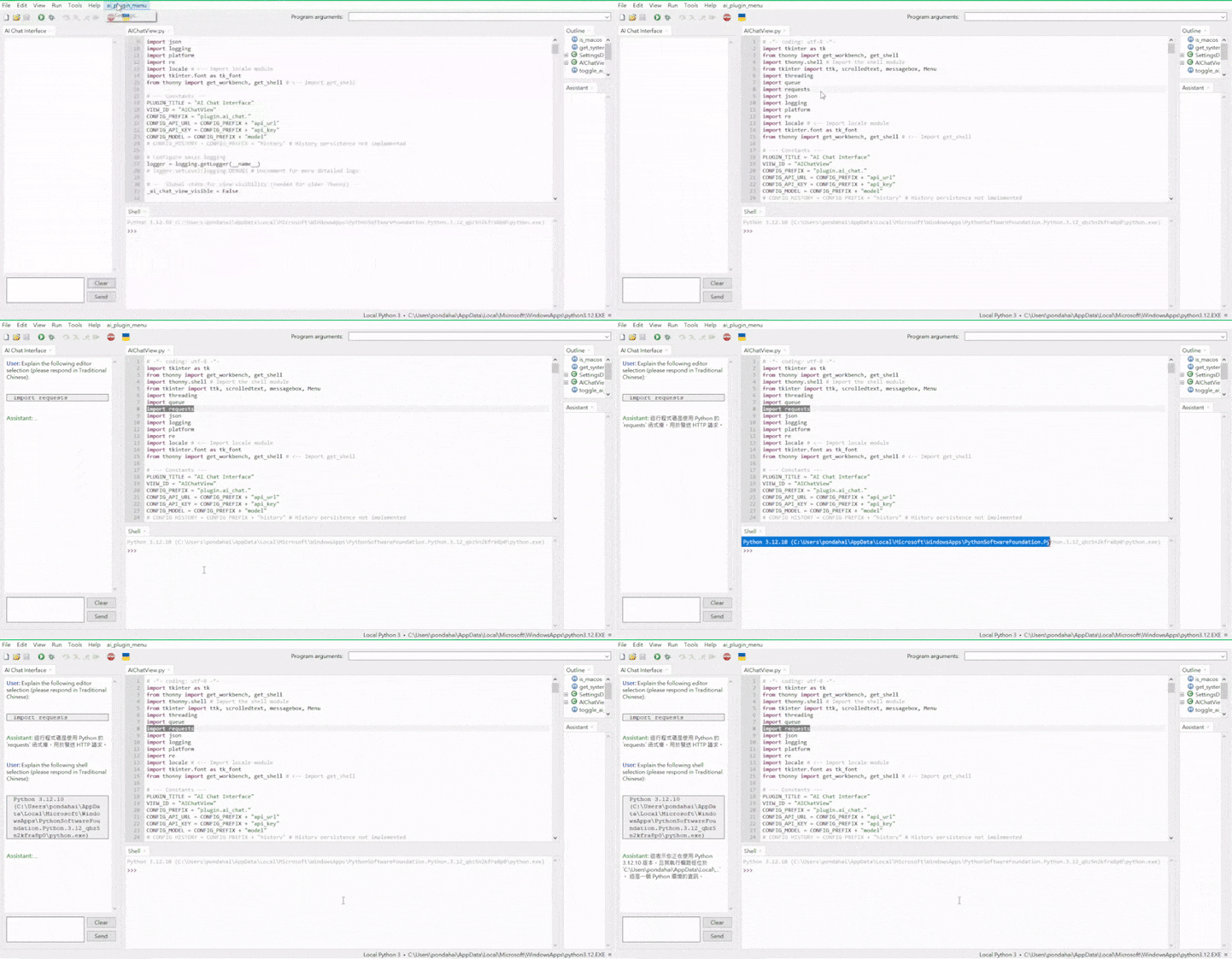
✨ 功能特色
- 整合式聊天介面: 直接在 Thonny 的側邊面板提供一個 AI 聊天視窗。
- 支援 API 配置: 可透過設定對話框配置 AI 服務的 API URL、API Key 和選擇模型 (例如 OpenAI API、本地 Ollama 或其他相容 API)。
- 模型列表獲取: 自動從設定的 API URL 獲取可用的模型列表。
- 串流回覆 (Streaming): AI 的回覆會即時顯示,無需等待完整回覆生成。
- 對話歷史: 記錄當前的對話歷史 (注意:目前關閉 Thonny 後歷史不會保存)。
- 清除對話: 提供按鈕快速清除聊天記錄。
- 系統語言提示: 自動檢測系統語言,並在發送請求時提示 AI 使用該語言回覆。
- 增強的 Markdown 渲染: 支援豐富的 Markdown 格式顯示,包括粗體、斜體、程式碼區塊、標題、列表和行內程式碼。
- 聊天內容複製: 在聊天視窗中右鍵點擊,可以:
- 複製選取的文字。
- 複製整個程式碼區塊。
- 複製整條訊息 (原始 Markdown 或純文字)。
- 編輯器整合 (Explain Selection):
- 在程式碼編輯器中選取文字後,右鍵選單會出現「🤖Explain Selection (AI Chat)」選項。
- 點擊後會將選取的文字發送到 AI 聊天視窗,要求 AI 進行解釋。
- Shell 整合 (Explain Selection):
- 在 Shell 視窗中選取文字後,右鍵選單也會出現「🤖Explain Selection (AI Chat)」選項。
- 同樣會將選取的文字發送到 AI 聊天視窗要求解釋。
- 獨立設定選單: 在 Thonny 主選單新增 "AI" 選單,包含 "Settings..." 項目,方便存取設定。
📦 安裝
有兩種安裝方式:
-
透過 Thonny 外掛管理器 (推薦):
- 開啟 Thonny IDE。
- 前往
工具 (Tools)>管理外掛 (Manage plug-ins...)。 - 搜尋
thonny-chatbot-plugin。 - 點擊安裝。
- 完全關閉並重新啟動 Thonny IDE 以載入外掛。
-
透過 pip:
- 開啟您的系統終端機或命令提示字元。
- 執行
pip install thonny-chatbot-plugin。 - 完全關閉並重新啟動 Thonny IDE 以載入外掛。
🚀 使用方式
-
設定 API:
- 安裝並重新啟動 Thonny 後,您會在主選單看到一個新的
AI選單。 - 點擊
AI>Settings...開啟設定對話框。 - API URL: 輸入您的 AI 服務端點。
- 例如,OpenAI API:
https://api.openai.com/v1 - 例如,本地 Ollama (預設):
http://localhost:11434/api(請確認您的 Ollama 端點) - 對於 OpenAI 相容的 API,通常是
/v1結尾。
- 例如,OpenAI API:
- API Key: 輸入您的 API 金鑰。對於像 Ollama 這樣的本地服務,可能不需要金鑰,可以留空或輸入任意字元 (如 "ollama")。
- Model:
- 點擊
Refresh Models按鈕,外掛會嘗試從您提供的 API URL 獲取模型列表。 - 成功後,從下拉選單中選擇您想要使用的模型。
- 點擊
- 點擊
Save & Close。
- 安裝並重新啟動 Thonny 後,您會在主選單看到一個新的
-
開啟聊天視窗:
- 設定完成後,AI 聊天介面 (
AI Chat Interface) 應該會出現在 Thonny 的某個面板區域 (預設註冊在w- West/左側)。 - 如果沒有看到,請檢查
檢視 (View)選單,確保AI Chat Interface被勾選。如果還是沒有,請嘗試再次重新啟動 Thonny。
- 設定完成後,AI 聊天介面 (
-
開始聊天:
- 在底部的輸入框中輸入您的訊息。
- 按下
Ctrl + Enter、Shift + Enter(Windows/Linux) 或Command + Return(macOS) 或點擊Send按鈕發送訊息。 - AI 的回覆將會串流顯示在聊天視窗中。
-
使用 Explain Selection:
- 在 Thonny 的程式碼編輯器或 Shell 中選取一段程式碼或文字。
- 在選取的文字上按右鍵。
- 選擇
🤖Explain Selection (AI Chat)。 - 聊天視窗會自動顯示,並將您的請求發送給 AI。
-
其他操作:
- 點擊聊天視窗下方的
Clear按鈕可以清空當前的對話紀錄。 - 在聊天內容上按右鍵可以執行複製操作。
- 點擊聊天視窗下方的
⚙️ 配置詳情
所有設定都在 AI > Settings... 對話框中完成:
- API URL: AI 服務的基礎 URL。外掛會在此基礎上附加
/models來獲取模型列表,以及/chat/completions來發送聊天請求。 - API Key: 用於驗證您的請求的金鑰。請妥善保管。
- Model: 從 API 獲取的可用模型列表。您必須選擇一個模型才能進行聊天。
設定會儲存在 Thonny 的設定檔中。
🔗 依賴項
requests>=2.20.0: 用於向 AI API 發送 HTTP 請求。
🤝 貢獻
歡迎各種形式的貢獻!如果您發現了 Bug、有功能建議或想改進程式碼:
- 請先到 Issue Tracker 查看是否已有相關討論。
- 如果沒有,請建立一個新的 Issue 來描述您的問題或建議。
- 如果您想提交程式碼,請 Fork 這個專案,建立您的功能分支,進行修改,然後提交 Pull Request。
📄 授權
本專案採用 MIT 授權。
🙏 致謝
- 感謝 Thonny IDE 提供了一個優秀且易於擴展的 Python 開發環境。
Support the Project! ❤️
This project is a labor of love, and I'm incredibly grateful for your use and feedback. If you appreciate what I'm building and want to help keep it going, any contribution would be greatly appreciated! Your support allows me to dedicate more time to development, bug fixes, and new features.
Here are some ways you can contribute:

Project details
Verified details
These details have been verified by PyPIProject links
GitHub Statistics
Maintainers


Download files
Download the file for your platform. If you're not sure which to choose, learn more about installing packages.
Source Distribution
Built Distribution
Filter files by name, interpreter, ABI, and platform.
If you're not sure about the file name format, learn more about wheel file names.
Copy a direct link to the current filters
File details
Details for the file thonny_chatbot_plugin-0.1.6.tar.gz.
File metadata
- Download URL: thonny_chatbot_plugin-0.1.6.tar.gz
- Upload date:
- Size: 23.7 kB
- Tags: Source
- Uploaded using Trusted Publishing? Yes
- Uploaded via: twine/6.1.0 CPython/3.13.7
File hashes
| Algorithm | Hash digest | |
|---|---|---|
| SHA256 |
d7e099300c291cf4be38df8d7dc28e11c879bfcaed55f9b5a53f16b989838894
|
|
| MD5 |
ec038e896ae320274c4773f390dcd20f
|
|
| BLAKE2b-256 |
af69f889fa2fd3f1acf4a622ec703116dee671fe59034249cbee9d8ecf6c80e9
|
Provenance
The following attestation bundles were made for thonny_chatbot_plugin-0.1.6.tar.gz:
Publisher:
publish.yml on pondahai/thonny_chatbot_plugin
-
Statement:
-
Statement type:
https://in-toto.io/Statement/v1 -
Predicate type:
https://docs.pypi.org/attestations/publish/v1 -
Subject name:
thonny_chatbot_plugin-0.1.6.tar.gz -
Subject digest:
d7e099300c291cf4be38df8d7dc28e11c879bfcaed55f9b5a53f16b989838894 - Sigstore transparency entry: 742502657
- Sigstore integration time:
-
Permalink:
pondahai/thonny_chatbot_plugin@52fecf2dee73bd9996e8d85da25b8869f7a682fb -
Branch / Tag:
refs/tags/v0.1.6 - Owner: https://github.com/pondahai
-
Access:
public
-
Token Issuer:
https://token.actions.githubusercontent.com -
Runner Environment:
github-hosted -
Publication workflow:
publish.yml@52fecf2dee73bd9996e8d85da25b8869f7a682fb -
Trigger Event:
release
-
Statement type:
File details
Details for the file thonny_chatbot_plugin-0.1.6-py3-none-any.whl.
File metadata
- Download URL: thonny_chatbot_plugin-0.1.6-py3-none-any.whl
- Upload date:
- Size: 23.5 kB
- Tags: Python 3
- Uploaded using Trusted Publishing? Yes
- Uploaded via: twine/6.1.0 CPython/3.13.7
File hashes
| Algorithm | Hash digest | |
|---|---|---|
| SHA256 |
b38a4734854a7c4bf50f913ee254253a8ec55b56cbecc836698c0028df256062
|
|
| MD5 |
8bec39aa3cf3346695e27e9d3c996727
|
|
| BLAKE2b-256 |
866ca7f8d829615704dd5a5bb750a5f1020666a72edc7dba96a8a370720b3855
|
Provenance
The following attestation bundles were made for thonny_chatbot_plugin-0.1.6-py3-none-any.whl:
Publisher:
publish.yml on pondahai/thonny_chatbot_plugin
-
Statement:
-
Statement type:
https://in-toto.io/Statement/v1 -
Predicate type:
https://docs.pypi.org/attestations/publish/v1 -
Subject name:
thonny_chatbot_plugin-0.1.6-py3-none-any.whl -
Subject digest:
b38a4734854a7c4bf50f913ee254253a8ec55b56cbecc836698c0028df256062 - Sigstore transparency entry: 742502662
- Sigstore integration time:
-
Permalink:
pondahai/thonny_chatbot_plugin@52fecf2dee73bd9996e8d85da25b8869f7a682fb -
Branch / Tag:
refs/tags/v0.1.6 - Owner: https://github.com/pondahai
-
Access:
public
-
Token Issuer:
https://token.actions.githubusercontent.com -
Runner Environment:
github-hosted -
Publication workflow:
publish.yml@52fecf2dee73bd9996e8d85da25b8869f7a682fb -
Trigger Event:
release
-
Statement type:






