
Thonny SE
English · Deutsch
Design your software right in Thonny. With structured flowcharts, UML and an interactive object bench. Easy to get into, so you can focus on your ideas.
Contents
Features · Requirements · Getting started · Manual · Planned features · Educational references · Technical feature list
What you can do
-
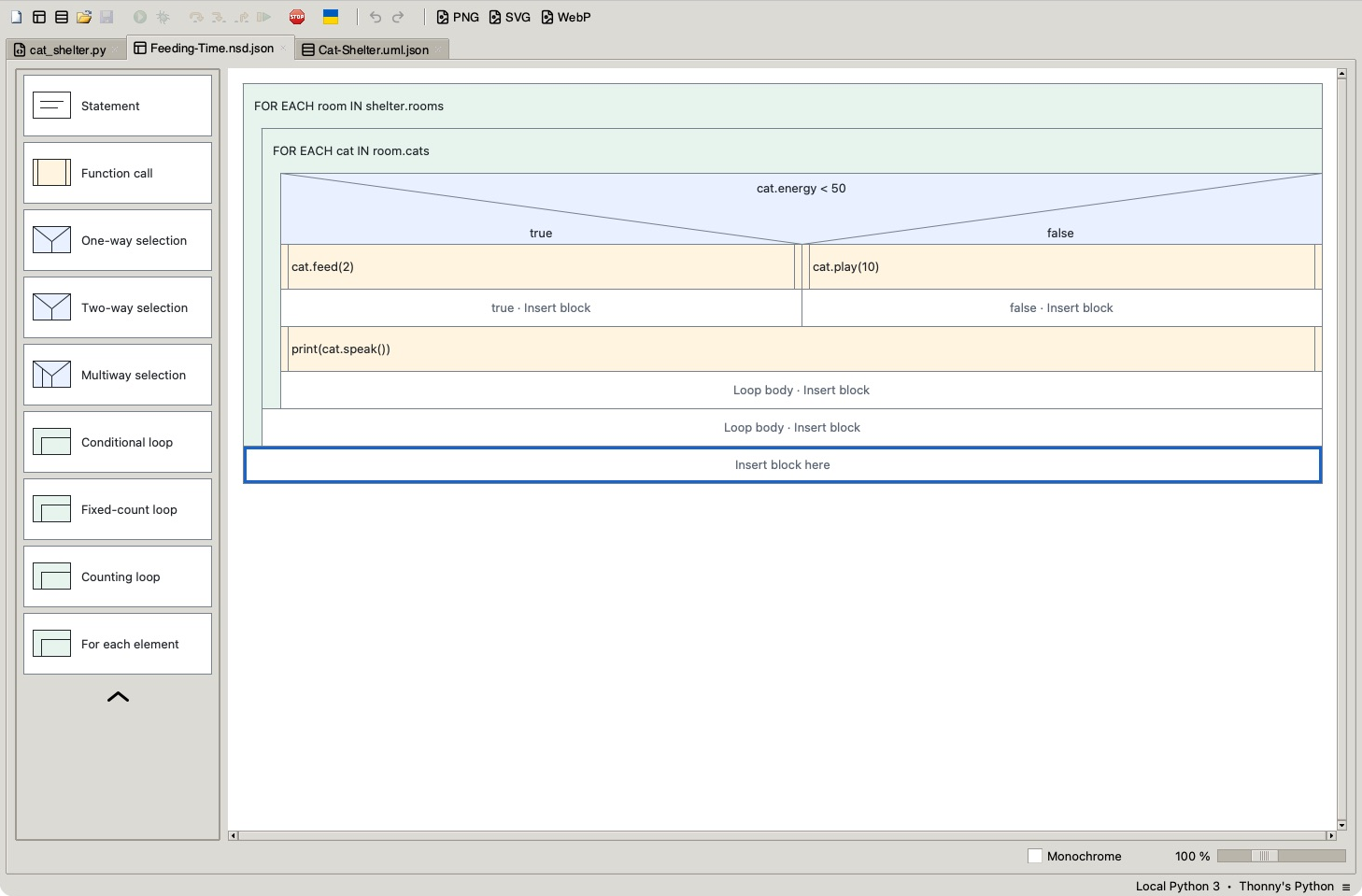
Plan your algorithms– Build Nassi–Shneiderman diagrams from statements, branches and loops. Move and edit the blocks to suit your plan. -
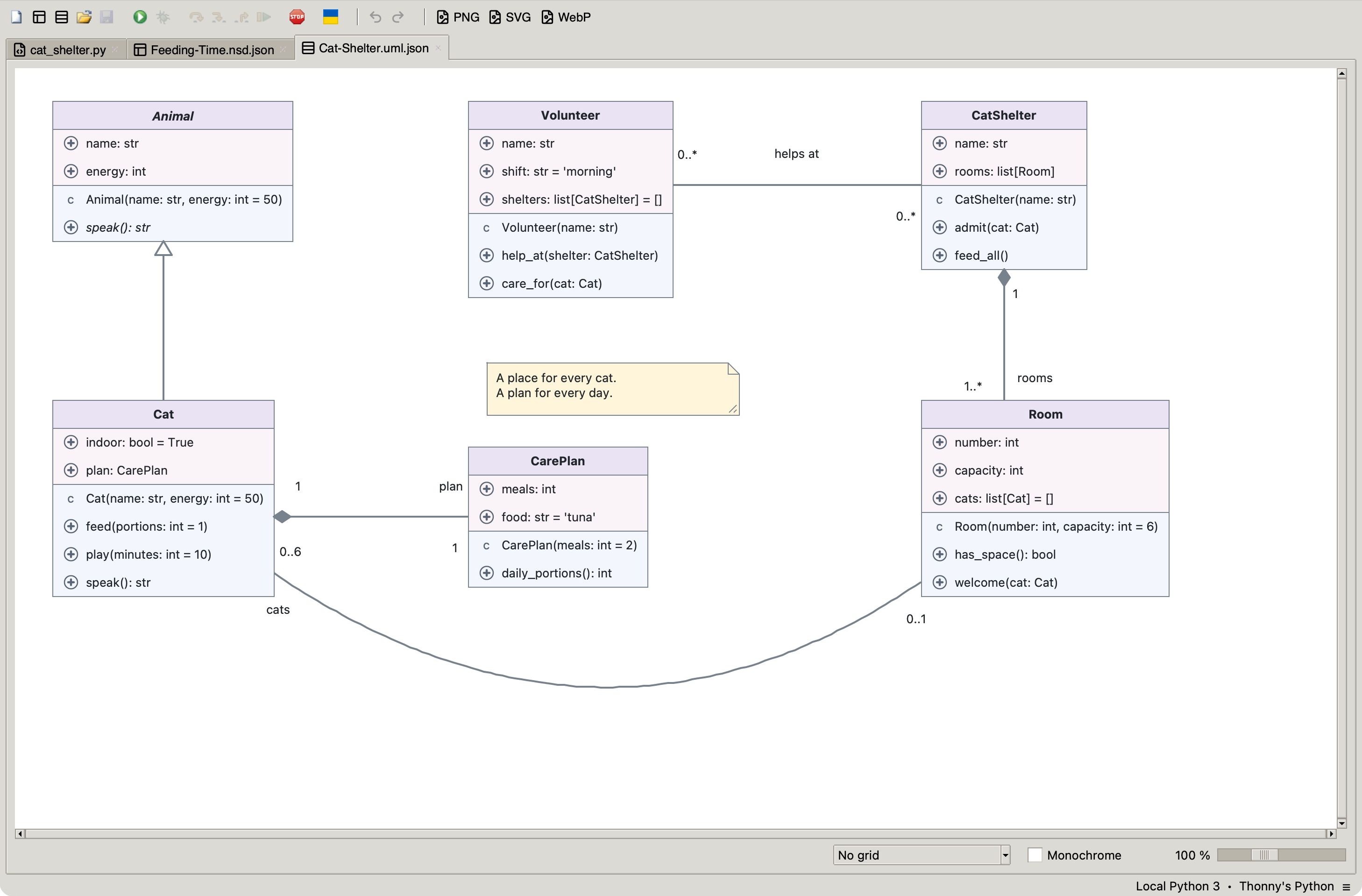
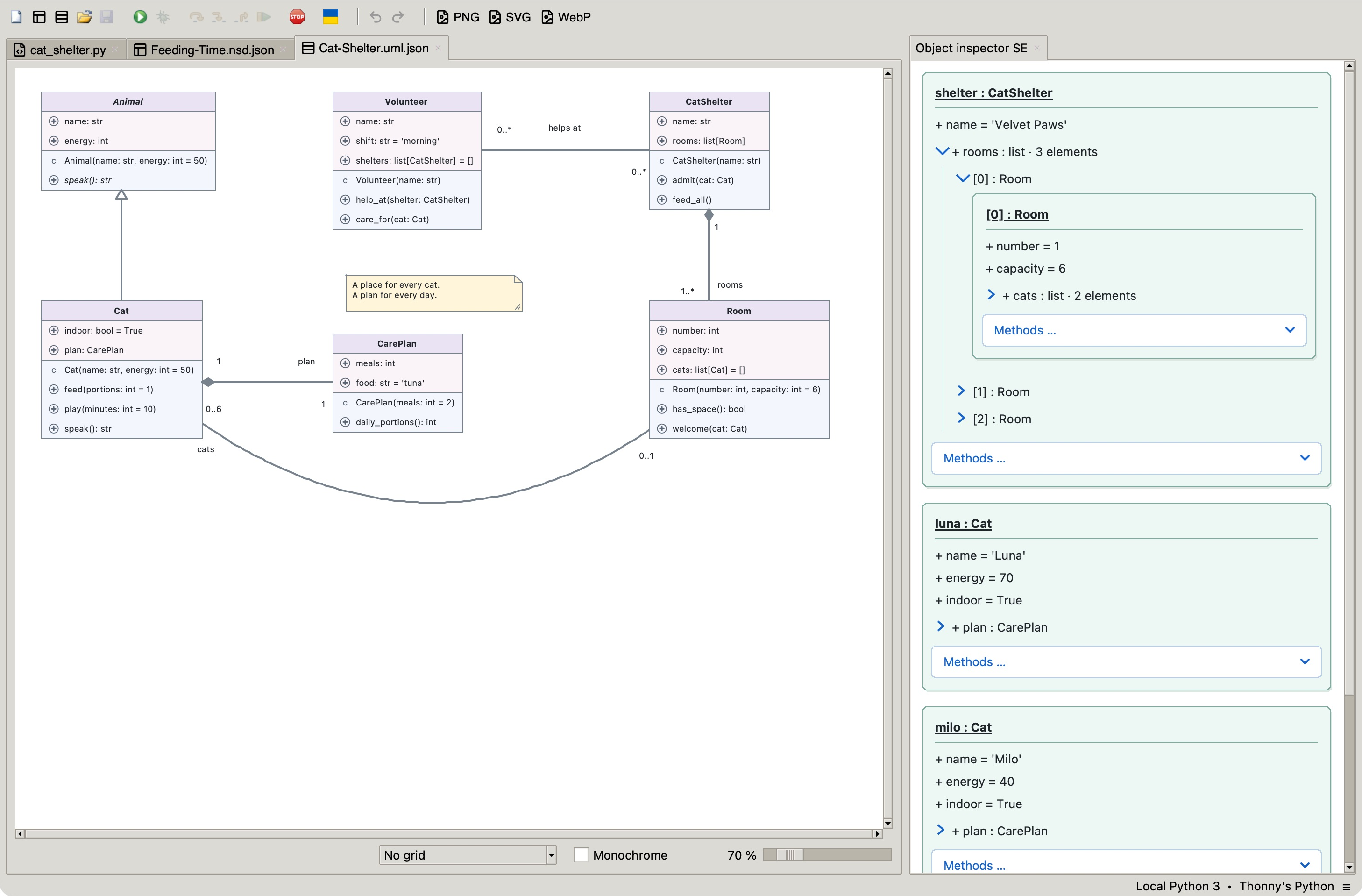
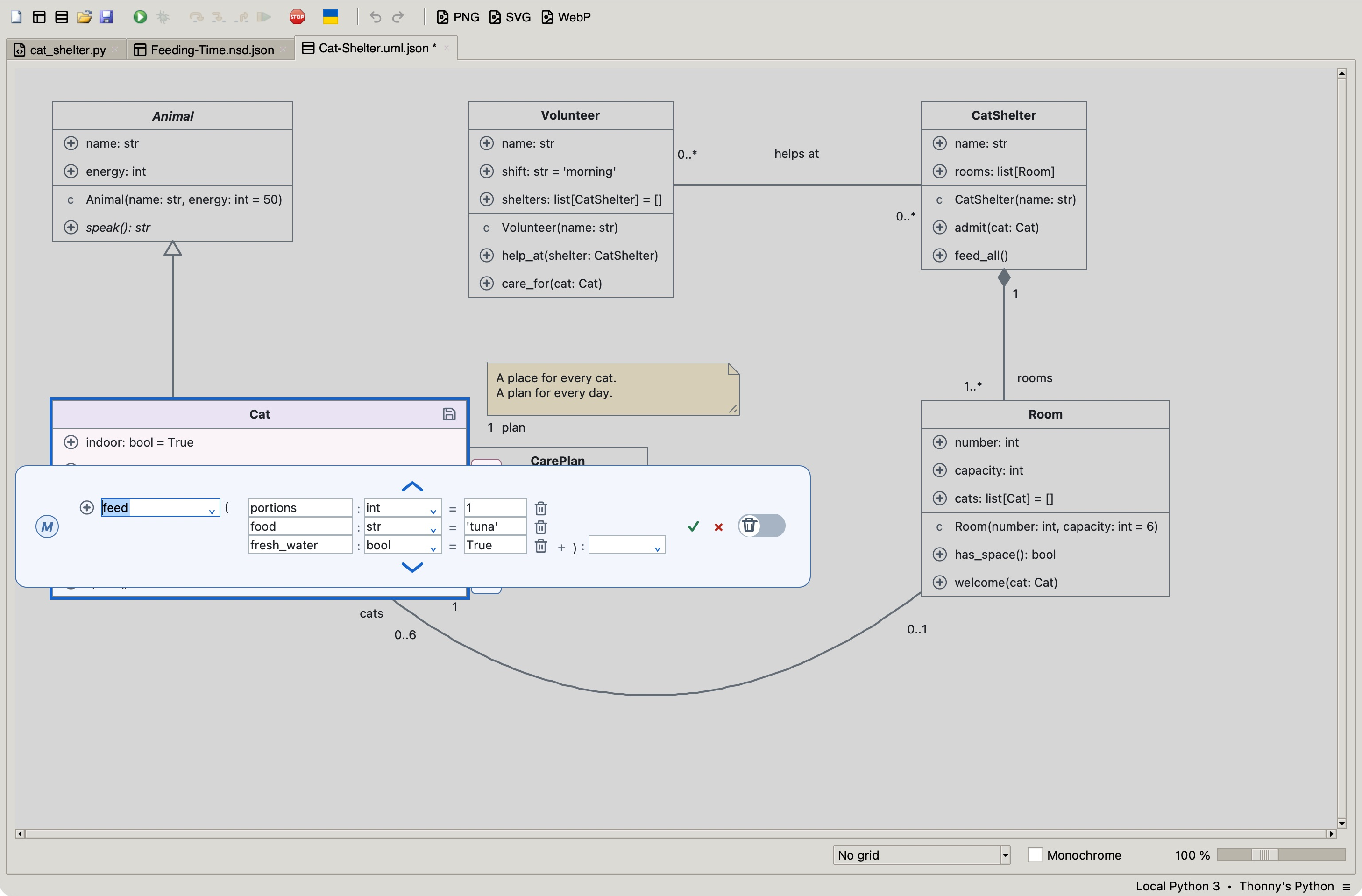
Design your classes– Give your classes attributes and methods. Connect them and add comments. -
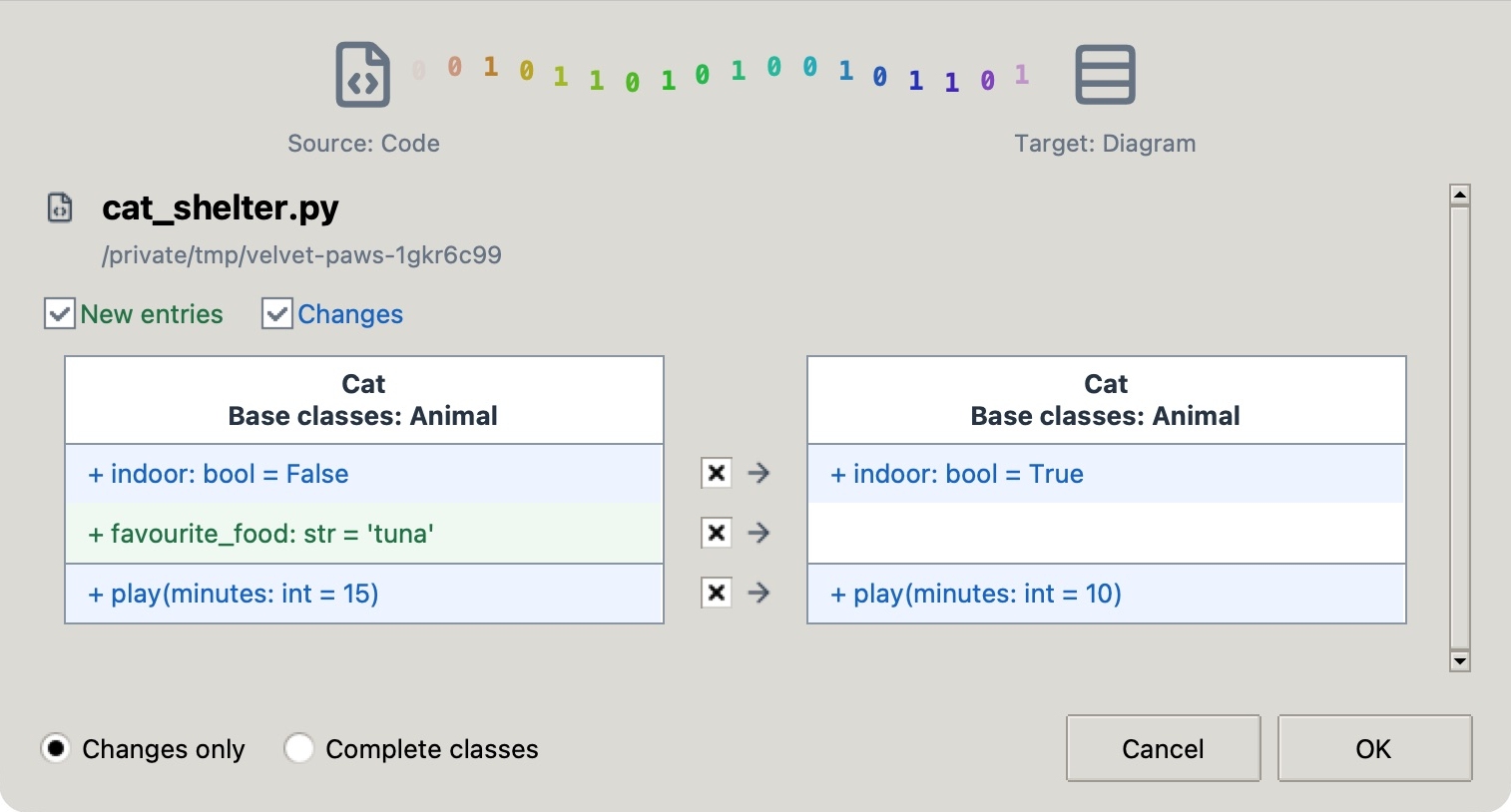
Move between models and code– Turn your diagrams into Python code or your code into diagrams. For linked classes, you choose which changes to apply. -
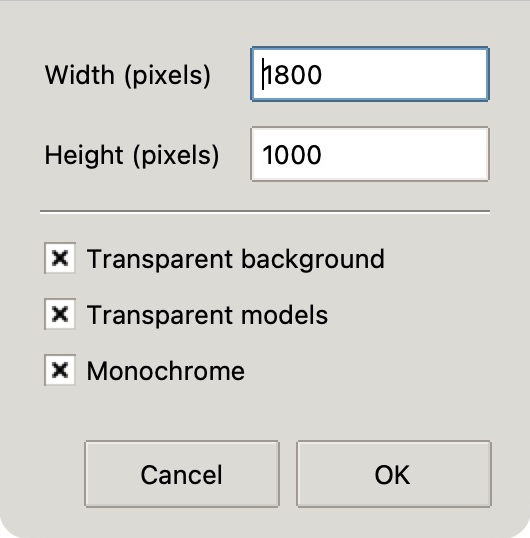
Take your diagrams with you– Save your designs as PNG, SVG or WebP. Ready for a worksheet, a presentation or your documentation. -
Try your objects– Create objects from your UML classes. Explore their values, call methods and expand lists and nested objects. -
Learn and present comfortably– Familiar commands, an uncluttered interface and clear visuals help you focus on your content. The aim is to keep everything sharp and easy to use across multiple displays with different scaling settings – while learning, explaining and presenting. -
Cats
What you need
Thonny 5.0.x and Python 3.10 or later.
Tested on Windows and macOS. Also runs on Linux. Feedback on using it on Linux is welcome.
Thonny SE is under active development.
Get started
Installation through PyPI and the wheel download on GitHub will be available with the release.
Download wheel for 1.0.0 · All releases
Through Thonny’s plug-in manager
- In Thonny, open
Tools → Manage plug-ins.... - Search for
thonny-se. - Select the plug-in and click
Install.
With a wheel file from GitHub
- Download the file ending in
.whlfrom the GitHub releases. - In Thonny, open
Tools → Manage plug-ins.... - Choose
Install from local fileand open the downloaded wheel file.
Restart Thonny after installation.
Under File, create a New structogram or a New UML diagram. Open the object bench under View → Object inspector SE.
Installing on a school network
Many schools use a proxy server for internet access. Thonny 5.0 has no dedicated proxy field in its settings. Installation can fail without the correct proxy. This also affects a local wheel file when dependencies still need to be downloaded.
Set a proxy for installation
In Thonny, open Tools → Open system shell... and enter this command:
pip config --user set global.proxy http://proxy.schule.de:8080
Replace the example address and port with the details provided by your school. The setting is saved permanently for the current user and also applies to later pip commands.
Then install the plug-in through the plug-in manager or the wheel file.
Bring your classes to life
Run your UML design and try its objects. You do not need your own Python file yet. The manual walks you through getting started and explains how diagrams, code and the object bench work together.
Planned features
The following features are planned for future versions:
- More languages: Translate the interface into languages beyond German and English.
- Dark mode: Consistently support dark Thonny themes across diagrams, editing controls and the object bench.
Your feedback helps
Found a bug or have an idea? Open a GitHub issue. For bugs, include your Thonny version, your operating system and the steps needed to reproduce the problem.
Educational references
Thonny SE’s school-related requirements are informed by the curricula of Mecklenburg-Vorpommern, Germany, and the supplementary reference materials (Tafelwerkergänzungen).
- Mecklenburg-Vorpommern curricula for computer science and media education
- Supplementary reference materials on “Informatik in der Schule MV”
As of 9 November 2026.
Technical features
Structogram editor
- Nassi–Shneiderman diagrams with nested blocks.
- Statements, function calls, one-way and two-way selection, and multi-way selection.
- While loops, fixed repetition counts, counting loops and for-each loops.
- Switchable basic and full block palettes.
- Activation and deactivation of blocks. Deactivated subtrees stay in the design and are omitted from Python and image exports.
- Drag-and-drop, select all, contiguous multi-selection and clipboard operations, including between diagram tabs.
- Undo/redo, keyboard navigation and keyboard editing.
- Python import from the full editor content or a text selection. Constructs without a structural representation are retained as code blocks.
- Python export of the full diagram or selected blocks. Non-executable statement text is retained as comments, while control expressions are validated.
- Zoom, horizontal and vertical scrolling, and monochrome display.
- Dedicated JSON file format with support for older model files.
- PNG, SVG and WebP export with configurable raster resolution, transparency and monochrome output.
UML class editor
- Classes, abstract classes and interfaces.
- Attributes with visibility, type and optional initial value.
- Methods with visibility, parameters, parameter types, default values and return type.
- Constructor parameters and optional display of the constructor using the class name.
- Getter/setter generation for attributes.
- Optional static validation of known type names.
- Association, directed association, aggregation, composition, inheritance and interface realization.
- Roles, multiplicities and relationship names.
- Self-relationships for association, aggregation and composition, with separate roles and multiplicities.
- Freely positioned class cards and manually adjustable relationship curves.
- Group selection and movement of classes, plus copying between diagrams with internal relationships and attached comments.
- Optional visual or magnetic grid for snapping class positions.
- Movable, resizable comments with optional class attachment.
- Python import from the current editor, individual files or all Python files in a folder, excluding subfolders.
- Relationship inference from base classes and attribute types.
- Python code generation for individual classes or the entire diagram.
- Persistent source links and explicit updates in both directions, individually or across multiple classes.
- Change preview with individual and group selection and conflict handling.
- Preservation of existing method implementations when updating signatures.
- Navigation to the linked class, method or attribute definition in Python code.
- Execution of the current diagram state using Thonny’s
Runcommand / F5, without saving first or creating a Python file. - Undo/redo, zoom and scrolling.
- Versioned JSON file format with support for older model versions.
- PNG, SVG and WebP export with configurable raster resolution, transparency and monochrome output.
Object bench
- Instantiation of UML classes after successful execution of the diagram. After code-affecting changes, run the diagram again before creating new objects.
- Entry of parameter values with required fields, defaults, type information and selection of existing objects.
- Named instances displayed with their class, attribute values and methods.
- Method calls with result and error display, and support for interrupting running calls.
- Object state updates after completed executions and method calls.
- Expandable lists, tuples, dictionaries, sets and frozensets.
- Incremental loading of larger collections.
- Referenced nested objects displayed as indented object cards with callable methods.
- Indication of shared object identities and cyclic references.
- Preservation of expanded branches during state updates.
- Method display selectable between a drop-down list and individual buttons.
- Indication of differences between the loaded program state and the UML design.
- Existing objects remain available after design changes. Running the diagram again restarts the object session.
1 maintainer

Metadata
1 maintainer
Release files for thonny-se 1.0.0
For a detailed explanation of source distributions (sdists) and built distributions (wheels), please see the package formats documentation.
Source distribution (sdist)
| File | Size | Uploaded | Provenance | Actions |
|---|---|---|---|---|
| thonny_se-1.0.0.tar.gz | 567.0 kB | With provenance | Details for thonny_se-1.0.0.tar.gz |
Built distribution (wheel)
| File | Interpreter | ABI | Platform | Actions Reset |
|---|---|---|---|---|
| thonny_se-1.0.0-py3-none-any.whl | Python 3 | none | any | Details for thonny_se-1.0.0-py3-none-any.whl |
Total release size: 1.3 MB
Release files / thonny_se-1.0.0.tar.gz
| Download URL | thonny_se-1.0.0.tar.gz |
|---|---|
| Size | 567.0 kB |
| Tags | Source |
|
SHA-256 checksum How to use checksums |
d367875276b0f8ae6566be86ab129b596fbd01a6fde344a2bb222b16f3678c3c
|
|
BLAKE2b-256 checksum How to use checksums |
0516831fe24dc9ab227a31842f4f9751f01be01644b97d1fbb276bdb0ca031ec
|
| Upload date | |
|
Uploaded using Trusted Publishing? What is trusted publishing? |
Yes |
| Uploaded via |
twine/7.0.0 CPython/3.13.16
|
Provenance
Provenance describes where a file came from. On PyPI, provenance is shared via attestations, which provide a verifiable record of the build or publishing details. View details, limitations and caveats.


PyPI Publish Attestation
PyPI verified that this artifact, at this checksum, originated from the publisher listed below.
Signed by GitHub Actions, verified by PyPI on Nov 19, 2026.
Transparency logRelease files / thonny_se-1.0.0-py3-none-any.whl
| Download URL | thonny_se-1.0.0-py3-none-any.whl |
|---|---|
| Size | 730.1 kB |
| Tags | Python 3 |
|
SHA-256 checksum How to use checksums |
12ffc05aa0823e5cebd415629344994d06df28fb4dd8d567c71c98263758206b
|
|
BLAKE2b-256 checksum How to use checksums |
64911dcb4d80a6efadbd84a270fe2e210f65d8da5e223ecd8a2bfefec57f9628
|
| Upload date | |
|
Uploaded using Trusted Publishing? What is trusted publishing? |
Yes |
| Uploaded via |
twine/7.0.0 CPython/3.13.16
|
Provenance
Provenance describes where a file came from. On PyPI, provenance is shared via attestations, which provide a verifiable record of the build or publishing details. View details, limitations and caveats.
PyPI Publish Attestation
PyPI verified that this artifact, at this checksum, originated from the publisher listed below.
Signed by GitHub Actions, verified by PyPI on Nov 19, 2026.
Transparency logSecurity for thonny-se 1.0.0
Provenance
Provenance describes where a file came from. On PyPI, provenance is shared via attestations, which provide a verifiable record of the build or publishing details. View details, limitations and caveats.
Full provenance
Both files in this release have been uploaded with provenance metadata.
Attestation for thonny_se-1.0.0.tar.gz
PyPI Publish Attestation
PyPI verified that this artifact, at this checksum, originated from the publisher listed below.
Signed by GitHub Actions, verified by PyPI on Nov 19, 2026.
Transparency logA note on package security
PyPI is a repository for distributing packages, not a service for auditing them. While third-party security researchers and our staff do their best to detect and remove malicious packages, PyPI cannot guarantee the quality, security or suitability of any given package.
To learn more about protecting yourself from malicious actors, visit our package security documentation.














