
A Thonny IDE plug-in that offers PyQt / QT / Python support for Tunisian computer science secondary teachers / students. macOS support added by JOSEPH218.

Project description
thonny-tunisiaschools
A Thonny plug-in which offers Tunisian computer science secondary teachers / students some help creating Python & PyQt Applications:
-
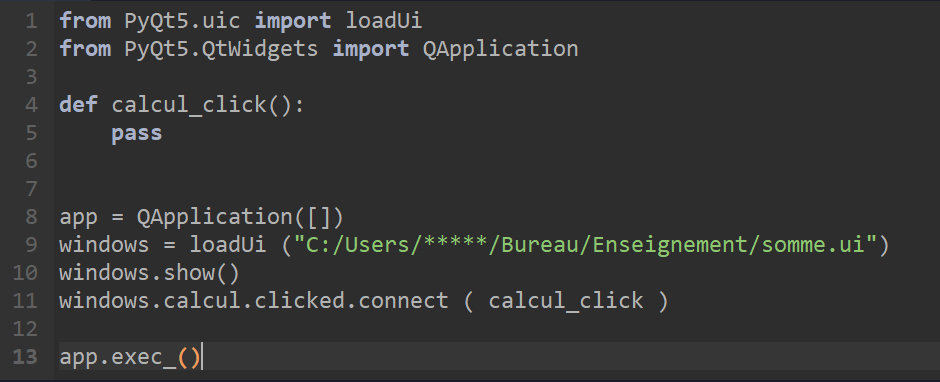
Loads a QT UI file and:
- Adds needed code to load that file to the current document
- Creates empty functions bound to button clicks
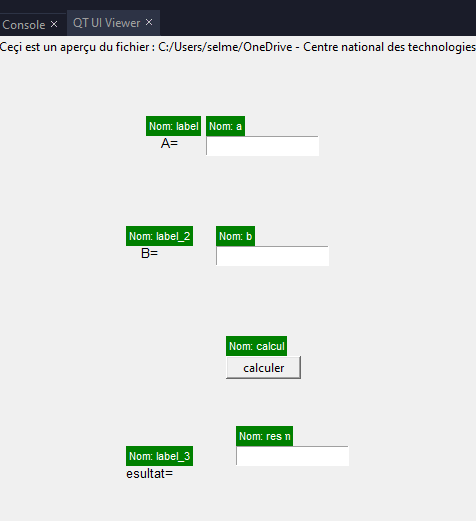
- Adds a view that displays the UI inside Thonny (currently supporting Labels, Text inputs and buttons only)
-
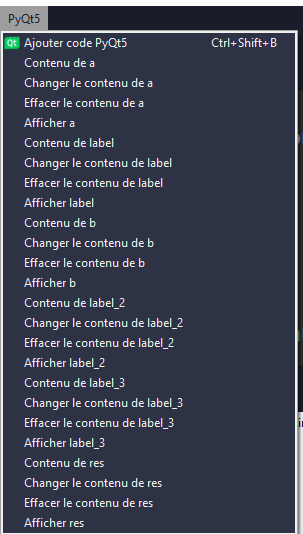
Adds a new menu (PyQt5) with commands to insert calls to common functions (text, setText, clear, show) for Labels and LineEdits
-
Changes the default save location for final exams (baccalauréat)
-
Disables reopening last open files (to reduce risks of students overwriting each other's work)
Installation
Windows
Use Tools → Manage plugins inside Thonny, search for thonny-tunisiaschools and click Install.
macOS
- Download and extract this repository
- Open Terminal (Spotlight → type "Terminal")
- Run this command (you will be asked for your Mac password):
sudo /Applications/Thonny.app/Contents/Frameworks/Python.framework/Versions/3.10/bin/python3 -m pip install ~/Downloads/thonny_tunisiaschools-0.0.14
- Restart Thonny — you should see a PyQt5 menu in the menu bar
Note: The
sudoand Mac password are required because Thonny on macOS installs into a protected system folder. This is a one-time step.
Prerequisite — Qt Designer (macOS)
To use the "Open in Designer" button, install Qt Designer:
pip3 install pyqt5-tools
Supported platforms
- ✅ Windows
- ✅ macOS
- ✅ Linux


Download files
Download the file for your platform. If you're not sure which to choose, learn more about installing packages.
Source Distribution
Built Distribution
Filter files by name, interpreter, ABI, and platform.
If you're not sure about the file name format, learn more about wheel file names.
Copy a direct link to the current filters
File details
Details for the file thonny_tunisiaschools_macos-0.0.16.tar.gz.
File metadata
- Download URL: thonny_tunisiaschools_macos-0.0.16.tar.gz
- Upload date:
- Size: 8.9 kB
- Tags: Source
- Uploaded using Trusted Publishing? No
- Uploaded via: twine/6.2.0 CPython/3.9.6
File hashes
| Algorithm | Hash digest | |
|---|---|---|
| SHA256 |
1ed1b624f1593f840fc72f04e55d8a1eda616be5a7fe4b747f1e520874a68c7d
|
|
| MD5 |
ab0dcf7a6e0602e58eaa21e5a3caa006
|
|
| BLAKE2b-256 |
5e6ada7ef7c54d074ae1381036828f46ef82c09a8dfe3b897dc6a4b70c9673c1
|
File details
Details for the file thonny_tunisiaschools_macos-0.0.16-py3-none-any.whl.
File metadata
- Download URL: thonny_tunisiaschools_macos-0.0.16-py3-none-any.whl
- Upload date:
- Size: 9.5 kB
- Tags: Python 3
- Uploaded using Trusted Publishing? No
- Uploaded via: twine/6.2.0 CPython/3.9.6
File hashes
| Algorithm | Hash digest | |
|---|---|---|
| SHA256 |
46d9048d49c4bef305b19dc71b9986d352b75da2dd858c699e38fc31994bccfb
|
|
| MD5 |
d00f6fa2ad0e4ca8a006c22a5dad9d9c
|
|
| BLAKE2b-256 |
844fe9fa8c54d49e7d71b24d7e5417c059fbe29ad74f7564064610e40754c9ab
|






