

Documentation |
Issues |
Changelog |
Funding 💚
Threadmill 


Durable high-performance backend for Django's task framework.

Design Principles
- Durability – Recover from any failures, even poorly written tasks.
- Consistency – Never lose data, even if someone unplugs the power or network.
- Utilization – Keep the CPU saturated with tasks, not with idle time or waiting for locks.
Setup
You need to have Django's Task framework set up properly.
uv add "threadmill[redis]"
Add threadmill to your INSTALLED_APPS in settings.py
and configure the task backend:
# settings.py
import os

INSTALLED_APPS = [
    "threadmill",
    # ...
]

TASKS = {
    "default": {
        "BACKEND": "threadmill.backends.redis.RedisTaskBackend",
        "REDIS_URL": os.getenv("REDIS_URL", "redis://localhost:6379/0"),
    },
    # ...
}
Optionally, install the inspector dependency if you want the TUI:
uv add "threadmill[inspector]"
Then launch the worker pool:
uv run manage.py threadmill worker
Usage
Workers
The workers are inspired by Gunicorn, and the CLI is very similar.
Utilization
Depending on your workload, you can tweak the number of worker processes and the number of threads per process. Processes always run in parallel, because each one has its own interpreter. Threads share memory, so they are cheap, but whether they run in parallel depends on your interpreter:
- On a regular GIL build, Python runs in one thread at a time. Threads still overlap waiting for IO, but CPU-bound tasks do not speed up. Raising the thread count far above the queue depth can also leave processes idle, because each process prefetches a batch sized by its thread count.
- On a free-threaded build, threads run truly in parallel, so CPU-bound tasks scale across cores without the cost of extra processes.
A pool on a free-threaded interpreter therefore reaches the same throughput with one process running many threads as with many processes running one thread each, while using a single Redis connection pool and one copy of your application state:
uv run manage.py threadmill worker --workers 1 --threads 8
Threads all live in one process, so a crash or a --max-tasks recycle takes every thread down at once. One process per core, the default, confines that to a single process. Prefer threads when memory matters more than that isolation, and keep the default when it does not.
A free-threaded interpreter can be slower than a regular one for single-threaded work, so a GIL build stays the better choice for IO-bound tasks. Pick the interpreter that fits your workload rather than assuming free threading is an upgrade.
Health
If your tasks leak memory, you can recycle (restart) the workers after a certain number of tasks have been processed:
uv run manage.py threadmill worker --max-tasks 1000 --max-tasks-jitter 100
This will restart the workers after 1000 tasks have been processed, with a random jitter of up to 100 tasks to avoid all workers restarting at the same time.
The limit is soft. A worker drains its buffer and the batch in hand before it stops. It can then run about twice --prefetch-count tasks more than the configured maximum.
Should a worker crash or be killed, the pool will automatically restart it.
Shutdown
A graceful shutdown is possible with SIGTERM or a keyboard interrupt.
All workers finish the tasks they acquired and acknowledge them. This includes the tasks in their prefetch buffer.
A hard kill cannot be intercepted, so the lease reaper collects the buffered tasks after the lease expires.
You can use --exit-empty to exit immediately after all tasks have been processed,
which might be useful for draining a one-off queue.
Inspector
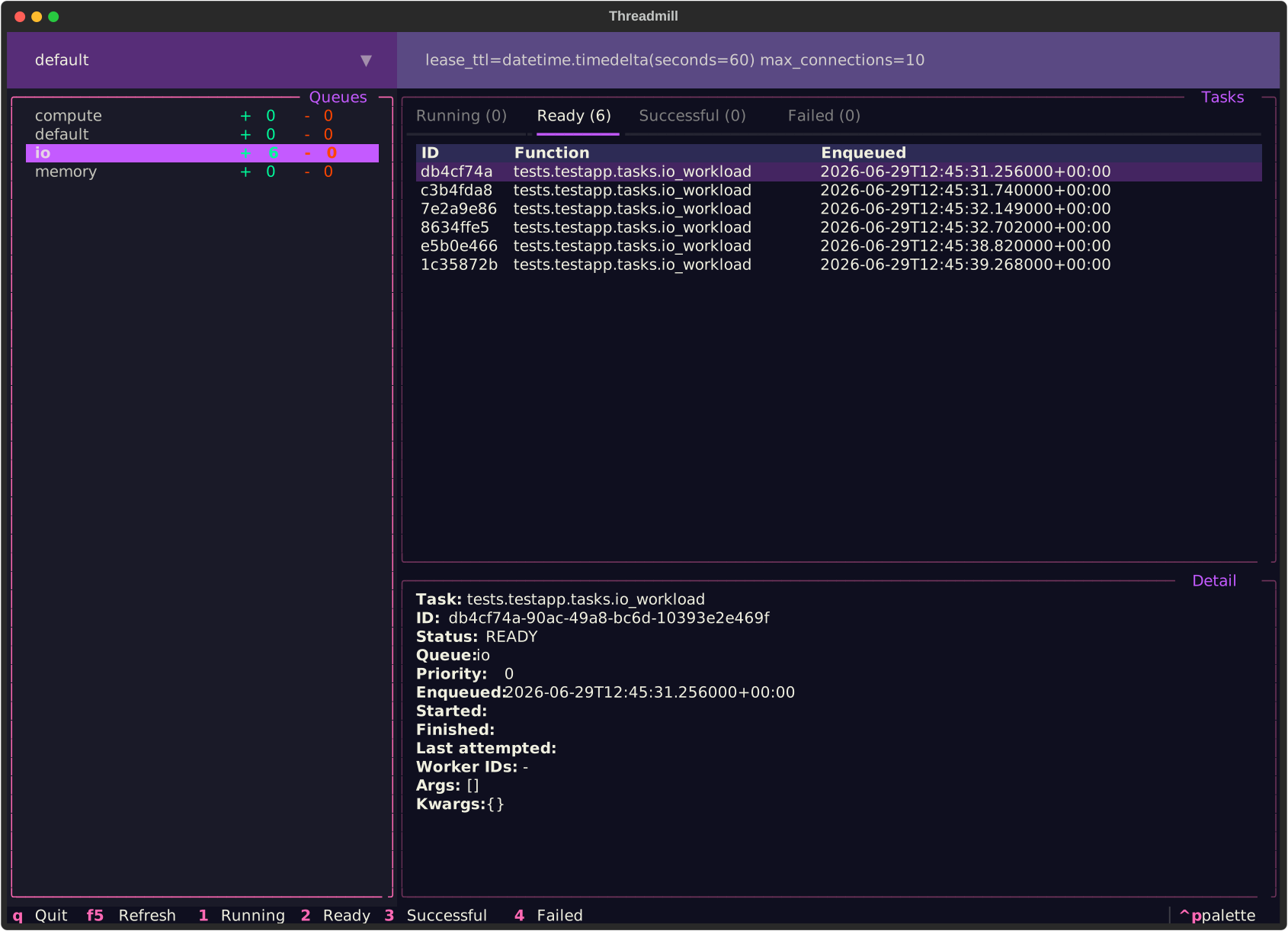
The optional TUI inspector lets you watch queues, tasks, and task details in real-time.
Install it with the inspector extra and launch it from a separate terminal:
uv add "threadmill[inspector]"
uv run manage.py threadmill inspector
Redis Backend Options
The RedisTaskBackend accepts the following options under OPTIONS in your
TASKS configuration:
| Option | Default | Description |
|---|---|---|
lease_ttl |
timedelta(hours=1) |
Max time from acquisition to acknowledgement before the task is retried or marked FAILED. |
result_ttl |
timedelta(days=1) |
How long task results are retained before automatic removal. |
broker_interval |
timedelta(seconds=1) |
Interval between background broker maintenance passes. |
batch_size |
100 |
Max tasks to move or reap per broker pass. |
poll_interval |
timedelta(seconds=0.01) |
Base wait between idle acquire attempts, doubled after each empty poll. |
poll_max_interval |
timedelta(seconds=1) |
Max wait between idle acquire attempts. |
redis_connection_retries |
3 |
Retries per command when its Redis connection fails before the error surfaces. |
A task whose lease expired reaches the retry callback as an
AcknowledgementTimeoutError error, or is marked FAILED when nothing retries it.
A claimed task whose stored payload cannot be read any more is dropped with the
read error logged. A dropped task records no result, so it leaves the inspector
and cannot be requeued.
Keep lease_ttl above your worst-case runtime and above the time a task waits in a
prefetch buffer. A task that outlives its lease can still run, so a retry can run
at the same time. The acknowledgement of the lease holder wins. The late result
of an expired attempt is discarded.
All keys for one backend alias share a Redis Cluster hash tag ({alias}), so
every multi-key operation — including the cross-queue acquire — runs on a single
shard. Scale horizontally by running additional backend aliases, not by relying
on cross-slot operations.
Retrying failed tasks
Pass a retry callback to @task() to retry failed tasks with a delay.
The callback receives a TaskContext — use context.attempt for the current
attempt count and context.task_result.errors[-1] for the latest error.
Return a timedelta to schedule the next attempt, or None to stop retrying.
Failed tasks are re-queued preserving their ID and error history; the broker promotes them back to the ready queue once the delay elapses.
Built-in ExponentialBackoff
threadmill.retry.ExponentialBackoff provides a serializable exponential
backoff strategy out of the box. It caps the delay at max_delay, stops
after max_retries attempts, and only retries exceptions listed in
expected_exceptions.
import datetime

from django.tasks import task
from requests import HTTPError

from threadmill.exceptions import AcknowledgementTimeoutError
from threadmill.retry import ExponentialBackoff


@task(
    retry=ExponentialBackoff(
        base_delay=datetime.timedelta(seconds=1),
        max_delay=datetime.timedelta(minutes=5),
        factor=2.0,
        max_retries=5,
        expected_exceptions=(HTTPError, AcknowledgementTimeoutError),
    )
)
def fetch_github_api(url: str): ...
Custom retry callbacks
For cases that need logic beyond what ExponentialBackoff supports,
write a callable that accepts a TaskContext and returns a timedelta
or None. Use TaskError.exception_class to filter by exception type:
import datetime

from django.tasks import task
from django.tasks.base import TaskContext
from requests import HTTPError


def retry_on_rate_limit(context: TaskContext) -> datetime.timedelta | None:
    """Retry HTTP 429 responses with exponential backoff, up to 5 attempts."""
    if context.attempt >= 5:
        return None
    error = context.task_result.errors[-1]
    if not issubclass(error.exception_class, HTTPError):
        return None
    return min(
        datetime.timedelta(seconds=2**context.attempt),
        datetime.timedelta(seconds=60),
    )


@task(retry=retry_on_rate_limit)
def fetch_github_api(url: str): ...
Sponsors

1 maintainer

Metadata
1 maintainer
Release files for threadmill 0.8.4
For a detailed explanation of source distributions (sdists) and built distributions (wheels), please see the package formats documentation.
Source distribution (sdist)
| File | Size | Uploaded | Provenance | |
|---|---|---|---|---|
| threadmill-0.8.4.tar.gz | 37.0 kB | With provenance | Details |
Built distribution (wheel)
| File | Interpreter | ABI | Platform | Reset |
|---|---|---|---|---|
| threadmill-0.8.4-py3-none-any.whl | Python 3 | none | any | Details |
Total release size: 76.5 kB
Release files / threadmill-0.8.4.tar.gz
| Download URL | threadmill-0.8.4.tar.gz |
|---|---|
| Size | 37.0 kB |
| Tags | Source |
|
SHA-256 checksum How to use checksums |
a788ffaebbb8e27726eb2ce3c4658d0d0c1b83ed449f562b4636bd25710584a0
|
|
BLAKE2b-256 checksum How to use checksums |
ac11ccf6bfbb0913e4c8191255c8e380d0c5f0c46c20386e8b2960dcb8c85f16
|
| Upload date | |
|
Uploaded using Trusted Publishing? What is trusted publishing? |
Yes |
| Uploaded via |
twine/7.0.0 CPython/3.13.14
|
Provenance
Provenance describes where a file came from. On PyPI, provenance is shared via attestations, which provide a verifiable record of the build or publishing details. View details, limitations and caveats.


PyPI Publish Attestation
PyPI verified that this artifact, at this checksum, originated from the publisher listed below.
Signed by GitHub Actions, verified by PyPI on Oct 19, 2026.
Transparency logRelease files / threadmill-0.8.4-py3-none-any.whl
| Download URL | threadmill-0.8.4-py3-none-any.whl |
|---|---|
| Size | 39.5 kB |
| Tags | Python 3 |
|
SHA-256 checksum How to use checksums |
29612f5cbee695429482f98bd9cc0b8db4aea2193255a610a8a5ce5f15dfaa57
|
|
BLAKE2b-256 checksum How to use checksums |
aa7421a780fa96d8b23f1f35439428a6733bf0d78eeb7ce35e5346f93e1c0d3c
|
| Upload date | |
|
Uploaded using Trusted Publishing? What is trusted publishing? |
Yes |
| Uploaded via |
twine/7.0.0 CPython/3.13.14
|
Provenance
Provenance describes where a file came from. On PyPI, provenance is shared via attestations, which provide a verifiable record of the build or publishing details. View details, limitations and caveats.
PyPI Publish Attestation
PyPI verified that this artifact, at this checksum, originated from the publisher listed below.
Signed by GitHub Actions, verified by PyPI on Oct 19, 2026.
Transparency logSecurity for threadmill 0.8.4
Provenance
Provenance describes where a file came from. On PyPI, provenance is shared via attestations, which provide a verifiable record of the build or publishing details. View details, limitations and caveats.
Full provenance
All 2 files in this release have been uploaded with provenance metadata.
Attestation for threadmill-0.8.4.tar.gz
PyPI Publish Attestation
PyPI verified that this artifact, at this checksum, originated from the publisher listed below.
Signed by GitHub Actions, verified by PyPI on Oct 19, 2026.
Transparency logA note on package security
PyPI is a repository for distributing packages, not a service for auditing them. While third-party security researchers and our staff do their best to detect and remove malicious packages, PyPI cannot guarantee the quality, security or suitability of any given package.
To learn more about protecting yourself from malicious actors, visit our package security documentation.














