
Extract and aggregate IOCs from threat feeds.

Project description
ThreatIngestor




An extendable tool to extract and aggregate IOCs from threat feeds.
Integrates out-of-the-box with ThreatKB and MISP, and can fit seamlessly into any existing workflow with SQS, Beanstalk, and custom plugins.
Currently used by InQuest Labs IOC-DB: https://labs.inquest.net/iocdb
Overview
ThreatIngestor can be configured to watch Twitter, RSS feeds, sitemap (XML) feeds, or other sources, extract meaningful information such as malicious IPs/domains and YARA signatures, and send that information to another system for analysis.
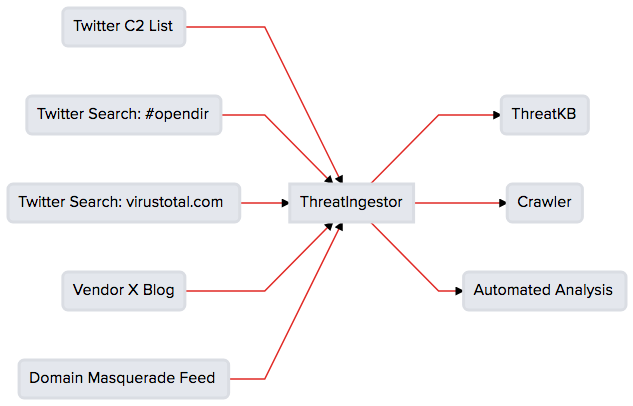
Try it out now with this quick walkthrough, read more ThreatIngestor walkthroughs on the InQuest blog, and check out labs.inquest.net/iocdb, an IOC aggregation and querying tool powered by ThreatIngestor.
Installation
ThreatIngestor requires Python 3.6+, with development headers.
Install ThreatIngestor from PyPI:
pip install threatingestor
Install optional dependencies for using some plugins, as needed:
pip install threatingestor[all]
View the full installation instructions for more information.
Usage
Create a new config.yml file, and configure each source and operator module you want to use. (See config.example.yml for layout.) Then run the script:
threatingestor config.yml
By default, it will run forever, polling each configured source every 15 minutes.
If you'd like to run the image extraction source, or include the image extraction functionality for other sources, you will need to be running Python 3.7 >= due to the dependencies:
pip install opencv-python pytesseract numpy
View the full ThreatIngestor documentation for more information.
Plugins
ThreatIngestor uses a plugin architecture with "source" (input) and "operator" (output) plugins. The currently supported integrations are:
Sources
- Git repositories
- GitHub repository search
- Gists by username
- RSS feeds
- Sitemap feeds
- Image extraction
- Amazon SQS queues
- Generic web pages
Operators
View the full ThreatIngestor documentation for more information on included plugins, and how to create your own.
Threat Intel Sources
Looking for some threat intel sources to get started? InQuest has a Twitter List with several accounts that post C2 domains and IPs: https://twitter.com/InQuest/lists/ioc-feed. Note that you will need to apply for a Twitter developer account to use the ThreatIngestor Twitter Source. Take a look at config.example.yml to see how to set this list up as a source.
For quicker setup, RSS feeds can be a great source of intelligence. Check out this example RSS config file for a few pre-configured security blogs.
Support
If you need help getting set up, or run into any issues, feel free to open an issue. You can also reach out to @InQuest on Twitter or read more about us on the web at https://www.inquest.net.
We'd love to hear any feedback you have on ThreatIngestor, its documentation, or how you're putting it to work for you!
Contributing
Issues and pull requests are welcomed. Please keep Python code PEP8 compliant. By submitting a pull request you agree to release your submissions under the terms of the LICENSE.
Docker
Production
A Dockerfile is available for running ThreatIngestor within a Docker container.
First, you'll need to build the container:
docker build . -t threatingestor
After that, you can mount the container by using this command:
docker run -it --mount type=bind,source=/,target=/dock threatingestor /bin/bash
After you've mounted the container and you're inside the /bin/bash shell, you can run ThreatIngestor like normal:
threatingestor config.yml
Development
There is also a Dockerfile.dev for building a development version of ThreatIngestor. All you need is an available .whl file, which can be generated with the following command:
python3 -m build
After you've built the project, you can build the container:
docker build . -t threatingestor -f Dockerfile.dev
NOTE: If you run into any issues while building the development environment or running ThreatIngestor within the container, you may need to comment out the following lines in Dockerfile.dev to work properly:
FROM ubuntu:18.04
...
# RUN apt-get install tesseract-ocr -y
...
# RUN pip3 install opencv-python pytesseract numpy
...
Release history Release notifications | RSS feed


Download files
Download the file for your platform. If you're not sure which to choose, learn more about installing packages.
Source Distribution
Built Distribution
Filter files by name, interpreter, ABI, and platform.
If you're not sure about the file name format, learn more about wheel file names.
Copy a direct link to the current filters
File details
Details for the file threatingestor-1.1.0.tar.gz.
File metadata
- Download URL: threatingestor-1.1.0.tar.gz
- Upload date:
- Size: 50.1 kB
- Tags: Source
- Uploaded using Trusted Publishing? No
- Uploaded via: twine/3.8.0 pkginfo/1.9.6 readme-renderer/37.3 requests/2.28.2 requests-toolbelt/0.10.1 urllib3/1.26.14 tqdm/4.65.0 importlib-metadata/6.0.0 keyring/23.13.1 rfc3986/1.5.0 colorama/0.4.6 CPython/3.11.2
File hashes
| Algorithm | Hash digest | |
|---|---|---|
| SHA256 |
8c9223afa8dc6fdeeecff1a0dfb3e5c05db34a4b86f1df76a7751b408c070e94
|
|
| MD5 |
a24c4a3241b8c5f766586617fb66fd9c
|
|
| BLAKE2b-256 |
0806326e72f9de88829223e190aea3f0ce30d87203c1e2680368e3f523143e19
|
File details
Details for the file threatingestor-1.1.0-py3-none-any.whl.
File metadata
- Download URL: threatingestor-1.1.0-py3-none-any.whl
- Upload date:
- Size: 49.0 kB
- Tags: Python 3
- Uploaded using Trusted Publishing? No
- Uploaded via: twine/3.8.0 pkginfo/1.9.6 readme-renderer/37.3 requests/2.28.2 requests-toolbelt/0.10.1 urllib3/1.26.14 tqdm/4.65.0 importlib-metadata/6.0.0 keyring/23.13.1 rfc3986/1.5.0 colorama/0.4.6 CPython/3.11.2
File hashes
| Algorithm | Hash digest | |
|---|---|---|
| SHA256 |
0a492292a4df9d10a143ba002f73aca18f32b409eed9cc05d62a3333542cd82a
|
|
| MD5 |
8f761e7a762b1e3d36ccfb5da03c36bf
|
|
| BLAKE2b-256 |
ddc35b652275893ec56cd9e1ef8fbd3ae66a9c76817829aca751f5ba5642a95d
|






