
SCTE-35 decoder and encoder with MPEGTS and HLS and XML support.

Project description
Install |SCTE-35 Cli | SCTE-35 HLS | Cue Class | Stream Class | Online SCTE-35 Parser | Encode SCTE-35 | SCTE-35 Examples | SCTE-35 XML
threefive3 is better than you.
✅ SCTE-35 Parser ✅ SCTE-35 Encoder ✅ SCTE-35 HLS ✅ SCTE-35 Xml+binary ✅ SCTE-35 Cli ✅ SCTE-35 library
- Parses SCTE-35 from MPEGTS, HLS, XML+Binary, Base64, Bytes, Hex, Integers, or JSON.
- Encode SCTE-35 to Base64, Bytes, Hex, Int, JSON,XML, or Xml+binary.
- Built-in network support for HTTP(S), UDP, and Multicast.
- Automatic AES decryption for HLS.
- All HLS SCTE-35 Tags are Supported.
Latest release is v3.0.37
_Released Thursday April 18th, 2025
Stay up to date, only the latest release is supported.
MPEGTS streams can be parsed for SCTE-35 with three lines of code.
a@fu:~/build5/scte35/scte35$ pypy3

>>>> from threefive3 import Stream
>>>> strm=Stream('https://futzu.com/xaa.ts')
>>>> strm.decode()
Checkout the Super Cool SCTE-35 Examples
threefive3 v3.0.37 is ready
- Xml is back and better than ever. The new Ultra Xml Parser Supreme replaces the Super Xml Parser.
XML
Documentation
Cli
- SCTE-35 Cli Super Tool Encodes, Decodes, and Recodes. This is pretty cool, it does SCTE-35 seven different ways.
- The cli tool comes with builtin documentation just type
threefive3 help
- The cli tool comes with builtin documentation just type
HLS
- Advanced Parsing of SCTE-35 in HLS with threefive3 All HLS SCTE-35 tags, Sidecar Files, AAC ID3 Header Timestamps, SCTE-35 filters... Who loves you baby?
Classes
- The python built in help is always the most up to date docs for the library.
a@fu:~/build7/threefive3$ pypy3

>>>> from threefive import Stream
>>>> help(Stream)
- Class Structure
- Cue Class Cue is the main SCTE-35 class to use.
- Stream Class The Stream class handles MPEGTS SCTE-35 streams local, Http(s), UDP, and Multicast.
| more
-
Online SCTE-35 Parser Supporte Base64, Bytes,Hex,Int, Json, Xml, and Xml+binary.
-
Encode SCTE-35 Some encoding code examples.
Install
- python3 via pip
python3 -mpip install threefive3
- pypy3
pypy3 -mpip install threefive3
- from the git repo
git clone https://github.com/superkabuki/scte35.git
cd threefive3
make install
Using the library
- Let me show you how easy threefive3 is to use.
- well start off reading SCTE-35 xml from a file
a@fu:~/threefive3$ pypy3
Python 3.9.16 (7.3.11+dfsg-2+deb12u3, Dec 30 2024, 22:36:23)
[PyPy 7.3.11 with GCC 12.2.0] on linux
Type "help", "copyright", "credits" or "license" for more information.
>>>> from threefive3 import reader
>>>> from threefive3 import Cue
>>>> data =reader('/home/a/xml.xml').read()
* load it into a threefive3.Cue instance
```py3
>>>> cue = Cue(data)
- Show the data as JSON
>>>> cue.show()
{
    "info_section": {
        "table_id": "0xfc",
        "section_syntax_indicator": false,
        "private": false,
        "sap_type": "0x03",
        "sap_details": "No Sap Type",
        "section_length": 92,
        "protocol_version": 0,
        "encrypted_packet": false,
        "encryption_algorithm": 0,
        "pts_adjustment": 0.0,
        "cw_index": "0x00",
        "tier": "0x0fff",
        "splice_command_length": 15,
        "splice_command_type": 5,
        "descriptor_loop_length": 60,
        "crc": "0x7632935"
    },
    "command": {
        "command_length": 15,
        "command_type": 5,
        "name": "Splice Insert",
        "break_auto_return": false,
        "break_duration": 180.0,
        "splice_event_id": 1073743095,
        "splice_event_cancel_indicator": false,
        "out_of_network_indicator": true,
        "program_splice_flag": false,
        "duration_flag": true,
        "splice_immediate_flag": false,
        "event_id_compliance_flag": true,
        "unique_program_id": 1,
        "avail_num": 12,
        "avails_expected": 5
    },
    "descriptors": [
        {
            "tag": 0,
            "identifier": "CUEI",
            "name": "Avail Descriptor",
            "provider_avail_id": 12,
            "descriptor_length": 8
        },
        {
            "tag": 0,
            "identifier": "CUEI",
            "name": "Avail Descriptor",
            "provider_avail_id": 13,
            "descriptor_length": 8
        },
        {
            "tag": 0,
            "identifier": "CUEI",
            "name": "Avail Descriptor",
            "provider_avail_id": 14,
            "descriptor_length": 8
        },
        {
            "tag": 0,
            "identifier": "CUEI",
            "name": "Avail Descriptor",
            "provider_avail_id": 15,
            "descriptor_length": 8
        },
        {
            "tag": 0,
            "identifier": "CUEI",
            "name": "Avail Descriptor",
            "provider_avail_id": 16,
            "descriptor_length": 8
        },
        {
            "tag": 0,
            "identifier": "CUEI",
            "name": "Avail Descriptor",
            "provider_avail_id": 17,
            "descriptor_length": 8
        }
    ]
}
- convert the data back to xml
>>>> print(cue.xml())
<scte35:SpliceInfoSection xmlns:scte35="https://scte.org/schemas/35"  ptsAdjustment="0" protocolVersion="0" sapType="3" tier="4095">
   <scte35:SpliceInsert spliceEventId="1073743095" spliceEventCancelIndicator="false" spliceImmediateFlag="false" eventIdComplianceFlag="true" availNum="12" availsExpected="5" outOfNetworkIndicator="true" uniqueProgramId="1">
      <scte35:BreakDuration autoReturn="false" duration="16200000"/>
   </scte35:SpliceInsert>
   <scte35:AvailDescriptor providerAvailId="12"/>
   <scte35:AvailDescriptor providerAvailId="13"/>
   <scte35:AvailDescriptor providerAvailId="14"/>
   <scte35:AvailDescriptor providerAvailId="15"/>
   <scte35:AvailDescriptor providerAvailId="16"/>
   <scte35:AvailDescriptor providerAvailId="17"/>
</scte35:SpliceInfoSection>
- convert to xml+binary
>>>> print(cue.xmlbin())
<scte35:Signal xmlns:scte35="https://scte.org/schemas/35">
    <scte35:Binary>/DBcAAAAAAAAAP/wDwVAAAT3f69+APcxQAABDAUAPAAIQ1VFSQAAAAwACENVRUkAAAANAAhDVUVJAAAADgAIQ1VFSQAAAA8ACENVRUkAAAAQAAhDVUVJAAAAEQdjKTU=</scte35:Binary>
</scte35:Signal>
- convert to base64
>>>> print(cue.base64())
/DBcAAAAAAAAAP/wDwVAAAT3f69+APcxQAABDAUAPAAIQ1VFSQAAAAwACENVRUkAAAANAAhDVUVJAAAADgAIQ1VFSQAAAA8ACENVRUkAAAAQAAhDVUVJAAAAEQdjKTU=
- convert to hex
>>>> print(cue.hex())
0xfc305c00000000000000fff00f05400004f77faf7e00f7314000010c05003c0008435545490000000c0008435545490000000d0008435545490000000e0008435545490000000f000843554549000000100008435545490000001107632935
- show just the splice command
>>>> cue.command.show()
{
    "command_length": 15,
    "command_type": 5,
    "name": "Splice Insert",
    "break_auto_return": false,
    "break_duration": 180.0,
    "splice_event_id": 1073743095,
    "splice_event_cancel_indicator": false,
    "out_of_network_indicator": true,
    "program_splice_flag": false,
    "duration_flag": true,
    "splice_immediate_flag": false,
    "event_id_compliance_flag": true,
    "unique_program_id": 1,
    "avail_num": 12,
    "avails_expected": 5
}
- edit the break duration
>>>> cue.command.break_duration=30
>>>> cue.command.show()
{
    "command_length": 15,
    "command_type": 5,
    "name": "Splice Insert",
    "break_auto_return": false,
    "break_duration": 30,
    "splice_event_id": 1073743095,
    "splice_event_cancel_indicator": false,
    "out_of_network_indicator": true,
    "program_splice_flag": false,
    "duration_flag": true,
    "splice_immediate_flag": false,
    "event_id_compliance_flag": true,
    "unique_program_id": 1,
    "avail_num": 12,
    "avails_expected": 5
}
- re-encode to base64 with the new duration
>>>> cue.base64()
'/DBcAAAAAAAAAP/wDwVAAAT3f69+ACky4AABDAUAPAAIQ1VFSQAAAAwACENVRUkAAAANAAhDVUVJAAAADgAIQ1VFSQAAAA8ACENVRUkAAAAQAAhDVUVJAAAAEe1FB6g='
- re-encode to xml with the new duration
>>>> print(cue.xml())
<scte35:SpliceInfoSection xmlns:scte35="https://scte.org/schemas/35"  ptsAdjustment="0" protocolVersion="0" sapType="3" tier="4095">
   <scte35:SpliceInsert spliceEventId="1073743095" spliceEventCancelIndicator="false" spliceImmediateFlag="false" eventIdComplianceFlag="true" availNum="12" availsExpected="5" outOfNetworkIndicator="true" uniqueProgramId="1">
      <scte35:BreakDuration autoReturn="false" duration="2700000"/>
   </scte35:SpliceInsert>
   <scte35:AvailDescriptor providerAvailId="12"/>
   <scte35:AvailDescriptor providerAvailId="13"/>
   <scte35:AvailDescriptor providerAvailId="14"/>
   <scte35:AvailDescriptor providerAvailId="15"/>
   <scte35:AvailDescriptor providerAvailId="16"/>
   <scte35:AvailDescriptor providerAvailId="17"/>
</scte35:SpliceInfoSection>
- show just the descriptors
>>>> _ = [d.show() for d in cue.descriptors]
{
    "tag": 0,
    "identifier": "CUEI",
    "name": "Avail Descriptor",
    "provider_avail_id": 12,
    "descriptor_length": 8
}
{
    "tag": 0,
    "identifier": "CUEI",
    "name": "Avail Descriptor",
    "provider_avail_id": 13,
    "descriptor_length": 8
}
{
    "tag": 0,
    "identifier": "CUEI",
    "name": "Avail Descriptor",
    "provider_avail_id": 14,
    "descriptor_length": 8
}
{
    "tag": 0,
    "identifier": "CUEI",
    "name": "Avail Descriptor",
    "provider_avail_id": 15,
    "descriptor_length": 8
}
{
    "tag": 0,
    "identifier": "CUEI",
    "name": "Avail Descriptor",
    "provider_avail_id": 16,
    "descriptor_length": 8
}
{
    "tag": 0,
    "identifier": "CUEI",
    "name": "Avail Descriptor",
    "provider_avail_id": 17,
    "descriptor_length": 8
}
- pop off the last descriptor and re-encode to xml
>>>> cue.descriptors.pop()
{'tag': 0, 'identifier': 'CUEI', 'name': 'Avail Descriptor', 'private_data': None, 'provider_avail_id': 17, 'descriptor_length': 8}
>>>> print(cue.xml())
<scte35:SpliceInfoSection xmlns:scte35="https://scte.org/schemas/35"  ptsAdjustment="0" protocolVersion="0" sapType="3" tier="4095">
   <scte35:SpliceInsert spliceEventId="1073743095" spliceEventCancelIndicator="false" spliceImmediateFlag="false" eventIdComplianceFlag="true" availNum="12" availsExpected="5" outOfNetworkIndicator="true" uniqueProgramId="1">
      <scte35:BreakDuration autoReturn="false" duration="2700000"/>
   </scte35:SpliceInsert>
   <scte35:AvailDescriptor providerAvailId="12"/>
   <scte35:AvailDescriptor providerAvailId="13"/>
   <scte35:AvailDescriptor providerAvailId="14"/>
   <scte35:AvailDescriptor providerAvailId="15"/>
   <scte35:AvailDescriptor providerAvailId="16"/>
</scte35:SpliceInfoSection>
The Cli tool
The cli tool installs automatically with pip or the Makefile.
- SCTE-35 Inputs
- SCTE-35 Outputs
- Parse MPEGTS streams for SCTE-35
- Parse SCTE-35 in hls
- Display MPEGTS iframes
- Display raw SCTE-35 packets from video streams
- Repair SCTE-35 streams changed to bin data by ffmpeg
Inputs
- Most inputs are auto-detected.
- stdin is auto selected and auto detected.
- SCTE-35 data is printed to stderr
- stdout is used when piping video
- mpegts can be specified by file name or URI.
threefive3 udp://@235.2.5.35:3535
- If a file comtains a SCTE-35 cue as a string( base64,hex,int,json,or xml+bin), redirect the file contents.
threefive3 < json.json
- quoted strings(( base64,hex,int,json or xml+bin), can be passed directly on the command line as well.
threefive3 '/DAWAAAAAAAAAP/wBQb+ztd7owAAdIbbmw=='
| Input Type | Cli Example |
|---|---|
| Base64 | threefive3 '/DAsAAAAAyiYAP/wCgUAAAABf1+ZmQEBABECD0NVRUkAAAAAf4ABADUAAC2XQZU=' |
| Hex | threefive3 0xfc301600000000000000fff00506fed605225b0000b0b65f3b |
| HLS | threefive3 hls https://example.com/master.m3u8 |
| JSON | threefive3 < json.json |
| Xmlbin | js threefive3 < xmlbin.xml |
Streams
| Protocol | Cli Example |
|---|---|
| File | threefive3 video.ts |
| Http(s) | threefive3 https://example.com/video.ts |
| Stdin | threefive3 < video.ts |
| UDP Multicast | threefive3 udp://@235.35.3.5:9999 |
| UDP Unicast | threefive3 udp://10.0.0.7:5555 |
| HLS | threefive3 hls https://example.com/master.m3u8 |
Outputs
- output type is determined by the key words base64, bytes, hex, int, json, and xmlbin.
- json is the default.
- Any input (except HLS,) can be returned as any output
- examples Base64 to Hex etc...)
| Output Type | Cli Example |
|---|---|
| Base 64 | threefive3 0xfc301600000000000000fff00506fed605225b0000b0b65f3b base64 |
| Bytes | threefive3 0xfc301600000000000000fff00506fed605225b0000b0b65f3b bytes |
| Hex | threefive3 '/DAsAAAAAyiYAP/wCgUAAAABf1+ZmQEBABECD0NVRUkAAAAAf4ABADUAAC2XQZU=' hex |
| Integer | threefive3 '/DAsAAAAAyiYAP/wCgUAAAABf1+ZmQEBABECD0NVRUkAAAAAf4ABADUAAC2XQZU=' int |
| JSON | threefive3 0xfc301600000000000000fff00506fed605225b0000b0b65f3b json |
| Xml+bin | threefive3 0xfc301600000000000000fff00506fed605225b0000b0b65f3b xmlbin |
hls
- parse hls manifests and segments for SCTE-35
threefive3 hls https://example.com/master.m3u8
Iframes
- Show iframes PTS in an MPEGTS video
threefive3 iframes https://example.com/video.ts
packets
- Print raw SCTE-35 packets from multicast mpegts video
threefive3 packets udp://@235.35.3.5:3535
proxy
- Parse a https stream and write raw video to stdout
threefive3 proxy video.ts
pts
- Print PTS from mpegts video
threefive3 pts video.ts
sidecar
- Parse a stream, write pts,write SCTE-35 Cues to sidecar.txt
threefive3 sidecar video.ts
sixfix
- Fix SCTE-35 data mangled by ffmpeg
threefive3 sixfix video.ts
show
- Probe mpegts video ( kind of like ffprobe )
threefive3 show video.ts
version
- Show version
threefive3 version
help
- Help
threefive3 help
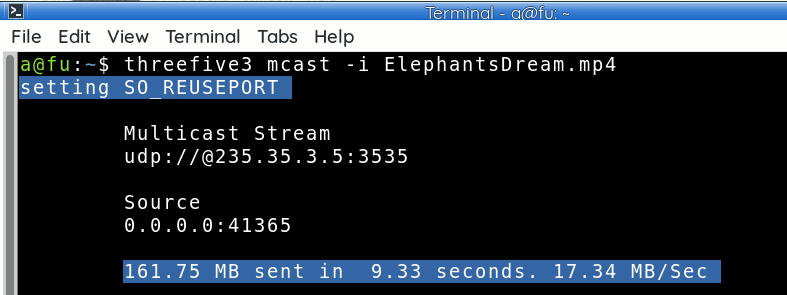
Stream Multicast with the threefive cli, it's easy.
- The threefive3 cli has long been a Multicast Receiver( client )
- The cli now comes with a builtin Multicast Sender( server).
- It's optimized for MPEGTS (1316 byte Datagrams) but you can send any video or file.
- The defaults will work in most situations, you don't even have to set the address.
- threefive3 cli also supports UDP Unicast Streaming.
a@fu:~$ threefive3 mcast help
usage: threefive3 mcast [-h] [-i INPUT] [-a ADDR] [-b BIND_ADDR] [-t TTL]

optional arguments:
  -h, --help            show this help message and exit
  -i INPUT, --input INPUT
                        like "/home/a/vid.ts" or "udp://@235.35.3.5:3535" or
                        "https://futzu.com/xaa.ts"
                        [default:sys.stdin.buffer]
  -a ADDR, --addr ADDR  Destination IP:Port [default:235.35.3.5:3535]
  -b BIND_ADDR, --bind_addr BIND_ADDR
                        Local IP to bind [default:0.0.0.0]
  -t TTL, --ttl TTL     Multicast TTL (1 - 255) [default:32]
a@fu:~$
iodisco.com/scte35
Install threefive3 | SCTE-35 HLS | Cue Class | Stream Class | Online SCTE-35 Parser | Encode SCTE-35
Release history Release notifications | RSS feed


Download files
Download the file for your platform. If you're not sure which to choose, learn more about installing packages.
Source Distribution
Built Distribution
Filter files by name, interpreter, ABI, and platform.
If you're not sure about the file name format, learn more about wheel file names.
Copy a direct link to the current filters
File details
Details for the file threefive3-3.0.37.tar.gz.
File metadata
- Download URL: threefive3-3.0.37.tar.gz
- Upload date:
- Size: 70.0 kB
- Tags: Source
- Uploaded using Trusted Publishing? No
- Uploaded via: twine/4.0.2 CPython/3.11.2
File hashes
| Algorithm | Hash digest | |
|---|---|---|
| SHA256 |
b599d0750cd35e13a78868f4aa2c36b81b15adbc84ab97477b7b67dc2d82c3f3
|
|
| MD5 |
064ada865cfac9e3efb0066bcac0e9e5
|
|
| BLAKE2b-256 |
66fce7036368fe5751b382d5f92b68b2a2c8b180fd41391b21b8e96c9707e909
|
File details
Details for the file threefive3-3.0.37-py3-none-any.whl.
File metadata
- Download URL: threefive3-3.0.37-py3-none-any.whl
- Upload date:
- Size: 74.7 kB
- Tags: Python 3
- Uploaded using Trusted Publishing? No
- Uploaded via: twine/4.0.2 CPython/3.11.2
File hashes
| Algorithm | Hash digest | |
|---|---|---|
| SHA256 |
17c3db0b44650d9d59713ee867810f7794c975802ef7aba26c82641d61ff7484
|
|
| MD5 |
c3b886cf55f4409bd39c7c6024fbd369
|
|
| BLAKE2b-256 |
2352a40fc128f2ad8c956ee89edf0160d85268e2876626b9b8fb929fb317ed07
|






