

Sometimes our programs need to execute console commands. In some cases, a command may be executed locally, while in others it may be executed in parallel across thousands of machines in the cloud. This library serves as an abstraction layer over various command execution environments, allowing you to write code once that will run anywhere. Specific execution environments are connected here as plugins (and you can even write your own!) with a unified API, and your code doesn’t need to know the internal workings of a specific plugin to run commands within it.
This library provides:
- Complete isolation of the program’s core logic from where and how commands are executed. The logic remains compact and describes the essence of the problem.
- The ability to easily swap one implementation for another. For example, you can replace local command execution with execution inside a Docker container or a cloud virtual machine without changing the code.
- Parallelization is simple. Each plugin decides for itself what level of parallelism it needs, so the main code doesn’t even need to know that it’s running in parallel.
Table of Contents
Installation
You can install throng with pip:
pip install throng
You can also use instld to quickly try this package and others without installing them.
Quick start
As an example, let's try creating a file in a directory and verify that it was created:
>>> from throng import throng
>>>
>>> with throng('.')['temporary_directory'].scope as isolate:
...     isolate.run('ls')
...     isolate.run('touch file.txt')
...     isolate.run('ls')
...
SubprocessResult(id='fc1b660ab68211f196d7f6817fdcabf4', stdout='LICENSE\nREADME.md\ndocs\npyproject.toml\nrequirements_dev.txt\ntests\nthrong\nvenv\n', stderr='', returncode=0, killed_by_token=False)
SubprocessResult(id='fc1ca4f2b68211f196d7f6817fdcabf4', stdout='', stderr='', returncode=0, killed_by_token=False)
SubprocessResult(id='fc1d7602b68211f196d7f6817fdcabf4', stdout='LICENSE\nREADME.md\ndocs\nfile.txt\npyproject.toml\nrequirements_dev.txt\ntests\nthrong\nvenv\n', stderr='', returncode=0, killed_by_token=False)
Let’s understand this code:
- The
with ... isolateconstruct creates an environment for executing commands, while ensuring that this environment is cleaned up or destroyed as needed after exiting the code block. scope.run()executes the commands in the created temporary environment.- Where exactly will the commands be executed? In this case, it’s determined by the
'temporary_directory'string, which is actually the name of a built-in plugin. If needed, it can be replaced with the name of any other command-execution plugin you can connect, and your main code will work with it as if nothing had changed. This particular plugin creates a temporary directory on your computer, copies all files from the current directory into it, and deletes the entire directory once it’s finished. '.'means that the state of the current directory is transferred to the execution environment. You can use a different directory.
Why?
There are many places and ways to run console commands. You can almost certainly run such a command in some way on the device you’re currently using to read this text. You can also connect to a remote device via SSH and run the command there. You can create a Docker container or a local virtual machine and pass the command to it for execution. Commands can also be executed in serverless environments like AWS Lambda. Of course, we won’t list every possible option here.
There are two independent axes along which we can evaluate different methods of executing commands. First, different methods vary in their degree of parallelism. For example, your computer almost certainly has limited memory and processing power, so we cannot increase parallelism indefinitely. Second, different methods have different levels of isolation for command execution. For instance, if you run commands in different directories on your computer, such isolation can only be described as very limited—processes can easily interact with one another and interfere with each other. If, on the other hand, you run commands via serverless environments, they are usually fairly well isolated from one another, and it is much more difficult for them to interact with each other.
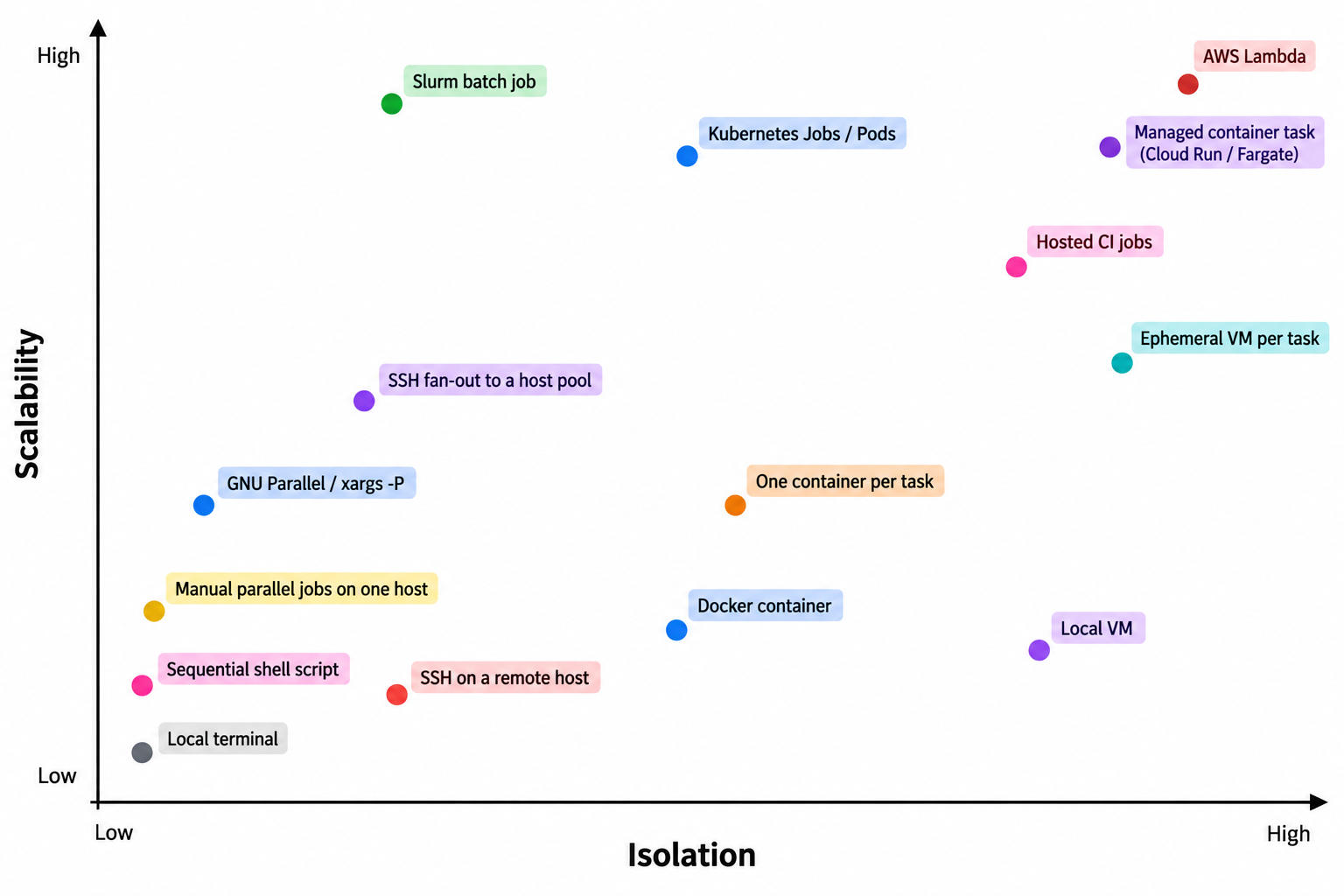
ⓘ This is roughly what the breakdown by axis might look like for various popular command-launching technologies. The axes here aren't strict, so don't take the image too seriously.
Importantly, both parallelism and isolation come at a cost. For example, if you decide to thoroughly isolate a command when running it on your computer by using virtual machines, you’ll need much more memory and time to start executing the command than you would with a “naive” execution of the command. That’s why it’s good to have a choice of different options, so you can select the one that best fits your specific needs and the price you’re willing to pay for it.
Most systems that offer you various ways to execute commands are typically tied to a specific infrastructure—whether physical or software-based—whose position on the two axes described above is fixed. If you want to write your own logic on top of such systems, your code will generally contain duplicate components. And with every new way of executing commands you add, your codebase will become bloated.
throng solves this problem. Various command execution systems are abstracted here into a separate layer that can be easily swapped out for another using the modern pristan plugin system. You can enable the plugin that is most optimal for you in terms of operation cost, while also offering the right balance on the axes of parallelism and execution isolation. Now you don’t need to rewrite or bloat your program when you want to add another way to execute code—just select the appropriate plugin and connect it.
Now it is the plugin's responsibility to determine how much of your code can be executed in parallel and to what extent different executions will be isolated from one another. Your code knows nothing about this—it simply executes commands and receives results. You write compact and powerful programs, isolated from the specifics of execution on distributed systems or virtual machines, debug them locally, and then run them anywhere.
Key concepts
When working with the throng system, you need to understand four key concepts:
- What a plugin is.
- What an isolate is.
- What an isolate manager is.
- How the initial state is handled.
The main idea behind throng is that your main program doesn't “know” exactly how its command will be executed. It simply issues the command and receives the result. Different execution methods are connected as plugins that can be easily installed and removed, and from which you can choose.
Throng provides a special object that you can import and call like a regular function; in pristan terminology, such an object is called a slot. When called, it returns a dictionary whose keys are the names of all available plugins, and whose values are special managers—whose capabilities we’ll explore later. Immediately after installing throng, while no additional plugins have been installed yet, calling the slot will look something like this:
from throng import throng

managers = throng('.')
print(managers)
#> {'local': LocalManager('.'), 'temporary_directory': TemporaryDirectoryManager('.')}
↑ We pass a point as a reference to the current directory, the state of which will serve as the basis for all isolates that are created (you'll learn what these are later).
As you can see, by default, throng comes with two built-in plugins. We’ll take a closer look at them a little later. Let’s retrieve the manager object returned by one of the plugins and explore the features it offers.
manager = managers['local']
All manager objects have a uniform API, which allows them to be used in the same way, making it easy to swap one for another. The manager’s responsibility is to manage the lifecycle of isolates, and its main operations relate specifically to this.
An isolate is a special object responsible for executing commands. Operations related to its lifecycle come from outside; that is, it is always created and destroyed by someone (usually a manager). Thus, responsibility is clearly divided between them: the isolate is responsible only for executing commands, while the manager handles lifecycle issues.
To create an instance of an isolate, use the manager to read the initial state, and then use it to create the isolate::
state = manager.read()
isolate = manager.get(state)
ⓘ In general, a “state” is simply a bunch of bytes, and you have no way of knowing what it actually represents. Each plugin may read the state differently, include different aspects of your system in it, and save it all in a format that works best for it. Never expect a specific data format, and don’t access this state on your own. If you’re interested in this for some reason, study the inner workings of the plugin you’ve chosen.
Once the isolate has been created, you can try running a command in it:
result = isolate.run('ls')
print(result.stdout)
#> LICENSE
#> README.md
#> docs
#> pyproject.toml
#> requirements_dev.txt
#> tests
#> throng
#> venv
↑ Just in case: The author ran this command in the throng project directory; the output of the
lscommand may be different for you.
When we no longer need a specific isolate, you must destroy it by calling its kill() method:
isolate.kill()
It may be necessary to destroy isolates to conserve resources if those resources were specifically allocated for that isolate. For example, if an isolate abstracts a virtual machine from you, the memory and other resources allocated to it will remain occupied until you destroy the isolate. The specific details of what needs to be done to free up the occupied resources are abstracted from your code and are entirely determined by the internal workings of the connected plugin.
However, determining the lifecycle of isolates “manually” can be too tedious, so you might find it more convenient to use a context manager for this:
with manager.scope as isolate:
    isolate.run('touch x.txt')
    isolate.run('touch y.txt')
    isolate.run('touch z.txt')
    print(isolate.run('ls').stdout)
#> LICENSE
#> README.md
#> docs
#> pyproject.toml
#> requirements_dev.txt
#> tests
#> throng
#> venv
#> x.txt
#> y.txt
#> z.txt
As you can see, in the example above, there was no need to destroy the isolate; it was destroyed automatically after exiting the code block where its commands were executed.
However, in some cases, even creating a context is an unnecessary complication. You may need an isolate simply to execute a command within it and get the result. In this case, instead of creating an isolate, you can pass the command directly to the manager, which will create an instance of the isolate “behind the scenes” specifically for that command, pass the command to it, destroy the isolate, and return the command to you:
print(manager.run('ls').stdout)
#> LICENSE
#> README.md
#> docs
#> pyproject.toml
#> requirements_dev.txt
#> tests
#> throng
#> venv
#> x.txt
#> y.txt
#> z.txt
Generally, creating a new isolate for each command is costly, since the operations involved in reading the state and creating isolates can be expensive. Do this only if you are certain that you do not plan to reuse this environment.
Now that you know all the necessary basic concepts, read on to learn the details of working with throng — such as how the built-in plugins work or how to create your own.
Isolates and command execution
As you may have read above, isolates are created by the selected manager and are responsible for one thing: executing commands. Your code should not expect a specific way in which a command will be executed, but it can pass commands to the isolate and receive the result in the specified format.
As a reminder, to obtain an isolate, you need to ask the manager to get the state and then, based on that state, request the isolate object from it:
from throng import throng

managers = throng('.')
manager = managers['temporary_directory']
state = manager.read()
isolate = manager.get(state)
A command that can be passed to an isolate is a string, usually containing Bash code; however, the specific string format accepted and its interpretation are the responsibility of the particular plugin. You must understand and expect that plugins may represent completely different internal structures of isolation environments—in some cases, your commands may be executed locally, while in others they may be executed on remote server farms running an unknown operating system designed for cluster computing. Your code cannot expect a precisely guaranteed output from commands, and it is recommended that it double-check the results of command execution.
As a result of executing any command, you will receive a special object that must contain the following fields:
success(bool) - a flag indicating whether the command was executed successfully.returncode(int | None) - the return code of the executed command, orNoneif the command did not even begin execution for some reason.stdout(str | None) - the program's standard text output, orNoneif the command was not executed.stderr(str | None) - the standard error stream, orNoneif the command was not executed.
The availability of these fields is guaranteed, and you can base your code on them. Individual plugin implementations may add their own fields to this list, but you should not expect anything else in your programs.
In addition to the command, you can pass one more thing to the isolator—a cancellation token from the cantok library. A token is a special object that allows the isolator to know when to stop executing the command. It might look something like this:
from cantok import TimeoutToken

print(isolate.run('python -c "import time; time.sleep(1000)"', token=TimeoutToken(0.1)))
#> SubprocessResult(id='01fcdbacb6d911f1808df6817fdcabf4', stdout='', stderr='', returncode=-9, killed_by_token=True)
Cancelling a token does not guarantee that the team in the isolate will stop working early; it simply requests that they do so. Whether or not to respond to such a request is the plugin’s responsibility. Do not base your code on the expectation that isolates will always read the token’s status.
If you need to execute not just one command but a whole series of them, it is recommended that you use the chain() method:
print(
    isolate.chain(
        'touch x.txt',
        'touch y.txt',
        'touch z.txt',
    )
)
#> [SubprocessResult(id='4f0e1a3eb75411f18829f6817fdcabf4', stdout='', stderr='', returncode=0, killed_by_token=False), SubprocessResult(id='4f10c432b75411f18829f6817fdcabf4', stdout='', stderr='', returncode=0, killed_by_token=False), SubprocessResult(id='4f115172b75411f18829f6817fdcabf4', stdout='', stderr='', returncode=0, killed_by_token=False)]
When you no longer need a particular isolate, call its kill() method:
isolate.kill()
Do not attempt to call a command in an isolate that has been destroyed — this may cause an exception. The execution time of the method when it is called is not guaranteed—there may be a network call or some other resource-intensive operation happening behind the scenes. However, plugin authors are advised to make this operation fast.
With some "expensive" isolates, it may be important to you that they do not remain in a suspended state if, for example, your code "forgot" to destroy the isolate, or if it terminated abnormally without having had time to release resources. throng does not provide such guarantees, as they depend on the specific infrastructure used to run the commands. Check the documentation for the specific plugin to see if this kind of problem could arise in its infrastructure and how it is recommended to resolve it.
Managers
The primary task of managers is to create isolates and, in some cases, to manage their subsequent lifecycle. By regulating the creation of isolates, a manager effectively regulates parallelism as well. In other words, the isolate is responsible for isolation, and the manager is responsible for parallelism.
How does this work? For example, a manager might maintain a pool of executables behind the scenes, and a new isolate will be created only when space becomes available in that pool. When your code requests a new isolate, the manager may “hang” until the necessary resources become available. The manager may also maintain a mutex or semaphore internally to limit local concurrency. In some cases, it may take into account feedback signals from the execution system and adjust its resource requests accordingly. All these details are internal aspects of the manager’s implementation, and that’s where the magic lies: you simply request an isolate from the manager and wait, and it handles everything else.
Unfortunately, execution abstraction comes at a cost. For you as a user, the main drawback of throng may be the unpredictability of wait times for basic operations in your software, since you can’t tell for sure whether a command is executed immediately via a local subprocess or is sent to a data center on the other side of the globe.
Although we’ve already shown above how to obtain a manager and how to use it, we’ll briefly review this in this section so that everything related to managers is covered here. Essentially, there are two ways to use throng:
- Query individual isolate objects and work with them — let’s call this the "open" method.
- Passing commands directly to the manager without retrieving the isolates for them — let’s call this the "closed" method, since the isolates remain hidden from you.
Let's get a manager object for further demonstrations:
from throng import throng

managers = throng('.')
manager = managers['local']
Here's what the open option looks like:
state = manager.read()
isolate = manager.get(state)
isolate.run('ls')
And here's the closed one:
manager.run('ls')
The chain() method, which executes a series of commands at once, can also be used in both open and closed modes. The open mode is called from an isolate:
isolate.chain(
    'touch x.txt',
    'touch y.txt',
    'touch z.txt',
)
And the closed way is called directly from the manager:
manager.chain(
    'touch x.txt',
    'touch y.txt',
    'touch z.txt',
)
As you can see, the open and closed approaches aren’t all that different. So which one should you choose? For simple scenarios, the closed approach is almost always preferable: it allows you to focus on your logic without having to worry about isolator management. The open approach is intended for exceptional situations, such as when, for some reason, the lifecycle of an isolate becomes long and the logic for working with it becomes complex and nonlinear. For example, if your code frequently reloads a saved state instead of reading the current state each time.
Plugins
The main feature of throng is that it doesn’t force you to use any specific method for executing commands, with all its advantages and limitations. You have the freedom to choose. This is made possible by the powerful pristan plugin system.
Throng includes two basic plugins:
- A plugin for running commands locally.
- A plugin for running commands in temporary directories.
Don’t expect too much from these plugins. They are designed to run commands directly on your computer—without sophisticated isolation methods, without the ability to scale to a computing cluster, and so on. They serve as placeholders until a user of your program finds a better plugin, as well as for testing your logic that works with throng.
The local execution plugin runs commands directly in the directory you specify:
from throng import throng

managers = throng('.')
manager = managers['local']

print(manager.run('ls').stdout)
#> LICENSE
#> README.md
#> docs
#> pyproject.toml
#> requirements_dev.txt
#> tests
#> throng
#> venv
With the open method of accessing isolates, both reading the current directory and “recreating” an isolate from it are fake operations. These operations simply transfer an empty set of bytes. This is fast, but it’s not secure, because any changes you make alter your main set of files in the specified directory, rather than the copy you specifically created for experiments.
The plugin that uses temporary directories does almost the same thing, but when each isolate is created, the following actually happens: all files in the current directory (and this is important: only files, not empty directories or symlinks) are packed into a tar archive; then a temporary directory with a random name is created on your computer; and finally, the archive is extracted there. When the isolate is destroyed, the entire directory that was created is deleted. Commands are executed via subprocesses, which are passed the path to the temporary directory for command execution.
You can retrieve the manager from the plugin that handles temporary directories using the 'temporary_directory' key:
managers = throng('.')
manager = managers['temporary_directory']
As you can see, the built-in plugins are very limited, and they will almost certainly not be enough for you, so you can install additional ones. Any Throng plugin is simply a Python package that can be installed via pip or uv and is packaged in a specific way using Pristan. In other words, all you need to install a plugin is a command like this:
pip install plugin-name
Once the package is installed, it will automatically be available in your code for you to select and execute commands within it:
managers = throng('.')
print(managers)
#> {'local': LocalManager('.'), 'temporary_directory': TemporaryDirectoryManager('.'), 'plugin_name': ThirdPartyManager('.')}

manager = managers['plugin_name']
Once you've installed the plugin and loaded it into your code, you can use it just like any of the built-in plugins. For information on the features of third-party plugins—such as the degree of command isolation or the level of parallelism—please refer to the documentation included with the plugin.
1 maintainer

Release files for throng 0.0.3
For a detailed explanation of source distributions (sdists) and built distributions (wheels), please see the package formats documentation.
Source distribution (sdist)
| File | Size | Uploaded | |
|---|---|---|---|
| throng-0.0.3.tar.gz | 23.5 kB | Details |
Built distribution (wheel)
| File | Interpreter | ABI | Platform | Reset |
|---|---|---|---|---|
| throng-0.0.3-py3-none-any.whl | Python 3 | none | any | Details |
Total release size: 42.2 kB
Release files / throng-0.0.3.tar.gz
| Download URL | throng-0.0.3.tar.gz |
|---|---|
| Size | 23.5 kB |
| Tags | Source |
|
SHA-256 checksum How to use checksums |
e52e96a3b0670a96026ddbf8cdfd0eb86afee303800f89251d990109d357063d
|
|
BLAKE2b-256 checksum How to use checksums |
57a5491ea5e7037f100da39c51f6b18f4f6441251aaa62b59d46fd80cfdcfc88
|
| Upload date | |
|
Uploaded using Trusted Publishing? What is trusted publishing? |
Yes |
| Uploaded via |
twine/7.0.0 CPython/3.13.14
|
Provenance
Provenance describes where a file came from. On PyPI, provenance is shared via attestations, which provide a verifiable record of the build or publishing details. View details, limitations and caveats.


PyPI Publish Attestation
PyPI verified that this artifact, at this checksum, originated from the publisher listed below.
Signed by GitHub Actions, verified by PyPI on Sep 25, 2026.
Transparency logRelease files / throng-0.0.3-py3-none-any.whl
| Download URL | throng-0.0.3-py3-none-any.whl |
|---|---|
| Size | 18.6 kB |
| Tags | Python 3 |
|
SHA-256 checksum How to use checksums |
1249f258e73baf58e38754e1bd05cc29c176fef30525bc9fed8ff66ae3ce7663
|
|
BLAKE2b-256 checksum How to use checksums |
e5b3a29b977780498ea53aec9cd3ca42fb24801b1dc2d22713659ba6f9ddd5eb
|
| Upload date | |
|
Uploaded using Trusted Publishing? What is trusted publishing? |
Yes |
| Uploaded via |
twine/7.0.0 CPython/3.13.14
|
Provenance
Provenance describes where a file came from. On PyPI, provenance is shared via attestations, which provide a verifiable record of the build or publishing details. View details, limitations and caveats.
PyPI Publish Attestation
PyPI verified that this artifact, at this checksum, originated from the publisher listed below.
Signed by GitHub Actions, verified by PyPI on Sep 25, 2026.
Transparency log













