
throttlecheck
Your speed test says 400 Mbps. So why does Netflix buffer? Speed tests measure the one server your ISP knows you're testing with. throttlecheck downloads from Netflix's own video servers, a public video stream and the big download CDNs, side by side with a neutral control, and shows you which ones your internet provider is holding back.
uvx throttlecheck
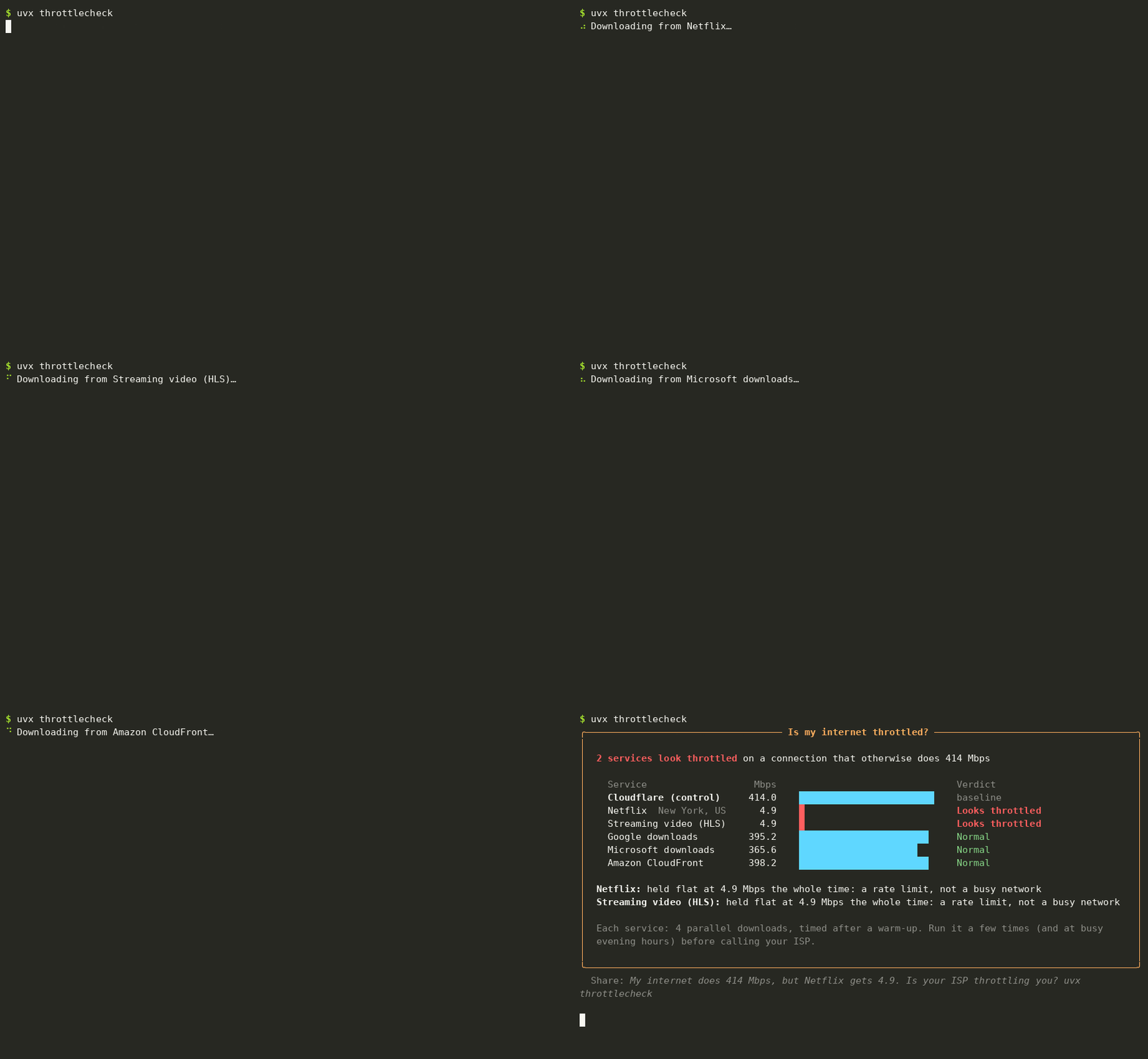
Demo with made-up results, generated by docs/demo.py.
What it tests
| Where the bytes come from | |
|---|---|
| Control | Cloudflare's speed-test server |
| Netflix | Netflix's Open Connect video servers, the same machines that stream your shows (handed out by fast.com) |
| Streaming video | the segments of a public HLS video stream on Apple's CDN, fetched like a player would |
| Google, Microsoft, Amazon | large public downloads from each company's CDN |
Each one gets 4 parallel downloads for 8 seconds; the first 1.5 seconds are ignored while connections speed up. The control runs first and last, and the faster of the two is the baseline.
How it decides
- Looks throttled: under 25% of the control, or under 60% and flat. A rate limiter holds speed at one number (mobile carriers like 1.5, 3 or 5 Mbps for video); a busy network goes up and down.
- Slower: under 60% of the control without the flat line. Could be throttling, could just be a server further away.
- Normal: everything else.
Throttling is usually by time of day or by plan, so run it a few times, including at busy evening hours, before calling your ISP. Mobile hotspots and "unlimited" phone plans are where you're most likely to see it.
Options
throttlecheck                       # everything
throttlecheck --only netflix        # control + Netflix
throttlecheck --seconds 15          # longer, steadier measurements
throttlecheck --streams 8           # more parallel connections (fast fiber)
throttlecheck --json                # for scripts and cron
A full run downloads a few hundred megabytes on a fast connection; mind your data cap on mobile.
Install
uvx throttlecheck           # run without installing
pipx install throttlecheck  # or install it
Requires Python 3.9+. The only dependency is rich. macOS, Linux and Windows.
License
MIT
1 maintainer

Metadata
1 maintainer
Release files for throttlecheck 0.1.0
For a detailed explanation of source distributions (sdists) and built distributions (wheels), please see the package formats documentation.
Source distribution (sdist)
| File | Size | Uploaded | Provenance | Actions |
|---|---|---|---|---|
| throttlecheck-0.1.0.tar.gz | 10.3 kB | With provenance | Details for throttlecheck-0.1.0.tar.gz |
Built distribution (wheel)
| File | Interpreter | ABI | Platform | Actions Reset |
|---|---|---|---|---|
| throttlecheck-0.1.0-py3-none-any.whl | Python 3 | none | any | Details for throttlecheck-0.1.0-py3-none-any.whl |
Total release size: 20.7 kB
Release files / throttlecheck-0.1.0.tar.gz
| Download URL | throttlecheck-0.1.0.tar.gz |
|---|---|
| Size | 10.3 kB |
| Tags | Source |
|
SHA-256 checksum How to use checksums |
f66cb24c179c5ef300f7fca3eee7977670a2eaea508fc46cbb0a549c98a93ff5
|
|
BLAKE2b-256 checksum How to use checksums |
a778114eb1a5342a9100b6ab6b11ca512a0b047b137202108c3eab0431fd000f
|
| Upload date | |
|
Uploaded using Trusted Publishing? What is trusted publishing? |
Yes |
| Uploaded via |
twine/7.0.0 CPython/3.13.16
|
Provenance
Provenance describes where a file came from. On PyPI, provenance is shared via attestations, which provide a verifiable record of the build or publishing details. View details, limitations and caveats.


PyPI Publish Attestation
PyPI verified that this artifact, at this checksum, originated from the publisher listed below.
Signed by GitHub Actions, verified by PyPI on Nov 10, 2026.
Transparency logRelease files / throttlecheck-0.1.0-py3-none-any.whl
| Download URL | throttlecheck-0.1.0-py3-none-any.whl |
|---|---|
| Size | 10.3 kB |
| Tags | Python 3 |
|
SHA-256 checksum How to use checksums |
9f2940c7e89592382f7c0de06905308cbc404721ea626126bc59344ab16db262
|
|
BLAKE2b-256 checksum How to use checksums |
1090d2e9eec47a5c9b622f3fe04963e0582118c53c9ba8ce9bdc8becda397968
|
| Upload date | |
|
Uploaded using Trusted Publishing? What is trusted publishing? |
Yes |
| Uploaded via |
twine/7.0.0 CPython/3.13.16
|
Provenance
Provenance describes where a file came from. On PyPI, provenance is shared via attestations, which provide a verifiable record of the build or publishing details. View details, limitations and caveats.
PyPI Publish Attestation
PyPI verified that this artifact, at this checksum, originated from the publisher listed below.
Signed by GitHub Actions, verified by PyPI on Nov 10, 2026.
Transparency logSecurity for throttlecheck 0.1.0
Provenance
Provenance describes where a file came from. On PyPI, provenance is shared via attestations, which provide a verifiable record of the build or publishing details. View details, limitations and caveats.
Full provenance
Both files in this release have been uploaded with provenance metadata.
Attestation for throttlecheck-0.1.0.tar.gz
PyPI Publish Attestation
PyPI verified that this artifact, at this checksum, originated from the publisher listed below.
Signed by GitHub Actions, verified by PyPI on Nov 10, 2026.
Transparency logA note on package security
PyPI is a repository for distributing packages, not a service for auditing them. While third-party security researchers and our staff do their best to detect and remove malicious packages, PyPI cannot guarantee the quality, security or suitability of any given package.
To learn more about protecting yourself from malicious actors, visit our package security documentation.













