
Python application that can be used to generate video thumbnail for mp4 and mkv file types.
Verified details
These details have been verified by PyPIProject links
GitHub Statistics
Maintainers

Project description
Thumbnail Generator 🎬





What is This
This is a Python application that can be used to generate video thumbnail for mp4 and mkv file types.
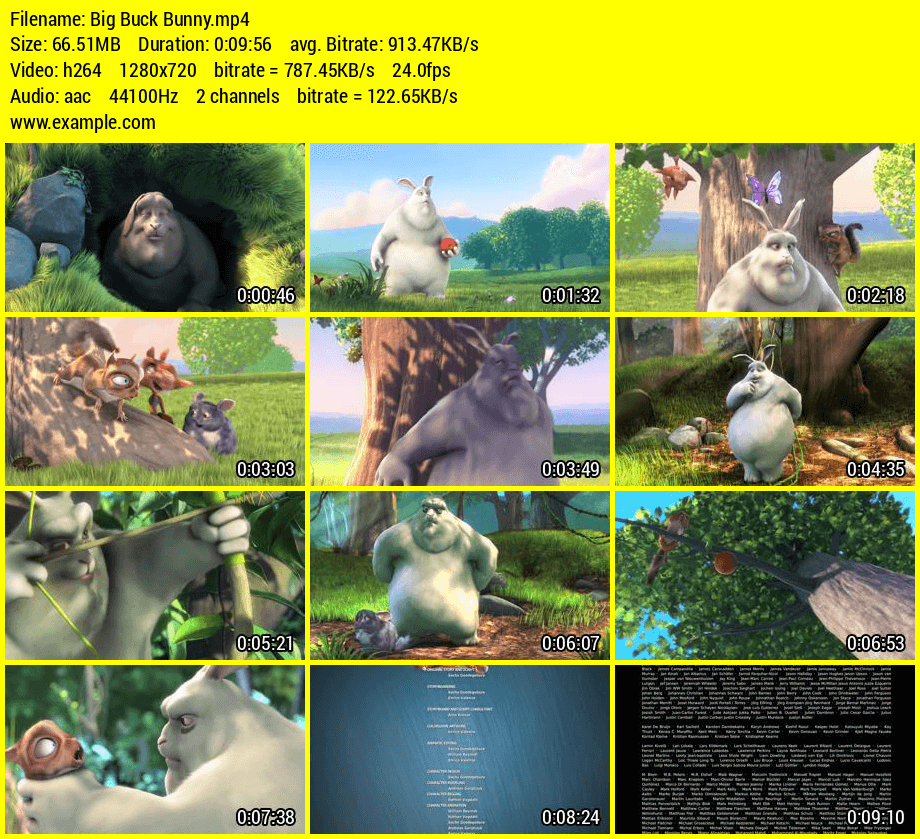
Installation
You can use pip:
~$ pip3 install thumb-gen
Configurations
- The number of screen images that should be included in the final thumbnail image
- Thumbnail image quality
- Font type in the video info panel. You can add a file path of a font file (.ttf) to this
- Font size in the video info panel
- Custom text in the video info panel
- Background color of the thumbnail (Hex codes are also supported)
- Font colour of the thumbnail (Hex codes are also supported)
Download font files : FontSquirrel
~$ thumb-gen -c
or
~$ thumb-gen --config
By program default:
IMAGES = 12
IMAGE_QUALITY = 80
FONT =
FONT_SIZE = 20
CUSTOM_TEXT =
BG_COLOUR = white
FONT_COLOUR = black
Usage
Usage options
Usage: thumb-gen file file
usage: thumb-gen dir dir

Options:
  -h, --help     show this help message and exit
  -c, --config   configurations (images, image quality, font, font size,
                 custom text, bg color, font color)
  -v, --version  show thumb-gen version and exit
Console
~$ thumb-gen -h
~$ thumb-gen --help

~$ thumb-gen -c
~$ thumb-gen --config

~$ thumb-gen -v
~$ thumb-gen --version

~$ thumb-gen input.mp4
~$ thumb-gen input.mp4 input2.mp4
~$ thumb-gen "d:/videos/input.mp4"

~$ thumb-gen "/videos"
~$ thumb-gen "/videos" "/videos2"
~$ thumb-gen "d:/videos"
Python
- If you don't set an output folder, thumbnail images will be saved in the video folder (video_path).
- If you don't need a custom text and custom font file (including font size) and you have already set these for the configuration file (using console or defaults), it will be added automatically. To avoid this set the
custom_textvalue toFalseand add a custom font file location. - If you do not set the
columnssize, it will use the default value (3)
Generator(video_path, output_path='', rows=0, columns=0, imgCount=0, custom_text='True', font_dir='', font_size=0, bg_colour='', font_colour='')
Example 1
from thumb_gen import Generator

app = Generator(video_path="C:/input/video.mp4",
                output_path="C:/output/",
                custom_text="www.example.com",
                font_dir="C:/Windows/Fonts/Arial.ttf",
                font_size=30)
app.run()
Example 2
import os
from thumb_gen import Generator

folder = 'C:/input'
for video in os.listdir(folder):
    if video.endswith('.mp4') or video.endswith('.mkv'):
        app = Generator(video_path=os.path.join(folder, video),
                        custom_text=False,
                        font_dir="C:/Project/font.ttf",
                        font_size=25,
                        bg_colour='blue',
                        font_colour='red')
        app.run()
Example 3
import os
from thumb_gen import Generator

folder = 'C:/input'
for video in os.listdir(folder):
    if video.endswith('.mp4') or video.endswith('.mkv'):
        app = Generator(video_path=os.path.join(folder, video),
                        columns=5,
                        rows=10,
                        custom_text=False,
                        font_dir="C:/Project/font.ttf",
                        font_size=25,
                        bg_colour='blue',
                        font_colour='red')
        app.run()
Project details
Verified details
These details have been verified by PyPIProject links
GitHub Statistics
Maintainers
Release history Release notifications | RSS feed


Download files
Download the file for your platform. If you're not sure which to choose, learn more about installing packages.
Source Distribution
Built Distribution
Filter files by name, interpreter, ABI, and platform.
If you're not sure about the file name format, learn more about wheel file names.
Copy a direct link to the current filters
File details
Details for the file thumb_gen-4.1.0.tar.gz.
File metadata
- Download URL: thumb_gen-4.1.0.tar.gz
- Upload date:
- Size: 87.5 kB
- Tags: Source
- Uploaded using Trusted Publishing? Yes
- Uploaded via: twine/6.1.0 CPython/3.13.7
File hashes
| Algorithm | Hash digest | |
|---|---|---|
| SHA256 |
9d1cd27eb58a99ec4dc8bb1828fb2b9010f5e5eb92ff831ba896cbbcdadd5926
|
|
| MD5 |
efe8794a25664511811dd3aeaa02c467
|
|
| BLAKE2b-256 |
574948f1cee4d64b3961b1d15fe910e88b1c1baa3b5a6a087c3535a9fb51f98d
|
Provenance
The following attestation bundles were made for thumb_gen-4.1.0.tar.gz:
Publisher:
python-publish.yml on truethari/thumb-gen
-
Statement:
-
Statement type:
https://in-toto.io/Statement/v1 -
Predicate type:
https://docs.pypi.org/attestations/publish/v1 -
Subject name:
thumb_gen-4.1.0.tar.gz -
Subject digest:
9d1cd27eb58a99ec4dc8bb1828fb2b9010f5e5eb92ff831ba896cbbcdadd5926 - Sigstore transparency entry: 976496370
- Sigstore integration time:
-
Permalink:
truethari/thumb-gen@dc8aa6a332c2acee719ebf743ace22891193bce9 -
Branch / Tag:
refs/tags/v4.1.0 - Owner: https://github.com/truethari
-
Access:
public
-
Token Issuer:
https://token.actions.githubusercontent.com -
Runner Environment:
github-hosted -
Publication workflow:
python-publish.yml@dc8aa6a332c2acee719ebf743ace22891193bce9 -
Trigger Event:
release
-
Statement type:
File details
Details for the file thumb_gen-4.1.0-py3-none-any.whl.
File metadata
- Download URL: thumb_gen-4.1.0-py3-none-any.whl
- Upload date:
- Size: 85.8 kB
- Tags: Python 3
- Uploaded using Trusted Publishing? Yes
- Uploaded via: twine/6.1.0 CPython/3.13.7
File hashes
| Algorithm | Hash digest | |
|---|---|---|
| SHA256 |
88908708e4e0ed9ca86fbf1b21eb24424746b1899b907ededb414ae75dcb8140
|
|
| MD5 |
358b28026f3db2e34bbac8cbd025fb42
|
|
| BLAKE2b-256 |
bc4d449838e5a92cce8d71d0a1b25cf291484faa6077ece47896f355d87d54be
|
Provenance
The following attestation bundles were made for thumb_gen-4.1.0-py3-none-any.whl:
Publisher:
python-publish.yml on truethari/thumb-gen
-
Statement:
-
Statement type:
https://in-toto.io/Statement/v1 -
Predicate type:
https://docs.pypi.org/attestations/publish/v1 -
Subject name:
thumb_gen-4.1.0-py3-none-any.whl -
Subject digest:
88908708e4e0ed9ca86fbf1b21eb24424746b1899b907ededb414ae75dcb8140 - Sigstore transparency entry: 976496372
- Sigstore integration time:
-
Permalink:
truethari/thumb-gen@dc8aa6a332c2acee719ebf743ace22891193bce9 -
Branch / Tag:
refs/tags/v4.1.0 - Owner: https://github.com/truethari
-
Access:
public
-
Token Issuer:
https://token.actions.githubusercontent.com -
Runner Environment:
github-hosted -
Publication workflow:
python-publish.yml@dc8aa6a332c2acee719ebf743ace22891193bce9 -
Trigger Event:
release
-
Statement type:






