
thumbor-ai-label




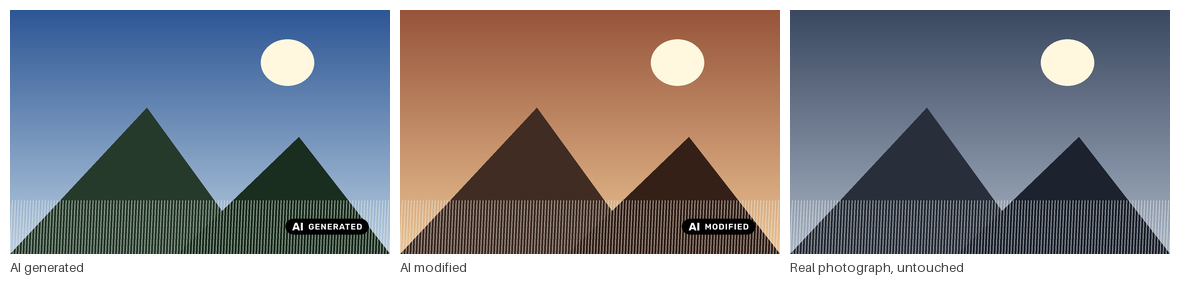
A Thumbor plugin that reads AI provenance metadata from the source image and draws a visible AI label on every generated image style.
📖 Documentation — configuration guide, the Article 50 mapping, and how the internals work.
Pre-1.0. Everything below works and is covered by tests, but the configuration surface may still change.
Why this exists — EU AI Act Article 50
Article 50 has applied since 2 August 2026. Non-compliance carries fines of up to €15 million or 3% of worldwide annual turnover.
The plugin targets Article 50(4), the deployer obligation: anyone publishing a deep fake — AI-generated or manipulated image content that would falsely appear authentic — must disclose that it was artificially generated or manipulated. Article 50(5) requires that disclosure "in a clear and distinguishable manner at the latest at the time of the first interaction or exposure."
A publisher is a deployer, not a provider, and that distinction decides what you owe:
| Article 50(2) — providers | Article 50(4) — deployers | |
|---|---|---|
| Who | Whoever builds and ships the AI system | Whoever publishes the output |
| What | Machine-readable marking | Human-perceptible disclosure |
| Applies to a publisher? | Usually no | Yes |
The Commission is explicit that deployers cannot rely solely on machine-readable markings embedded by providers. The Code of Practice on Transparency of AI-Generated Content asks for a "clearly visible, fixed icon" on images, directly embedded.
A label burnt into every derivative is exactly that: visible, fixed, embedded, present at first exposure, and — because it is composited after every other filter — not removable through URL manipulation.
What it covers, and what it does not
| Requirement | Status |
|---|---|
| Visible, human-perceptible label | ✅ Burnt into every derivative |
| Directly embedded in the image | ✅ Not a CSS overlay a client can drop |
| Present at first exposure | ✅ Every style carries it |
| Survives downstream filtering | ✅ Composited last; blur() cannot erase it |
| Generated vs modified distinguished | ✅ Separate states and icons |
| Official EU icon set | ✅ Bundled — AI_LABEL_ICON_SET = "eu" |
| Icon paired with a text label | ✅ The EU labels read "AI GENERATED" / "AI MODIFIED" |
| Alt text / ARIA for assistive tech | ⚠️ Verdict published on /meta/; your CMS must use it |
| Deciding which images are AI | ⚠️ Only detects what the metadata declares |
It over-labels, deliberately. Article 50(4) covers only deep fakes and exempts evidently creative, satirical or artistic work. The plugin cannot judge realism or intent, so it labels every image whose metadata declares AI involvement. Over-disclosure is the safer direction legally, with an editorial cost you should weigh.
It is only the automated half. The plugin sees what the metadata says. An AI image arriving with its provenance stripped passes through unlabelled. The Code of Practice expects deployers to combine automated detection with human oversight.
This is a technical mapping onto published requirements, not legal advice. Have your own counsel confirm what Article 50 requires of your organisation.
Install
Requires Thumbor 7.8+ and Python 3.10+. Reads JPEG, PNG, WebP and GIF; AVIF and HEIC are not yet supported. The bundled engine wraps Thumbor's PIL engine.
pip install thumbor-ai-label
One key in thumbor.conf is the whole integration:
# Labels every image, with no change to any URL.
APP_CLASS = "thumbor_ai_label.app.AiLabelServiceApp"
No URLs change, no services are added, and your ENGINE setting is left alone — the app
subclasses whichever engine you have configured, so this composes with a custom engine
rather than displacing it. Labelling costs well under a millisecond per request — the
metadata scan never decodes a pixel, and its cost does not grow with image size.
Prefer opt-in per URL instead? Skip APP_CLASS, add thumbor_ai_label.filters.ai_label
to FILTERS, and put ai_label() in the URLs that should carry a label. That setup has no
app to install the hook, so it needs the engine set explicitly:
ENGINE = "thumbor_ai_label.engine" # only for the filter-only setup
If you run your own engine and the filter-only setup, subclass it yourself:
from thumbor_ai_label.engine import AiLabelEngineMixin
from my.engine import Engine as Base


class Engine(AiLabelEngineMixin, Base):
    pass
Verifying it works
tests/images/ holds 24 images covering every detection and policy case,
with a manifest of expected outcomes. Point a file loader at them and request a few — see
its README.
Configuration
Policy — the setting that matters most
AI_LABEL_POLICY decides what happens when nothing asserts how an image was made.
| Situation | strict (default) |
relaxed |
|---|---|---|
| AI asserted | label | label |
| Camera asserted | no label | no label |
| Provenance block present, inconclusive | unknown |
unknown |
| EXIF only, no provenance block | unknown |
no label |
| No metadata at all | unknown |
no label |
The row that decides your deployment is EXIF only. EXIF defines no provenance field,
so an EXIF block asserts nothing either way — and counting it as "metadata present" puts
an unknown label on essentially every camera photograph ever taken. DigitalSourceType
is a young field, so images predating it carry no provenance at all — under strict every
one of them is labelled.
The unknown label has no basis in Article 50. The law obliges you to disclose content
you know is AI, not content whose provenance you cannot establish. strict is a
defensive posture, not a legal requirement, and it may mislead readers in its own way.
Measure before you choose
Both policies are defensible; which suits you depends on what your source images actually carry. Point a second Thumbor at the same source storage and ask it. Meta requests never draw a label, so a measurement instance cannot alter an image even if production traffic reaches it by mistake.
while read -r path; do
  curl -s "http://localhost:8888/unsafe/meta/600x400/$path" \
    | jq -r '.ai_label | if .label == null then "no label" else .label end'
done < paths.txt | sort | uniq -c | sort -rn
Run it under each AI_LABEL_POLICY. Against this project's own 24 fixtures:
| Verdict | strict |
relaxed |
|---|---|---|
ai_generated |
12 | 12 |
ai_manipulated / ai_composite |
1 / 1 | 1 / 1 |
unknown |
6 | 3 |
| no label | 4 | 7 |
Three images move — the ones carrying only EXIF, or no metadata at all. Across real source images that gap is far wider, and it is the whole decision.
Worth counting too: how often labelled is false while label is set. Those are images
the plugin identified but which are too small to carry a visible mark, so the disclosure
your CMS writes is the only one a reader gets.
while read -r path; do
  curl -s "http://localhost:8888/unsafe/meta/120x80/$path" \
    | jq -r '.ai_label | select(.label != null) | .labelled | tostring'
done < paths.txt | sort | uniq -c
If a second instance is impractical, setting AI_LABEL_MIN_IMAGE_SIZE above any image you
serve gives byte-identical output to the plugin being off while detection still runs. Do
not leave it in place: it reads like a fat-fingered threshold, and a compliance tool that
looks enabled while marking nothing is worse than one that is plainly off.
AI_LABEL_OPACITY = 0 looks equivalent and is not — it reports labelled: true while
drawing nothing.
Detectors
Selected and ordered by config, resolved through the thumbor_ai_label.detectors entry
point group, so a deployment can add its own — a DAM lookup, a house heuristic — without
forking.
AI_LABEL_DETECTORS = ["iptc", "exif"]
iptc — the primary signal
Reads IPTC DigitalSourceType at HIGH confidence. This is the only signal that is both
standardised and unambiguous: the field exists to state how an image was made, so reading
it is not inference.
Named for the schema, not the carrier — IPTC's provenance fields live in the XMP packet, the way EXIF lives in APP1. Handles the attribute and element forms, arbitrary namespace prefixes, UTF-8/16/32, and Adobe Extended XMP split across segments. It uses no XML parser: the input is attacker-controllable, and hardening a parser against entity-expansion and XXE costs more than a targeted scan that is also faster.
| Term | State |
|---|---|
trainedAlgorithmicMedia |
ai_generated |
compositeWithTrainedAlgorithmicMedia |
ai_composite |
algorithmicallyEnhanced |
ai_manipulated |
digitalCapture, digitalArt, compositeCapture, … |
no label |
| anything unrecognised | unknown |
An unfamiliar term resolves to unknown, never to "not AI". A term this build has not
heard of must not read as a clean bill of health.
exif — the weak fallback
EXIF defines no field that means "this image is AI." Unlike IPTC, nothing in the
specification carries a provenance assertion. What EXIF has is free-text fields that tools
write their own name into: Software, ProcessingSoftware, Make, Model,
ImageDescription, XPComment, and UserComment in the Exif sub-IFD.
So this detector reads standard EXIF tags, not vendor-private MakerNote data. The tags are standard; the matching vocabulary is what is vendor-specific. That is why the verdict is always LOW confidence — an assertion is inferred from a tool name, not read from a field that means what we need it to mean.
Patterns are deliberately narrow. A generic editor — Adobe Photoshop 25.0 — must never
match, because most images through Photoshop are not AI and a false positive labels a real
photograph. Tests pin that for Photoshop, Lightroom, GIMP, darktable and Capture One.
AI_LABEL_MIN_CONFIDENCE gates only the positive AI claim. A not-AI assertion is honoured
at any confidence, because discarding it would push the image into the unknown bucket and
label it — the opposite of what raising the bar was for.
Icon variants
Four sets ship, each covering ai_generated, ai_manipulated, ai_composite and
unknown. NOT_AI has no icon by design: a positively identified photograph gets no
label at all.
AI_LABEL_ICON_SET = "default"  # this plugin's own marks, dark, for light imagery
AI_LABEL_ICON_SET = "default-light"  # the same marks, light, for dark imagery
AI_LABEL_ICON_SET = "eu"  # official EU labels, dark, for light imagery
AI_LABEL_ICON_SET = "eu-white"  # official EU labels, light, for dark imagery
Every set comes in a variant for light imagery and one for dark, so the choice is which family of marks you want, then which way round it reads against your pictures.
The artwork is in ai-labels/ at the repository root, one directory per
set. To build a house style, copy a directory, edit the four PNGs, put it somewhere your
container can reach, and name that directory:
AI_LABEL_ICON_DIR = "/etc/thumbor/icon-sets"
AI_LABEL_ICON_SET = "house-style"
A set needs all four icons, including states you do not draw — ai_generated.png,
ai_manipulated.png, ai_composite.png and unknown.png, even if
AI_LABEL_DRAW_STATES leaves some of them unmarked. A set is validated once when it is
built, so it cannot break later because someone added a state back to that key. Building
one from scratch is where this bites: a DRAW_STATES list naming three states makes three
files look like the whole job, and the set then fails at boot. A placeholder is enough for
a state you never draw.
A set is a subdirectory of AI_LABEL_ICON_DIR holding the same four filenames, so your
own artwork resolves exactly like a bundled set — no rebuild, no bind-mount landing on top
of installed package files. Both keys are plain strings, so both survive a thumbor.conf
rendered from the environment.
While AI_LABEL_ICON_DIR is set, the bundled names do not resolve. Sets are looked up
there and nowhere else, and AI_LABEL_ICON_SET = "eu" against a directory with no eu/ in
it fails at boot. That is deliberate: a silent fallback would turn a typo in a house-style
name into this plugin's default marks going out under your byline — a wrong label rather
than a missing one. To use a bundled set again, unset the key, or copy the set into your
directory.
The eu sets are the European Commission's harmonised icons, published 10 June 2026 and
free to use without attribution. Their use is optional; the disclosure obligation is
not.
| Official mark | Plugin state |
|---|---|
| AI GENERATED | ai_generated |
| AI MODIFIED | ai_manipulated, ai_composite |
| (none — see below) | unknown |
ai_composite maps to AI MODIFIED because a composite containing AI elements is
exactly "pre-existing human-made content partially modified with AI".
unknown never draws an official EU mark. Those marks assert that content is AI.
Using one on an image whose provenance merely could not be established would make a claim
the evidence does not support, so that state keeps this plugin's own neutral icon.
Labels are not assumed to be square — the EU marks are icon-plus-text lockups around 3:1, so size settings describe height and width follows the icon. Per-state overrides, for swapping one mark rather than a whole set:
AI_LABEL_ICONS = {"ai_generated": "/etc/thumbor/icons/house-style.png"}
Overrides are validated and decoded once at startup, so a missing or corrupt path fails
loudly rather than becoming a broken image mid-request. A value that is not a path — "",
None, False — is rejected too; to leave a state unmarked, use AI_LABEL_DRAW_STATES
below.
The Commission notes that use of these icons by non-signatories of the Code of Practice "should not be construed as signaling of their adherence to the code", and that signatories must follow its placement specifications.
Which states get a mark
By default all four states draw. AI_LABEL_DRAW_STATES narrows that to the states you
want burnt into the pixels:
AI_LABEL_DRAW_STATES = ["ai_generated", "ai_manipulated", "ai_composite"]
That is the common case: mark what a detector positively identified as AI, and leave
unknown — provenance that could not be established — unmarked. unknown is this
plugin's fail-closed hedge, not an AI claim, and a publisher may reasonably decide it does
not warrant a mark on the image itself.
A state left out is still detected and still published. Only the drawing stops. The
/meta/ payload carries the verdict as before with "labelled": false, exactly as it does
for an image below AI_LABEL_MIN_IMAGE_SIZE:
{"label": "unknown", "reason": "inconclusive", "labelled": false,
 "disclosure": "Image provenance could not be established"}
For a suppressed state, the DOM disclosure becomes the only one. The label a CMS
writes from /meta/ is the entire disclosure the image carries. Narrowing this key is a
decision about your obligations under Article 50(4), so it is announced in the log at
startup.
An empty list — AI_LABEL_DRAW_STATES = [] — is a valid "meta only" mode: detection runs,
verdicts are published, no pixels are touched. Use AI_LABEL_ENABLED = False if you want
detection off as well.
Narrowing this key does not shrink the icon set. A house set still needs all four PNGs, including the states this list leaves out — see icon variants.
Two things this key is not for. Setting an icon override to "", None or False
does not suppress a state; it is rejected at startup, because a map of paths holds paths.
And not_ai is not a valid entry — a positively identified photograph never had a mark to
suppress.
Because the value is a list of plain strings, it also survives being passed through the
environment: AI_LABEL_DRAW_STATES=ai_generated,ai_manipulated is read as a
comma-separated list, which AI_LABEL_ICONS cannot be.
The meta endpoint
The verdict is published on Thumbor's /meta/ endpoint under a top-level ai_label key.
This is how a CMS obtains the verdict to write alt text or an ARIA label, which is what
Article 50(5) accessibility asks for and what a label burnt into pixels cannot provide.
GET /unsafe/meta/600x400/photo.jpg
{
  "thumbor": { "source": {}, "operations": [], "target": {} },
  "ai_label": {
    "label": "ai_generated",
    "reason": "ai_asserted",
    "policy": "strict",
    "labelled": true,
    "disclosure": "AI generated"
  }
}
labelled is the field that matters. It says whether an image request at those
dimensions would actually carry a visible mark. Below AI_LABEL_MIN_IMAGE_SIZE nothing is
drawn, so {"label": "ai_generated", "labelled": false} means the image is AI but the
pixels do not say so — and the disclosure you write into the DOM is the only one.
disclosure is English by default and overridable per state via
AI_LABEL_META_DISCLOSURES. Consumers wanting full control should map the
machine-readable label themselves.
Diagnostics — detector, confidence, evidence, generator — appear only with
AI_LABEL_META_VERBOSE = True. evidence can carry a fragment of a generation prompt read
out of EXIF UserComment, and this endpoint is publicly reachable.
Reference
| Key | Default | Meaning |
|---|---|---|
AI_LABEL_ENABLED |
True |
Master switch |
AI_LABEL_DETECTORS |
None |
Ordered detector names; None uses the default order |
AI_LABEL_POLICY |
"strict" |
strict or relaxed |
AI_LABEL_MIN_CONFIDENCE |
"low" |
Lowest confidence that may raise an AI label |
AI_LABEL_ICON_DIR |
None |
Directory of icon sets; None uses the bundled artwork |
AI_LABEL_ICON_SET |
"default" |
default, default-light, eu, eu-white, or a set in AI_LABEL_ICON_DIR |
AI_LABEL_ICONS |
{} |
Per-state icon path overrides; win over the set |
AI_LABEL_DRAW_STATES |
None |
States that get a visible mark; None draws all four |
AI_LABEL_OPACITY |
100 |
Label opacity, 0–100 |
AI_LABEL_POSITION |
"bottom-right" |
Corner, or center |
AI_LABEL_SIZE_RATIO |
0.14 |
Label height as a fraction of the shorter edge |
AI_LABEL_MIN_SIZE / MAX_SIZE |
20 / 96 |
Height clamps, in pixels |
AI_LABEL_MIN_IMAGE_SIZE |
120 |
Below this shorter edge, no label |
AI_LABEL_MARGIN_RATIO |
0.04 |
Margin as a fraction of the shorter edge |
AI_LABEL_MIN_MARGIN |
3 |
Smallest margin, in pixels |
AI_LABEL_STRICT_ERRORS |
False |
Make labelling failures fatal instead of logged |
AI_LABEL_META |
True |
Publish the verdict on /meta/ |
AI_LABEL_META_VERBOSE |
False |
Include detector, confidence, evidence, generator |
AI_LABEL_META_DISCLOSURES |
None |
Per-state disclosure strings; None uses English |
Sizes track the shorter edge, so a label carries the same visual weight on a panorama
as on a square crop. Images below AI_LABEL_MIN_IMAGE_SIZE get no label: on a 64 px
thumbnail it is an unreadable smudge that costs bytes and tells the viewer nothing.
Known constraints
Thumbor strips provenance metadata from every derivative. It has no XMP support of any
kind, and PRESERVE_EXIF_INFO defaults to False. The label this plugin draws is
therefore the only surviving signal on the output image.
This is a property of the deployment, not a gap in the plugin, and it does not affect your Article 50(4) position — that is a human-perceptible obligation, which the label satisfies. Machine-readable marking under 50(2) binds the provider of the AI system, not a publisher redistributing its output. The plugin is deliberately read-only: it reads metadata to decide which label to show, and never writes.
Accessibility needs your CMS to cooperate. A label burnt into pixels is invisible to a
screen reader, and Thumbor does not control the surrounding HTML. The plugin closes its
half by publishing the verdict on /meta/; something has to read it and write the markup.
USE_GIFSICLE_ENGINE means GIFs get no visible mark. Thumbor's gifsicle engine holds
no image in memory — it delegates every operation to the binary — so there is nothing to
composite a label onto. Detection still runs and the verdict is still published, with
"labelled": false, which makes the /meta/ disclosure the only one those images carry.
It is logged once per engine rather than per request, and is not treated as a failure. On
the default PIL engine GIFs are labelled, every frame of an animation included.
Result storage caches labelled derivatives. A policy change will not reach already-cached images without invalidation.
No real-world AI images have been tested. Every fixture is synthetic. See CONTRIBUTING.md — this is the most useful gap you could help close.
Contributing
See CONTRIBUTING.md, and SECURITY.md for reporting a vulnerability privately. Contributions are Apache-2.0 by submission and there is no CLA.
The most useful contribution is not a patch: it is a real image from a real AI tool whose provenance this reads wrongly. Every fixture here is synthetic, and that limit has already hidden one genuine bug.
python -m venv .venv && .venv/bin/pip install -e '.[dev,thumbor]'
.venv/bin/python -m pytest --cov=thumbor_ai_label --cov-report=term-missing
Versions come from git tags via setuptools-scm; there is no version string to edit.
Release by tagging:
git tag v0.1.0 && git push --tags
That runs the full test matrix, builds, and creates the GitHub Release automatically. The PyPI upload waits for a maintainer to approve it, because PyPI is append-only — a version number, once used, cannot be reused.
Sponsoring
This is licensed permissively on purpose. A compliance tool is worth more the more widely it is used, and a licence that fenced off commercial users would have fenced off almost everyone who actually runs Thumbor.
That leaves development unfunded, so: if you run this in a commercial product — and particularly if you offer AI labelling as a feature your customers pay for — please sponsor its development. It is a request, not a licence condition; nothing is enforced and nothing is withheld from anyone who does not.
Licence
Apache License 2.0 — see LICENSE.
Use it for anything: private projects, internal tooling, commercial products, hosted services. No fee, no permission needed, no copyleft. Apache-2.0 also grants an express patent licence, which MIT does not, so it is the safer choice for corporate adopters.
Two obligations, both light: keep the licence and copyright notice with any copy you distribute, and state what you changed if you ship a modified version.
Bundled European Commission AI-labelling icons carry the Commission's own terms and are not covered by the above — see THIRD-PARTY.md.
1 maintainer

Metadata
1 maintainer
Release files for thumbor-ai-label 0.4.0
For a detailed explanation of source distributions (sdists) and built distributions (wheels), please see the package formats documentation.
Source distribution (sdist)
| File | Size | Uploaded | |
|---|---|---|---|
| thumbor_ai_label-0.4.0.tar.gz | 1.1 MB | Details |
Built distribution (wheel)
| File | Interpreter | ABI | Platform | Reset |
|---|---|---|---|---|
| thumbor_ai_label-0.4.0-py3-none-any.whl | Python 3 | none | any | Details |
Total release size: 1.5 MB
Release files / thumbor_ai_label-0.4.0.tar.gz
| Download URL | thumbor_ai_label-0.4.0.tar.gz |
|---|---|
| Size | 1.1 MB |
| Tags | Source |
|
SHA-256 checksum How to use checksums |
fb714dbc0c3074fc0b08d438271eea7da57e99d4341e10307ea9d30d93c0390e
|
|
BLAKE2b-256 checksum How to use checksums |
280e21ff0c45fb178ac2ad9b8131284b2161edf14bbdbb213ab2d10b0231e271
|
| Upload date | |
|
Uploaded using Trusted Publishing? What is trusted publishing? |
Yes |
| Uploaded via |
twine/7.0.0 CPython/3.13.14
|
Provenance
Provenance describes where a file came from. On PyPI, provenance is shared via attestations, which provide a verifiable record of the build or publishing details. View details, limitations and caveats.


PyPI Publish Attestation
PyPI verified that this artifact, at this checksum, originated from the publisher listed below.
Signed by GitHub Actions, verified by PyPI on Sep 8, 2026.
Transparency logRelease files / thumbor_ai_label-0.4.0-py3-none-any.whl
| Download URL | thumbor_ai_label-0.4.0-py3-none-any.whl |
|---|---|
| Size | 421.9 kB |
| Tags | Python 3 |
|
SHA-256 checksum How to use checksums |
384274bc5219ddccc100f080dc1d734f9ce6f756e06c9b0f819112f429083da5
|
|
BLAKE2b-256 checksum How to use checksums |
50e1f30983d25a072f5be4722b42add423dcc60e4c1a3d64ec650fdc341179e9
|
| Upload date | |
|
Uploaded using Trusted Publishing? What is trusted publishing? |
Yes |
| Uploaded via |
twine/7.0.0 CPython/3.13.14
|
Provenance
Provenance describes where a file came from. On PyPI, provenance is shared via attestations, which provide a verifiable record of the build or publishing details. View details, limitations and caveats.
PyPI Publish Attestation
PyPI verified that this artifact, at this checksum, originated from the publisher listed below.
Signed by GitHub Actions, verified by PyPI on Sep 8, 2026.
Transparency log













