
CLI tool for codebase indexing and natural language retrieval.

Project description
codebase-intelligence
🧩 Tibo – a powerful command-line tool designed to index your codebase, generate call graphs, and chunk code into a vector database. With tibo, you can query your codebase using natural language and retrieve contextually relevant files, functions, and code snippets effortlessly.
Features
- Codebase Indexing: Scans and organizes your project for easy querying.
- Call Graph Generation: Maps relationships between functions and files.
- Vector Database: Embeds code chunks for fast, intelligent retrieval.
- Natural Language Queries: Ask questions about your code in plain English.
- Context-Aware Results: Returns relevant files and snippets with added context from the call graph.
Installation
Get started with tibo by installing:
pip install tibo
Find the latest version and additional details on the PyPI project page.
Usage
Follow these steps to integrate tibo into your workflow:
- Configure the Tool - Set up tibo with your OpenAI API key:
tibo config
- Index Your Project - Navigate to your project directory and index your codebase:
cd /path/to/your/project
tibo index
Note: This creates a .tibo folder in your project root to store indexed data, call graphs, and vector embeddings.
- Query Your Codebase - Fetch relevant context by asking questions in natural language:
tibo fetch "my query to the codebase"
Results include the most relevant file names and code chunks. Full output is saved in .tibo/query_output/query_output.json.
- NEW Interact with Tibo Agent - chat with the ai agent to understnad the codebase better and get help with implementing new features:
tibo agent
NOTE: requires running tibo config and adding ANTHROPIC_API_KEY when prompted. The agent can use the tibo fetching tools if you have run 'tibo index' before. In the shell:
- type 'exit' or 'quit' to quit the agent shell
- type '#' followed by a command to execute a command directly in your terminal
- type 'reset' to reset the conversation history
How It Works
Configuration: Link Tibo to your OpenAI API for LLM-powered enhancements.
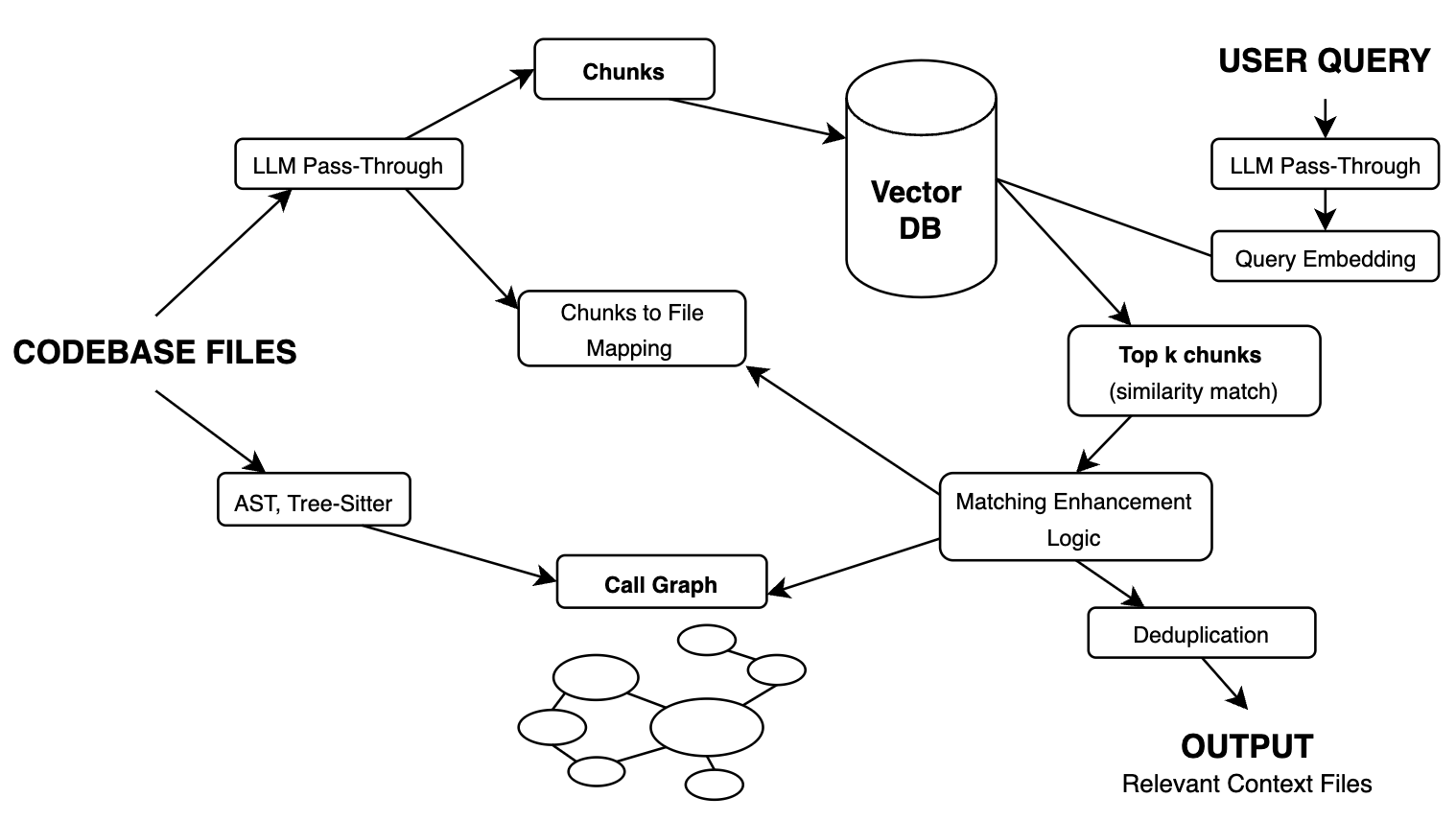
Indexing: Processes codebase, builds call graph, chunks files, enhances with GPT-4o-mini, and stores vector embeddings locally.
Querying: Enhances your query with an LLM, matches it to the top relevant chunks, and supplements results with call graph context.
Requirements
Python 3.7+ An OpenAI API key (required for LLM functionality)
Contributing
We welcome contributions! Feel free to open issues or submit pull requests on our GitHub repository.
License
MIT License


Download files
Download the file for your platform. If you're not sure which to choose, learn more about installing packages.
Source Distribution
Built Distribution
Filter files by name, interpreter, ABI, and platform.
If you're not sure about the file name format, learn more about wheel file names.
Copy a direct link to the current filters
File details
Details for the file tibo-1.1.2.tar.gz.
File metadata
- Download URL: tibo-1.1.2.tar.gz
- Upload date:
- Size: 175.9 kB
- Tags: Source
- Uploaded using Trusted Publishing? No
- Uploaded via: twine/6.1.0 CPython/3.11.11
File hashes
| Algorithm | Hash digest | |
|---|---|---|
| SHA256 |
bc289ca030c77ecaf69bc2d835445359cd7fb1ed734dfe5c2dd94d080f183183
|
|
| MD5 |
8453bc61bcbb189fa9ee52ff5baec390
|
|
| BLAKE2b-256 |
4a012ff6861940c0bf9b8c6547b4dc66149809bc94891f3e9cf973d379929a26
|
File details
Details for the file tibo-1.1.2-py3-none-any.whl.
File metadata
- Download URL: tibo-1.1.2-py3-none-any.whl
- Upload date:
- Size: 185.3 kB
- Tags: Python 3
- Uploaded using Trusted Publishing? No
- Uploaded via: twine/6.1.0 CPython/3.11.11
File hashes
| Algorithm | Hash digest | |
|---|---|---|
| SHA256 |
ab56fa652bdd8648644b652024053e4ef21611ec9119e96e10c4a70a96ce8293
|
|
| MD5 |
8b7cf49bb0d11f7ceb792cc4da4f9802
|
|
| BLAKE2b-256 |
e7fcb38a232d2d35f0a158074e20d447a63d8d59900a15307fdbd23d4e2430dd
|






