
Get started · Try it · Skills · Safety · Data and network · Docs · Changelog





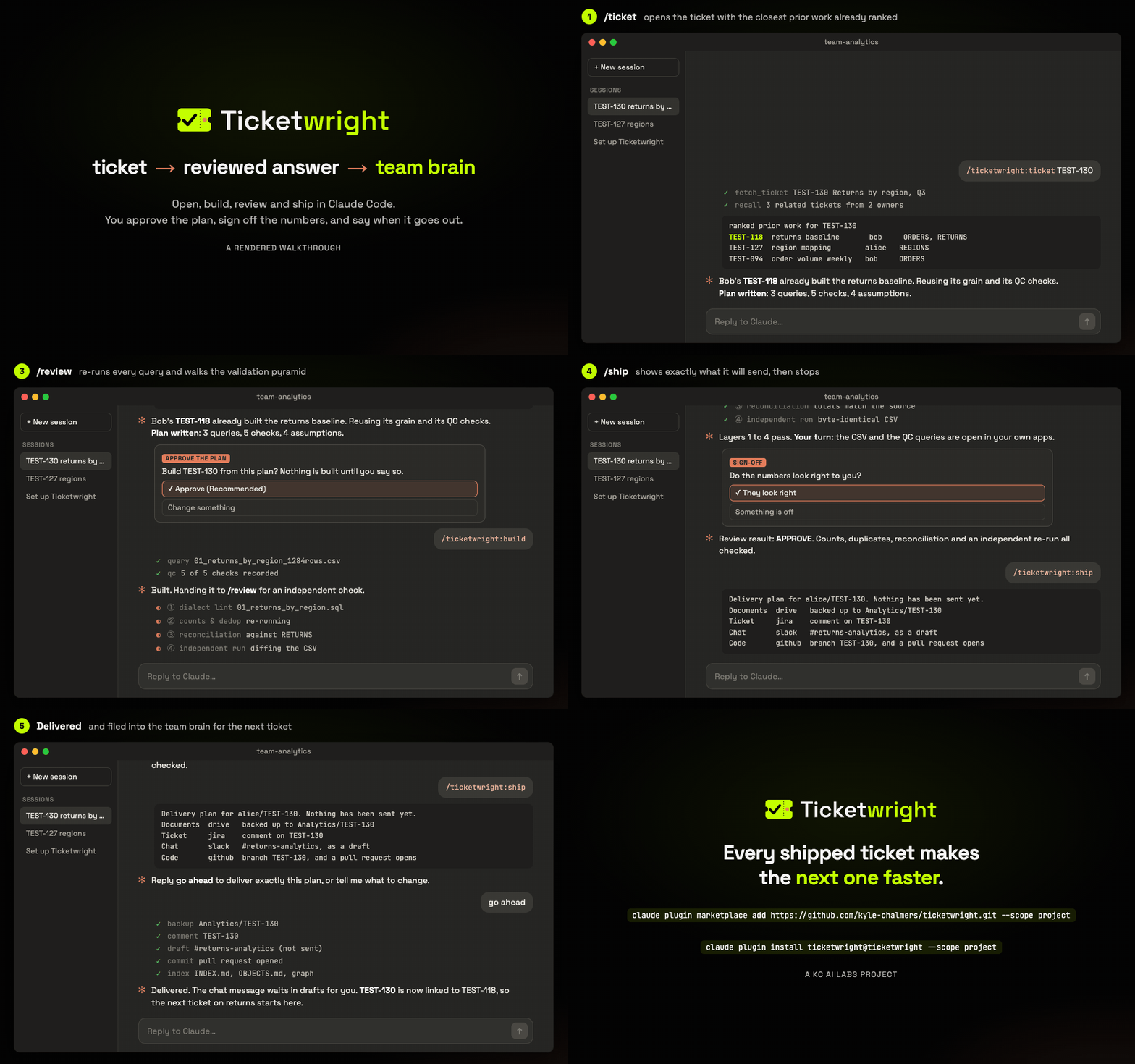
A rendered walkthrough drawn from the skills' own wording, not a screen recording.
Ticketwright is a Claude Code plugin for teams whose work product is an answer. Every ticket follows the same five phases, every result is re-run and signed off before it ships, and every finished ticket is filed where the next person or agent can find it.
Quick start. Open your coding agent (Claude Code, Codex, Cursor and others) in your team's ticket repo and say:
"Read the install prompt in github.com/kyle-chalmers/ticketwright and follow it."
Prefer typing the steps? See Get started.
Mission
Ticketwright empowers a team to do a high volume of analysis without letting quality slide, on whatever tools they already use.
Vision
Any new or experienced member can pick up any analysis and be productive the same day, because the team's past work is written down and organized, and AI can trace it.
This is for you if:
- ✅ you're an analytics, BI, ops or reporting team closing many tickets a week
- ✅ you want every number re-run and signed off before it leaves
- ✅ you want past work to surface when a similar ticket arrives
- ✅ you want to keep your tracker, warehouse, chat and drive
- ❌ you ship software features, or want an agent that posts on its own
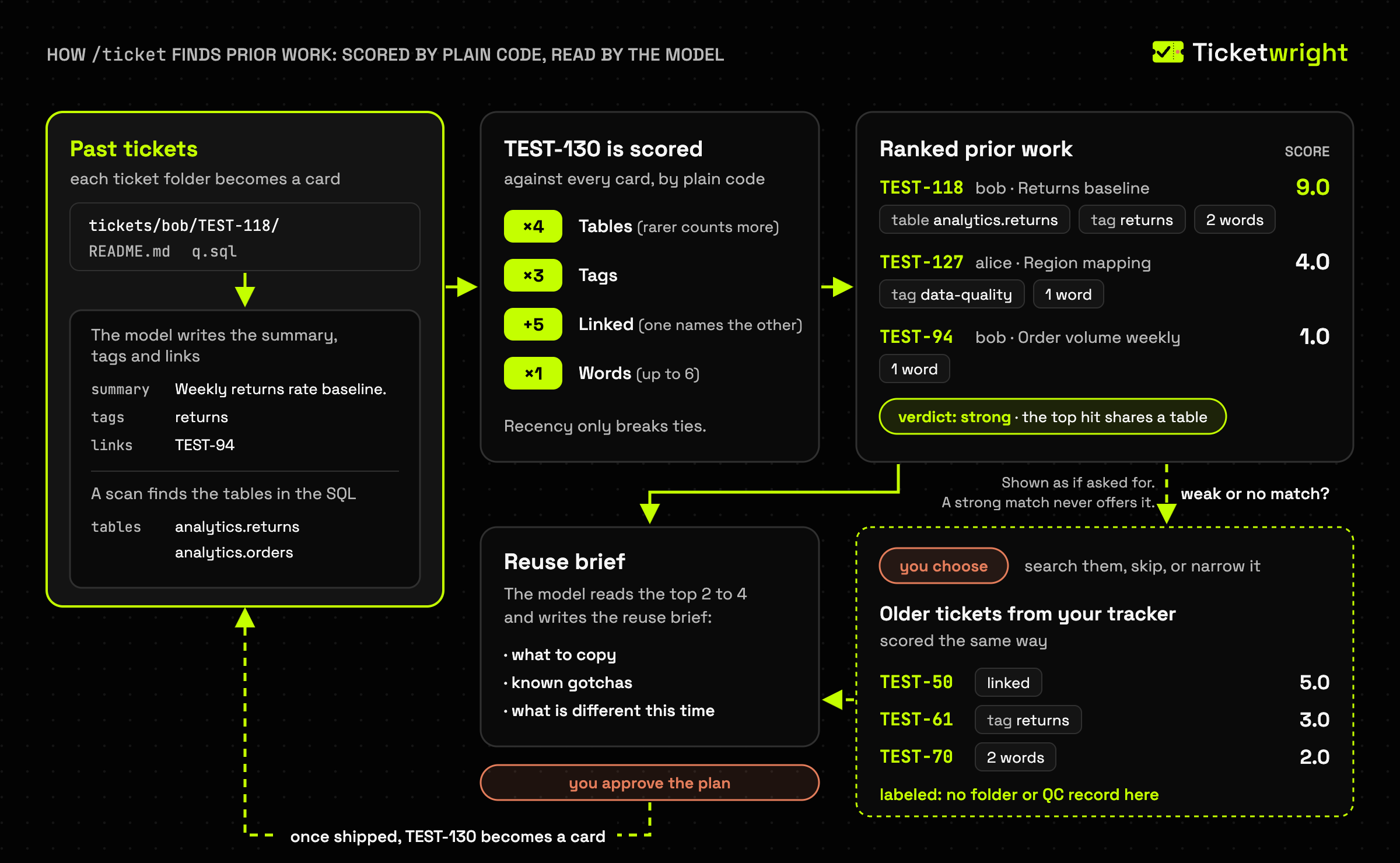
What it builds: a team brain
Every ticket lands in one folder with its business context, written assumptions, QC verdict and
deliverables. An auto-maintained catalog (tickets/INDEX.md) and object map (tickets/OBJECTS.md)
make that history searchable by people and agents, so /ticket opens new work with the closest
prior work ranked. Details: docs/how-it-works.md.
The lifecycle is the map
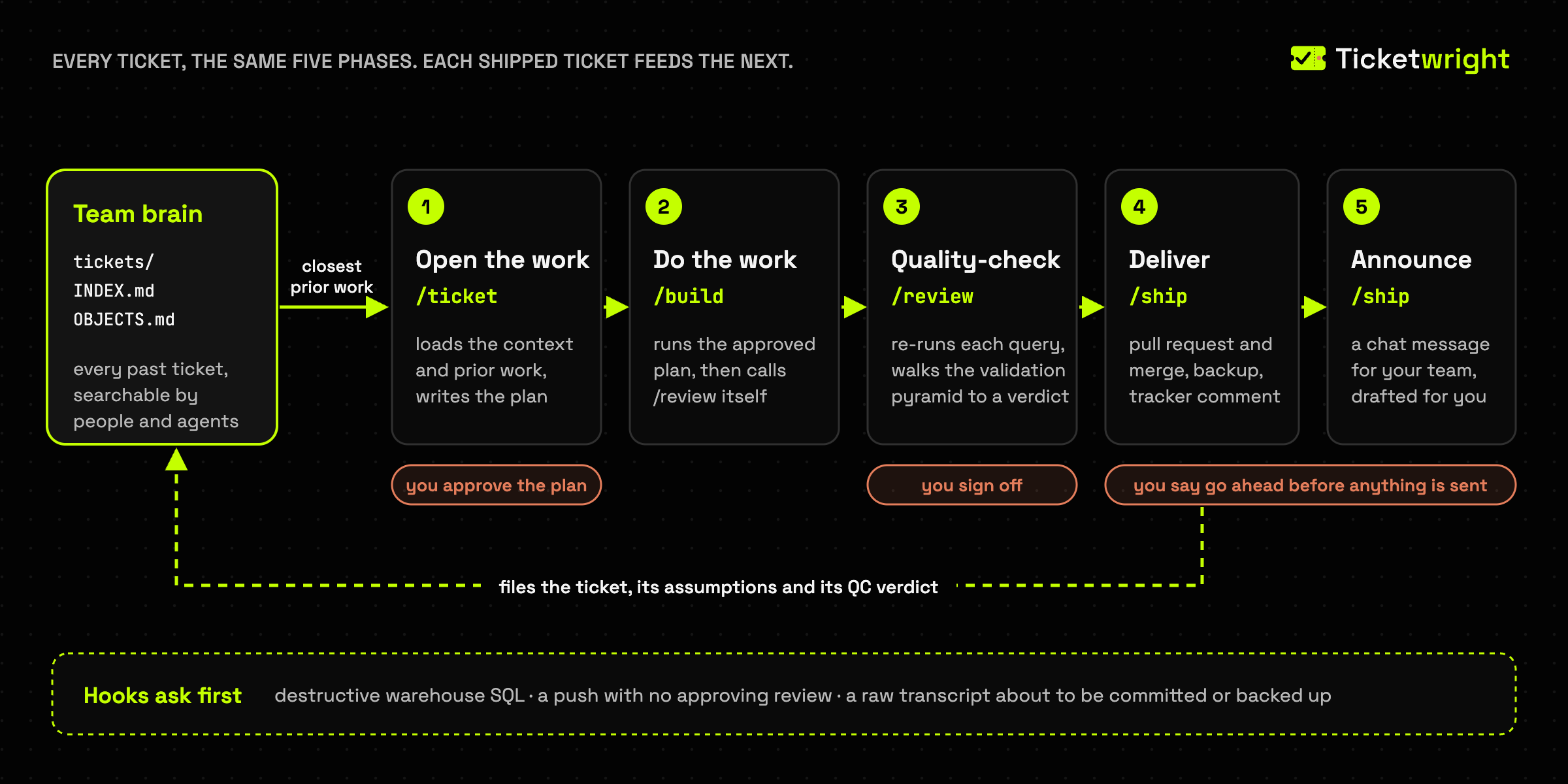
Quality checking has no slot of its own: /review borrows the warehouse to re-run your queries,
then a person signs off. Skills speak to tool slots, never to a vendor, so swapping a tool is one
config line and one adapter file:
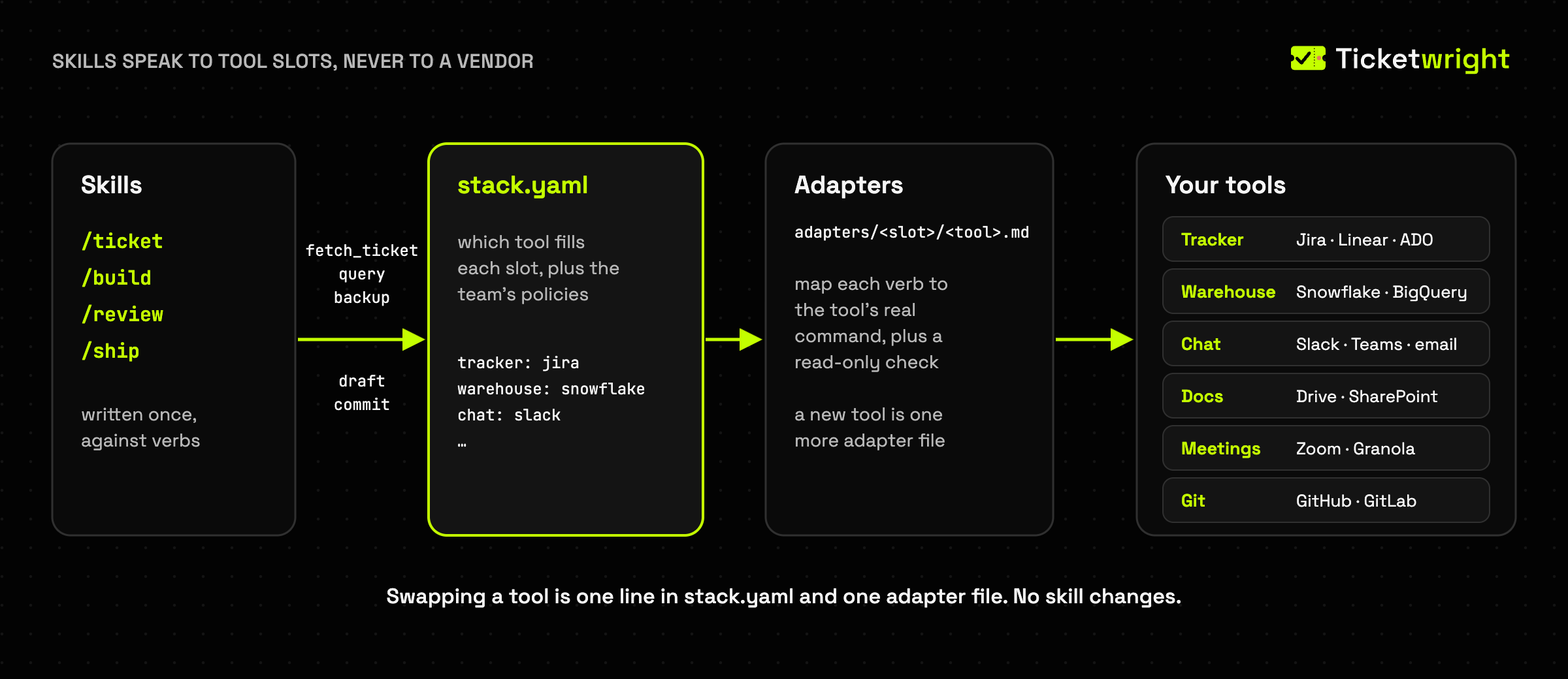
| Tool slot | Works with |
|---|---|
| Tracker | Jira (acli optional), Azure DevOps, Linear, Asana, Monday, GitHub Issues, or none (id_mode: slug) |
| Warehouse | Snowflake, BigQuery, Databricks, Postgres, Redshift, Synapse, or none |
| Chat | Slack, Teams, Gmail, Outlook |
| Docs | Google Drive, SharePoint, or Dropbox/S3/Box through rclone |
| Meetings | Zoom, Fireflies, Granola, Teams, Notion (optional) |
| Git | GitHub, GitLab, Azure Repos |
Another tool is one more adapter file. Desktop-sync backup needs one local step: docs/drive-mount.md.
Try it
Plain requests work too:
/ticketwright:ticket TEST-130
    Open the ticket, load its context and the closest prior work, write the plan, wait for my OK.

/ticketwright:ticket --recall --object RETURNS
    Which past tickets touched the RETURNS table, and what can I reuse?

/ticketwright:review --deep
    Re-check this ticket's numbers with one independent reviewer per validation layer.

/ticketwright:ship
    Show me exactly what will be sent and where, then wait for "go ahead".

What did we learn last time someone measured late orders by region?
The skills
/ticket <id>        opens or resumes the ticket, auto-loads its context + closest prior work,
                    writes the plan (and the spec when the plan calls for one), and waits for
                    your approval before anything is built ↓
/build              starts on your approval (subagents build the bigger tickets), runs /review,
                    asks before /ship, and replans with you when the review finds the plan was wrong
/review [--deep]    the independent QC pass /build runs for you: re-runs queries, walks the validation
                    pyramid → APPROVE / REQUEST-CHANGES; run it directly to re-check or go --deep
                    …and at the top of that pyramid, opens the deliverables in YOUR apps and waits
/ship [--go]        PR → merge (asks first) → backup → comment → chat draft, a HARD HALT before anything
                    external; warns, waits for a typed `ship unreviewed`, and records it when no
                    review verdict is on file
/setup              configure once, or onboard a teammate
/refresh            rebuild the catalog
/skillify           turn a recurring workflow into its own skill
On a plugin install, prefix each one: /ticketwright:ticket.
What a working repo looks like
/setup writes the top half; the tickets/ half grows as the team works.
your-repo/
├── AGENTS.md                  # team rules, read by people and agents alike
├── CLAUDE.md                  # one line: @AGENTS.md
├── bin/tw                     # launcher that finds the installed kit
├── .claude/config/
│   ├── stack.yaml             # which tool fills each slot, plus team policies
│   └── connections.local.yaml # your machine only (gitignored)
├── people/
│   ├── alice.yaml             # one file per teammate: identities, viewer, voice
│   └── bob.yaml
├── documentation/             # the domain knowledge pack
└── tickets/
    ├── INDEX.md               # every owner's tickets in one catalog      (auto)
    ├── OBJECTS.md             # table or view -> tickets that touched it  (auto)
    ├── graph/  objects/       # Obsidian nodes for tickets and tables     (auto)
    ├── bob/
    │   └── TEST-118/          # returns baseline, shipped last month
    └── alice/
        ├── TEST-127/          # shipped
        └── TEST-130/          # in progress, builds on bob's TEST-118
            ├── README.md              /ticket   business context, every assumption
            ├── plan.md                /ticket   the plan you approved
            ├── specs/                 /ticket   the spec, when the plan calls for one
            ├── source_materials/      /ticket   attachments, curated meeting notes
            ├── exploratory_analysis/  /build    scratch queries, kept for the record
            ├── final_deliverables/    /build    01_returns_by_region_1284rows.sql + .csv
            ├── qc_queries/            /build    numbered checks, then /review's verdict
            └── delivery-plan.yaml     /ship     who received it, and where
Alice's TEST-130 cites Bob's TEST-118, so her reviewer can trace the numbers back to his.
Install with your coding agent
Show the install prompt
Install Ticketwright (https://github.com/kyle-chalmers/ticketwright) for me at the
project level: for this repo only, never at the user level or with --global. Confirm
with me before installing anything, ask me each setup question yourself and wait for
my answer (never answer one for me), and show me the file list before committing.

1. Work in the git repo where my team keeps its ticket work. Ask me which folder if
   unsure; if it is new, create it and run `git init`. Run every command below from
   its root.

2. If you are Claude Code: run
   `claude plugin marketplace add https://github.com/kyle-chalmers/ticketwright.git --scope project`
   and then `claude plugin install ticketwright@ticketwright --scope project`. Both
   record the plugin in this repo's .claude/settings.json, not my user settings. If
   either fails, run `python3 ~/.claude/plugins/marketplaces/ticketwright/bin/plugin_doctor.py`
   (on disk once the marketplace is added) and follow its fixes in order. Then tell me
   to run `/reload-plugins` (or fully quit and relaunch the app; a new chat is not a
   restart), then `/ticketwright:setup`, or `/ticketwright:setup --teammate` if the
   repo already has .claude/config/stack.yaml. Stop there; setup does the rest.

3. Any other agent: with Python 3.9 or newer, run `pip install ticketwright`, then
   `ticketwright init`, then `ticketwright install --runtime <name>`, where <name> is
   codex-cli, cursor, opencode, cline, devin or antigravity. Tell me plainly that
   /setup runs only in Claude Code, so here the config is written by hand. If the repo
   has no .claude/config/stack.yaml, offer to draft it with me from
   .claude/config/stack.schema.md and the closest .claude/config/stack.example.*.yaml,
   asking me which tool fills each slot, then check it with
   `bash bin/verify_stack.sh .claude/config/stack.yaml --dry-run`.

Rules: never ask me for a password, token or key in chat; I sign in to each tool
myself. While installing, run no warehouse SQL and post nothing to my tracker or chat.
Get started
Install project-scoped, from the root of your ticket repo, so the whole team runs one version:
claude plugin marketplace add https://github.com/kyle-chalmers/ticketwright.git --scope project
claude plugin install ticketwright@ticketwright --scope project
Run /reload-plugins (or fully quit the app), then /ticketwright:setup, which interviews you
before writing anything. Step by step: docs/getting-started.md.
Upgrading: uninstall, install, relaunch.
Other coding agents
From PyPI, for Codex, Cursor, OpenCode, Cline, Devin and Antigravity:
pip install ticketwright
ticketwright init                         # copy the kit into this repo
ticketwright install --runtime codex-cli  # write the skills where your agent reads them
/setup runs only in Claude Code, so elsewhere you write the config yourself, and the guards are proven only in Claude Code. Details:
docs/runtimes.md and
installing without the plugin.
Safety rails
- Destructive warehouse SQL run through a CLI asks first, even hidden in a
-ffile; verifiably read-only SQL runs without a prompt. /shipstops before any external post and shows exactly what it will send.- Pushing deliverables with no approving review on file asks first.
- Committing or backing up a raw meeting transcript asks first.
Hooks fail open, never loosen your own deny rules, and see shell commands only, so SQL sent through an MCP tool falls under that tool's permissions. All of them: docs/how-it-works.md.
Data and network
No telemetry, and no service of its own: Ticketwright's own code makes no network calls. Installing fetches it from GitHub or PyPI; everything else goes through tools you configured, under your own sign-in.
- Your coding agent. What the skills read (ticket text, query results, notes, team docs you link) goes to your
agent's model provider under your account's terms, as does the ticket text
ticketwright enrichsends to the model command you configure, and up to three older tracker tickets it summarizes. - Your tools, named in
stack.yaml./ticketreads the ticket and, on your yes, searches your tracker's older tickets./buildand/reviewquery the warehouse;/shipbacks up, comments, drafts the chat message (sent only on "send it") and opens and merges a pull request. - Local reads. Hooks read the repo, any
-fSQL file a command names, your viewer and people config, and Claude Code'sinstalled_plugins.json. They write nothing outside the repo. - Committed by default: ticket folders, deliverable CSVs and voice profiles. Raw transcripts
and
*.private.csvfiles are not.
Full statement: PRIVACY.md.
See it as a graph (Obsidian)
The index also writes tickets/graph/ and tickets/objects/: open the repo as an Obsidian vault
to see which tickets touched which tables (docs/obsidian.md).
Learn more
- docs/README.md: every doc, grouped by what you're trying to do
- docs/how-it-works.md: the lifecycle, voice profiles, every hook
- docs/architecture.md: adapters, the verb contract, adding a tool
- docs/obsidian.md and docs/drive-mount.md
- CONTRIBUTING.md · ROADMAP.md · CHANGELOG.md
Support and security
Questions and bugs: SUPPORT.md. Vulnerabilities, privately: SECURITY.md. Everyone taking part follows the Code of Conduct.
License
MIT, see LICENSE. A KC AI Labs project by Kyle Chalmers, not
affiliated with Anthropic or any vendor named above.
1 maintainer

Metadata
1 maintainer
Release files for ticketwright 4.9.1
For a detailed explanation of source distributions (sdists) and built distributions (wheels), please see the package formats documentation.
Source distribution (sdist)
| File | Size | Uploaded | Provenance | Actions |
|---|---|---|---|---|
| ticketwright-4.9.1.tar.gz | 967.9 kB | With provenance | Details for ticketwright-4.9.1.tar.gz |
Built distribution (wheel)
| File | Interpreter | ABI | Platform | Actions Reset |
|---|---|---|---|---|
| ticketwright-4.9.1-py3-none-any.whl | Python 3 | none | any | Details for ticketwright-4.9.1-py3-none-any.whl |
Total release size: 2.0 MB
Release files / ticketwright-4.9.1.tar.gz
| Download URL | ticketwright-4.9.1.tar.gz |
|---|---|
| Size | 967.9 kB |
| Tags | Source |
|
SHA-256 checksum How to use checksums |
0711a59a8b704c2ca271059305638cc18aff35d408381ed484a8d4a7624c6605
|
|
BLAKE2b-256 checksum How to use checksums |
f1b4a59791b304cd831d1b65ddf1dd0031a1c500853c2da2871badd06c82b3c2
|
| Upload date | |
|
Uploaded using Trusted Publishing? What is trusted publishing? |
Yes |
| Uploaded via |
twine/7.0.0 CPython/3.13.16
|
Provenance
Provenance describes where a file came from. On PyPI, provenance is shared via attestations, which provide a verifiable record of the build or publishing details. View details, limitations and caveats.


PyPI Publish Attestation
PyPI verified that this artifact, at this checksum, originated from the publisher listed below.
Signed by GitHub Actions, verified by PyPI on Oct 29, 2026.
Transparency logRelease files / ticketwright-4.9.1-py3-none-any.whl
| Download URL | ticketwright-4.9.1-py3-none-any.whl |
|---|---|
| Size | 1.0 MB |
| Tags | Python 3 |
|
SHA-256 checksum How to use checksums |
491e66c76cdf78dc03d921dc8fca36151e11f12b3ca3d784aa89fc8ae3c3aff0
|
|
BLAKE2b-256 checksum How to use checksums |
5f65185ae9501d4c54ece677669437d080f5f41a0af150945582f54e7d466a75
|
| Upload date | |
|
Uploaded using Trusted Publishing? What is trusted publishing? |
Yes |
| Uploaded via |
twine/7.0.0 CPython/3.13.16
|
Provenance
Provenance describes where a file came from. On PyPI, provenance is shared via attestations, which provide a verifiable record of the build or publishing details. View details, limitations and caveats.
PyPI Publish Attestation
PyPI verified that this artifact, at this checksum, originated from the publisher listed below.
Signed by GitHub Actions, verified by PyPI on Oct 29, 2026.
Transparency logSecurity for ticketwright 4.9.1
Provenance
Provenance describes where a file came from. On PyPI, provenance is shared via attestations, which provide a verifiable record of the build or publishing details. View details, limitations and caveats.
Full provenance
All 2 files in this release have been uploaded with provenance metadata.
Attestation for ticketwright-4.9.1.tar.gz
PyPI Publish Attestation
PyPI verified that this artifact, at this checksum, originated from the publisher listed below.
Signed by GitHub Actions, verified by PyPI on Oct 29, 2026.
Transparency logA note on package security
PyPI is a repository for distributing packages, not a service for auditing them. While third-party security researchers and our staff do their best to detect and remove malicious packages, PyPI cannot guarantee the quality, security or suitability of any given package.
To learn more about protecting yourself from malicious actors, visit our package security documentation.














