


ticktick-py
Unofficial TickTick API Client for Python 3
Designed for TickTick.com API v2
Full Documentation
https://lazeroffmichael.github.io/ticktick-py/
Description
ticktick-py is an unofficial API library for interacting with TickTick.com. It allows
users a way to interact with their TickTick account using Python. Currently,
as of 1/14/2021, there is no official API for TickTick.
Features
The API automatically fetches all the tasks, tags, lists, and more linked to your profile and stores them in a dictionary named state.
- Tasks
- Batch create, update, and delete tasks
- Acquire all your uncompleted tasks
- Move tasks easily between projects
- Acquire all completed tasks in a certain date range
- Tags
- Batch create, update, and delete tags
- Create tags with parameters that are not usually allowed:
\\ / " # : * ? < > | Space
- Projects
- Batch create, update, and delete 'lists' (projects)
- Batch archive projects
Quick Guide
Initializing Your Session
from ticktick import api
client = api.TickTickClient('username', 'password')  # Enter correct username and password
Once you have initialized your session, all interactions will occur through the reference, in this case: client
Example: Creating A Task
Lets create a task in our inbox titled "Get Groceries", with the date as 5/6/2021 at 2:30PM:
from datetime import datetime  # Dates are supported through the datetime module

name = 'Get Groceries'
date = datetime(2021, 5, 6, 14, 30)
groceries = client.task.create(name, start=date)  # Create the task with the parameters.
Result
A dictionary for the newly created task is returned.
print(groceries)
{'id': '5ff24e4b8f08904035b304d9', 'projectId': 'inbox416323287', 'sortOrder': -1099511627776,
'title': 'Get Groceries', 'content': '', 'startDate': '2021-05-06T21:30:00.000+0000',
'dueDate': '2021-05-06T21:30:00.000+0000', 'timeZone': 'America/Los_Angeles',
'isFloating': False, 'isAllDay': False, 'reminders': [], 'priority': 0, 'status': 0,
'items': [], 'modifiedTime': '2021-01-03T23:07:55.004+0000', 'etag': 'ol2zesef', 'deleted': 0,
'createdTime': '2021-01-03T23:07:55.011+0000', 'creator': 359368200, 'kind': 'TEXT'}
Created Task In TickTick
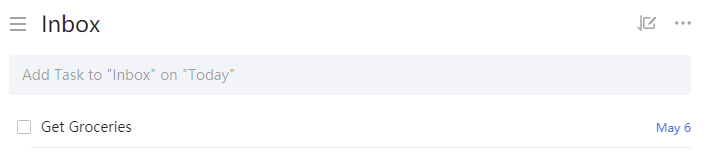
Most methods will return the object that was changed. Consult the usage documentation for more information on specific methods.
Installation
Note: ticktick-py requires Python 3.6 or above.
pip install ticktick-py
Future Plans
- General
- Enhanced Team Support
- Tasks
- Notification and Repeats For Tasks
- Get and Restore From Trash
- Projects
- Smart List Support
- Column Creation For Kanban View
- Pomo and Focus
- Getting the focus / pomo statistics for your profile
- Starting and stopping the focus / pomo timer
- Habits
- Get, create, archive, delete, and complete habits
1 maintainer

Metadata
1 maintainer
Release files for ticktick-py 1.0.2
For a detailed explanation of source distributions (sdists) and built distributions (wheels), please see the package formats documentation.
Source distribution (sdist)
| File | Size | Uploaded | Provenance | Actions |
|---|---|---|---|---|
| ticktick-py-1.0.2.tar.gz | 41.7 kB | Without provenance | Details for ticktick-py-1.0.2.tar.gz |
Built distribution (wheel)
| File | Interpreter | ABI | Platform | Actions Reset |
|---|---|---|---|---|
| ticktick_py-1.0.2-py3-none-any.whl | Python 3 | none | any | Details for ticktick_py-1.0.2-py3-none-any.whl |
Total release size: 85.5 kB
Release files / ticktick-py-1.0.2.tar.gz
| Download URL | ticktick-py-1.0.2.tar.gz |
|---|---|
| Size | 41.7 kB |
| Tags | Source |
|
SHA-256 checksum How to use checksums |
4c31ec11e4f3c0981c19ee76646bf6ad254697c6158c071fca5de1009f1352a5
|
|
BLAKE2b-256 checksum How to use checksums |
3ef11c87fdefb3f0697c409548d14b2acd266b43ee6e7762df240db5e552c544
|
| Upload date | |
|
Uploaded using Trusted Publishing? What is trusted publishing? |
No |
| Uploaded via |
twine/3.3.0 pkginfo/1.7.0 requests/2.25.1 setuptools/49.2.1 requests-toolbelt/0.9.1 tqdm/4.56.0 CPython/3.9.1
|
Release files / ticktick_py-1.0.2-py3-none-any.whl
| Download URL | ticktick_py-1.0.2-py3-none-any.whl |
|---|---|
| Size | 43.8 kB |
| Tags | Python 3 |
|
SHA-256 checksum How to use checksums |
8e2a5946b3da1e260af9840bc20f5ddcbb717f6cb706a613a8f013430f8f594f
|
|
BLAKE2b-256 checksum How to use checksums |
ab2116dd67e080b303d69dcd91013a98ea7449259468fa09b6c31d546d194626
|
| Upload date | |
|
Uploaded using Trusted Publishing? What is trusted publishing? |
No |
| Uploaded via |
twine/3.3.0 pkginfo/1.7.0 requests/2.25.1 setuptools/49.2.1 requests-toolbelt/0.9.1 tqdm/4.56.0 CPython/3.9.1
|
Security for ticktick-py 1.0.2
Provenance
Provenance describes where a file came from. On PyPI, provenance is shared via attestations, which provide a verifiable record of the build or publishing details. View details, limitations and caveats.
No provenance found
None of the files in this release were uploaded with provenance metadata.
A note on package security
PyPI is a repository for distributing packages, not a service for auditing them. While third-party security researchers and our staff do their best to detect and remove malicious packages, PyPI cannot guarantee the quality, security or suitability of any given package.
To learn more about protecting yourself from malicious actors, visit our package security documentation.














