
A suite of utilities designed to streamline TiDB documentation workflows.

Project description
TiDocs: Tools for TiDB Documentation
TiDocs is a toolkit that streamlines TiDB documentation workflows. It specializes in document conversion and formatting, making it easy to create professional, well-structured documentation.
Installation
To avoid conflicts with your existing Python environment, install tidocs using pipx:
pipx install tidocs
Merge Release Notes (tidocs merge)
TiDocs addresses a common challenge in documentation workflows: converting Markdown files containing complex HTML tables into well-formatted Word or PDF documents. While traditional tools like Pandoc exist, they often struggle with complex HTML tables, resulting in poorly formatted output.
For example, consider the following complex HTML table in a Markdown file:
Click to expand
The following is an HTML table:

<table>
<thead>
  <tr>
    <th>Header 1</th>
    <th>Header 2</th>
    <th>Header 3</th>
  </tr>
</thead>
<tbody>
  <tr>
    <td rowspan="2">Group 1</td>
    <td>Lorem ipsum odor amet, consectetuer adipiscing elit.</td>
    <td>Justo hendrerit facilities tristique ligula nostra quisque nunc potenti. Ornare porttitor elementum primis imperdiet mus.</td>
  </tr>
  <tr>
    <td>Nisi litora ornare rhoncus nunc primis molestie nullam.</td>
    <td>Urna adipiscing sollicitudin nostra facilities platea per. Ullamcorper name ut magna at sagittis nulla natoque. Lacus curabitur sagittis dictum pretium dignissim sit dolor.</td>
  </tr>
  <tr>
    <td rowspan="1">Group 2</td>
    <td>Nunc mollis tempor maecenas, morbi enim augue justo. Ut metus libero pulvinar aenean nunc.</td>
    <td>Various tortor vulputate viverra ullamcorper volutpat maximus habitasse maecenas nec. Tempor tempor facilities sem ad ultricies tincidunt imperdiet auctor. Curabitur aenean nisl scelerisque laoreet metus. Ipsum vel primis vel inceptos nulla class.</td>
  </tr>
</tbody>
</table>

The preceding is an HTML table.
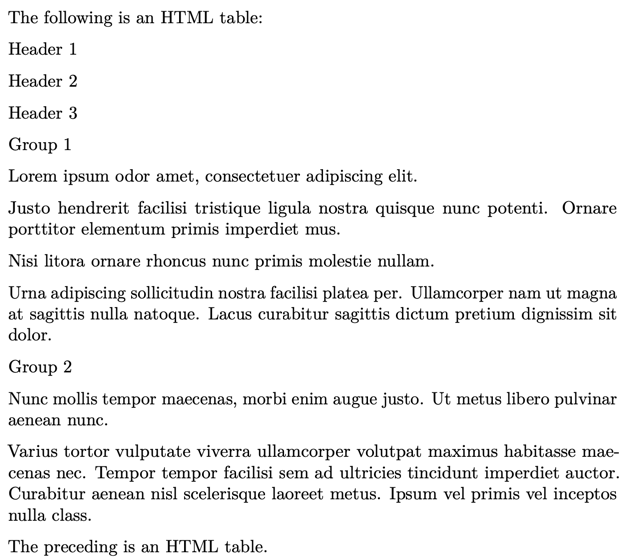
When you convert this Markdown file to a Word or PDF document using Pandoc, you might encounter formatting issues like this:
| Pandoc Output | TiDocs Output |
|---|---|
 |
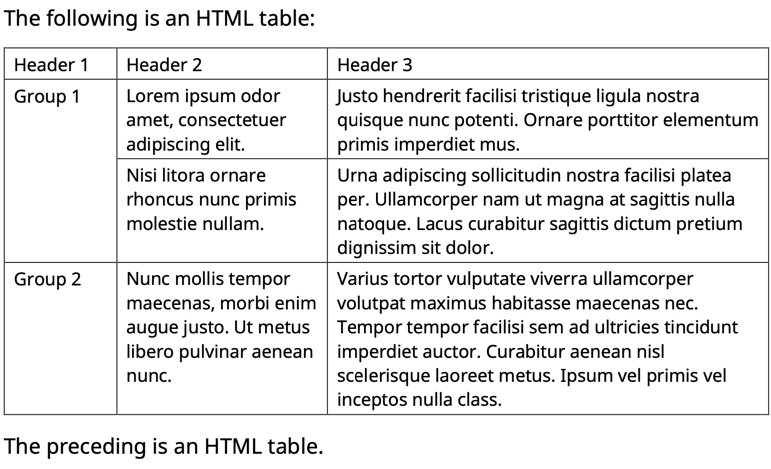 |
Pandoc fails to maintain the table structure and formatting, resulting in a poorly formatted document. In contrast, TiDocs preserves the complex table structure and formatting, ensuring that your document looks good.
Features
- Merge multiple Markdown files into a single document
- Preserve the formatting of complex HTML tables
- Automatically generate a table of contents
- Convert internal links like
[Overview](/overview.md)to external links like[Overview](https://docs.pingcap.com/tidb/stable/overview)
Usage
Use the tidocs merge command to access a web interface for combining multiple release notes into a single, well-formatted Word document.
-
Launch the application:
tidocs mergeThe application will start and display a URL:
✨ Running marimo app Merge Release Notes
🔗 URL: http://127.0.0.1:8080
To specify a custom host and port, use:
tidocs merge --host 127.0.0.1 --port 9000
The output is as follows:
✨ Running marimo app Merge Release Notes
🔗 URL: http://127.0.0.1:9000
-
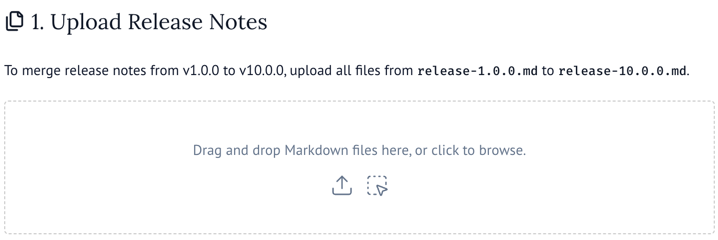
Upload release notes:
To merge release notes from v1.0.0 to v10.0.0, upload all files from
release-1.0.0.mdtorelease-10.0.0.md. -
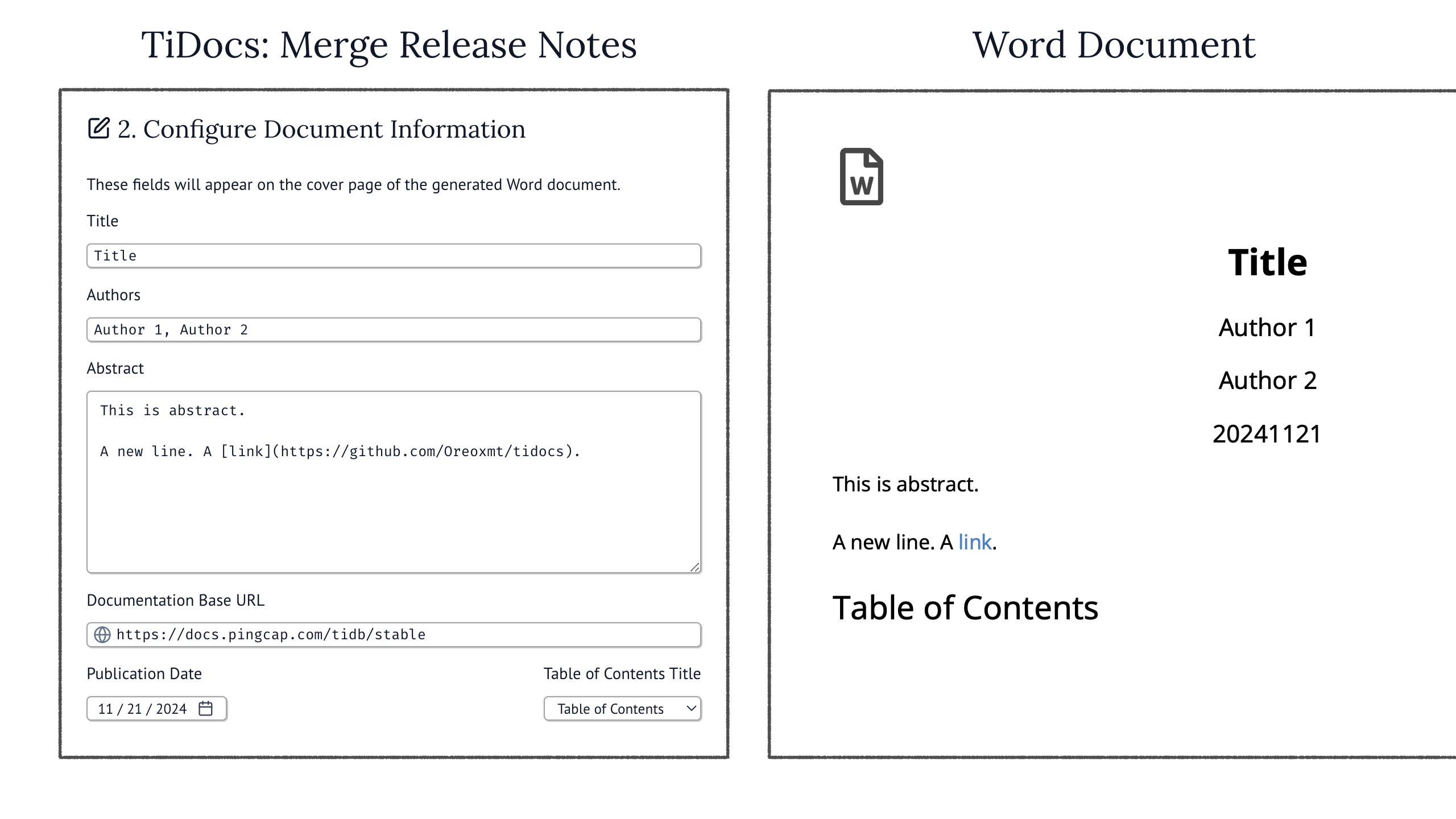
Configure document information:
Fill in the fields to customize the cover page of the generated Word document.
-
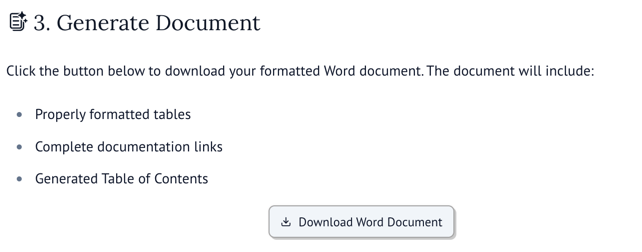
Generate document:
Click Download Word Document to export your formatted Word document. The document will include:
- Properly formatted tables
- Complete documentation links
- Generated Table of Contents
-
Post-process document:
After generating the Word document, you can finalize it by following these steps:
-
Open the downloaded document in Microsoft Word.
If prompted with "This document contains fields that may refer to other files. Do you want to update the fields in this document?", click No.
-
Update the table of contents:
On the References tab, click Update Table > Update entire table > OK
-
Optional formatting adjustments:
-
Adjust table column widths if needed.
-
If link text turns black after applying styles, use the following macro to batch update the link colors:
Sub FormatLinks()
Dim H As Hyperlink
Dim themeColorRGB As Long

themeColorRGB = ActiveDocument.Styles("Hyperlink").Font.Color

    For Each H In ActiveDocument.Hyperlinks
        H.Range.Font.Color = themeColorRGB
    Next H

End Sub
-
Review and adjust page breaks and heading styles.
-
-
Changelog
[1.0.6] - 2024-12-21
- Fix the issue that hyperlinks become broken after merging Word documents due to incorrect relationship reference handling. (#2)
[1.0.5] - 2024-12-03
- Fix compatibility issues with Python 3.9.
- Fix formatting error when only one input file is provided.
[1.0.4] - 2024-11-22
- Enhance the rendering of abstracts containing multiple paragraphs.
[1.0.3] - 2024-11-22
- Remove the "Abstract" heading from the generated Word document.
[1.0.2] - 2024-11-22
- Fix the issue that Pandoc fails to write docx output to the terminal on Windows.
[1.0.1] - 2024-11-22
- Fix the issue that Pandoc becomes non-executable after installation on macOS because
Zipfile.extract()doesn't maintain file permissions.
[1.0.0] - 2024-11-21
- Support merging multiple TiDB release notes Markdown files with HTML tables into one well-formatted Word document.
Release history Release notifications | RSS feed


Download files
Download the file for your platform. If you're not sure which to choose, learn more about installing packages.
Source Distribution
Built Distribution
Filter files by name, interpreter, ABI, and platform.
If you're not sure about the file name format, learn more about wheel file names.
Copy a direct link to the current filters
File details
Details for the file tidocs-1.0.6.tar.gz.
File metadata
- Download URL: tidocs-1.0.6.tar.gz
- Upload date:
- Size: 61.1 kB
- Tags: Source
- Uploaded using Trusted Publishing? Yes
- Uploaded via: pdm/2.22.1 CPython/3.12.8 Linux/6.5.0-1025-azure
File hashes
| Algorithm | Hash digest | |
|---|---|---|
| SHA256 |
dd1d2c50f7c0d2c38f76f750e3e3d919976c674fb90c6f4d9fb02cc131879597
|
|
| MD5 |
f824f3f10a2f268a7a43b6cf423dfdfb
|
|
| BLAKE2b-256 |
e344d52ab2ea6067eff1b6cdf4997935fc66ab0affe623bf38b4ed166c9582eb
|
File details
Details for the file tidocs-1.0.6-py3-none-any.whl.
File metadata
- Download URL: tidocs-1.0.6-py3-none-any.whl
- Upload date:
- Size: 59.7 kB
- Tags: Python 3
- Uploaded using Trusted Publishing? Yes
- Uploaded via: pdm/2.22.1 CPython/3.12.8 Linux/6.5.0-1025-azure
File hashes
| Algorithm | Hash digest | |
|---|---|---|
| SHA256 |
9baa3a9c933daefc4b1373c86971d468831fa0d1541da6f479fecd7e72537f0f
|
|
| MD5 |
f0c80558abf7a929601f27befbc84c45
|
|
| BLAKE2b-256 |
7aa59c14ae1984fd48c09b6f6d5fd7449a7dade1bd1e9d33b56020e5f105d71f
|






