
tidy3
dplyr for Python, on Polars. Write R-style pipes in a notebook, one verb per line with comments in between, see every column's type, and hand the result to plot3, scikit-learn, NumPy, or pandas without leaving the pipe.
pip install tidy3
Contents: In a notebook · From R · Lazy and fast · Reshape · Plot · scikit-learn · Scripts · Full reference
In a notebook
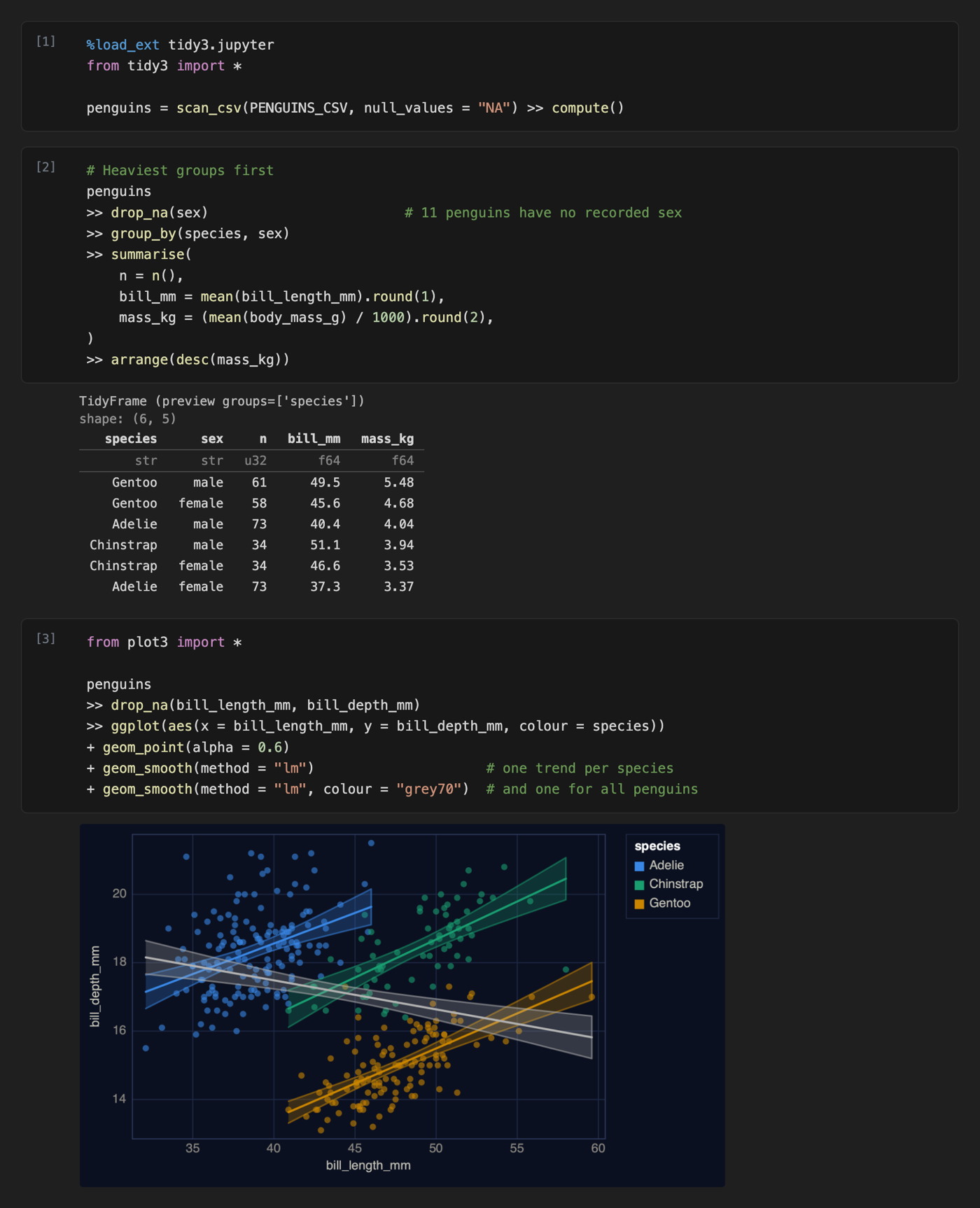
Load the extension once, in a cell of its own:
%load_ext tidy3.jupyter
from tidy3 import *
From the next cell on, a pipe runs over as many lines as you like, each
line starting with >>, comments and blank lines included, and column
names go bare, as in R. (The cell that loads the extension can't use them
yet: IPython reads a whole cell before running any of it.)
penguins = scan_csv(
    "https://raw.githubusercontent.com/allisonhorst/palmerpenguins/main/inst/extdata/penguins.csv",
    null_values="NA",
) >> compute()

# Heaviest groups first
penguins
>> drop_na(sex)                        # 11 penguins have no recorded sex
>> group_by(species, sex)
>> summarise(
    n = n(),
    bill_mm = mean(bill_length_mm).round(1),
    mass_kg = (mean(body_mass_g) / 1000).round(2),
)
>> arrange(desc(mass_kg))
TidyFrame (preview groups=['species'])
shape: (6, 5)
┌───────────┬────────┬─────┬─────────┬─────────┐
│ species   ┆ sex    ┆ n   ┆ bill_mm ┆ mass_kg │
│ ---       ┆ ---    ┆ --- ┆ ---     ┆ ---     │
│ str       ┆ str    ┆ u32 ┆ f64     ┆ f64     │
╞═══════════╪════════╪═════╪═════════╪═════════╡
│ Gentoo    ┆ male   ┆ 61  ┆ 49.5    ┆ 5.48    │
│ Gentoo    ┆ female ┆ 58  ┆ 45.6    ┆ 4.68    │
│ Adelie    ┆ male   ┆ 73  ┆ 40.4    ┆ 4.04    │
│ Chinstrap ┆ male   ┆ 34  ┆ 51.1    ┆ 3.94    │
│ Chinstrap ┆ female ┆ 34  ┆ 46.6    ┆ 3.53    │
│ Adelie    ┆ female ┆ 73  ┆ 37.3    ┆ 3.37    │
└───────────┴────────┴─────┴─────────┴─────────┘
Every table shows each column's type under its name, and the caption
keeps the grouping that's left (summarise drops the last group, as in
dplyr). glimpse(penguins) prints one line per column. To check part of a
long pipe, run its first lines with %%tidy3_run.
If you know dplyr
The verbs, helpers, and arguments are dplyr's and tidyr's, with >> for
R's |>:
| R (dplyr) | tidy3 |
|---|---|
penguins |> filter(species == "Gentoo") |
penguins >> filter(species == "Gentoo") |
mutate(mass_kg = body_mass_g / 1000) |
mutate(mass_kg = body_mass_g / 1000) |
group_by(species) |> summarise(n = n(), bill = mean(bill_length_mm, na.rm = TRUE)) |
group_by(species) >> summarise(n = n(), bill = mean(bill_length_mm, na_rm = True)) |
count(species, island, sort = TRUE) |
count(species, island, sort = True) |
select(species, ends_with("_mm")) |
select(species, ends_with("_mm")) |
select(-year) |
select(-year) |
pivot_longer(ends_with("_mm"), names_to = "measure") |
pivot_longer(ends_with("_mm"), names_to = "measure") |
rename(`body mass` = body_mass_g) |
rename(`body mass` = body_mass_g) |
across(all_of(vars), mean) |
across(all_of(vars), mean) |
filter(is.na(body_mass_g)) |
filter(is_na(body_mass_g)) |
mutate(hp_capped = pmin(hp, 200)) |
mutate(hp_capped = pmin(hp, 200)) |
mutate(date = ymd(date)) |
mutate(date = ymd(date)) |
As in dplyr, a column beats a notebook variable of the same name; write
env.x for the variable. Python's own spellings differ in a few places:
na_rm for na.rm, True for TRUE, and _x/_y join suffixes for
.x/.y.
Lazy until you need rows
A pipe is a plan, not a computation. Polars optimises the whole plan, reads only the columns it uses, and pushes filters into the file scan. Rows are computed when something needs them:
- a preview: a notebook table shows its first rows, and its shape counts
all of them, as a tibble does (
… 20 more rows). On a very large query,options(preview_count=False)skips the count and shows?, - a plot,
to_numpy(), orwrite_parquet()/write_csv(), collect(), which returns a Polars, pandas, Arrow, or NumPy result,compute(), which runs the plan so far and keeps piping from the in-memory result. Use it for a table you'll reuse, likepenguinsabove: the CSV downloads once, not once per step.
penguins.collect()                  # Polars DataFrame
penguins.collect(as_="pandas")      # pandas DataFrame
On 10 million rows, a filter → mutate → group_by → summarise → arrange pipeline takes 41 ms in tidy3, the same as hand-written Polars (42 ms), against 60 ms in pandas and 166 ms in datar (benchmarks).
Reshape for plotting
pivot_longer turns the three measurement columns into one, the shape
facets want:
long = penguins
>> mutate(id = row_number())
>> select(id, species, ends_with("_mm"))
>> pivot_longer(ends_with("_mm"), names_to = "measure", values_to = "mm",
                values_drop_na = True)

long >> head(4)
┌─────┬─────────┬───────────────────┬───────┐
│ id  ┆ species ┆ measure           ┆ mm    │
│ --- ┆ ---     ┆ ---               ┆ ---   │
│ i64 ┆ str     ┆ str               ┆ f64   │
╞═════╪═════════╪═══════════════════╪═══════╡
│ 1   ┆ Adelie  ┆ bill_length_mm    ┆ 39.1  │
│ 1   ┆ Adelie  ┆ bill_depth_mm     ┆ 18.7  │
│ 1   ┆ Adelie  ┆ flipper_length_mm ┆ 181.0 │
│ 2   ┆ Adelie  ┆ bill_length_mm    ┆ 39.5  │
└─────┴─────────┴───────────────────┴───────┘
A pipe flows into plot3's ggplot(),
and a line starting with + adds a layer, as in R:
from plot3 import *

long
>> ggplot(aes(x = species, y = mm, fill = species))
+ geom_boxplot()
+ facet_wrap("measure", scales = "free_y")   # one panel per measurement
+ scale_fill_hue()                           # ggplot2's default colours
+ theme_grey()                               # and its grey panel
+ theme(legend_position = "none")
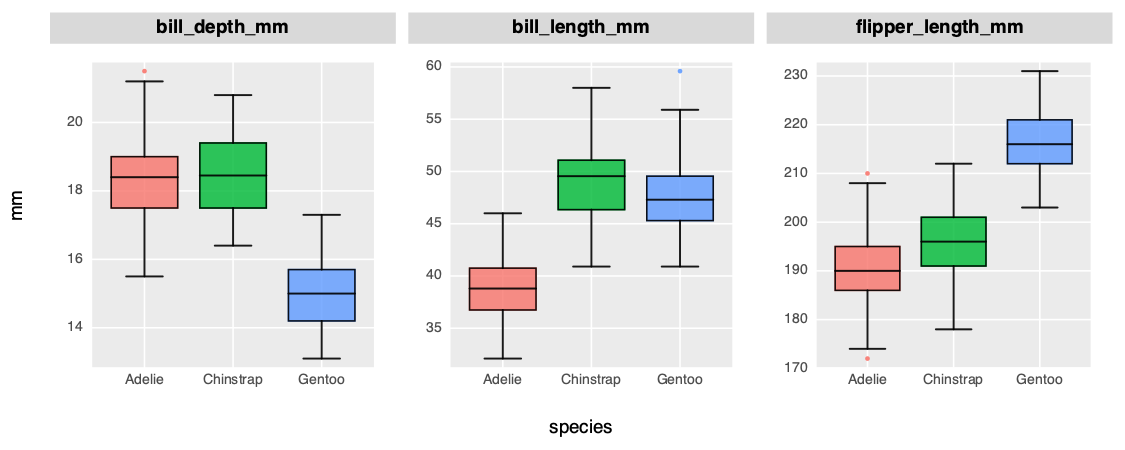
plot3 has ggplot2's themes and scales, so a figure can look exactly like
one from R. The other figures here use theme_dark(), the look of plot3's
interactive viewer.
pivot_wider, separate, unite, nest/unnest, complete, and the
rest of tidyr are in the reference.
Plot with plot3
One scatter shows Simpson's paradox: over all penguins, longer bills are shallower (grey), but within each species they are deeper:
penguins
>> drop_na(bill_length_mm, bill_depth_mm)
>> ggplot(aes(x = bill_length_mm, y = bill_depth_mm, colour = species))
+ geom_point(alpha = 0.6)
+ geom_smooth(method = "lm")                     # one trend per species
+ geom_smooth(method = "lm", colour = "grey70")  # and one for all penguins
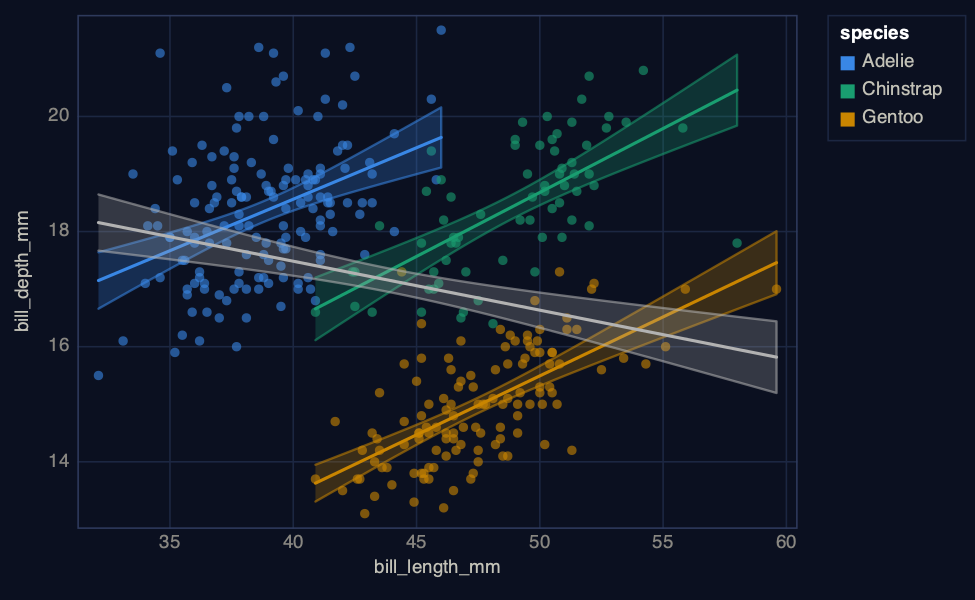
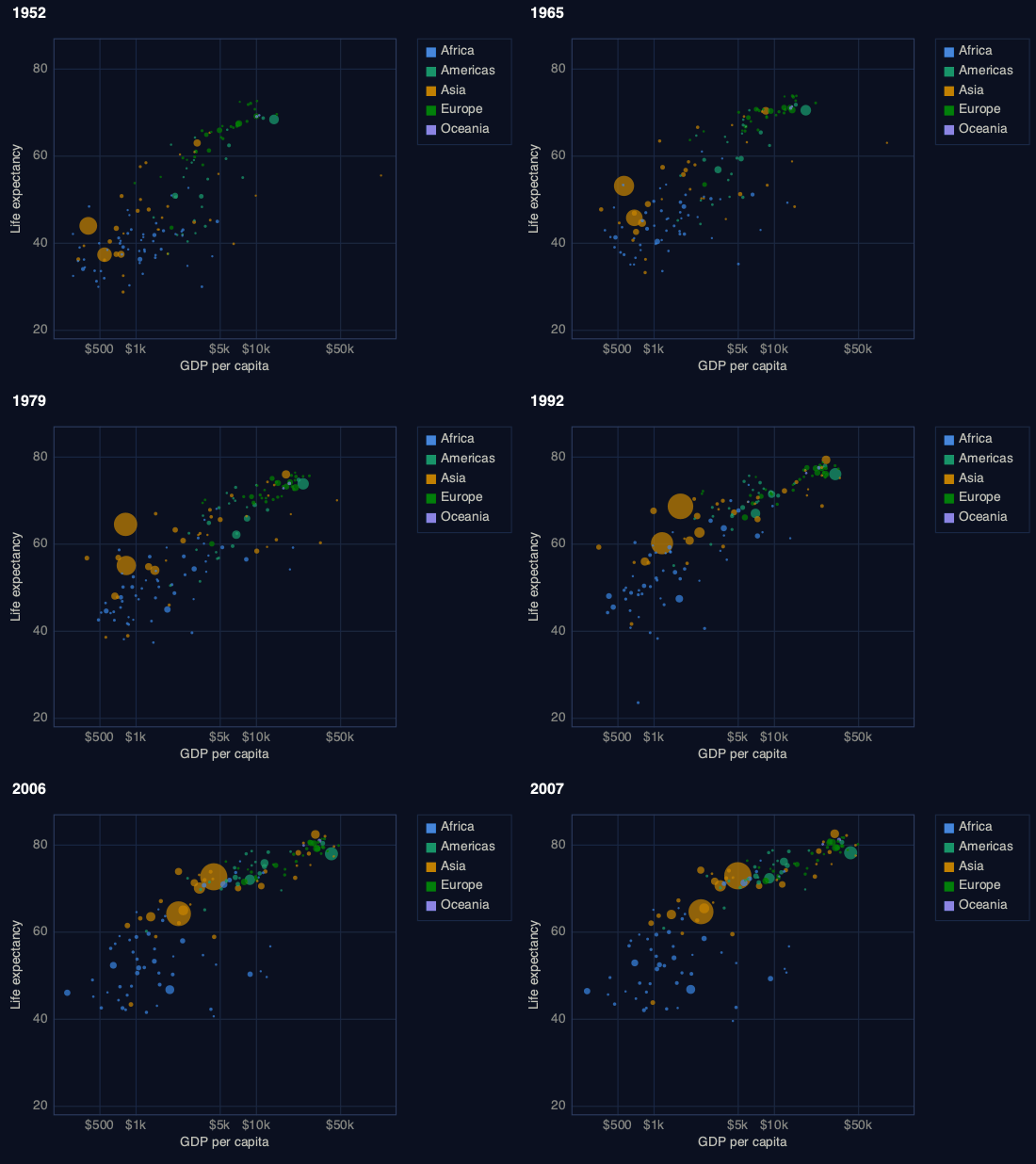
Figures are interactive (zoom, hover, orbit in 3D) and save for papers with
ggsave("fig.pdf", p). plot3's animations work the same way, here
gapminder's life expectancy against income, year by year:
gapminder = scan_csv("https://raw.githubusercontent.com/kirenz/datasets/master/gapminder.csv")

gapminder
>> mutate(pop_millions = pop / 1e6)
>> ggplot(aes(x = gdpPercap, y = lifeExp, size = pop_millions,
              colour = continent, group = country))
+ geom_point(alpha = 0.7)
+ scale_x_log10()
+ transition_time("year")
+ labs(title = "{frame_time}", x = "GDP per capita", y = "Life expectancy")
Hand off to scikit-learn, NumPy, and pandas
tidy3 does the cleaning and scaling, to_numpy() hands scikit-learn a plain
matrix, and the model's output comes straight back as a column. scale() is
R's z-score and rescale(to=(0, 1)) is min-max scaling; both skip missing
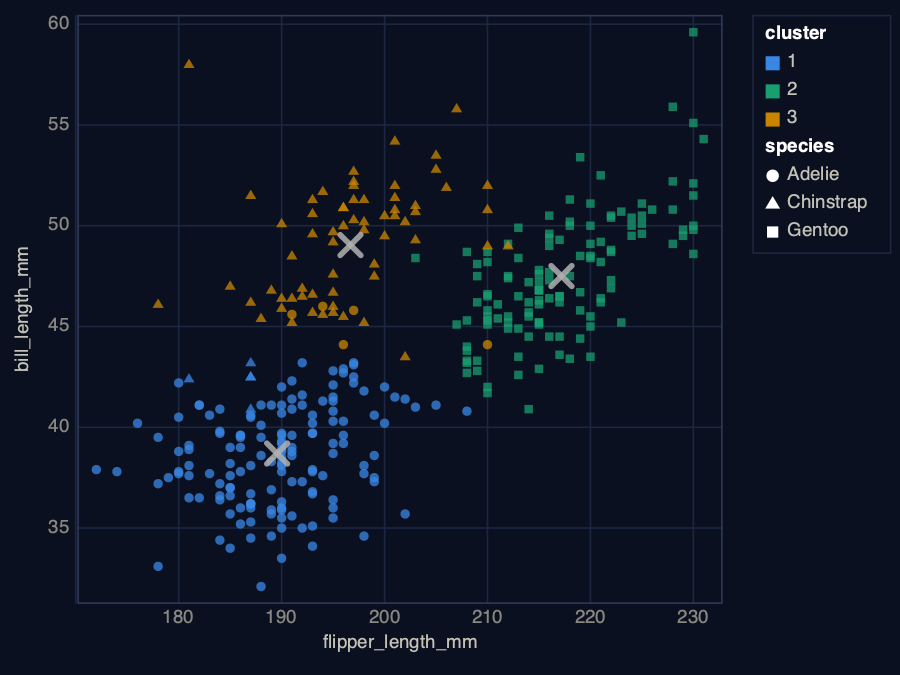
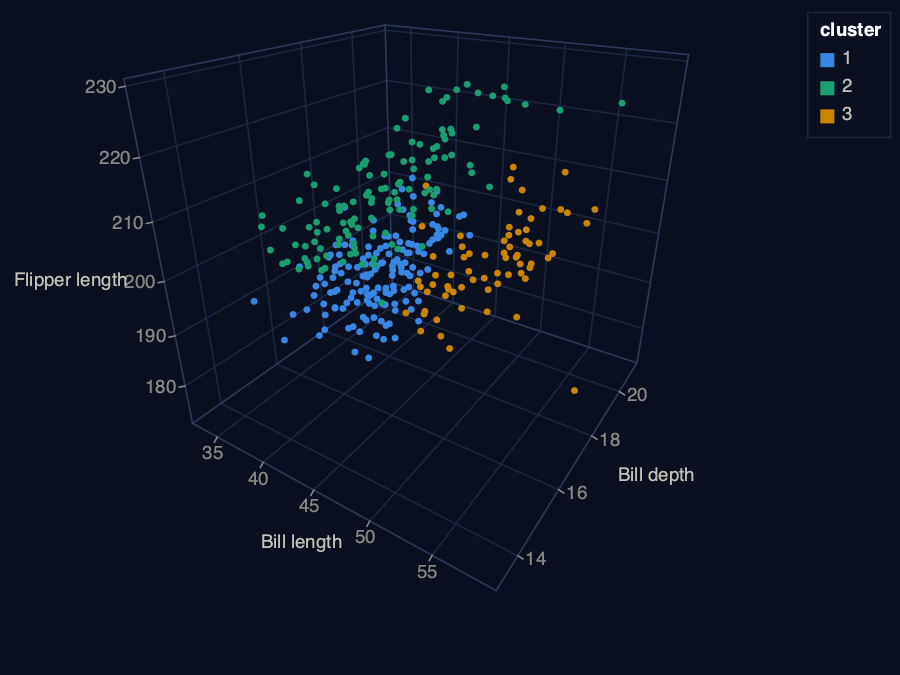
values and work by group. Here k-means
finds three groups in the penguins' bill and flipper sizes:
from sklearn.cluster import KMeans

features = ["bill_length_mm", "bill_depth_mm", "flipper_length_mm"]
complete = penguins >> drop_na(all_of(features)) >> compute()

X = complete
>> mutate(across(all_of(features), scale))
>> to_numpy(columns = features)

kmeans = KMeans(n_clusters=3, n_init=10, random_state=1).fit(X)

clustered = complete >> mutate(cluster = kmeans.labels_ + 1)   # labels come back
clustered >> count(species, cluster)
┌───────────┬─────────┬─────┐
│ species   ┆ cluster ┆ n   │
│ ---       ┆ ---     ┆ --- │
│ str       ┆ i32     ┆ u32 │
╞═══════════╪═════════╪═════╡
│ Adelie    ┆ 1       ┆ 146 │
│ Adelie    ┆ 3       ┆ 5   │
│ Chinstrap ┆ 1       ┆ 5   │
│ Chinstrap ┆ 3       ┆ 63  │
│ Gentoo    ┆ 2       ┆ 123 │
└───────────┴─────────┴─────┘
Note: Use custom normalizations as follows
z_score = lambda x: (x - mean(x)) / sd(x)
complete >> mutate(across(all_of(features), z_score))
The clusters match the species for 332 of 342 penguins. The centres, in
millimetres, are a group_by, not an inverse transform:
centres = clustered >> group_by(cluster) >> summarise(across(all_of(features), mean))

clustered
>> ggplot(aes(x = flipper_length_mm, y = bill_length_mm, colour = factor(cluster)))
+ geom_point(aes(shape = species), alpha = 0.75)
+ geom_point(data = centres, size = 16, shape = "cross", colour = "grey70")
The whole example, as a script, is
examples/cluster_penguins.py
(pip install scikit-learn). Other handoffs:
| To | Call |
|---|---|
| NumPy, PyTorch, Numba | to_numpy(columns=..., dtype=np.float32, order="c", writable=True) |
| pandas | collect(as_="pandas"), or arrow_backed=True to skip the copy |
| Arrow, Polars | collect(as_="arrow"), collect() |
| Files | read_csv, write_parquet, write_csv, write_ipc, write_excel |
| GPU | collect(engine="gpu") with cudf-polars installed |
In a Python script
A plain .py file is ordinary Python: wrap a multi-line pipe in
parentheses and name columns with col("…") in expressions and strings
elsewhere. This form works everywhere, notebooks included, and mixes with
bare names:
result = (
    penguins
    >> filter(col("species") == "Gentoo")
    >> group_by("island")
    >> summarise(heaviest=max("body_mass_g"))
)
Or keep the notebook style and run the script with python -m tidy3 run job.py, which applies the same rewriting. nb_export turns a notebook into
a plain script, and VS Code setup, %%tidy3_run, and the bare-name rules
are in docs/notebooks.md. Running on a remote GPU
kernel under CRAFT or SolveIt: docs/craft.md.
More
- Reference: every verb family, the API table,
pandas input and output, joins,
across, row-wise work, and performance controls. - Benchmarks and R parity: how tidy3 is timed, and the suite that checks its results against dplyr and tidyr.
- Changelog
Development
git clone https://github.com/rleyvasal/tidy3 && cd tidy3
python3 -m venv .venv && source .venv/bin/activate
pip install -e ".[dev]"
python -m pytest -q            # includes every example in this README and docs/
Releases go to PyPI from a version tag; see docs/releasing.md.
License
MIT. See LICENSE.
1 maintainer

Metadata
1 maintainer
Release files for tidy3 0.8.1
For a detailed explanation of source distributions (sdists) and built distributions (wheels), please see the package formats documentation.
Source distribution (sdist)
| File | Size | Uploaded | Provenance | |
|---|---|---|---|---|
| tidy3-0.8.1.tar.gz | 464.6 kB | With provenance | Details |
Built distribution (wheel)
| File | Interpreter | ABI | Platform | Reset |
|---|---|---|---|---|
| tidy3-0.8.1-py3-none-any.whl | Python 3 | none | any | Details |
Total release size: 747.1 kB
Release files / tidy3-0.8.1.tar.gz
| Download URL | tidy3-0.8.1.tar.gz |
|---|---|
| Size | 464.6 kB |
| Tags | Source |
|
SHA-256 checksum How to use checksums |
764bd82ddf02afc79d40e9e25d0b844af15ab11569e0834928d77eb87add1ad7
|
|
BLAKE2b-256 checksum How to use checksums |
746b46413d346a7fafd4e5bb79ca44747ec0ffcad98e0066caf29d2a36d6fcd2
|
| Upload date | |
|
Uploaded using Trusted Publishing? What is trusted publishing? |
Yes |
| Uploaded via |
twine/7.0.0 CPython/3.13.16
|
Provenance
Provenance describes where a file came from. On PyPI, provenance is shared via attestations, which provide a verifiable record of the build or publishing details. View details, limitations and caveats.


PyPI Publish Attestation
PyPI verified that this artifact, at this checksum, originated from the publisher listed below.
Signed by GitHub Actions, verified by PyPI on Oct 22, 2026.
Transparency logRelease files / tidy3-0.8.1-py3-none-any.whl
| Download URL | tidy3-0.8.1-py3-none-any.whl |
|---|---|
| Size | 282.4 kB |
| Tags | Python 3 |
|
SHA-256 checksum How to use checksums |
0ddcfe188a6e6d942d7837949871a0754415d5ec12b7798cfba605c8d65b3c9b
|
|
BLAKE2b-256 checksum How to use checksums |
773afa7eb9868b3302f7b4fb316793eac6a3d45d0b7cd484864d03a1092a5689
|
| Upload date | |
|
Uploaded using Trusted Publishing? What is trusted publishing? |
Yes |
| Uploaded via |
twine/7.0.0 CPython/3.13.16
|
Provenance
Provenance describes where a file came from. On PyPI, provenance is shared via attestations, which provide a verifiable record of the build or publishing details. View details, limitations and caveats.
PyPI Publish Attestation
PyPI verified that this artifact, at this checksum, originated from the publisher listed below.
Signed by GitHub Actions, verified by PyPI on Oct 22, 2026.
Transparency logSecurity for tidy3 0.8.1
Provenance
Provenance describes where a file came from. On PyPI, provenance is shared via attestations, which provide a verifiable record of the build or publishing details. View details, limitations and caveats.
Full provenance
All 2 files in this release have been uploaded with provenance metadata.
Attestation for tidy3-0.8.1.tar.gz
PyPI Publish Attestation
PyPI verified that this artifact, at this checksum, originated from the publisher listed below.
Signed by GitHub Actions, verified by PyPI on Oct 22, 2026.
Transparency logA note on package security
PyPI is a repository for distributing packages, not a service for auditing them. While third-party security researchers and our staff do their best to detect and remove malicious packages, PyPI cannot guarantee the quality, security or suitability of any given package.














