
tidye - Tidal simulation with multiple moons in Python




The tidye simulator calculates tidal interactions between a planet and one or more moons.
Installation
The easiest way to install the package is to download it from PyPI using pip.
Note that tidye depends on Python 3.9 or newer; please
ensure that you have a semi-recent version of Python installed before proceeding.
Run the following command in a shell (a UNIX-like environment is assumed):
$ pip install tidye
The package has a few external dependencies besides Python itself. If you wish to sandbox your installation inside a virtual environment, you may choose to use virtualenvwrapper or a similar utility to do so.
When successfully installed, a program called tidye will be placed on your PATH.
See the Usage section below for details about how to use this program.
Usage
The tidye program is a command-line interface for simulating tidal forces.
At any time, you can use the -h or --help flags to see a summary of options that
the program accepts.
$ tidye -h
usage: tidye [-h] [-d DURATION] file

Simulate lunar tides from a provided configuration file.

positional arguments:
  file                  Path to config file (e.g., config.json)

optional arguments:
  -h, --help            show this help message and exit
  -d DURATION, --duration DURATION
                        Simulation duration (defaults to two full orbits)
Typical usage is tidye <config_file>, where <config_file> is the path to a file
describing the configuration of the planet and moons that you wish to simulate. For an
example config file, see the sample_config.json included in the repository, or check
the example below:
{
  "planet": {
    "mass": 1000
  },
  "moons": [
    {
      "mass": 100,
      "orbital_radius": 300,
      "orbital_period": 1
    },
    {
      "mass": 200,
      "orbital_radius": 500,
      "orbital_period": 2,
      "orbital_phase": 0.5
    },
    {
      "mass": 150,
      "orbital_radius": 400,
      "geostationary": true
    }
  ]
}
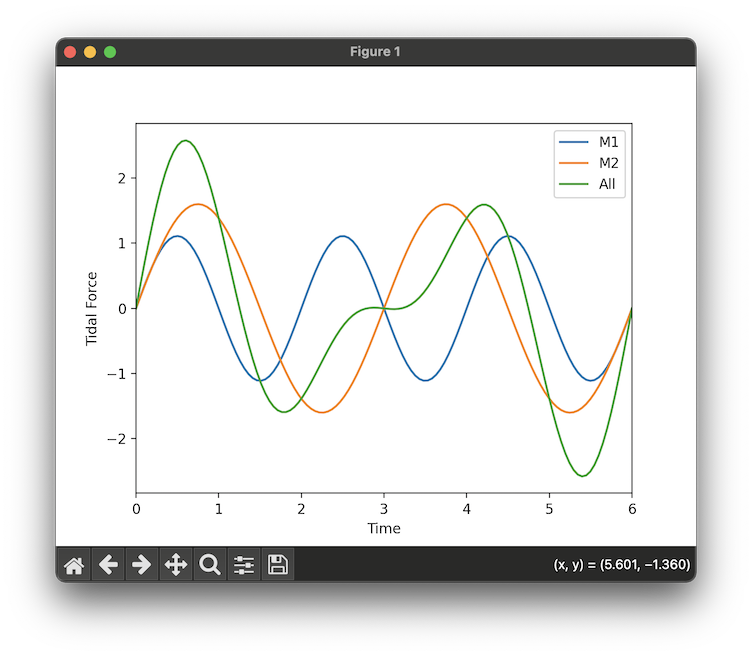
The program will produce a graph showing the tidal forces on the planet resulting from
each individual moon, as well as the cumulative force from all moons combined
(labeled All). See the image below for an example graph generated by tidye.
1 maintainer

Download files
Download the file for your platform. If you're not sure which to choose, learn more about installing packages.
Source Distribution
Built Distribution
Filter files by name, interpreter, ABI, and platform.
If you're not sure about the file name format, learn more about wheel file names.
Copy a direct link to the current filters
File details
Details for the file tidye-0.1.4.tar.gz.
File metadata
- Download URL: tidye-0.1.4.tar.gz
- Upload date:
- Size: 4.6 kB
- Tags: Source
- Uploaded using Trusted Publishing? No
- Uploaded via:
poetry/1.6.1 CPython/3.11.1 Darwin/24.3.0
File hashes
| Algorithm | Hash digest | |
|---|---|---|
| SHA256 |
bcbe1e3e33ec14a64ff98963615efc85f8222c925becc6b3e332787fbf2108f2
|
|
| MD5 |
e541795987837369c16eb3984018e32f
|
|
| BLAKE2b-256 |
10602f617ddac016a964819184e1979089afda334522a23002813498c1bd6365
|
File details
Details for the file tidye-0.1.4-py3-none-any.whl.
File metadata
- Download URL: tidye-0.1.4-py3-none-any.whl
- Upload date:
- Size: 5.8 kB
- Tags: Python 3
- Uploaded using Trusted Publishing? No
- Uploaded via:
poetry/1.6.1 CPython/3.11.1 Darwin/24.3.0
File hashes
| Algorithm | Hash digest | |
|---|---|---|
| SHA256 |
b6ca9bb68d432776c81fe8728ac76f6f0d53830bcf7844356fe1fc6d93c0da03
|
|
| MD5 |
93aa4ffb1035627dfc2a39ffed63aef7
|
|
| BLAKE2b-256 |
46dbe5d1e0d4f40bbfb250e05fba16eb819c7d5e2e3b333d7ee644b22454dbc3
|














