
tidyline
An offline, read-only command-line tool that audits a Things 3 database on macOS.
Unofficial. tidyline is not affiliated with or endorsed by Cultured Code. "Things" is a trademark of its owner. This project uses the name only to say which app it reads. It uses no logo or icon.
Your data is personal
The Things database, the JSON export, the HTML report, the text output of
check and recurrence, and any decoded file contain your personal data: task
titles, notes, checklists and dates. Never commit them to a repository, and
never post them in a public issue. The text report prints counts only, and
check --json prints ids and fixed messages only; neither shows titles.
Anonymised exports reduce the risk. They cannot remove all of it.
lightkeeps titles but replaces emails, phone numbers, URLs, money amounts and long digit runs with placeholders. It removes notes. It is a best-effort scrub. It cannot catch names, addresses or alphanumeric account numbers.strictreplaces every title and name with a label such asTask k3f7az. It removes notes and replaces checklist items with a count. Onlystrictremoves all titles.- At every level, ids are kept. Anyone who also has your database can map them back to titles. Dates, counts and findings stay too, and they reveal how you work.
What it does
tidyline reads your Things database and reports on it: counts, health checks, an HTML report you open in your browser, a decoded view of your repeating tasks, a JSON export, and an anonymised prompt you can give to an AI assistant yourself.
What it does not do:
- It never writes to the Things database.
- It never reads the database file directly. It makes a private copy (a snapshot) with the SQLite backup API and reads that, then deletes the copy. Things can stay open while it runs.
- It makes no network calls. None of the current commands needs a network.
- It never reads or exports the URL-scheme auth token.
- It never changes, completes or opens anything in Things.
Install
You need Python 3.10 or later and uv or pipx.
uv tool install tidyline
or
pipx install tidyline
Then check it works:
tidyline --version
To upgrade:
uv tool upgrade tidyline
From source (for development)
git clone https://github.com/rathodlaxman/tidyline.git
cd tidyline
uv sync
uv run tidyline --version
macOS may block Terminal from reading Things' data folder. If doctor says so,
open System Settings, Privacy & Security, Full Disk Access, turn it on for your
terminal app, then quit and reopen the terminal.
Quick start
These examples use the installed tidyline command. In a source checkout, run
uv run tidyline instead, from the folder you cloned. Write outputs outside any
git folder, so they cannot be committed by accident. The examples use
~/tidyline-out/. tidyline creates that folder for you the first time, readable
only by you:
tidyline doctor
tidyline report
tidyline report --html --out ~/tidyline-out/report.html
tidyline check
tidyline recurrence
tidyline export --out ~/tidyline-out/export.json
tidyline prompt --out ~/tidyline-out/prompt
tidyline decode ~/tidyline-out/answer.md --out ~/tidyline-out/answer-decoded.md
doctorfinds the database and checks permissions, the schema and versions.reportprints a text summary. It shows counts only, including counts of repeating templates. No title appears in it;recurrenceshows the titles.report --html --out FILEwrites the same report as one HTML file, with your task titles. See The HTML report.checkruns the health checks.recurrencelists every repeating template with its readable rule.exportwrites a JSON export. Add--anonymise lightor--anonymise strictto anonymise it.promptanddecodeare described below.
Every command accepts --db PATH for a database in a non-standard place. You
can also set the THINGSDB environment variable. Add --verbose before the
command for more detail when something fails.
Guides
- Getting started: a step-by-step guide for people who have never used a command line tool.
- Fixing the problems tidyline finds: what each health check means and how to fix it in Things 3.
Commands
| Command | What it does | Options |
|---|---|---|
doctor |
Finds the database and checks permissions, schema and versions. | --db |
report |
Prints a text summary with counts only, or writes it to a new file. It shows no titles and is safe to paste. | --out PATH, --include-completed, --no-color, --db |
report --html --out FILE |
Writes the report as one HTML file to open in a browser. It contains your task titles: do not commit or share it. | --include-completed, --db |
check |
Runs the health checks. The text output has a heading per check, and the items are grouped by project or area, with a count. | --only ID [ID ...], --pattern REGEX [REGEX ...], --json, --db |
export |
Writes a JSON export to a new file. | --out PATH (required), --anonymise {none,light,strict}, --db |
recurrence |
Lists every repeating template with its readable rule. | --raw, --db |
prompt |
Writes an anonymised payload and a filled audit prompt. | --anonymise {light,strict}, --context FILE, --out DIR, --copy, --db |
decode |
Replaces strict labels in an answer with your real titles. |
ANSWER_FILE, --out FILE, --db |
Files written with --out get mode 0600, and an existing file is never
overwritten. If the --out folder does not exist, tidyline creates its last
level with mode 0700 and says so on stderr, as long as the parent folder
exists. It never creates a chain of folders, never defaults to a location, and
never changes a folder that already exists (it warns if group or others can read
it). Do not use a folder that is synced or backed up to a cloud service for these
files.
Colour is used sparingly (bold, yellow and red from the terminal's own palette)
and only when the output goes to a terminal. Set NO_COLOR to turn it off;
report also has --no-color.
Run tidyline with no arguments for a short help screen. tidyline --help
gives the full option list.
Exit codes:
| Code | Meaning |
|---|---|
| 0 | Success. For check: no warnings. |
| 1 | Only check uses this: at least one warning-level finding. |
| 2 | Usage error, such as a bad option, a bad regular expression, an output file that already exists, or an output folder that cannot be used (its parent is missing, or something that is not a folder is in the way). |
| 3 | The run failed: the database could not be found or read, or a file could not be written. |
The HTML report
tidyline report --html --out ~/tidyline-out/report.html
open ~/tidyline-out/report.html
report --html writes the file but does not open it; open shows it in your
default browser. Unlike the text report, it shows your task titles and the
names of your projects and areas, so it is personal data. Keep it private, do
not commit or share it, and delete it when you are done:
rm ~/tidyline-out/report.html
- It has the counts, where your open to-dos sit, every health check with the
items it found grouped by project or area, your repeating to-dos, and any
values tidyline could not read cleanly.
--include-completedadds a table of closed items. - It is a single file with inline styles only: no script, no fonts, no images and nothing loaded from the network. A Content-Security-Policy in the file blocks anything else. It follows your system's light or dark setting, shows tables as cards on a phone-width screen, and prints cleanly.
- Each check with findings links to its section in Fixing the problems tidyline finds.
- A "Want a deeper review?" box at the end points to
tidyline promptandtidyline decode. tidyline itself does not write recommendations. --out FILEis required with--html, and an existing file is never overwritten.
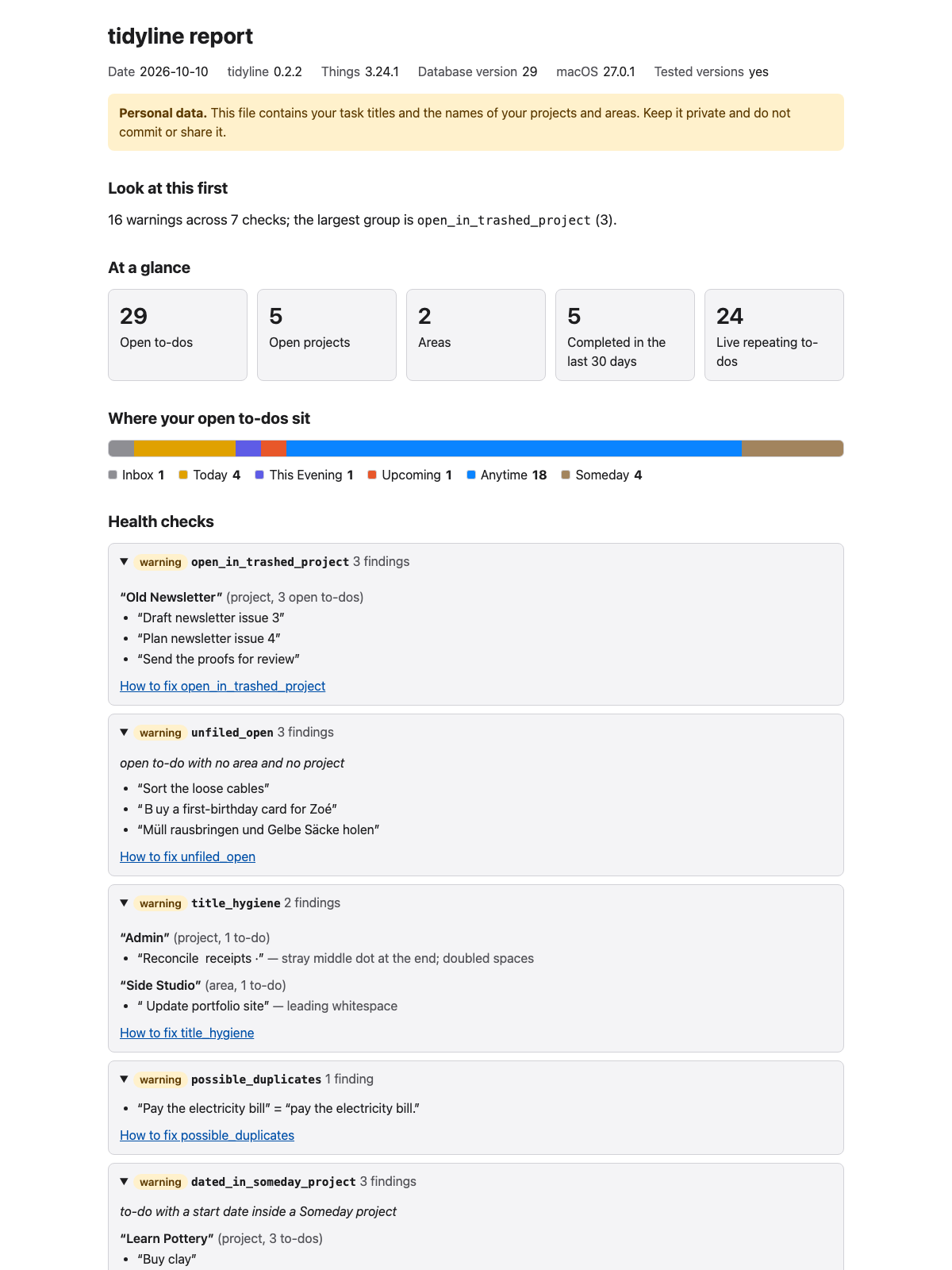
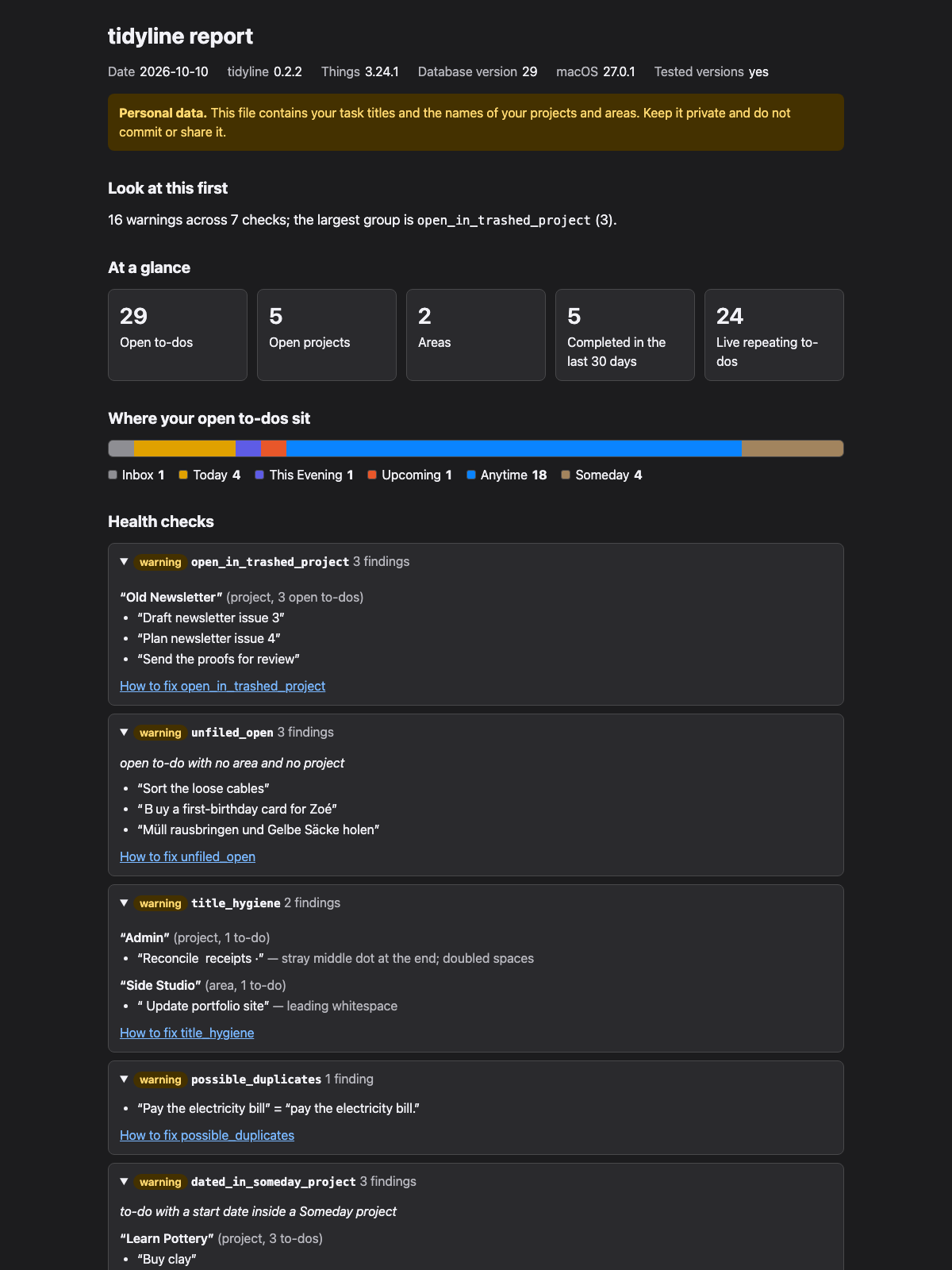
The HTML report in light and dark mode. Both screenshots use the synthetic test fixture, not a real Things database.
Using an AI assistant without sending anything automatically
tidyline never sends your data anywhere. prompt prepares two files, and you
decide whether to attach or paste them into an assistant yourself.
tidyline prompt --context my-context.txt --out ~/tidyline-out/prompt
- The default is
--anonymise strict. There is nononeoption forprompt. --context FILEis a plain text file with sections labelledRole:,Priorities:andDates:. It is added to the prompt exactly as you wrote it. A section you leave out stays as a visible placeholder, and the preview warns you.--out DIRwritestidyline_payload.json(your open work with ready-made counts, anonymised) andtidyline_prompt.md(the filled prompt).--copyputs the prompt on the clipboard withpbcopy. With neither option, nothing is written.- The payload holds open work only. Completed, cancelled and trashed to-dos, and completed or trashed projects, appear only as counts in its summary.
promptalways prints a preview first: the level, the counts, what was removed or replaced, what was left out, and your context text. The last line says nothing has been sent anywhere.- Neither the text report nor the HTML report is part of the output.
- Use a private chat (in Claude, an incognito chat) with memory switched off, and also check the assistant's profile and personal-preference settings. Claude's help says incognito chats do not use memory but can still use profile information such as custom styles and personal preferences (https://support.claude.com/en/articles/12260368-use-incognito-chats, read 2026-10-11). Clear or pause those settings if you do not want them to appear in the answer. Other assistants have similar settings; check yours.
At strict, titles are hidden, so the assistant cannot judge how your tasks are
worded. The prompt tells it to skip that part. Use --anonymise light if you
want task wording reviewed, and accept that light leaves titles in place.
To turn the answer back into real titles, save it to a file and run:
tidyline decode ~/tidyline-out/answer.md
decode recomputes each label from the current database, so it needs no
mapping file. It needs the same database the prompt was made from, and light
output needs no decoding.
- It replaces whole labels such as
Task k3f7az, and bare codes such ask3f7azwhen the code belongs to exactly one item. A code shared by several items is left as it is. - Titles go in double quotes, unless the answer already quoted the label or put it in backticks.
- Long titles are cut to 80 characters, and line breaks in titles become spaces.
- In a markdown table row, a
|inside a title is written\|, so the table keeps its shape. - When two open items share a title, each gets its project or area:
"Sort the mail (in Household)". - It reports how many labels and codes it replaced, and how many it left because they were ambiguous or matched nothing. That summary never shows titles.
The decoded text contains real titles, so treat it as personal data.
Health checks
tidyline check exits with 1 if any warning is found. Info findings do not
change the exit code. The findings themselves carry ids and fixed messages.
The text output looks up the titles and shows them on your own screen, so do
not paste it into a public place. check --json prints ids and fixed messages
only, with no titles.
| Check | Severity | What it finds |
|---|---|---|
open_in_trashed_project |
warning | Open to-dos inside a trashed project. The other checks leave these out. |
unfiled_open |
warning | Open to-dos with no area and no project, outside the Inbox. |
title_hygiene |
warning | A stray · at either end, leading or trailing spaces, doubled spaces, and matches of your own --pattern regular expressions. |
possible_duplicates |
warning | Open to-dos whose titles match after Unicode normalisation, case folding, apostrophes removed and other punctuation treated as spaces. |
dated_in_someday_project |
warning | To-dos with a start date inside a Someday project. They will never surface. |
active_project_no_open_tasks |
warning | Active projects with no open to-dos and no live repeating template. |
recurrence_not_recognised |
warning | Repeating templates whose rule tidyline cannot read or does not recognise. |
leftover_templates |
info | Repeating templates whose project is trashed or missing. |
someday_in_active_project |
info | Someday to-dos inside active projects. |
outside_heading |
info | To-dos outside any heading in projects that use headings. |
A finding for one of your own patterns says only "matches user pattern N". The text output on your screen shows the pattern next to it; the JSON does not.
Things does not document its database
tidyline reads columns that Things does not document, because there is no public API for this. These include:
- the repeating-task columns
rt1_recurrenceRule,rt1_repeatingTemplateandrt1_instanceCreationPaused; startBucket, which marks This Evening;deadlineSuppressionDate, which keeps an overdue deadline out of Today.
Repeat rules are stored as property lists whose meaning was worked out by comparing them with what Things shows. A rule tidyline does not understand is reported as not recognised. It is never guessed.
Before reading, tidyline checks that the tables and columns it needs exist. If they do not, it stops with a message that names what is missing, the versions it was tested with, and what to do next. See docs/COMPATIBILITY.md for what has been tested and what has not.
Not yet built: the opt-in model integration.
Development
uv sync
uv run pytest
uv run ruff check .
uv run ruff format --check .
Tests use only a synthetic database built by tests/fixtures/build_fixture.py.
The real Things database is never used in tests, and no database, export or
report is ever committed. Network sockets are blocked while the tests run.
Golden files under tests/fixtures/ are regenerated with
TIDYLINE_UPDATE_GOLDEN=1 uv run pytest. Review the diff before committing.
The design and the decisions behind it are in docs/DESIGN.md. How repeat rules are read is in docs/RECURRENCE.md.
AI-Assisted Development
Claude Code was used as a development assistant during parts of this project.
I remain responsible for the design, code review, testing, security, licensing, and final acceptance of all changes.
Licence
MIT. See LICENSE. tidyline depends on things.py, which is licensed under Apache 2.0.
1 maintainer

Metadata
1 maintainer
Release files for tidyline 0.3.1
For a detailed explanation of source distributions (sdists) and built distributions (wheels), please see the package formats documentation.
Source distribution (sdist)
| File | Size | Uploaded | |
|---|---|---|---|
| tidyline-0.3.1.tar.gz | 72.8 kB | Details |
Built distribution (wheel)
| File | Interpreter | ABI | Platform | Reset |
|---|---|---|---|---|
| tidyline-0.3.1-py3-none-any.whl | Python 3 | none | any | Details |
Total release size: 163.0 kB
Release files / tidyline-0.3.1.tar.gz
| Download URL | tidyline-0.3.1.tar.gz |
|---|---|
| Size | 72.8 kB |
| Tags | Source |
|
SHA-256 checksum How to use checksums |
5d00539f822566d63f46d38853d0d28829c83df662b72d90ce0ce9a72c9491e5
|
|
BLAKE2b-256 checksum How to use checksums |
48a738ab4ce6ba1de577bb9f844963f79ba162779d9d277a761ed43187f97c5c
|
| Upload date | |
|
Uploaded using Trusted Publishing? What is trusted publishing? |
No |
| Uploaded via |
uv/0.13.0 {"installer":{"name":"uv","version":"0.13.0","subcommand":["publish"]},"python":null,"implementation":{"name":null,"version":null},"distro":{"name":"macOS","version":null,"id":null,"libc":null},"system":{"name":null,"release":null},"cpu":null,"openssl_version":null,"setuptools_version":null,"rustc_version":null,"ci":null}
|
Release files / tidyline-0.3.1-py3-none-any.whl
| Download URL | tidyline-0.3.1-py3-none-any.whl |
|---|---|
| Size | 90.3 kB |
| Tags | Python 3 |
|
SHA-256 checksum How to use checksums |
b85dcb76ca127924ba60af0e255ce77d2fb6634ae7b57e03cced0e8f2a44742a
|
|
BLAKE2b-256 checksum How to use checksums |
5209d57fd77836d955181b871fd37a6505e63550abbef0c1bb37445909d91055
|
| Upload date | |
|
Uploaded using Trusted Publishing? What is trusted publishing? |
No |
| Uploaded via |
uv/0.13.0 {"installer":{"name":"uv","version":"0.13.0","subcommand":["publish"]},"python":null,"implementation":{"name":null,"version":null},"distro":{"name":"macOS","version":null,"id":null,"libc":null},"system":{"name":null,"release":null},"cpu":null,"openssl_version":null,"setuptools_version":null,"rustc_version":null,"ci":null}
|














