
A terminal-based AI coding agent, similar to Claude Code, OpenAI Codex etc. but works with many more LLMs.

Project description
🐯 Tig
An automonous AI coding agent that runs in the terminal. Similar to Claude Code, OpenAI Codex etc. but works with many more LLMs.
It can:
- Write code 📝
- Fix bugs 🐛
- Execute shell commands 💻
- Write tests 🧪
- Analyze codebase 🔍 and many more...
All within the terminal! 🚀
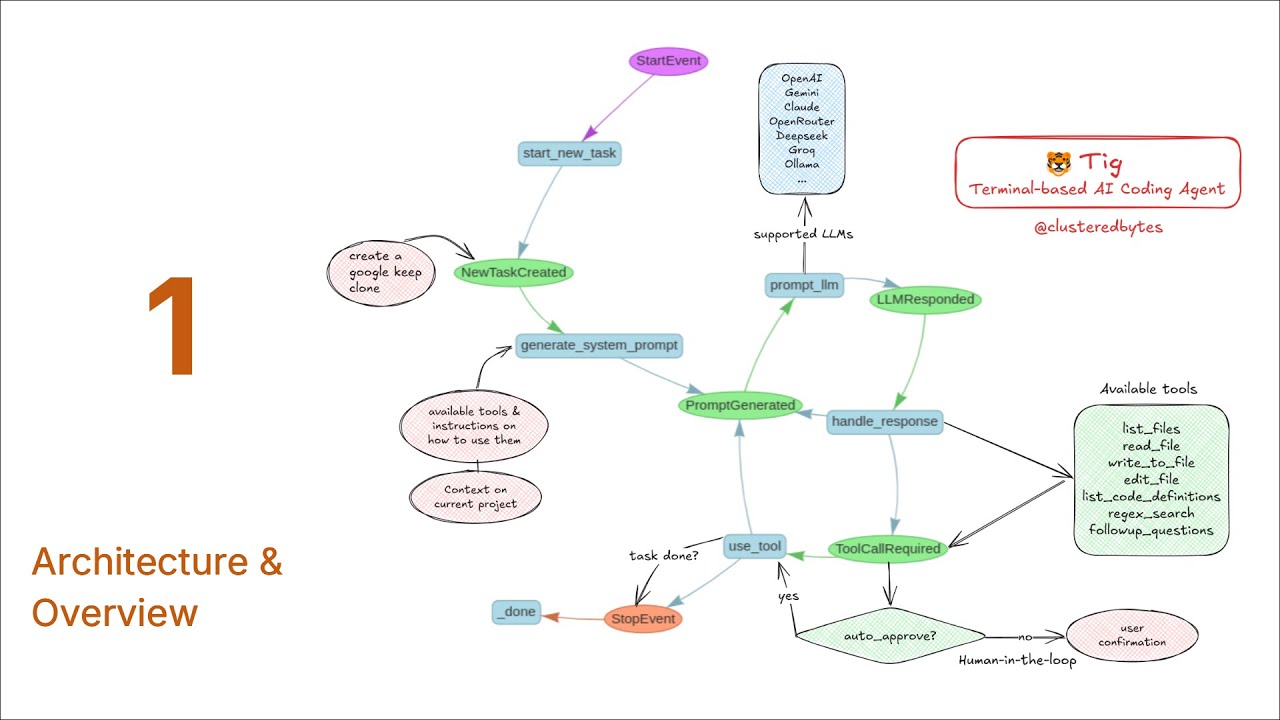
Full tutorial series on how to build it from scratch 👇
Modes
It has different modes for different tasks:
- 📝 Architect: Designs the system, brainstorms ideas with the user, saves the design in a markdown file.
- 💻 Code: Implements the architect's plan step by step
✅ LLMs supported so far:
- Google Gemini
- OpenAI
- Claude
- OpenRouter
- Deepseek
- Groq
- Local LLMs using Ollama
Tools Used
- LlamaIndex Workflow: For orchestrating and multiple LLMs support
- Tree-sitter: For searching code definitions (functions, classes, etc.) accross the codebase and checking for syntax errors
- Ripgrep: For regex search accross the codebase
- Google's diff-match-patch: For comparing and displaying diffs
Requirements
Tig depends on some external tools:
- Ripgrep: For regex search accross the codebase
Make sure to install it for your operating system.
For macOS, you can use Homebrew:
brew install ripgrep
For Linux, you can use the package manager for your distro:
For Arch:
sudo pacman -S ripgrep
For Fedora:
sudo dnf install ripgrep
Installation (using pip)
Install Tig using pip:
pip install tig-code
Note: If tig is not in your PATH, you need to add it first (depends on your python installation)
Usage
Tig is configured using .env file.
Specify the LLM and model to use alongside with appropriate API keys in the .env file.
GOOGLE_API_KEY="..."
TIG_MODEL="gemini-2.0-flash"
TIG_PROVIDER="google" # available providers: [google, openai, anthropic, deepseek, groq, ollama, openrouter]
Provide the right API key variable for the right model e.g. GOOGLE_API_KEY for Gemini, OPENAI_API_KEY for OpenAI, ANTHROPIC_API_KEY for Claude, etc.
Now run tig (optionally specify the mode --mode <code| architect>):
tig
If you want to auto-approve all the actions taken by Tig (read, write, update files), run tig with the --auto-approve flag:
tig --auto-approve
Finally when prompted, provide tig with a task to get started:
...
New task: Create a screen recorder website for chrome
...


Download files
Download the file for your platform. If you're not sure which to choose, learn more about installing packages.
Source Distribution
Built Distribution
Filter files by name, interpreter, ABI, and platform.
If you're not sure about the file name format, learn more about wheel file names.
Copy a direct link to the current filters
File details
Details for the file tig_code-0.1.7.tar.gz.
File metadata
- Download URL: tig_code-0.1.7.tar.gz
- Upload date:
- Size: 36.7 kB
- Tags: Source
- Uploaded using Trusted Publishing? No
- Uploaded via: twine/6.1.0 CPython/3.13.2
File hashes
| Algorithm | Hash digest | |
|---|---|---|
| SHA256 |
8f5f1d6f4ca89e2ed7b754520975e625e75bc10d82bfc18f987f0c948c92315f
|
|
| MD5 |
c120adb2cb02feee0de422f0014ed8ff
|
|
| BLAKE2b-256 |
645d7cf9ee97a1d867446195388edfe2392f2f98ba98c521f43c1d8916bacf8c
|
File details
Details for the file tig_code-0.1.7-py3-none-any.whl.
File metadata
- Download URL: tig_code-0.1.7-py3-none-any.whl
- Upload date:
- Size: 51.7 kB
- Tags: Python 3
- Uploaded using Trusted Publishing? No
- Uploaded via: twine/6.1.0 CPython/3.13.2
File hashes
| Algorithm | Hash digest | |
|---|---|---|
| SHA256 |
ddefa7a611ace141eefe0f9f9bfabe711c20b45030580997c35e1ab5bfaaf345
|
|
| MD5 |
4dccb1a4f3ee33c302e9de48dfcbd525
|
|
| BLAKE2b-256 |
9f2963710c8b0937ba42a0e40c1bc8815a49910378bb045cef7ede3c4893b2f2
|






