
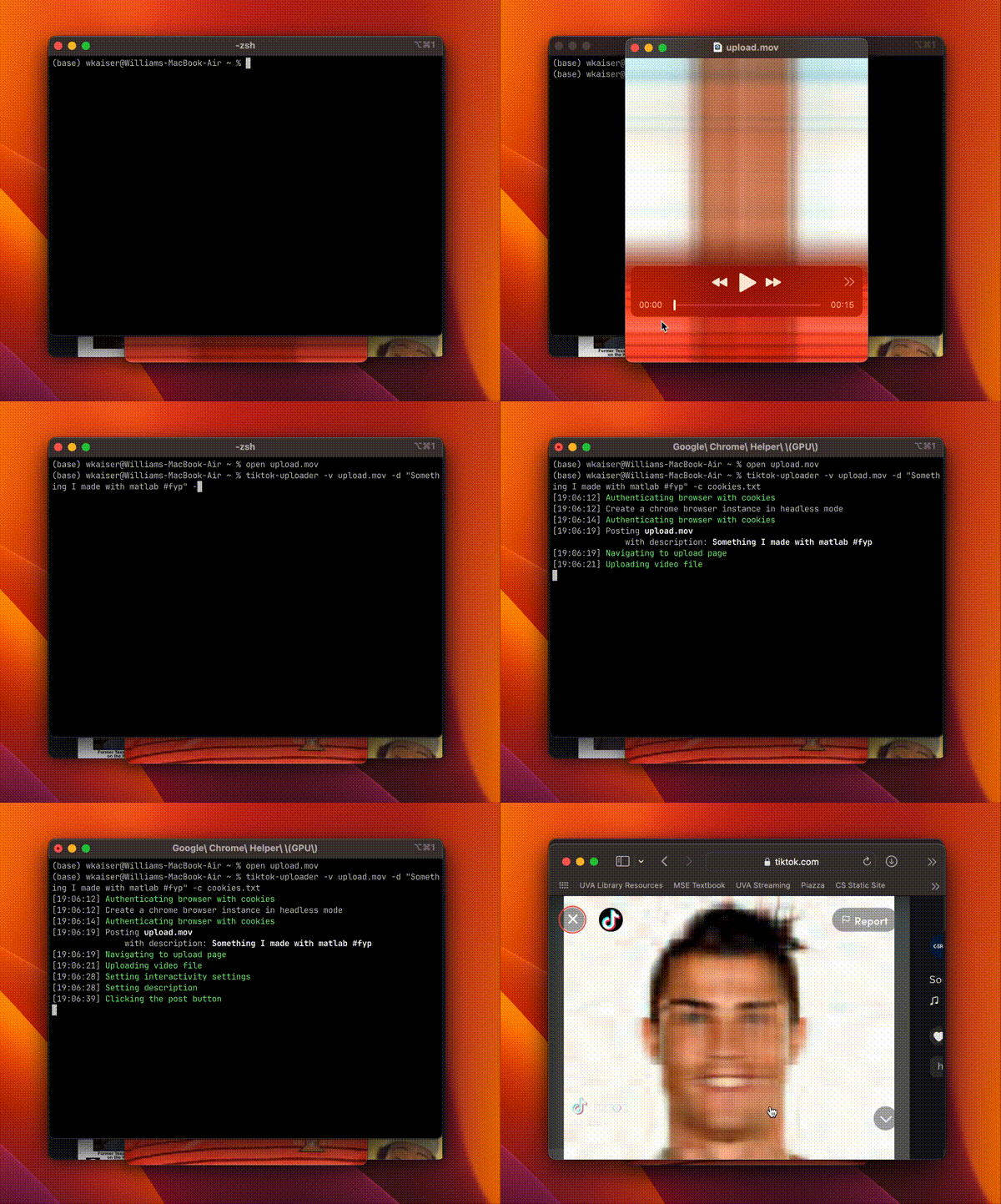
⬆️ TikTok Uploader
A Playwright-based automated TikTok video uploader



Table of Contents
Installation
A prerequisite to using this program is the installation of Playwright browsers.
MacOS, Windows and Linux
Install Python 3 or greater from python.org
Downloading from PyPI (Recommended)
Install tiktok-uploader using pip
pip install tiktok-uploader
playwright install
Building from source
Installing from source allows greater flexibility to modify the module's code to extend default behavior.
First, install uv a really fast python package manager.
curl -LsSf https://astral.sh/uv/install.sh | sh
Next, clone the repository using git. Then change directories and run the project with uv run tiktok-uploader.
git clone https://github.com/wkaisertexas/tiktok-uploader
cd tiktok-uploader
uv sync
uv run playwright install
uv run tiktok-uploader
After uv installs the required packages, you should see something like the following:
usage: tiktok-uploader [-h] -v VIDEO [-d DESCRIPTION] [-t SCHEDULE] [--proxy PROXY] [--product-id PRODUCT_ID]
                       [-c COOKIES] [-s SESSIONID] [-u USERNAME] [-p PASSWORD] [--attach]
Usage
tiktok-uploader works by duplicating your browser's cookies which tricks TikTok into believing you are logged in on a remote-controlled browser.
💻 Command Line Interface (CLI)
Using the CLI is as simple as calling tiktok-uploader with your videos: path (-v), description(-d), and cookies (-c).
tiktok-uploader -v video.mp4 -d "this is my escaped \"description\"" -c cookies.txt
from tiktok_uploader.upload import TikTokUploader

# single video
uploader = TikTokUploader(cookies='cookies.txt')
uploader.upload_video('video.mp4', description='this is my description')

# Multiple Videos
videos = [
    {
        'path': 'video.mp4',
        'description': 'this is my description'
    },
    {
        'path': 'video2.mp4',
        'description': 'this is also my description'
    }
]

uploader = TikTokUploader(cookies='cookies.txt')
uploader.upload_videos(videos=videos)
⬆ Uploading Videos
This library revolves around the TikTokUploader class which has a upload_videos function which takes in a list of videos which have filenames and descriptions and are passed as follows:
from tiktok_uploader.upload import TikTokUploader

videos = [
    {
        'video': 'video0.mp4',
        'description': 'Video 1 is about ...'
    },
    {
        'video': 'video1.mp4',
        'description': 'Video 2 is about ...'
    }
]

uploader = TikTokUploader(cookies='cookies.txt')
failed_videos = uploader.upload_videos(videos=videos)

for video in failed_videos:  # each input video object which failed
    print(f"{video['video']} with description {video['description']} failed")
🫵 Mentions and Hashtags
Mentions and Hashtags now work so long as they are followed by a space. However, you as the user are responsible for verifying a mention or hashtag exists before posting
from tiktok_uploader.upload import TikTokUploader

uploader = TikTokUploader(cookies='cookies.txt')
uploader.upload_video('video.mp4', description='#fyp @icespicee')
🪡 Stitches, Duets and Comments
To set whether or not a video uploaded allows stitches, comments or duet, simply specify comment, stitch and/or duet as keyword arguments to upload_video or upload_videos.
uploader = TikTokUploader(cookies='cookies.txt')
uploader.upload_video(..., comment=True, stitch=True, duet=True)
Comments, Stitches and Duets are allowed by default
🌐 Proxy
To set a proxy, currently only works with chrome as the browser, allow user:pass auth.
# proxy = {'user': 'myuser', 'pass': 'mypass', 'host': '111.111.111', 'port': '99'}  # user:pass
proxy = {'host': '111.111.111', 'port': '99'}

uploader = TikTokUploader(cookies='cookies.txt', proxy=proxy)
uploader.upload_video(...)
📆 Schedule
The datetime to schedule the video will be treated with the UTC timezone.
The scheduled datetime must be at least 20 minutes in the future and a maximum of 10 days.
import datetime
from tiktok_uploader.upload import TikTokUploader

schedule = datetime.datetime(2020, 12, 20, 13, 00)

uploader = TikTokUploader(cookies='cookies.txt')
uploader.upload_video(..., schedule=schedule)
🖼️ Covers
You can add a custom cover image when uploading a video.
TikTok supports ".png", ".jpeg" and ".jpg".
my_cover = "crazy_cover.jpg"

uploader = TikTokUploader(cookies='cookies.txt')
uploader.upload_video(..., cover=my_cover)
🛍️ Product Link
You can automatically add a product link to your uploaded video.
Prerequisites:
- Your TikTok account must be eligible to add showcase products to your videos.
- You need to obtain the product ID beforehand. To do this:
- Go to the TikTok upload page in your browser.
- Click the "Add link" button and select "Product".
- A modal will appear showing your available showcase products along with their IDs.
- Copy the ID of the product you want to link.
Usage:
Provide the product_id when calling the uploader.
Command Line:
tiktok-uploader -v video.mp4 -d "this is my description" -c cookies.txt --product-id YOUR_PRODUCT_ID
Python:
from tiktok_uploader.upload import TikTokUploader

uploader = TikTokUploader(cookies='cookies.txt')

# Single video
uploader.upload_video('video.mp4',
            description='this is my description',
            product_id='YOUR_PRODUCT_ID')

# Multiple videos
videos = [
    {
        'path': 'video.mp4',
        'description': 'this is my description',
        'product_id': 'YOUR_PRODUCT_ID_1' # Add product link to this video
    },
    {
        'path': 'video2.mp4',
        'description': 'this is also my description' # No product link for this video
    }
]

uploader.upload_videos(videos=videos)
🔐 Authentication
Authentication uses your browser's cookies. This workaround was done due to TikTok's stricter stance on authentication by a Playwright-controlled browser.
Your sessionid is all that is required for authentication and can be passed as an argument to nearly any function
🍪 Get cookies.txt makes getting cookies in a NetScape cookies format.
After installing, open the extensions menu on TikTok.com and click 🍪 Get cookies.txt to reveal your cookies. Select Export As ⇩ and specify a location and name to save.
Alternatively, if you don't want to use an extension, you can use the following JavaScript line in the Developer Console (F12) on TikTok.com:
- Copy the code below:
(function(){const c=document.cookie.split("; ").map(x=>{const i=x.indexOf("=");return ".tiktok.com\tTRUE\t/\tFALSE\t2147483647\t"+x.substring(0,i)+"\t"+x.substring(i+1)}).join("\n");const b=new Blob([c],{type:"text/plain"});const a=document.createElement("a");a.href=URL.createObjectURL(b);a.download="cookies.txt";a.textContent="Download cookies.txt";a.style="position:fixed;top:20px;right:20px;z-index:9999;padding:10px;background:#fe2c55;color:white;border-radius:5px;text-decoration:none;font-weight:bold;font-family:sans-serif;";document.body.appendChild(a);if(!document.cookie.includes("sessionid"))alert("⚠️ sessionid is missing (HttpOnly). You must add it manually!");})();
- Paste it into the console and press Enter.
- A "Download cookies.txt" button will appear in the top-right corner. Click it to download your cookies file.
- If alerted about the missing
sessionid, follow the manual steps below.
⚠️ Important: Browsers often hide the
sessionidcookie from JavaScript (HttpOnly). If the script alerts you about this:
- Go to Application > Cookies in DevTools.
- Find
sessionidand copy its value.- Manually add it to your downloaded
cookies.txt:.tiktok.com TRUE / FALSE 2147483647 sessionid YOUR_SESSION_ID
uploader = TikTokUploader(cookies='cookies.txt')
uploader.upload_video(...)
Optionally, cookies_list is a list of dictionaries with keys name, value, domain, path and expiry which allow you to pass your own browser cookies.
cookies_list = [
    {
        'name': 'sessionid',
        'value': '**your session id**',
        'domain': 'https://tiktok.com',
        'path': '/',
        'expiry': '10/8/2023, 12:18:58 PM'
    },
    # the rest of your cookies all in a list
]

uploader = TikTokUploader(cookies_list=cookies_list)
uploader.upload_video(...)
👀 Browser Selection
Google Chrome is the preferred browser for TikTokUploader. The default anti-detection techniques used in this packaged are optimized for this. However, if you wish to use a different browser you may specify the browser in TikTokUploader.
from tiktok_uploader.upload import TikTokUploader

from random import choice

BROWSERS = [
    'chrome',
    'safari',
    'chromium',
    'edge',
    'firefox'
]

# randomly picks a web browser
uploader = TikTokUploader(cookies='cookies.txt', browser=choice(BROWSERS))
uploader.upload_video(...)
✅ Supported Browsers:
- Chrome (Recommended)
- Safari
- Chromium
- Edge
- FireFox
🤯 Headless Browsers
When using Chrome, adding the --headless flag using the CLI or passing headless as a keyword argument to TikTokUploader is all that is required.
uploader = TikTokUploader(cookies='cookies.txt', headless=True)
uploader.upload_video(...)
🔨 Initial Setup
You must install Playwright browsers:
playwright install
♻ Examples
-
Basic Upload Example: Uses
upload_videoto make one post. -
Multiple Videos At Once: Uploads the same video multiple times using
upload_videos. -
Series Upload Example: Videos are read from a CSV file using Pandas. A video upload attempt is made and if and only if it is successful will the video be marked as uploaded.
📝 Notes
This bot is not fool proof. Though I have not gotten an official ban, the video will fail to upload after too many uploads. In testing, waiting several hours was sufficient to fix this problem. For this reason, please think of this more as a scheduled uploader for TikTok videos, rather than a spam bot.
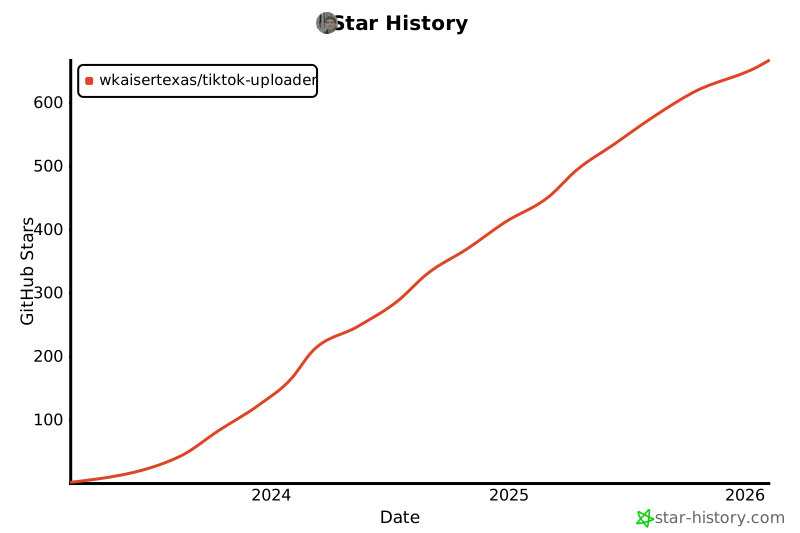
[!IMPORTANT] If you like this project, please ⭐ it on GitHub to show your support! ❤️
1 maintainer

Release files for tiktok-uploader 1.2.0
For a detailed explanation of source distributions (sdists) and built distributions (wheels), please see the package formats documentation.
Source distribution (sdist)
| File | Size | Uploaded | |
|---|---|---|---|
| tiktok_uploader-1.2.0.tar.gz | 73.6 kB | Details |
Built distribution (wheel)
| File | Interpreter | ABI | Platform | Reset |
|---|---|---|---|---|
| tiktok_uploader-1.2.0-py3-none-any.whl | Python 3 | none | any | Details |
Total release size: 100.0 kB
Release files / tiktok_uploader-1.2.0.tar.gz
| Download URL | tiktok_uploader-1.2.0.tar.gz |
|---|---|
| Size | 73.6 kB |
| Tags | Source |
|
SHA-256 checksum How to use checksums |
f0dfad2e38b159d56f250036cff72b109c0c3df948ae6e3282e957ab0ef5dccf
|
|
BLAKE2b-256 checksum How to use checksums |
f48db9b892a3a52e8d894a72b4e15dc0946addcce00c4a997c027117b36d2605
|
| Upload date | |
|
Uploaded using Trusted Publishing? What is trusted publishing? |
No |
| Uploaded via |
uv/0.5.26
|
Release files / tiktok_uploader-1.2.0-py3-none-any.whl
| Download URL | tiktok_uploader-1.2.0-py3-none-any.whl |
|---|---|
| Size | 26.4 kB |
| Tags | Python 3 |
|
SHA-256 checksum How to use checksums |
26cfc65443adba347715751eb3ede333af4c1c0e7e698af8b2e4890be46b2d71
|
|
BLAKE2b-256 checksum How to use checksums |
a99ac1d5856702ae9e57c65ccb4f2dc2f1b35f7c49c56ce03e88daf534dea93f
|
| Upload date | |
|
Uploaded using Trusted Publishing? What is trusted publishing? |
No |
| Uploaded via |
uv/0.5.26
|














