
TikzPlot to make TikZ/PGFPlots plots with matplotlib.pyplot-like syntax.

Project description
TikzPlot
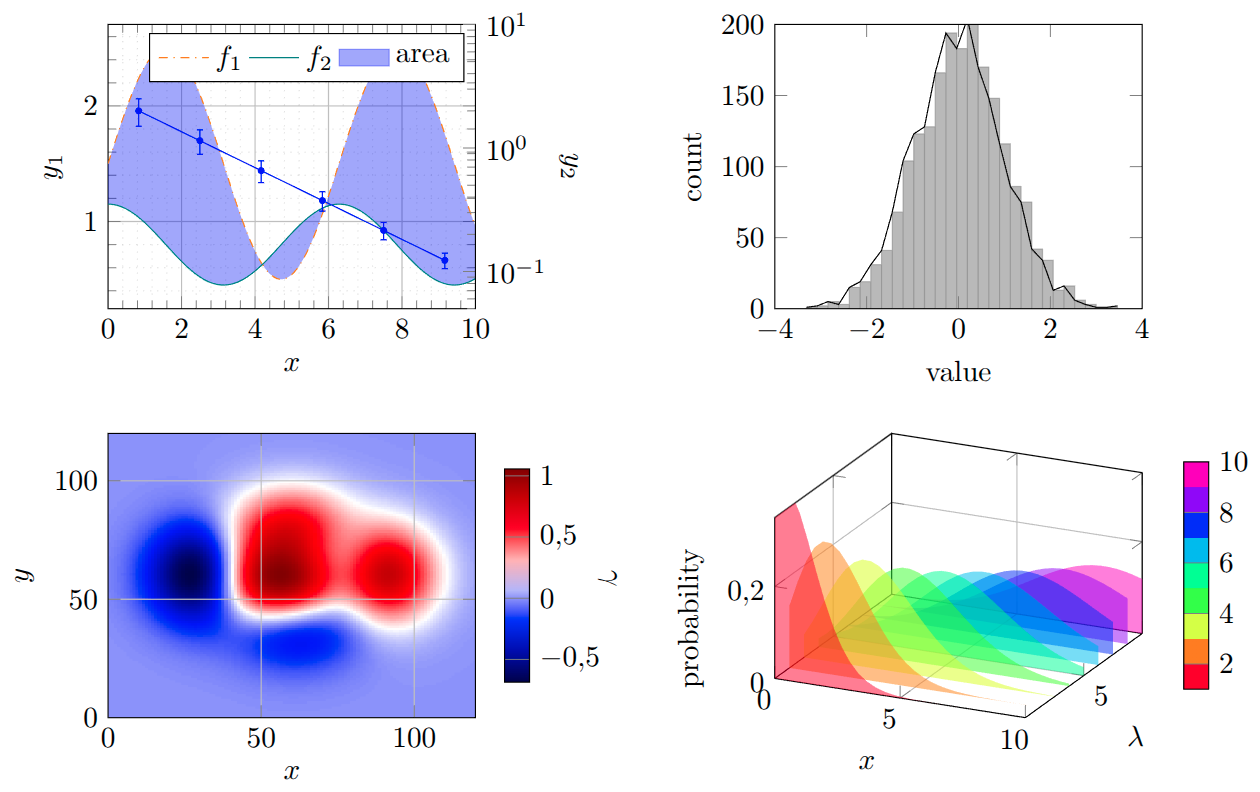
A clean version of PltToTikz, this time as Python package. Easy to use: only replace import matplotlib.pyplot with this library.
Please let me know if you find any bugs or unexpected behaviour. Examples may be found in repository under tests/ directory.
Installation
NEW: PyPI: pip install tikzplot42.
Alternativley, download this package and install using: pip install [path], where [path] is the path to the directory, containing pyproject.toml.
Python usage
Instead of using import matplotlib.pyplot (as plt), use import tikzplot.plots (as plt).
LaTeX requirements
\usepackage{tikz},\usepackage{pgfplots},\pgfplotsset{compat=1.18}(may be lower, but compilation is not guaranteed),\usepgfplotslibrary{fillbetween}(if you use fill-between plots),\usepgfplotslibrary{groupplots}(recommended for best results, enabled by default, may be avoided by setting TikzConfig USE_GROUPPLOTS=False),\usepackage{xcolor}(recommended for best colors, works without but needs change of TikzConfig USE_XCOLOR=False),\usepgfplotslibrary{polar}required for polar axis.
Export using plt.savefig("example_graph.tex") (recommended) or plt.show().
Then use the generated file as \input{example_graph.tex}.
Currently implemented:
Some basic plot commands are already implemented with commonly used arguments:
Plotting
plot(),scatter(),loglog(),semilogx()/semilogy(),errorbar(),stem(),fill_between(),hlines()/vlines(),histogram(),step(),imshow(),text(),magnify()(used to magnify part of a plot, but Tikz cannot handlefill_betweenif this one is used, which is a long known issue),axvline()/axhline(),axvspan()/axhspan()(background span).
Figures
plt.figure()(currently only to give you figure object or to setfigsize),plt.subplot(),plt.subplots()(withsharex/shareyfully implemented, projectionpolarand3dwith basic support),set_size_inches(),delaxes().
Styles
If axes and plot have different name for command with same effect, both are implemented (e.g. plt.xlim() and ax.set_xlim()).
grid(),xlabel()/ylabel(),xlim(), ylim(),xscale("log")/yscale("log"),xticks()/yticks(),ax.set_xticklabels()/ax.set_yticklabels(),legend()(basic position control),ax.twinx(),ax.set().
Supported common **kwargs
color/c(all matplotlib formats, except color schemes which are not yet implemented),linestyle/ls,linewidth/ls,fmt,marker,marksize/ms,alpha,label.
Colorbars
Colorbars and colormaps are implemented a bit differently than in matplotlib (simplified):
- if you use
imshow(), you may use its return inColorbar()(which you have to import asfrom tikzplot import Colorbar), - you may use
Colorbar(axis, cmap, lower, upper, ...)for manual colorbar. Additional kwargs may also be used byimshow()return, - note that only one colorbar/colormap per axis is allowed (also if you use
scatterwith colormap/colorbar).
TikzConfig
For plot configurations (default sizes, paddings, etc.), use from tikzplot import TikzConfig:
modifyParam(PARAM=value)(for runtime session setting),setPermanent(PARAM=value)(for user defined default value). Currently supported parameters are listed with their default values insrc/tikzplot/config.py.
More features coming soon...
- basic color schemes,
- improved 3D plots (currently only basic support: plot, errorbar, fill_between, scatter, plot_wireframe, plot_surface),
- ...


Download files
Download the file for your platform. If you're not sure which to choose, learn more about installing packages.
Source Distribution
Built Distribution
Filter files by name, interpreter, ABI, and platform.
If you're not sure about the file name format, learn more about wheel file names.
Copy a direct link to the current filters
File details
Details for the file tikzplot42-0.3.8.tar.gz.
File metadata
- Download URL: tikzplot42-0.3.8.tar.gz
- Upload date:
- Size: 86.0 kB
- Tags: Source
- Uploaded using Trusted Publishing? No
- Uploaded via: twine/6.1.0 CPython/3.13.12
File hashes
| Algorithm | Hash digest | |
|---|---|---|
| SHA256 |
c3714c58a5eb667e3f8d893f80b967672e1d1bbdb5fa9babe4ee2b0fe6f75bf6
|
|
| MD5 |
c12f1560b8c44b3fb35c82a45f554554
|
|
| BLAKE2b-256 |
dae5ac118ba861155f640a969aafa36626ecc068dea6f863161dc1400b6a9178
|
File details
Details for the file tikzplot42-0.3.8-py3-none-any.whl.
File metadata
- Download URL: tikzplot42-0.3.8-py3-none-any.whl
- Upload date:
- Size: 74.0 kB
- Tags: Python 3
- Uploaded using Trusted Publishing? No
- Uploaded via: twine/6.1.0 CPython/3.13.12
File hashes
| Algorithm | Hash digest | |
|---|---|---|
| SHA256 |
0c2cfb0defbfb43b177e28bab6b838ec5cae6795b227beaa70130c5003ca0838
|
|
| MD5 |
f78c77b3d6d978d92ad07145e094dd44
|
|
| BLAKE2b-256 |
c5d3c49a450338973615f042fb932b377f1173acd51f48bd9305b7aec0b0fff6
|






