


Tilebox Python
Query satellite data, read imagery from cloud storage, and run processing workflows with Tilebox.
tilebox installs three Python packages together. It contains no source code of its own:
- tilebox-datasets — Query satellite metadata by location, time, and attributes.
- tilebox-storage — Read imagery directly from cloud storage, including windows of Cloud Optimized GeoTIFFs (COGs).
- tilebox-workflows — Distribute processing tasks across local, cloud, or on-premises runners.
Install
Requires Python 3.11 or newer.
pip install tilebox
Documentation
See the documentation, Python SDK reference, and guides.
Getting started
Read Sentinel-2 imagery
Render the branching ice streams of the Aletsch Glacier in Switzerland. This example queries public Sentinel-2 metadata and reads only the RGB window covering the glacier from public COGs. No account, API key, or cloud credentials are needed.
Install the image-writing dependency and save the code below as aletsch.py:
pip install pillow
import asyncio

import numpy as np
from PIL import Image
from shapely import box
from tilebox.datasets import Client, field
from tilebox.datasets.assets import AssetCollection
from tilebox.storage.aio import open_geotiff
from tilebox.storage.geotiff import window_from_bounds

# Aletsch Glacier: west, south, east, north.
area = box(7.94, 46.37, 8.16, 46.57)
collection = Client().dataset("open_data.aws_earth.sentinel2").collection("L2A")
scenes = collection.query(
    temporal_extent=("2025-08-01", "2025-09-01"),
    spatial_extent=area,
    filter=field("cloud_cover") < 10,
)
scene = scenes.sortby("cloud_cover").isel(time=0)
assets = AssetCollection.from_datapoint(scene)


async def read_band(key):
    asset = assets[key]
    geotiff = await open_geotiff(asset)
    window = window_from_bounds(
        geotiff, area.bounds, crs="EPSG:4326", require_fully_contained=True
    )
    raster = await geotiff.read(window=window)
    return raster.data[0].astype(np.float32) * asset.raster.scale + asset.raster.offset


async def main():
    bands = await asyncio.gather(*(read_band(key) for key in ("red", "green", "blue")))
    rgb = np.stack(bands, axis=-1)
    display = np.clip(rgb / 0.9, 0, 1) ** (1 / 2.2)
    image = Image.fromarray((display * 255).astype(np.uint8))
    image.thumbnail((1200, 1200), Image.Resampling.LANCZOS)
    image.save("aletsch.jpg", quality=90)


asyncio.run(main())
Run python aletsch.py to create aletsch.jpg:
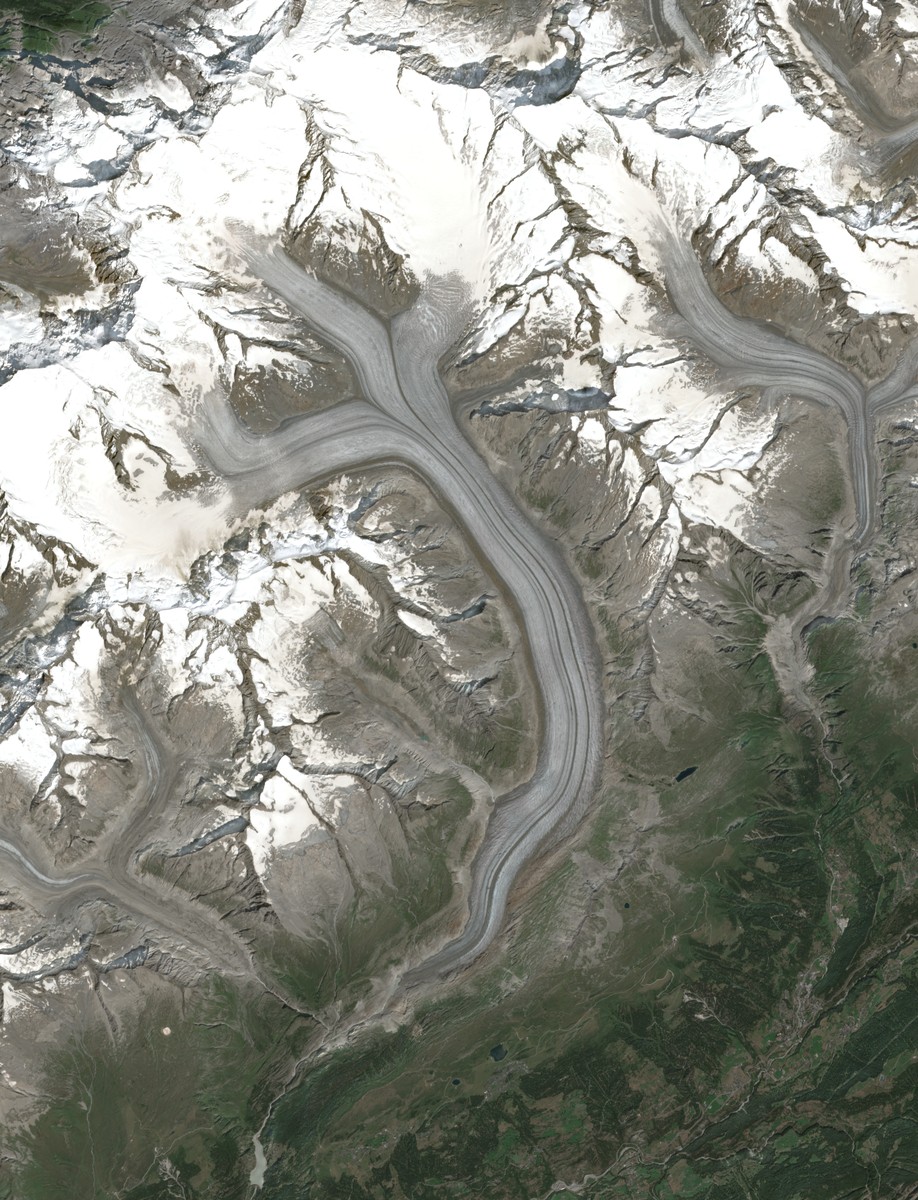
Aletsch Glacier, August 8, 2025. Contains modified Copernicus Sentinel data (2025), accessed through Element 84 Earth Search. Generated with the code above.
The scale and offset convert each band to surface reflectance; the stretch and gamma correction are for display only. See Create a Sentinel-2 RGB image for more detail. If you change the location or dates, check for an empty query result and verify that the selected scene covers your area.
Compare Alpine snow cover
How much of the same area is classified as snow or ice in June, August, and October? This workflow creates one task per month. Each task selects a low-cloud scene, reads a small window of its 20 m Scene Classification Layer (SCL), and logs snow-and-ice coverage without saving imagery to disk.
Authenticate before running workflows. Append this code to aletsch.py; it reuses the imports, area, and collection above:
from shapely import Polygon
from tilebox.workflows import Client as WorkflowsClient, Runner, Task


class SnowCover(Task):
    area: Polygon
    period: tuple[str, str]

    async def execute(self, context):
        scenes = collection.query(
            temporal_extent=self.period,
            spatial_extent=self.area,
            filter=field("cloud_cover") < 10,
        )
        if not scenes.sizes.get("time", 0):
            raise ValueError(f"No low-cloud scenes for {self.period}")
        scene = scenes.sortby("cloud_cover").isel(time=0)
        geotiff = await open_geotiff(AssetCollection.from_datapoint(scene)["scl"])
        window = window_from_bounds(
            geotiff, self.area.bounds, crs="EPSG:4326", require_fully_contained=True
        )
        classes = (await geotiff.read(window=window)).data[0]
        clear = np.isin(classes, [4, 5, 6, 11])  # Vegetation, bare ground, water, snow/ice.
        if clear.mean() < 0.8:
            raise ValueError("Less than 80% of the window has a clear classification")
        context.logger.info(
            "Snow cover",
            scene=scene.stac_id.item(),
            snow_ice_pct=round(100 * np.count_nonzero(classes == 11) / clear.sum(), 1),
            clear_pct=round(100 * clear.mean(), 1),
        )


class CompareSnowCover(Task):
    area: Polygon
    year: int

    def execute(self, context):
        context.submit_subtasks([
            SnowCover(self.area, (f"{self.year}-{m:02}-01", f"{self.year}-{m + 1:02}-01"))
            for m in (6, 8, 10)
        ])


client = WorkflowsClient()
job = client.jobs().submit("aletsch-snow-cover", CompareSnowCover(area, 2025))
Runner(tasks=[CompareSnowCover, SnowCover]).connect_to(client).run_all()
print(f"https://console.tilebox.com/workflows/jobs/{job.id}")
Run python aletsch.py again to submit the job and process its tasks on your machine. The runner prints results locally; open the printed Console link to inspect the task graph and logs. Additional runners can process the monthly tasks in parallel. See Build and deploy a workflow to run on cloud infrastructure.
These are scene snapshots, not a glacier-retreat or mass-balance estimate. snow_ice_pct is the fraction of clearly classified pixels labeled snow/ice; clear_pct reports how much of the window contributed. Clouds, shadows, missing data, and unclassified pixels are excluded. The window includes surrounding mountains, and a low scene-wide cloud percentage does not guarantee a clear glacier.
Contributing
Contributions are welcome! Please see the contributing guide for more information.
You can also join us on Discord if you have any questions or want to share your ideas.
License
Distributed under the MIT License (The MIT License).
Authentication
Public open-data queries and the imagery example work without authentication. Workflows, private datasets, and higher query rate limits require a Tilebox account.
Create an API key in the Tilebox Console, then set it before running your script:
export TILEBOX_API_KEY="your-api-key"
The clients read TILEBOX_API_KEY automatically. See Authentication for details. Access to other imagery providers or private storage may require separate credentials.
2 maintainers


Metadata
2 maintainers
Release files for tilebox 0.2.0
For a detailed explanation of source distributions (sdists) and built distributions (wheels), please see the package formats documentation.
Source distribution (sdist)
| File | Size | Uploaded | Provenance | Actions |
|---|---|---|---|---|
| tilebox-0.2.0.tar.gz | 5.5 kB | With provenance | Details for tilebox-0.2.0.tar.gz |
Built distribution (wheel)
| File | Interpreter | ABI | Platform | Actions Reset |
|---|---|---|---|---|
| tilebox-0.2.0-py3-none-any.whl | Python 3 | none | any | Details for tilebox-0.2.0-py3-none-any.whl |
Total release size: 11.3 kB
Release files / tilebox-0.2.0.tar.gz
| Download URL | tilebox-0.2.0.tar.gz |
|---|---|
| Size | 5.5 kB |
| Tags | Source |
|
SHA-256 checksum How to use checksums |
b50fb91597babee2eb056cdc772f9040e1661020bdf5642690b9aa3849952c46
|
|
BLAKE2b-256 checksum How to use checksums |
1d227583dcfaef7a1d086889b0125a09755a298e1acf0be2e324a34f36596b97
|
| Upload date | |
|
Uploaded using Trusted Publishing? What is trusted publishing? |
Yes |
| Uploaded via |
twine/7.0.0 CPython/3.13.16
|
Provenance
Provenance describes where a file came from. On PyPI, provenance is shared via attestations, which provide a verifiable record of the build or publishing details. View details, limitations and caveats.


PyPI Publish Attestation
PyPI verified that this artifact, at this checksum, originated from the publisher listed below.
Signed by GitHub Actions, verified by PyPI on Nov 9, 2026.
Transparency logRelease files / tilebox-0.2.0-py3-none-any.whl
| Download URL | tilebox-0.2.0-py3-none-any.whl |
|---|---|
| Size | 5.8 kB |
| Tags | Python 3 |
|
SHA-256 checksum How to use checksums |
339fd2be915f2e4dfa55bd1d9e8db8be2304ccb8af19d76dc9232232d3097551
|
|
BLAKE2b-256 checksum How to use checksums |
4ddf55129fe5f73410a0ceaf1f815009e23bdace69110a7dc717c9c8d1fa2757
|
| Upload date | |
|
Uploaded using Trusted Publishing? What is trusted publishing? |
Yes |
| Uploaded via |
twine/7.0.0 CPython/3.13.16
|
Provenance
Provenance describes where a file came from. On PyPI, provenance is shared via attestations, which provide a verifiable record of the build or publishing details. View details, limitations and caveats.
PyPI Publish Attestation
PyPI verified that this artifact, at this checksum, originated from the publisher listed below.
Signed by GitHub Actions, verified by PyPI on Nov 9, 2026.
Transparency logSecurity for tilebox 0.2.0
Provenance
Provenance describes where a file came from. On PyPI, provenance is shared via attestations, which provide a verifiable record of the build or publishing details. View details, limitations and caveats.
Full provenance
Both files in this release have been uploaded with provenance metadata.
Attestation for tilebox-0.2.0.tar.gz
PyPI Publish Attestation
PyPI verified that this artifact, at this checksum, originated from the publisher listed below.
Signed by GitHub Actions, verified by PyPI on Nov 9, 2026.
Transparency logA note on package security
PyPI is a repository for distributing packages, not a service for auditing them. While third-party security researchers and our staff do their best to detect and remove malicious packages, PyPI cannot guarantee the quality, security or suitability of any given package.
To learn more about protecting yourself from malicious actors, visit our package security documentation.














