

TileRT: Tile-Based Runtime for
Ultra-Low-Latency LLM Inference



TileRT serves large language models (LLMs) in ultra-low-latency scenarios — pushing the latency limits of hundred-billion-parameter models to millisecond-level time per output token (TPOT) without compromising model size or quality. Its tile-level runtime engine decomposes LLM operators into fine-grained tile tasks and dynamically overlaps computation, I/O, and communication across multiple GPUs.
The current preview supports DeepSeek-V3.2 and GLM-5 on 8× NVIDIA B200. For full usage, examples, and news, see the GitHub repository.
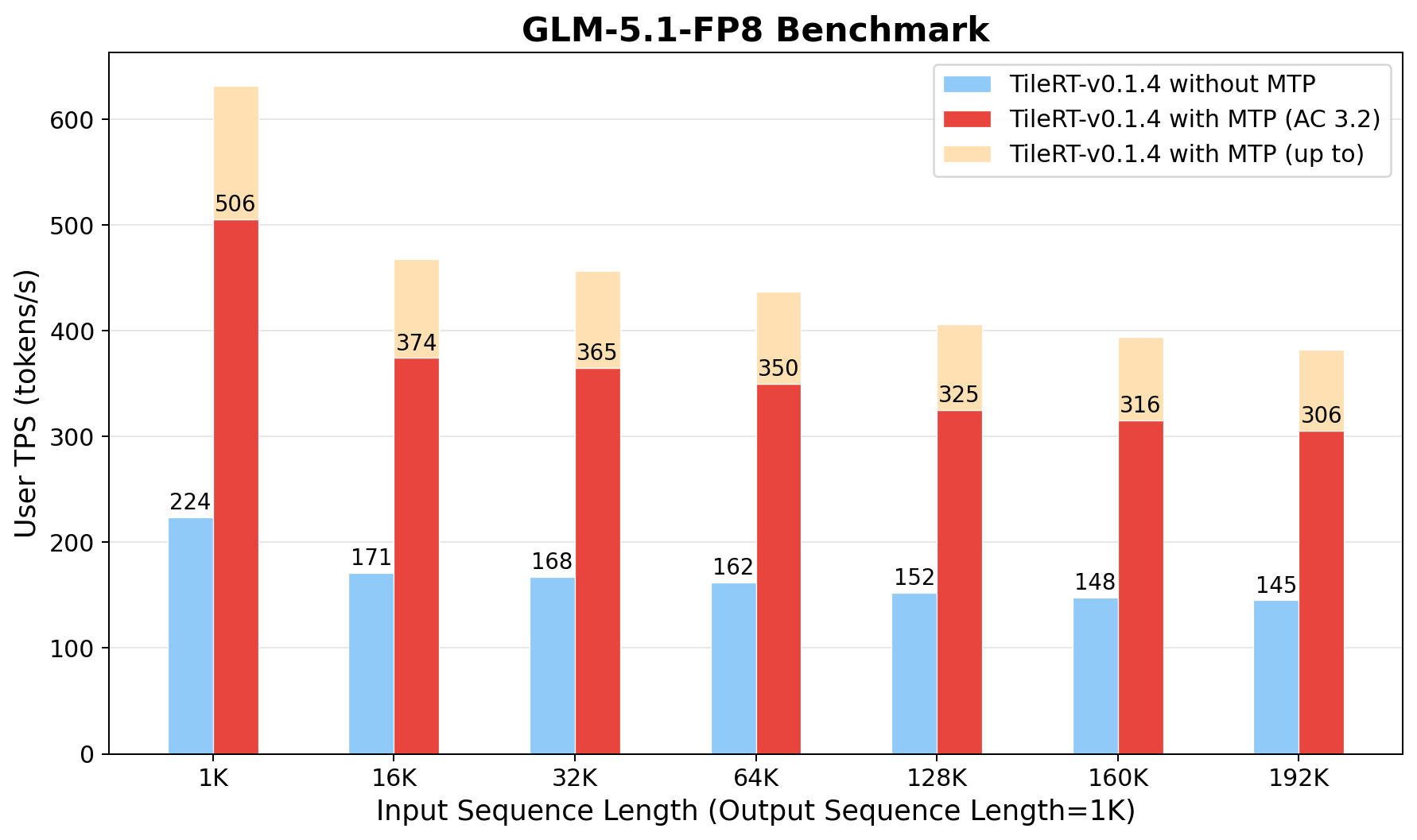
GLM-5.1-FP8 token generation speed with TileRT v0.1.5. Output length 1K, input length 1K–192K. Bars compare TileRT without MTP, with MTP at average acceptance length 3.2, and the peak under best-case MTP acceptance.
Installation
The official tilert==0.1.5 wheel on PyPI was compiled against the following stack. Treat these as hard requirements, not lower bounds.
| Component | Pinned version |
|---|---|
| NVIDIA driver | Supports CUDA 13.2 runtime |
| Operating System | Linux x86_64, glibc ≥ 2.28 (manylinux_2_28) |
| Python | 3.12 |
| PyTorch | torch==2.11.0+cu130 |
transformers |
4.46.3 |
tokenizers |
0.20.3 |
Recommended: pre-built Docker image
The pinned environment is preinstalled in our official image — the recommended way to run TileRT, avoiding version drift on the host. The image is mirrored to two registries; pull from whichever is reachable:
docker pull ghcr.io/tile-ai/tilert:cu132-latest   # GitHub Container Registry
docker pull tileai/tilert:cu132-latest            # Docker Hub
Launch a container with all 8 GPUs attached, then install the wheel inside:
docker run --rm -it --gpus all --ipc=host \
    -v "$PWD":/workspace -w /workspace \
    ghcr.io/tile-ai/tilert:cu132-latest

# Install from PyPI:
pip install tilert==0.1.5

# Or pin the exact wheel from the GitHub Release page (same artifact,
# useful when PyPI is unreachable):
pip install https://github.com/tile-ai/TileRT/releases/download/v0.1.5/tilert-0.1.5-cp312-cp312-manylinux_2_28_x86_64.whl
Verify the install:
python -c "import tilert, torch; print('tilert', tilert.__version__, '/ torch', torch.__version__, '/ cuda', torch.version.cuda)"
# Expected: tilert 0.1.5 / torch 2.11.0+cu130 / cuda 13.0
Documentation
For weight conversion, the generation CLI, the programmatic API, Multi-Token Prediction (MTP), and the latest benchmarks, see the TileRT GitHub repository.
1 maintainer

Metadata
1 maintainer
Release files for tilert 0.1.6.post3
For a detailed explanation of source distributions (sdists) and built distributions (wheels), please see the package formats documentation.
Built distribution (wheel)
| File | Interpreter | ABI | Platform | Reset |
|---|---|---|---|---|
| tilert-0.1.6.post3-cp312-cp312-manylinux_2_28_x86_64.whl | CPython 3.12 | CPython 3.12 | Linux glibc 2.28+ x86-64 | Details |
Release files / tilert-0.1.6.post3-cp312-cp312-manylinux_2_28_x86_64.whl
| Download URL | tilert-0.1.6.post3-cp312-cp312-manylinux_2_28_x86_64.whl |
|---|---|
| Size | 8.3 MB |
| Tags | CPython 3.12 Linux glibc 2.28+ x86-64 |
|
SHA-256 checksum How to use checksums |
d6fbf0a55be1fbde8869cb31412f33bfd4a82a2a73786651b61ab8dfff69de25
|
|
BLAKE2b-256 checksum How to use checksums |
8626d0ebace092c2576103abc4170fef670eb7fdb384e921ad7ca6a3d1922139
|
| Upload date | |
|
Uploaded using Trusted Publishing? What is trusted publishing? |
No |
| Uploaded via |
twine/7.0.0 CPython/3.12.13
|














