
Tilion — a stealth browser for AI agents
mcp-name: io.github.tiliondev/fortress
pip install tilion— drive a real, undetected Chromium that gets past Cloudflare, DataDome, and bot detection. No server, no account, no API key.




Framework & MCP: Beta · runs local & free · Tilion Cloud (residential egress) coming soon
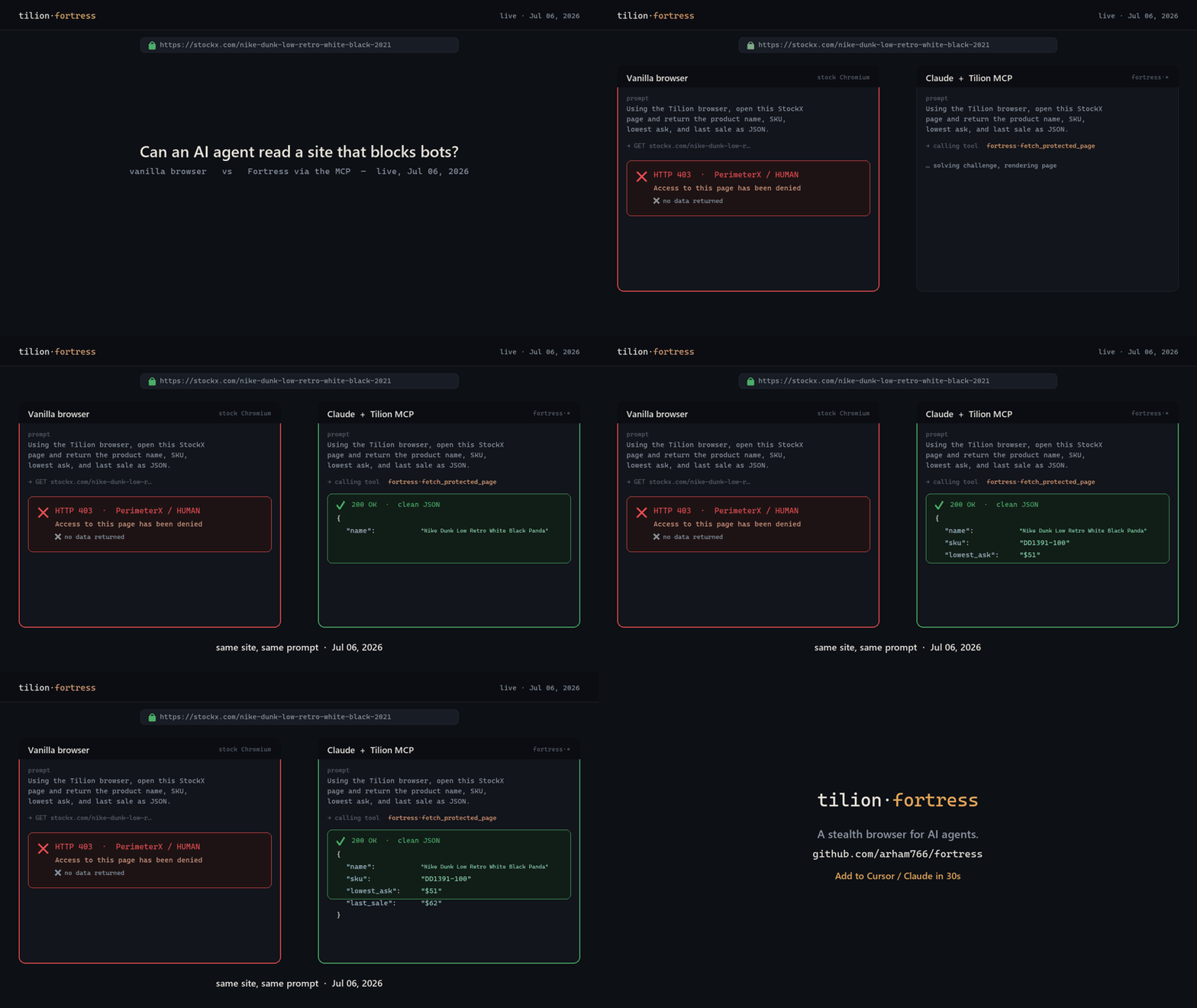
Real, dated run against stockx.com (PerimeterX). A stock browser gets HTTP 403 — "Access denied"; an agent with the Tilion MCP returns clean JSON — same site, same prompt.
Tilion runs a recompiled-Chromium stealth engine (Fortress) locally, in-process, and gives you one clean API for fetching protected pages, extracting content, crawling sites, reconnaissance, and multi-step automation — plus a Model Context Protocol (MCP) server so AI agents can reach for it the moment they get blocked.
pip install tilion
Quickstart
import asyncio
from tilion import Tilion

async def main():
    async with Tilion() as t:                                 # boots Fortress locally
        page = await t.fetch("https://protected.example")     # past Cloudflare/DataDome/403
        print(page["title"], page["text"][:200])

        data = await t.extract("https://site/pricing")        # clean markdown + tables
        docs = await t.crawl("https://site", depth=2)         # whole-site crawl (auto-SPA)
        apis = await t.recon("https://site")                  # discover the site's private API
        hits = await t.search("undetected playwright")        # real-browser web search

asyncio.run(main())
No uvicorn, no Redis, no auth — local mode holds one real browser and drives it directly.
Drop-in stealth for your existing stack
Already on browser-use, Playwright, Puppeteer, or Crawl4AI? They connect to a browser by CDP URL. Point that at Tilion and your code runs through the stealth engine — one line, no rewrite:
t = await Tilion().start()
cdp_url = t.cdp_url                       # hand this to any CDP-speaking stack

from browser_use import Agent, BrowserSession
agent = Agent(task="...", browser_session=BrowserSession(cdp_url=cdp_url))
MCP server — stealth browsing for any AI agent
pip install "tilion[mcp]"
tilion-mcp                                # or:  npx -y tilion-mcp
Claude Desktop / Cursor / Cline / Windsurf — add to the MCP config:
{ "mcpServers": { "fortress": { "command": "tilion-mcp" } } }
Claude Code (CLI): claude mcp add fortress -- tilion-mcp
26 tools: fetch_protected_page, extract_page, crawl_site, recon_site_apis,
search_web, run_browser_task, save_page, save_profile, get_stealth_cdp_endpoint, and
more — pre-warmed (~100 ms first call), concurrency-safe, timeout- and SSRF-guarded.
Full tool table →
What you get
fetch |
stealth GET past Cloudflare/DataDome/403 + auto challenge-resolve |
extract |
page → clean markdown + tables + metadata (or a schema-shaped record) |
crawl / spa_crawl |
whole-site crawl, auto-handles SPA/JS + lazy-load → sitemap |
recon |
reverse-engineer a site's private XHR/JSON API (secret-scrubbed) |
search |
real-browser web search (no SERP API) |
agent |
20 multi-step flows: login, paginate, infinite-scroll, checkout, downloads… |
screenshot / save |
PNG, or export as PDF / HTML / text |
cdp_url |
raw CDP endpoint for browser-use / Playwright / Puppeteer |
How stealth works
The engine is a recompiled Chromium C++ fork (shipped as the tilion-fortress dependency),
not a JS patch or a stealth plugin. Persona, User-Agent, WebGL, and canvas fingerprints are
applied natively with genuine binding returns (toString() === [native code]), so there are no
JavaScript injection tells. In independent suites it runs Sannysoft-clean, CreepJS 0%
headless, BrowserScan "Normal."
Honest note: a great fingerprint on a datacenter IP still gets blocked by the biggest sites — real anti-bot decisions weigh the egress IP heavily. For hostile targets, add a residential proxy or use hosted Tilion cloud egress (coming soon). Tilion does not claim to be "undetectable."
Install options
pip install tilion              # core: stealth browser + fetch/extract/crawl/recon/search
pip install "tilion[mcp]"       # + the MCP server
pip install "tilion[vision]"    # + LLM-driven agent (Claude/OpenAI/Gemini)
Links
- Engine + MCP repo: https://github.com/tiliondev/fortress
- MCP setup & tools: https://github.com/tiliondev/fortress/tree/main/mcp
- Engine package: https://pypi.org/project/tilion-fortress/
Open-core: the tilion facade + MCP are BSD-3; the engine (tilion.core driver + the Fortress
binary) is proprietary. Requires Python 3.10–3.13 on Linux, macOS, or Windows.
1 maintainer

Metadata
1 maintainer
Release files for tilion 0.1.16
For a detailed explanation of source distributions (sdists) and built distributions (wheels), please see the package formats documentation.
Built distributions (wheels)
| File | Reset | |||
|---|---|---|---|---|
| tilion-0.1.16-cp313-none-any.whl | CPython 3.13 | none | any | Details |
| tilion-0.1.16-cp312-none-any.whl | CPython 3.12 | none | any | Details |
| tilion-0.1.16-cp311-none-any.whl | CPython 3.11 | none | any | Details |
| tilion-0.1.16-cp310-none-any.whl | CPython 3.10 | none | any | Details |
Total release size: 4.8 MB
Release files / tilion-0.1.16-cp313-none-any.whl
| Download URL | tilion-0.1.16-cp313-none-any.whl |
|---|---|
| Size | 1.3 MB |
| Tags | CPython 3.13 |
|
SHA-256 checksum How to use checksums |
000e44235799f14137c9673b11d456e3ff611c05ef8b2ecd5e41b18e86484a35
|
|
BLAKE2b-256 checksum How to use checksums |
ed2df9c08308d10767c8dc3a492276ec5c5006556139abc28ee0c46d77025340
|
| Upload date | |
|
Uploaded using Trusted Publishing? What is trusted publishing? |
No |
| Uploaded via |
twine/6.2.0 CPython/3.12.10
|
Release files / tilion-0.1.16-cp312-none-any.whl
| Download URL | tilion-0.1.16-cp312-none-any.whl |
|---|---|
| Size | 1.3 MB |
| Tags | CPython 3.12 |
|
SHA-256 checksum How to use checksums |
2a7298c7fcdbfd4c86312ad7621e059955569eb916980f99e6a897b83ce9dfad
|
|
BLAKE2b-256 checksum How to use checksums |
3d23e6a13c13ad401b77a7add8b5b7fbee33fa18fc9f168c1a267b4901250588
|
| Upload date | |
|
Uploaded using Trusted Publishing? What is trusted publishing? |
No |
| Uploaded via |
twine/6.2.0 CPython/3.12.10
|
Release files / tilion-0.1.16-cp311-none-any.whl
| Download URL | tilion-0.1.16-cp311-none-any.whl |
|---|---|
| Size | 1.3 MB |
| Tags | CPython 3.11 |
|
SHA-256 checksum How to use checksums |
2720fade28b1880ba4a3eb453445f7e519ba3bd8dfa5a45c56038cf864143ec8
|
|
BLAKE2b-256 checksum How to use checksums |
d5402e91218356b536c05d1425134b3a58abbe8edc235cd4975201649dfe20b5
|
| Upload date | |
|
Uploaded using Trusted Publishing? What is trusted publishing? |
No |
| Uploaded via |
twine/6.2.0 CPython/3.12.10
|
Release files / tilion-0.1.16-cp310-none-any.whl
| Download URL | tilion-0.1.16-cp310-none-any.whl |
|---|---|
| Size | 915.2 kB |
| Tags | CPython 3.10 |
|
SHA-256 checksum How to use checksums |
f18cf02ec26bfd2c394801ec727cd0aee7780b9bba1617e53a73a4b2b8b4e792
|
|
BLAKE2b-256 checksum How to use checksums |
7be5d96e4a491e6ffa623b422ce82f09770c1b2c8d3c98714121036e10ff30bd
|
| Upload date | |
|
Uploaded using Trusted Publishing? What is trusted publishing? |
No |
| Uploaded via |
twine/6.2.0 CPython/3.12.10
|














