
Tilth — minimal long-running agent harness against any OpenAI-compatible endpoint. Brain/Hands/Session split, Ralph loop, four memory channels.
Verified details
These details have been verified by PyPIProject links
GitHub Statistics
Maintainers

Project description
Tilth
Prepare the ground, let the agent grow the work.
A minimal long-running agent harness against an OpenAI-compatible LLM endpoint. Tested today against OpenRouter; the OpenAI SDK underneath means other OpenAI-flavour gateways should work, but support for them is on the roadmap rather than validated. Built to learn (and demonstrate) the Brain/Hands/Session split, the Ralph loop, and the file-backed memory channels described in Addy Osmani's long-running agents and agent harness engineering posts.
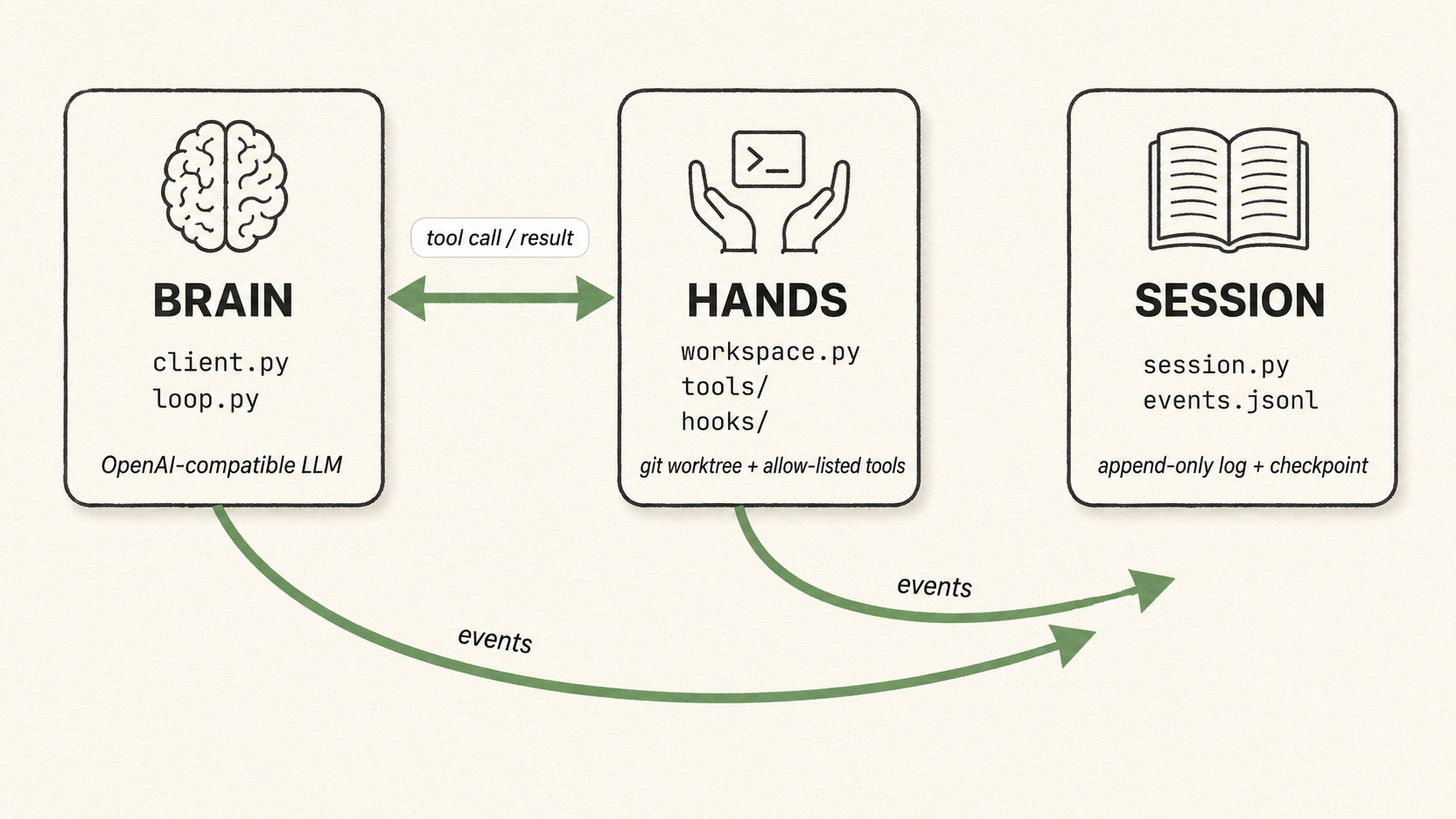
Audience: This is an active research project for my work in Altered Craft. I do actively use it for real work, so I'd suggest it for single-dev / few-dev teams who want to understand what a long-running agent harness actually does. That's today (June 2026); the future, we shall see.
Target run: 10–60 minutes of autonomous work against an open model (default deepseek/deepseek-v4-flash on OpenRouter for the worker; the evaluator defaults to deepseek/deepseek-v4-pro), completing a short task list against a small project on a per-session git worktree.
Status — prompt-driven core. Tilth is deliberately small and currently being driven down to its essentials: a worker and an independent evaluator, the base file/search/bash tools, and full observability. There is no codified test/lint gate — the evaluator is the only gate — and no interview step: you author the work as markdown and run it. Capabilities get added back only as testing shows they're needed.
How Tilth differs
Many minimal coding agents are interactive — a developer watches the output and course-corrects, kills a bad run, or re-prompts. Tilth runs autonomously for the length of a run, with no one watching mid-task. That single difference is why it carries machinery a pair-programming agent can skip: an evaluator — a second model that judges whether a change is a proper solution against the task's acceptance criteria, not just whether the code runs; between-task caps that stand in for the budget ceiling a human would otherwise impose; a per-task evaluator ledger so a retried task sees the reviewer's prior verdicts; state kept out of the model's context; and offline-first observability (detailed just below). None of this is a knock on interactive agents; it's a different shape for a different job.
Hyper-observability
If no one is watching a run mid-flight, the recording is the supervision. Tilth's standing goal is hyper-observability — every prompt the harness sends is accessible, and every run is fully inspectable after the fact. Every assembled prompt, memory load, model call, and evaluator verdict lands in an append-only events.jsonl, and tilth visualize serves the whole thing as a local chat-style web app — tail an active run in near-realtime or replay a finished one end-to-end, with no state hidden out of reach.
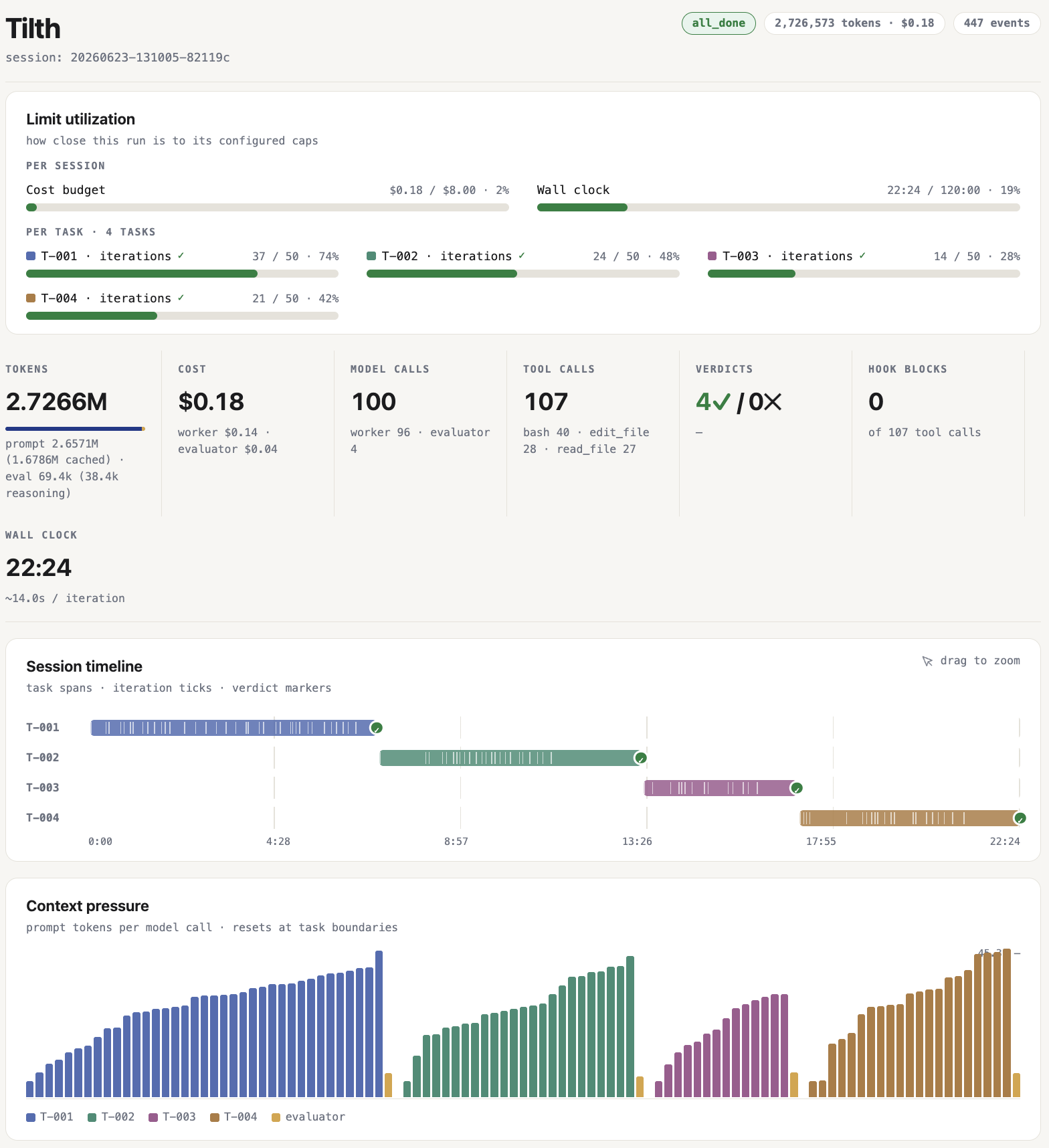
A finished run, rendered by tilth visualize.
It's an early example of the goal, not a finished product. For the full product story — the Brain/Hands/Session split in detail, the memory channels, the two loops, and the worker↔evaluator dialogue — see the docs site. (The docs are mid-revision for the prompt-driven core; the README is the current source of truth for the run flow.)
Quickstart
# Install the CLI from PyPI (puts `tilth` on your PATH, runnable from anywhere)
uv tool install tilth
# …or run it without installing, npx-style:   uvx tilth --help
# …or with pipx:                               pipx install tilth

tilth init                     # scaffolds ~/.tilth/.env
# edit ~/.tilth/.env — TILTH_BASE_URL, TILTH_API_KEY, TILTH_WORKER_MODEL are all
# required (Tilth refuses to start without them so a misconfigured run can't
# silently fall back to a provider/model your account doesn't have)
Working on Tilth? Install from a clone instead:
uv tool install --editable .putstilthon your PATH while tracking your working copy — see Working with the codebase.
Tilth keeps all per-user state under ~/.tilth/ — the .env above and every run's sessions/<id>/. Relocate it with $TILTH_HOME (whole tree) or $TILTH_SESSIONS_DIR (just the runs).
You author the feature as markdown in the target repo, then run it — there's no interview step. The work lives in a feature directory you name under <repo>/.tilth/<feature>/ (one repo can hold several features):
.tilth/todo-cli/
├── overview.md            # the feature's goal + scope boundaries (required)
├── T-001-<slug>.md        # one file per task, ordered by id
├── T-002-<slug>.md
└── ...
Each task file is small frontmatter plus two sections:
---
id: T-001
title: Add the `add` subcommand
---

## Description
What to build, in the worker's voice. Real paths/symbols
(todo_cli/__main__.py:main()), not "the entrypoint".

## Acceptance criteria
- An externally checkable behaviour
- Another one
Then point Tilth at the feature directory:
git clone git@github.com:AlteredCraft/tilth-demo-todo-cli.git tilth-demo
# author tilth-demo/.tilth/todo-cli/  (run prints ready-to-fill templates if it's missing)
tilth run ./tilth-demo/.tilth/todo-cli
For each pending task, Tilth resets context from disk, lets the worker work with the file/search/bash tools until it calls submit_case, hands the case + diff to the evaluator in a fresh context, and on accept commits one task = one commit on the session/<id> branch (humans review and merge — Tilth never auto-merges). A run stops on all-tasks-done or a cap (iterations / wall-clock / dollar spend / evaluator calls). Interrupt with Ctrl-C; resume with tilth resume.
tilth resume                 # continue the latest session
tilth reset                  # tear down a session's worktree + branch + dir
tilth visualize              # serve the live session viewer (127.0.0.1:8765)
tilth info                   # list sessions (status, progress, tokens); `tilth info <id>` for one session's detail
tilth config                 # show resolved provider config + run caps (API keys masked)
The TILTH_* env-var table (caps, evaluator routing, context-file selection) is documented in the generated ~/.tilth/.env (copied from .env.example).
Working with the codebase
Working on Tilth itself rather than using it? uv sync for the dev env, then run the CLI straight from the clone with uv run tilth … (no install needed — sessions still land in ~/.tilth/ unless you set $TILTH_HOME).
# Lint
.venv/bin/python -m ruff check tilth/

# Tests
.venv/bin/python -m pytest

# Docs — live preview at http://127.0.0.1:8000
uv run --extra docs mkdocs serve

# Docs — strict build (the CI gate; catches broken nav refs, missing files, dead links)
uv run --extra docs mkdocs build --strict --site-dir /tmp/tilth-site
See CLAUDE.md for repo conventions and the architecture invariants worth preserving when editing the harness itself.
Project details
Verified details
These details have been verified by PyPIProject links
GitHub Statistics
Maintainers
Release history Release notifications | RSS feed


Download files
Download the file for your platform. If you're not sure which to choose, learn more about installing packages.
Source Distribution
Built Distribution
Filter files by name, interpreter, ABI, and platform.
If you're not sure about the file name format, learn more about wheel file names.
Copy a direct link to the current filters
File details
Details for the file tilth-0.1.0.tar.gz.
File metadata
- Download URL: tilth-0.1.0.tar.gz
- Upload date:
- Size: 13.0 MB
- Tags: Source
- Uploaded using Trusted Publishing? Yes
- Uploaded via: uv/0.11.24 {"installer":{"name":"uv","version":"0.11.24","subcommand":["publish"]},"python":null,"implementation":{"name":null,"version":null},"distro":{"name":"Ubuntu","version":"24.04","id":"noble","libc":null},"system":{"name":null,"release":null},"cpu":null,"openssl_version":null,"setuptools_version":null,"rustc_version":null,"ci":true}
File hashes
| Algorithm | Hash digest | |
|---|---|---|
| SHA256 |
3a5e03a6dfd950166d17e7dd1857197f96f913bd12bffcf9cbe938c1299a2c47
|
|
| MD5 |
8fcddd0aaa000df4c03c2fa090479acd
|
|
| BLAKE2b-256 |
69aa6dbcc372e979d7c595cafb4833f51be5b16ecccd3e10211abd6892ed82fb
|
File details
Details for the file tilth-0.1.0-py3-none-any.whl.
File metadata
- Download URL: tilth-0.1.0-py3-none-any.whl
- Upload date:
- Size: 105.3 kB
- Tags: Python 3
- Uploaded using Trusted Publishing? Yes
- Uploaded via: uv/0.11.24 {"installer":{"name":"uv","version":"0.11.24","subcommand":["publish"]},"python":null,"implementation":{"name":null,"version":null},"distro":{"name":"Ubuntu","version":"24.04","id":"noble","libc":null},"system":{"name":null,"release":null},"cpu":null,"openssl_version":null,"setuptools_version":null,"rustc_version":null,"ci":true}
File hashes
| Algorithm | Hash digest | |
|---|---|---|
| SHA256 |
66a743ef070557880c8ecde3b4a946b180f7de213d8cadb1fe14c88d0ebe64fa
|
|
| MD5 |
50d78505c6b4419602b61c95a1ae287f
|
|
| BLAKE2b-256 |
8771acf8d55a9244643b0002ad5e4511b88f2211458918e8ebb2deffad9c58f0
|






