
TIMBER
Time-series Embedded Representation learning
Self-supervised representations of multichannel time series, learned from raw signals.




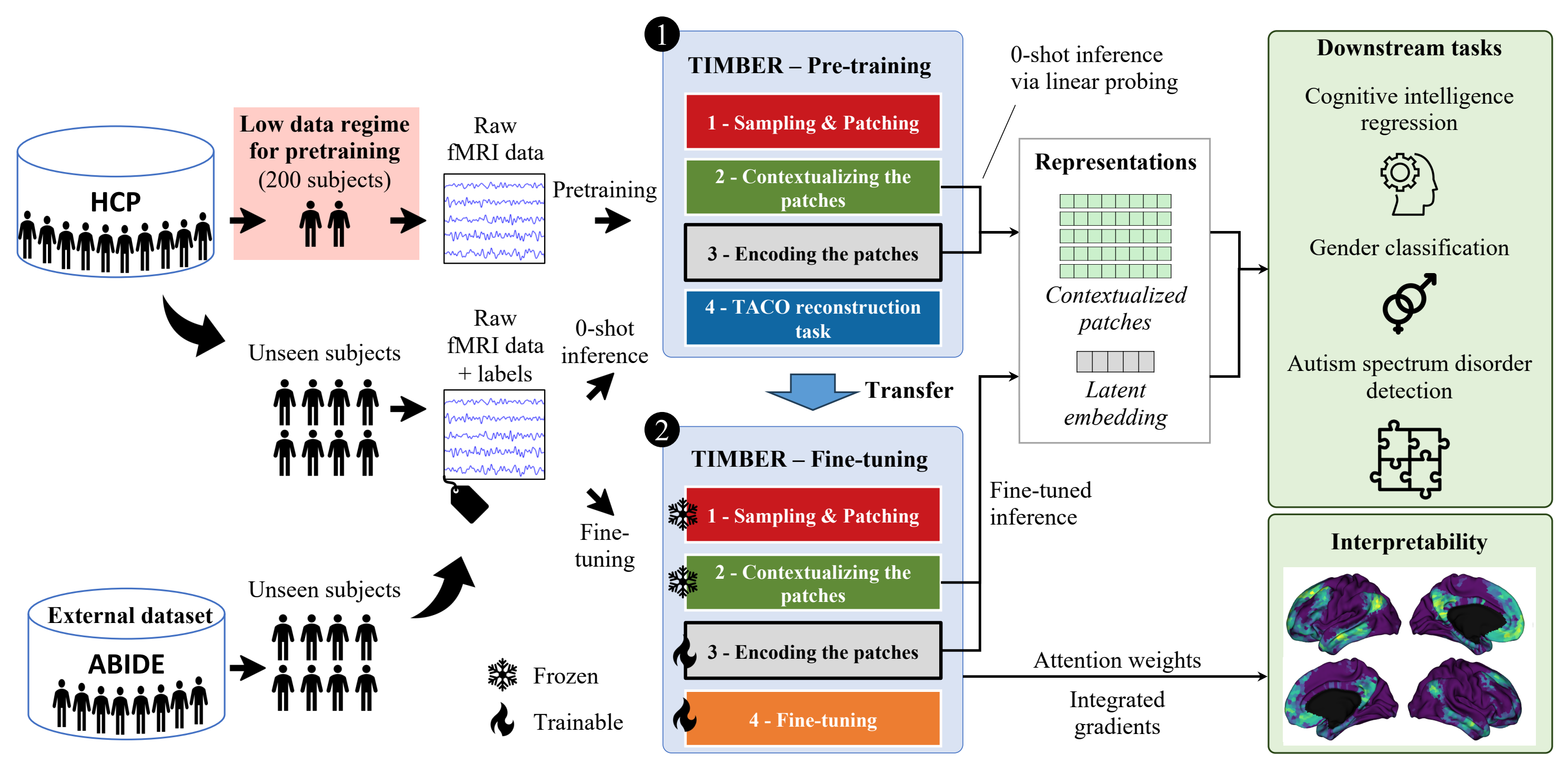
TIMBER stands for Time-series Embedded Representation learning: the patches of a multichannel time series are embedded, and their representations are learned without labels. The paper develops the approach for cortical fMRI, where each channel is a cortical vertex, and shows that the representations are data-efficient, interpretable and transferable.
The package is application-agnostic. It learns from any multichannel time series given as (time, channel) arrays. The fMRI application and the paper experiments are in experiments/.
Why TIMBER
For the fMRI application of the paper:
- Self-supervised. Pretraining needs no labels. The TACO objective predicts each patch of a channel from the patches before it, without any predefined time-position embedding.
- Data-efficient. Pretraining uses 200 HCP subjects, and the representations are competitive with supervised baselines on gender classification and cognitive score prediction.
- Interpretable. The attention of the encoder shows which patches each latent query reads, and integrated gradients highlight the regions behind each prediction.
- Transferable. The same pretrained model transfers to an external clinical dataset (ABIDE I, autism detection).
- Atlas-free. The model reads every channel (cortical vertex) directly, with no parcellation and no handcrafted connectivity measure.
What the model does
- Sampling and patching. Random channels and random time windows of a recording are cut into temporal patches.
- Contextualizing. The contextualizer makes the patches aware of the other channels and of their past.
- Encoding. The encoder summarises all the patches of an entity in a latent embedding of 512 latent queries.
- Task. Pretraining decoders (TACO) learn from the patches; a head predicts a target after finetuning.
The TACO objective
TACO (Time-Aware COnditional reconstruction) is the pretraining task of TIMBER. Its benefits:
- No time prior. TACO does not use a predefined time-position embedding, such as sinusoidal or rotary encodings. Such an embedding imposes a fixed assumption on the temporal structure, which can hurt the capture of brain dynamics. TACO lets the model infer the temporal relations from the data.
- Conditioned on context. The prediction of a patch is conditioned on the contextualized patches and on the latent embedding of the whole entity, so the model learns global structure, not only the next few samples.
- Many training samples. The task works on single patches. A run gives about 15,000 patch-level samples, which is why TIMBER learns from few subjects.
- Better representations. The paper's ablation study shows that the TACO reconstruction task improves the prediction score on cognitive intelligence regression, compared to vanilla reconstruction.
What the model learns
TIMBER produces two representations, as in the paper:
- the latent embedding
e: what the encoder returns for an entity, a compact summary of all its patches; - the contextualized patches
z: one representation per channel and per time patch, after the contextualizer.
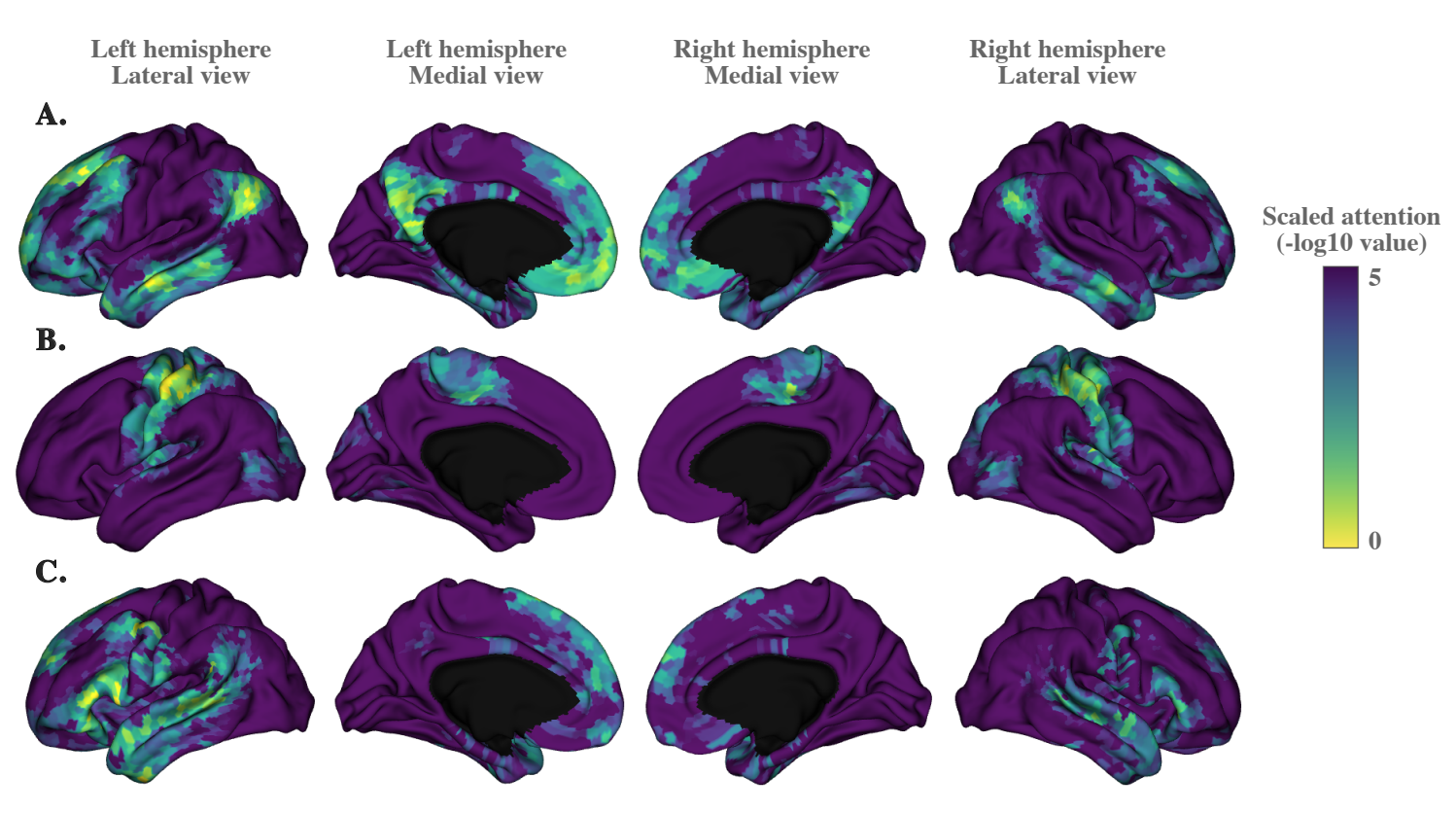
The latent queries (e_queries in the architecture figure) are not representations. They are the learned queries of the encoder: each one reads the contextualized patches through attention. The figure below shows the attention of three latent queries over the contextualized patches. Each query attends to a different functional network, the default mode network (A), the somatomotor network (B) and language-related regions (C), and no labels were used to learn them.
Install
pip install timber-ts
The distribution is timber-ts, but the import name is timber. An unrelated PyPI project named timber also installs a timber module, so do not install both in the same environment.
Requirements: Python ≥ 3.12, PyTorch ≥ 2.15, transformers ≥ 4.51.3. CUDA, Apple MPS and CPU are supported.
Quick start
import torch
import timber  # registers TIMBER with the transformers Auto classes
from timber import TimberConfig, TimberForPretraining, TimberModel

config = TimberConfig(
    tokenizer={"num_channels": 64, "patch_length": 16},  # 64 channels, patches of 16 samples
    encoder={"num_latents": 32, "num_blocks": 2},
)
model = TimberForPretraining(config)

signal = torch.randn(4, 64, 128)  # (entity, channel, time)
output = model(signal)  # TACO loss, with 70% of the patches masked
output.loss.backward()

# Representations, without masking
model.save_pretrained("my-timber")
backbone = TimberModel.from_pretrained("my-timber").eval()
with torch.inference_mode():
    out = backbone(signal, mask_patches=False)
latent_embedding = out.last_hidden_state  # (entity, latent, latent_dim)
contextualized_patches = out.contextualized  # (entity, channel, patch, dim)
-
Channel subsets.
channel_indices(shape(entity, channel)) gives the index of the channel embedding of each input channel. The model has one embedding per channel ofnum_channels, and you can feed any subset of them. For example, to feed 16 random channels out of 64 for each of 4 entities:signal = torch.randn(4, 16, 128) # 16 channels per entity channel_indices = torch.stack([torch.randperm(64)[:16] for _ in range(4)]) # (4, 16), values in 0..63 output = model(signal, channel_indices=channel_indices)
-
Finetuning. Give the configuration a head and no pretraining decoder, then load the pretrained backbone with
TimberForPrediction.from_pretrained. The training section shows the full workflow. -
Hugging Face Hub. Models are saved in the Hugging Face format and can be loaded from the Hub with
from_pretrained.
Training with Lightning
Training has three steps, in this order:
- Data.
TimberDataModuleturns(time, channel)arrays into batches and splits the entities into train, validation and test sets. A sampler cuts every recording into random chunks of entities, recordings, channels and time windows. - Pretraining.
TimberPretrainingModuletrains the model with the TACO objective (and any other configured decoder) on the training split. - Finetuning.
TimberFinetuningModuletrains a head on labelled entities, starting from the pretrained backbone.
The examples below follow the fMRI application of the paper, with a small model and synthetic data so that they run anywhere. Entities are subjects, recordings are runs, and channels are vertices.
Pretraining:
from lightning.pytorch import Trainer
from timber import TimberConfig
from timber.data import TimberDataModule
from timber.device import default_precision
from timber.lightning import TimberPretrainingModule

config = TimberConfig(tokenizer={"num_channels": 64, "patch_length": 16}, encoder={"num_latents": 32, "num_blocks": 2})
files = {(f"subject-{s}", r): f"subject-{s}_run-{r}.npy" for s in range(100) for r in range(2)}  # (entity, recording) -> (time, channel) array
datamodule_config = {
    "sampler": {
        "partition_shape": [100, 2, 64, 128],        # entities, recordings, channels, time samples
        "chunk_shape": [1, 1, 32, 128],              # per chunk: one entity, one recording, 32 channels, 128 samples
        "chunks_per_batch": [4, 2, 2, 1],            # 4 entities x 2 recordings x 2 channel sets per batch
        "shuffle_before_chunking": [True, True, True, False],  # keep time windows contiguous
    },
    "num_train_entities": 80, "num_val_entities": 10, "num_test_entities": 10,
}
datamodule = TimberDataModule(datamodule_config, files)
module = TimberPretrainingModule(config, training={"learning_rate": 2e-4, "max_epochs": 30})
Trainer(max_epochs=30, precision=default_precision(), gradient_clip_val=5.0).fit(module, datamodule=datamodule)
module.export_pretrained("my-timber")  # Hugging Face folder
Finetuning from the pretrained backbone, with one label per entity:
from timber import TimberConfig
from timber.data import TimberDataModule
from timber.lightning import TimberFinetuningModule

labels = {f"subject-{s}": [float(s % 2)] for s in range(100)}  # one target per entity
datamodule = TimberDataModule(datamodule_config, files, labels=labels)  # same sampler as pretraining
finetune_config = TimberConfig(  # same backbone as the pretrained model, with a head and no decoder
    tokenizer=config.tokenizer, contextualizer=config.contextualizer, encoder=config.encoder,
    decoders=[], head={"task": "regression", "num_outputs": 1}, patch_mask_ratio=0.0,
)
module = TimberFinetuningModule(finetune_config, training={"learning_rate": 2e-5, "head_learning_rate": 2e-4, "max_epochs": 20})
module.load_pretrained("my-timber")  # the pretrained backbone; discard=(...) skips parameter prefixes
module.freeze_parameters(["timber.tokenizer", "timber.contextualizer", "timber.encoder.blocks.0"])
Trainer(max_epochs=20, precision=default_precision()).fit(module, datamodule=datamodule)
The option lists, with tensor shapes, are in the code and in the configuration reference: timber.data.SamplerConfig, timber.data.DataModuleConfig, timber.lightning.TimberTrainingConfig and timber.TimberConfig.
The default precision is bf16-mixed on CUDA and MPS, 32-true on CPU.
Documentation
The full documentation (concepts of each module, the data format, usage, API and the paper's results) is at https://dubris.github.io/timber-ts/.
Repository layout
| Path | Content |
|---|---|
src/timber/ |
the package (models, modules, Lightning wrappers, data pipeline) |
tests/ |
package tests (synthetic data) |
experiments/timber_fmri/ |
fMRI application layer: file conventions, presets, training entry point, analysis |
experiments/<n>_*/ |
paper experiments (Hydra configs, MLflow tracking); see experiments/README.md |
docs/ |
the documentation site (MkDocs) |
Development setup: uv sync --group dev --group experiment. Build the documentation with uv run --group docs mkdocs serve. Run scripts/check.sh before committing; the release steps are in docs/releasing.md.
Citation
The paper is under review. Preprint: hal.science/hal-05632181.
@article{lebris2026timber,
  title  = {TIMBER: Data-Efficient Self-Supervised Representation Learning for fMRI Time Series},
  author = {Le Bris, Alexandre and Barbano, Carlo Alberto and Wassermann, Demian},
  note   = {Under review},
  url    = {https://hal.science/hal-05632181},
  year   = {2026}
}
License
MIT, see LICENSE.
1 maintainer

Metadata
1 maintainer
Release files for timber-ts 0.1.0
For a detailed explanation of source distributions (sdists) and built distributions (wheels), please see the package formats documentation.
Source distribution (sdist)
| File | Size | Uploaded | Provenance | Actions |
|---|---|---|---|---|
| timber_ts-0.1.0.tar.gz | 50.8 kB | Without provenance | Details for timber_ts-0.1.0.tar.gz |
Built distribution (wheel)
| File | Interpreter | ABI | Platform | Actions Reset |
|---|---|---|---|---|
| timber_ts-0.1.0-py3-none-any.whl | Python 3 | none | any | Details for timber_ts-0.1.0-py3-none-any.whl |
Total release size: 112.8 kB
Release files / timber_ts-0.1.0.tar.gz
| Download URL | timber_ts-0.1.0.tar.gz |
|---|---|
| Size | 50.8 kB |
| Tags | Source |
|
SHA-256 checksum How to use checksums |
06ebbcdddf3a990b116097ddd6713046c433e6fb5b667cb46d34127378f07fb3
|
|
BLAKE2b-256 checksum How to use checksums |
255ea60c5850a3d8e4b44874913636a2528cb3d16de0d1df5bc21fc9f44a5f5b
|
| Upload date | |
|
Uploaded using Trusted Publishing? What is trusted publishing? |
No |
| Uploaded via |
uv/0.12.3 {"installer":{"name":"uv","version":"0.12.3","subcommand":["publish"]},"python":null,"implementation":{"name":null,"version":null},"distro":{"name":"macOS","version":null,"id":null,"libc":null},"system":{"name":null,"release":null},"cpu":null,"openssl_version":null,"setuptools_version":null,"rustc_version":null,"ci":null}
|
Release files / timber_ts-0.1.0-py3-none-any.whl
| Download URL | timber_ts-0.1.0-py3-none-any.whl |
|---|---|
| Size | 62.0 kB |
| Tags | Python 3 |
|
SHA-256 checksum How to use checksums |
db20a60fe51fc444e826dab5e4a13153535b67c974ad97508e00d48df3b334fb
|
|
BLAKE2b-256 checksum How to use checksums |
e3aaa34ae80c891fb5f5cf674479d5ea2c71e1b92b8140e2e415b710fcd3189a
|
| Upload date | |
|
Uploaded using Trusted Publishing? What is trusted publishing? |
No |
| Uploaded via |
uv/0.12.3 {"installer":{"name":"uv","version":"0.12.3","subcommand":["publish"]},"python":null,"implementation":{"name":null,"version":null},"distro":{"name":"macOS","version":null,"id":null,"libc":null},"system":{"name":null,"release":null},"cpu":null,"openssl_version":null,"setuptools_version":null,"rustc_version":null,"ci":null}
|
Security for timber-ts 0.1.0
Provenance
Provenance describes where a file came from. On PyPI, provenance is shared via attestations, which provide a verifiable record of the build or publishing details. View details, limitations and caveats.
No provenance found
None of the files in this release were uploaded with provenance metadata.
A note on package security
PyPI is a repository for distributing packages, not a service for auditing them. While third-party security researchers and our staff do their best to detect and remove malicious packages, PyPI cannot guarantee the quality, security or suitability of any given package.
To learn more about protecting yourself from malicious actors, visit our package security documentation.













