
license: apache-2.0 library_name: transformers tags:
- time-series
- forecasting
- explainability
- modernbert pipeline_tag: time-series-forecasting
Time-Anchor
Source-code repository for the
time-anchorPython package. Looking for the ready-to-use model and its model card? See K-Iwa/time-anchor-modernbert-32m. This repository bundles the same checkpoint undermodels/so the code can be developed and tested self-contained.
A time-series forecasting package built around three outputs from one call:
| 📈 Quantile forecast | Probabilistic forecasts at any requested quantile levels |
| 🧭 Variable / time impact | Normalized contribution of every input variable at every time step |
| 📌 Anchor forecast | Forecasts conditioned on known future points you specify |
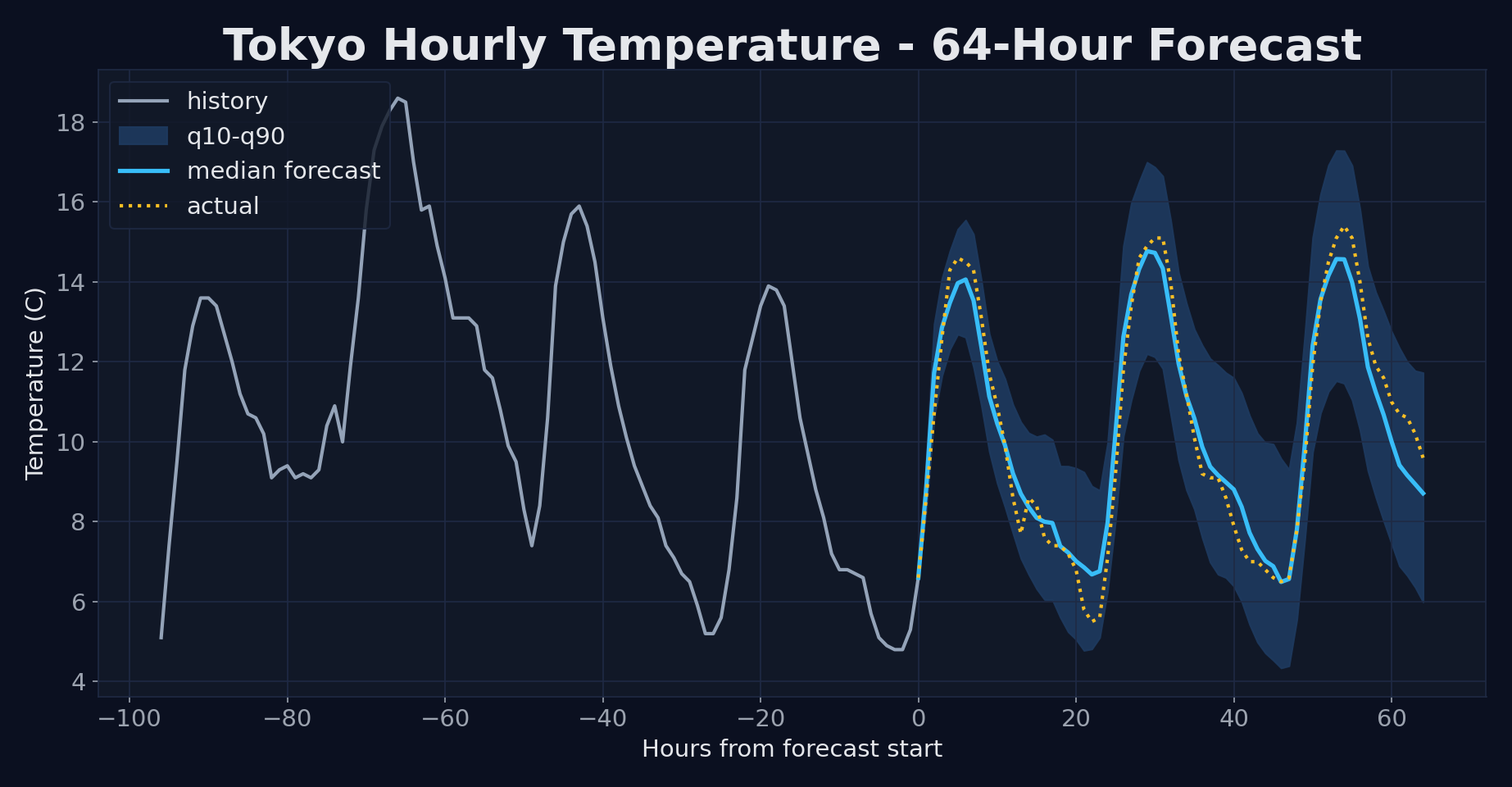
Hourly temperature in Tokyo (Open-Meteo archive), 64-hour holdout: median MAE 0.57 °C, with every actual value inside the q10–q90 band.
Installation
python -m pip install -e .
Quick Start
import pandas as pd
from time_anchor import predict_time_anchor

url = (
    "https://archive-api.open-meteo.com/v1/archive"
    "?latitude=35.69&longitude=139.69&start_date=2024-10-01&end_date=2024-12-31"
    "&hourly=temperature_2m,relative_humidity_2m,surface_pressure,wind_speed_10m&format=csv"
)
weather = pd.read_csv(url, skiprows=3)
temperature = weather.iloc[:, 1].astype("float32")

result = predict_time_anchor(
    "models/time-anchor-modernbert-32m",
    target_context=temperature[:1440],
    prediction_length=64,
    quantile_levels=(0.1, 0.5, 0.9),
)
print(pd.DataFrame(result.forecast_rows))
The first argument may be a local checkpoint directory or a Hugging Face Hub model id.
For a combined code/model repository, add subfolder="models/time-anchor-modernbert-32m".
Variable / Time-Step Impact
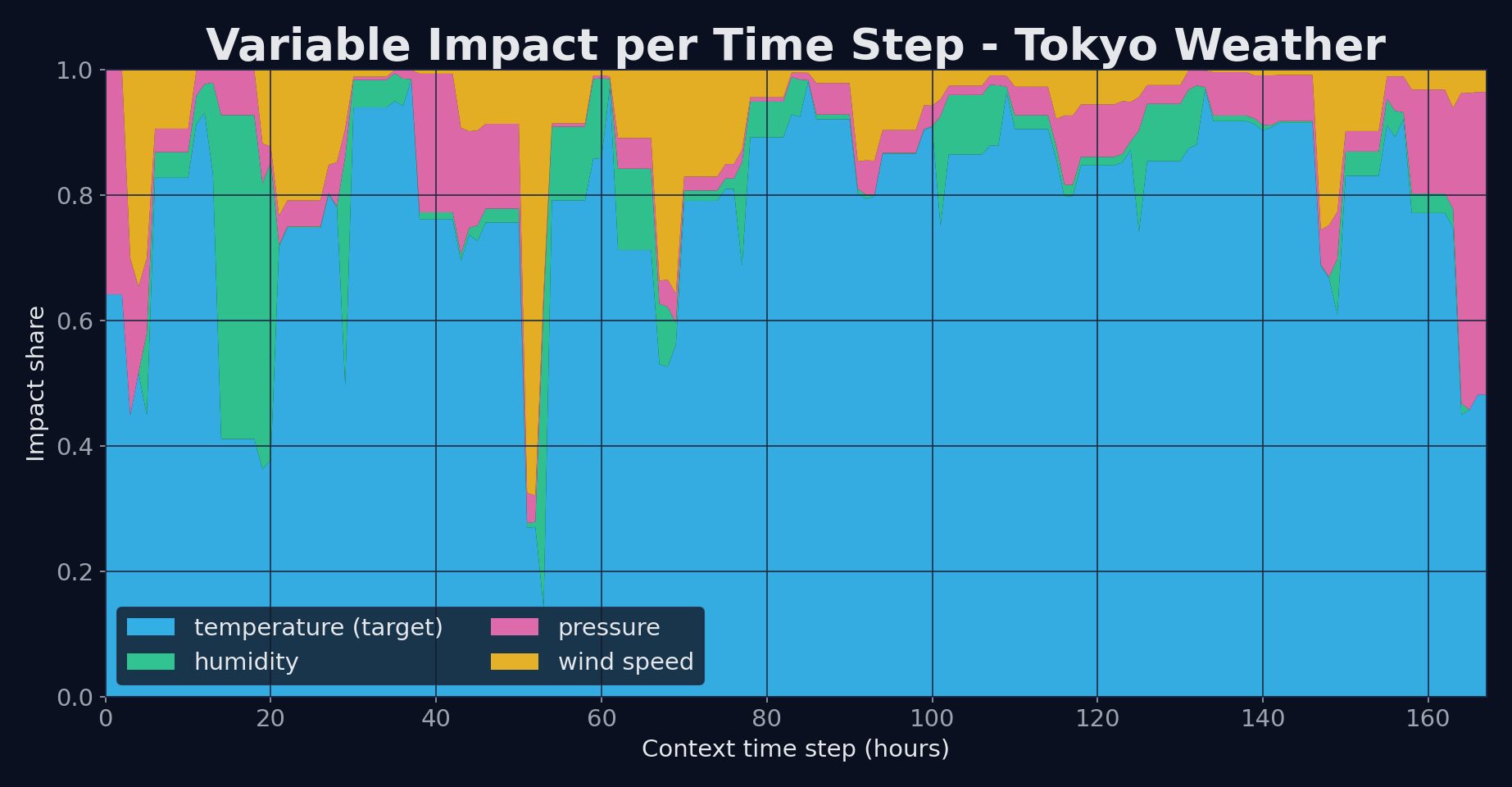
Per-hour contribution of each weather variable over a one-week Tokyo context.
For each time_index, impact across all variables sums to 1.
result = predict_time_anchor(
    "models/time-anchor-modernbert-32m",
    target_context=temperature[:168],
    explanatory_contexts=[weather.iloc[:168, i].astype("float32") for i in (2, 3, 4)],
    gaf={"enabled": True, "topk_time_steps": 0},
)
print(pd.DataFrame(result.variable_impact_rows))
Validation: build a target with known ground truth, `target = 0.60f1 + 0.30f2
- 0.10*f3` from three sine waves, and pass the waves as explanatory series — the measured impact shares come out at 0.55 / 0.33 / 0.12, matching the true weights. Swapping the weights swaps the shares, and when the target switches drivers mid-context, each wave's per-time impact is higher in the half it drives. See the model card for the full validation.
Anchor Forecast
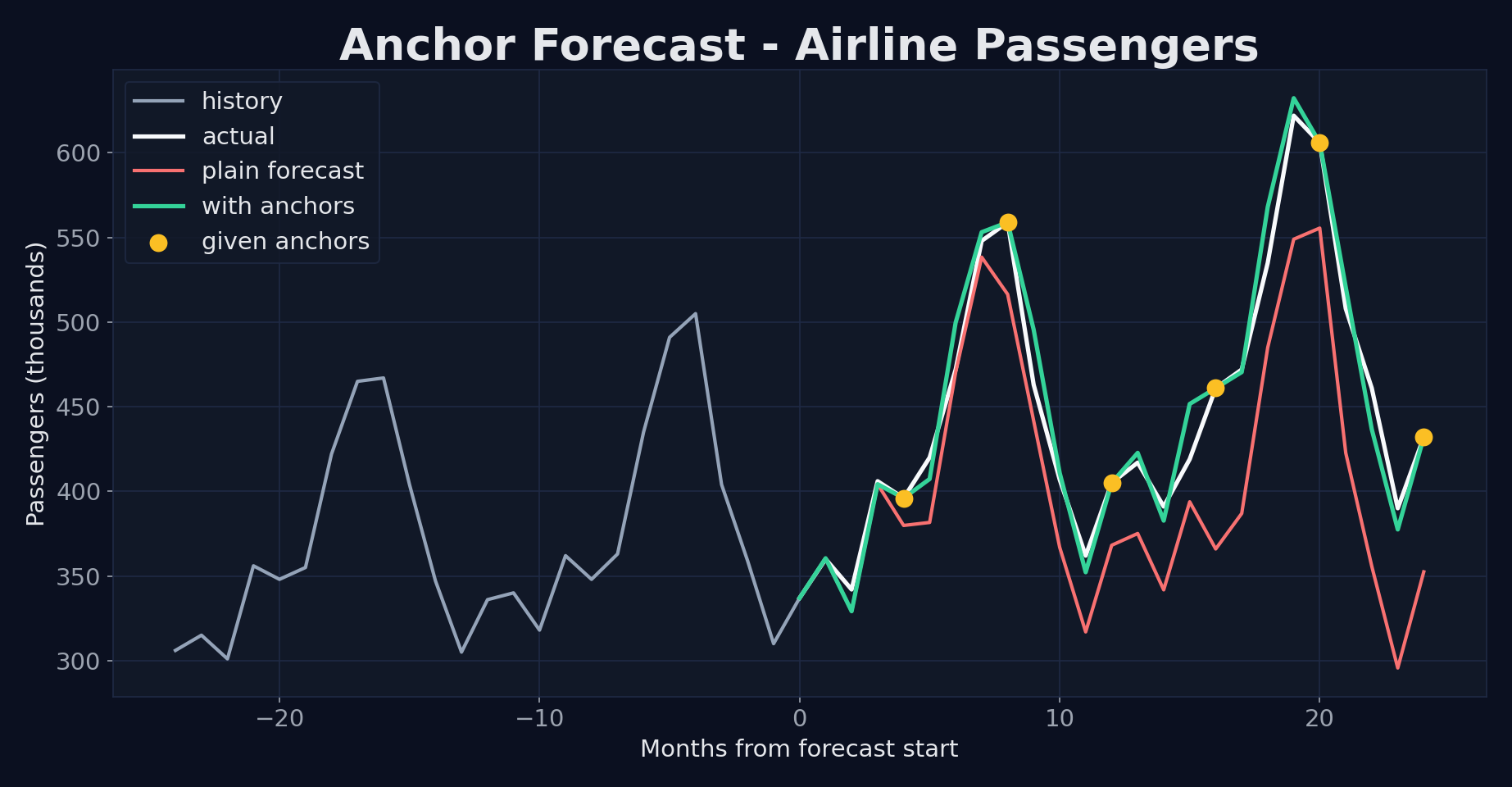
Monthly airline passengers (Box & Jenkins), 24-month holdout: pinning six known months cuts the median forecast MAE from 46 to 10 thousand passengers.
url = "https://raw.githubusercontent.com/jbrownlee/Datasets/master/airline-passengers.csv"
passengers = pd.read_csv(url)["Passengers"].astype("float32")

result = predict_time_anchor(
    "models/time-anchor-modernbert-32m",
    target_context=passengers[:-24],
    prediction_length=24,
    anchor={
        "mode": "observed",
        "positions": [4, 8, 12, 16, 20, 24],
        "values": [396, 559, 405, 461, 606, 432],
    },
)
print(pd.DataFrame(result.forecast_rows))
positions are 1-based forecast horizon steps. Anchor forecasts use the target
history only; disable anchors when passing explanatory_contexts.
CLI
time-anchor-infer                                   # forecast + impact on the bundled sample
time-anchor-infer --no-impact                       # forecast only
time-anchor-infer --no-impact --anchor-mode observed \
    --anchor-positions 12,24,36 --anchor-values 0.2,0.4,0.1
time-anchor-infer --checkpoint K-Iwa/time-anchor-modernbert-32m --input data.csv
Outputs are written to output/forecast.csv, output/variable_impact.csv, and
output/result.json. time-anchor-sine-test runs a sine-wave anchor evaluation
(requires pip install -e ".[examples]").
Repository Layout
src/time_anchor— model, pipeline, anchor samplers, and explainability codemodels/time-anchor-modernbert-32m— checkpoint and model cardexamples/sample_data.csv— small input file for smoke testsdocs/publishing.md— Hugging Face / PyPI release checklist
Development
python -m pip install -e ".[dev]"
python -m ruff check .
python -m ruff format --check .
python -m pytest
References
- Ansari et al. Chronos: Learning the Language of Time Series. TMLR 2024 (OpenReview) — informs the forecasting/tokenization design.
- Azarkhalili and Libbrecht. Generalized Attention Flow: Feature Attribution for Transformer Models via Maximum Flow. 2025 — the variable/time impact method (GAF).
See docs/references.md, NOTICE, and CITATION.cff for attribution details.
License
Apache-2.0. Some source files retain upstream Amazon copyright notices.
Figures use historical weather data from Open-Meteo (CC BY 4.0) and the classic airline passengers dataset (Box & Jenkins, 1976).
1 maintainer

Metadata
1 maintainer
Release files for time-anchor 0.1.3
For a detailed explanation of source distributions (sdists) and built distributions (wheels), please see the package formats documentation.
Source distribution (sdist)
| File | Size | Uploaded | |
|---|---|---|---|
| time_anchor-0.1.3.tar.gz | 90.9 kB | Details |
Built distribution (wheel)
| File | Interpreter | ABI | Platform | Reset |
|---|---|---|---|---|
| time_anchor-0.1.3-py3-none-any.whl | Python 3 | none | any | Details |
Total release size: 177.8 kB
Release files / time_anchor-0.1.3.tar.gz
| Download URL | time_anchor-0.1.3.tar.gz |
|---|---|
| Size | 90.9 kB |
| Tags | Source |
|
SHA-256 checksum How to use checksums |
52126822dbed266bb98a7cdedd79ab51633b0b336d5f322469192c0c601fbcd1
|
|
BLAKE2b-256 checksum How to use checksums |
f5e821a1e81b5db96488d1baab4d058ffb2d869c5cbfd218e6f64412eb4bfb1c
|
| Upload date | |
|
Uploaded using Trusted Publishing? What is trusted publishing? |
No |
| Uploaded via |
twine/6.2.0 CPython/3.11.4
|
Release files / time_anchor-0.1.3-py3-none-any.whl
| Download URL | time_anchor-0.1.3-py3-none-any.whl |
|---|---|
| Size | 87.0 kB |
| Tags | Python 3 |
|
SHA-256 checksum How to use checksums |
1677d0f5e891b22e3f7f3aa1982e22ba754c4f12202b1892786eb4f97d5a4e18
|
|
BLAKE2b-256 checksum How to use checksums |
319b463712f76b93e75c1afe65da3ac3e3370f219061f3f52b05e599f2006939
|
| Upload date | |
|
Uploaded using Trusted Publishing? What is trusted publishing? |
No |
| Uploaded via |
twine/6.2.0 CPython/3.11.4
|














