
A simple to use time tracking CLI for macOS.
Verified details
These details have been verified by PyPIProject links
GitHub Statistics
Maintainers

Project description
Time Buddy
A simple to use time tracking CLI for macOS.
Track your screen time based on macOS system logs to calculate how many hours you've worked each day.
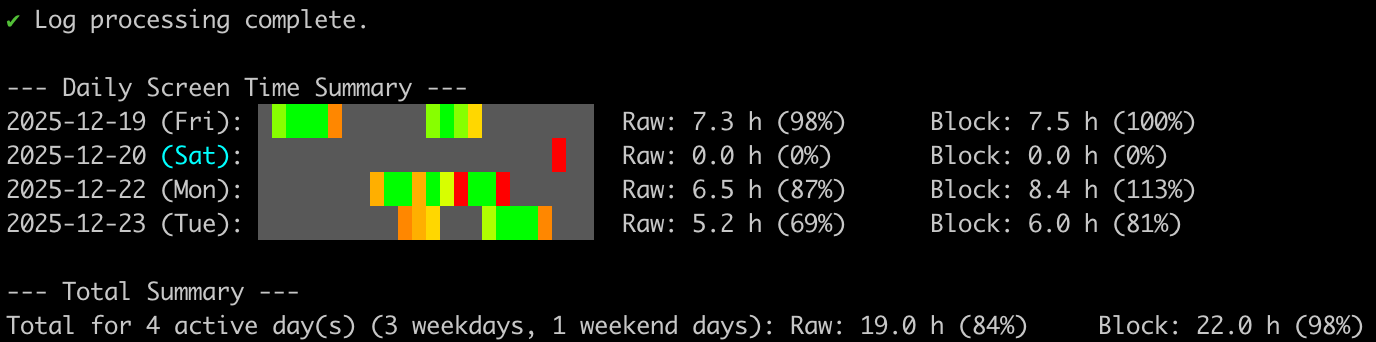
Features
- 📊 Track screen time based on macOS unlock/lock events
- 📅 Calculate time spent per day with hourly breakdown visualization
- 💾 Smart caching for faster subsequent runs
- 🎨 Colorful terminal output with progress indicators
Requirements
- macOS (uses macOS system logs)
- Python 3.7+ (for development)
Setup (Required)
Before using Time Buddy, you must enable persistent logging for screen lock/unlock events:
sudo log config --subsystem com.apple.loginwindow --mode "persist:info"
This command configures macOS to persistently store login window events. Without this, the system may not retain the screen lock/unlock logs needed for accurate time tracking.
Note: You only need to run this once. The setting persists across reboots.
Installation
pip (Recommended)
pip install time-buddy
Standalone Binary
If you don't have Python installed:
curl -fsSL https://raw.githubusercontent.com/alen-z/time-buddy/main/install.sh | bash
Or build from source:
git clone https://github.com/alen-z/time-buddy.git
cd time-buddy
make install
make install-binary
Usage
# Show version
time-buddy --version

# Show screen time for the last 7 days (default)
time-buddy

# Show screen time for the last 30 days
time-buddy --days 30

# Show detailed session information
time-buddy --verbose

# Force refresh (ignore cache)
time-buddy --no-cache

# Include weekends in expected hours calculation
time-buddy --include-weekends

# Clear the cache
time-buddy --clear-cache
Development
# Install dependencies
make install

# Install locally for testing (editable mode)
pip install -e .

# Run the application
make run

# Create standalone binary
make create-binary

# Test the binary
make test-binary

# Clean build artifacts
make clean
How It Works
Time Buddy reads macOS system logs for screen lock/unlock events and calculates:
- Raw time: Actual screen-on time between unlock and lock events
- Block time: Time span from first to last activity (your "work block")
The output shows a 24-hour visualization where each block represents an hour, colored by activity intensity.
License
MIT License
Project details
Verified details
These details have been verified by PyPIProject links
GitHub Statistics
Maintainers
Release history Release notifications | RSS feed


Download files
Download the file for your platform. If you're not sure which to choose, learn more about installing packages.
Source Distribution
Built Distribution
Filter files by name, interpreter, ABI, and platform.
If you're not sure about the file name format, learn more about wheel file names.
Copy a direct link to the current filters
File details
Details for the file time_buddy-1.0.4.tar.gz.
File metadata
- Download URL: time_buddy-1.0.4.tar.gz
- Upload date:
- Size: 8.8 kB
- Tags: Source
- Uploaded using Trusted Publishing? Yes
- Uploaded via: twine/6.1.0 CPython/3.13.7
File hashes
| Algorithm | Hash digest | |
|---|---|---|
| SHA256 |
a71e683abff3b2aa18fa835b71b36e7c61dde89d912e3a1eb6d56b711ead04e9
|
|
| MD5 |
0a10d3864f31257b66defcff59597abe
|
|
| BLAKE2b-256 |
4c0d7705eeb7cb176d89616bfae94c5c9a30b7ef7c11bb613d60f9925ffde3d0
|
Provenance
The following attestation bundles were made for time_buddy-1.0.4.tar.gz:
Publisher:
release.yml on alen-z/time-buddy
-
Statement:
-
Statement type:
https://in-toto.io/Statement/v1 -
Predicate type:
https://docs.pypi.org/attestations/publish/v1 -
Subject name:
time_buddy-1.0.4.tar.gz -
Subject digest:
a71e683abff3b2aa18fa835b71b36e7c61dde89d912e3a1eb6d56b711ead04e9 - Sigstore transparency entry: 778108601
- Sigstore integration time:
-
Permalink:
alen-z/time-buddy@e3e8a992210ffa85c5d7d9ffc5785744e42d2636 -
Branch / Tag:
refs/heads/main - Owner: https://github.com/alen-z
-
Access:
public
-
Token Issuer:
https://token.actions.githubusercontent.com -
Runner Environment:
github-hosted -
Publication workflow:
release.yml@e3e8a992210ffa85c5d7d9ffc5785744e42d2636 -
Trigger Event:
push
-
Statement type:
File details
Details for the file time_buddy-1.0.4-py3-none-any.whl.
File metadata
- Download URL: time_buddy-1.0.4-py3-none-any.whl
- Upload date:
- Size: 9.2 kB
- Tags: Python 3
- Uploaded using Trusted Publishing? Yes
- Uploaded via: twine/6.1.0 CPython/3.13.7
File hashes
| Algorithm | Hash digest | |
|---|---|---|
| SHA256 |
853a8cba352fdb23392f7e6cb6bdfc068fe5bd91c57c9fd342ff8bd325ae9a7e
|
|
| MD5 |
63ea7e635af1f65503b35eb4fe6ee2fc
|
|
| BLAKE2b-256 |
72d37f607045c27bb9ccfa1232506fa6163d2baf3993f96a5cc3aaa5ed8dda4e
|
Provenance
The following attestation bundles were made for time_buddy-1.0.4-py3-none-any.whl:
Publisher:
release.yml on alen-z/time-buddy
-
Statement:
-
Statement type:
https://in-toto.io/Statement/v1 -
Predicate type:
https://docs.pypi.org/attestations/publish/v1 -
Subject name:
time_buddy-1.0.4-py3-none-any.whl -
Subject digest:
853a8cba352fdb23392f7e6cb6bdfc068fe5bd91c57c9fd342ff8bd325ae9a7e - Sigstore transparency entry: 778108603
- Sigstore integration time:
-
Permalink:
alen-z/time-buddy@e3e8a992210ffa85c5d7d9ffc5785744e42d2636 -
Branch / Tag:
refs/heads/main - Owner: https://github.com/alen-z
-
Access:
public
-
Token Issuer:
https://token.actions.githubusercontent.com -
Runner Environment:
github-hosted -
Publication workflow:
release.yml@e3e8a992210ffa85c5d7d9ffc5785744e42d2636 -
Trigger Event:
push
-
Statement type:






