
time-in
CLI tool to figure out the time somewhere else
Installation
Requires python3.9+
To install with pip, run:
pip install time-in
Usage
time-in tz --help
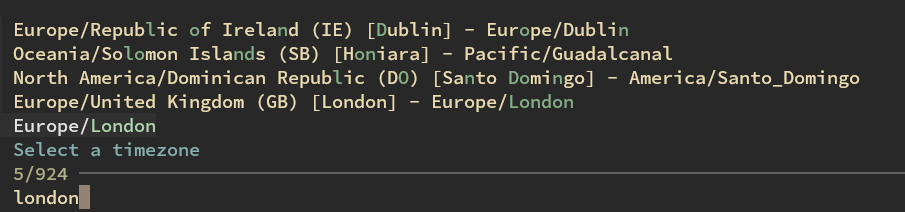
If no timezone is passed, this uses fzf to let you select a timezone from a list of all timezones/common countries/capitals.
Usage: time-in tz [OPTIONS] [TZ]...

Options:
  -f, --format TEXT              format for printing dates  [default: %Y-%m-%d %H:%M:%S %Z]
  -h, --hours INTEGER            print this many localized hours in timezones
  --print-local / --skip-local   print the local time as well
  -d, --date TEXT                date to print  [default: now]
  -P, --print-local-timezone     print the local timezone name as well
  -r, --round [up|down|nearest]  round the time to the nearest hour
  --print-info / --hide-info     print timezone info/difference
  -S, --sort-diffs               sort timezones by difference from the first timezone
  --help                         Show this message and exit.
By default, this uses the current time, and prints the time in the timezone(s) passed.
$ time-in tz US/Eastern
Here        (+0)  2023-08-16 10:51:04 PDT
US/Eastern  (+3)  2023-08-16 13:51:04 EDT
If you want to print the time in the future, you can pass a date:
$ time-in tz 'US/Eastern' --date '2023-10-16 10:30'
or, in more human language: $ time-in tz 'US/Eastern' --date 'in 3 hours'
Can show multiple timezones:
$ time-in tz US/Mountain US/Central US/Eastern
Here         (+0)  2023-08-16 10:51:52 PDT
US/Mountain  (+1)  2023-08-16 11:51:52 MDT
US/Central   (+2)  2023-08-16 12:51:52 CDT
US/Eastern   (+3)  2023-08-16 13:51:52 EDT
To label the timezones differently, you can prepend it with a label:
$ time-in tz 'East Coast: US/Eastern' 'UK: Europe/London'
Here        (+0)  2023-08-16 10:52:04 PDT
East Coast  (+3)  2023-08-16 13:52:04 EDT
UK          (+8)  2023-08-16 18:52:04 BST
This can also show a range of dates, if you pass --hours:
$ time-in tz 'East Coast: US/Eastern' 'UK: Europe/London' --hours 12 --round down
Here        (+0)  [Aug 16]  10  11  12  13  14  15  16  17  18  19  20  21
East Coast  (+3)  [Aug 16]  13  14  15  16  17  18  19  20  21  22  23  00
UK          (+8)  [Aug 16]  18  19  20  21  22  23  00  01  02  03  04  05
$ time-in tz -h 6 -r down --print-local-timezone US/Eastern Europe/London Asia/Calcutta Asia/Shanghai Asia/Tokyo US/Hawaii
America/Los_Angeles  (+0)     [Aug 16]  10     11     12     13     14     15
US/Eastern           (+3)     [Aug 16]  13     14     15     16     17     18
Europe/London        (+8)     [Aug 16]  18     19     20     21     22     23
Asia/Calcutta        (+12.5)  [Aug 16]  22:30  23:30  00:30  01:30  02:30  03:30
Asia/Shanghai        (+15)    [Aug 17]  01     02     03     04     05     06
Asia/Tokyo           (+16)    [Aug 17]  02     03     04     05     06     07
US/Hawaii            (-3)     [Aug 16]  07     08     09     10     11     12
Example Usage
I create a wrapper tz script that just passes the arguments to time-in tz:
#!/bin/sh
exec time-in tz "$@"
And then have a tz-friends functions in my shell for my friends in different timezones:
tz-friends () {
	tz "$@" 'East Coast: America/New_York' 'Japan: Asia/Tokyo' 'UK: Europe/London' 'India: Asia/Calcutta'
}
$ tz-friends
Here        (+0)     2023-08-17 21:12:57 PDT
East Coast  (+3)     2023-08-18 00:12:57 EDT
Japan       (+16)    2023-08-18 13:12:57 JST
UK          (+8)     2023-08-18 05:12:57 BST
India       (+12.5)  2023-08-18 09:42:57 IST
$ tz-friends -h 6 -r down
Here        (+0)     [Aug 17]  21     22     23     00     01     02
East Coast  (+3)     [Aug 18]  00     01     02     03     04     05
Japan       (+16)    [Aug 18]  13     14     15     16     17     18
UK          (+8)     [Aug 18]  05     06     07     08     09     10
India       (+12.5)  [Aug 18]  09:30  10:30  11:30  12:30  13:30  14:30
Tests
git clone 'https://github.com/seanbreckenridge/time-in'
cd ./time_in
pip install '.[testing]'
flake8 ./time_in
mypy ./time_in
Attributions
- The hours format was heavily influenced by this script
- Thanks to this gist for country/city data for timezones
1 maintainer

Metadata
1 maintainer
Release files for time-in 0.1.1
For a detailed explanation of source distributions (sdists) and built distributions (wheels), please see the package formats documentation.
Source distribution (sdist)
| File | Size | Uploaded | |
|---|---|---|---|
| time_in-0.1.1.tar.gz | 15.1 kB | Details |
Built distribution (wheel)
| File | Interpreter | ABI | Platform | Reset |
|---|---|---|---|---|
| time_in-0.1.1-py3-none-any.whl | Python 3 | none | any | Details |
Total release size: 28.6 kB
Release files / time_in-0.1.1.tar.gz
| Download URL | time_in-0.1.1.tar.gz |
|---|---|
| Size | 15.1 kB |
| Tags | Source |
|
SHA-256 checksum How to use checksums |
986685c9a8b3d3687660d13e9833607831c7c178daa6617ab764a296f59679fe
|
|
BLAKE2b-256 checksum How to use checksums |
89121b088fcad89cc25e231db3483178b3488fde426c33e6c78638e2230108f7
|
| Upload date | |
|
Uploaded using Trusted Publishing? What is trusted publishing? |
No |
| Uploaded via |
twine/4.0.2 CPython/3.11.3
|
Release files / time_in-0.1.1-py3-none-any.whl
| Download URL | time_in-0.1.1-py3-none-any.whl |
|---|---|
| Size | 13.5 kB |
| Tags | Python 3 |
|
SHA-256 checksum How to use checksums |
fff9f5592da1740aea21b097f5c91233c5bfbf73fc4d1fd8f7d1702cf0855386
|
|
BLAKE2b-256 checksum How to use checksums |
06d018e3c9009d766531e7bbac84fbdd44e4e461601ac79ecb7d1906bd8e55e8
|
| Upload date | |
|
Uploaded using Trusted Publishing? What is trusted publishing? |
No |
| Uploaded via |
twine/4.0.2 CPython/3.11.3
|














