
time-series-metadata



A metrologically enabled time-series metadata scheme
time-series-metadata is a Python implementation of a metadata scheme for time-series with measurement uncertainties. It is developed jointly by software developers and researchers from Physikalisch-Technische Bundesanstalt (Germany) and Institute for Manufacturing (UK) as part of the joint European Research Project EMPIR 17IND12 Met4FoF and the German research project FAMOUS.
time-series-metadata is written in Python 3 and strives to run with all Python versions with upstream support. Currently it is tested to work with Python 3.5 to 3.8.
Scheme
The following image illustrates an abstract representation of a time series:
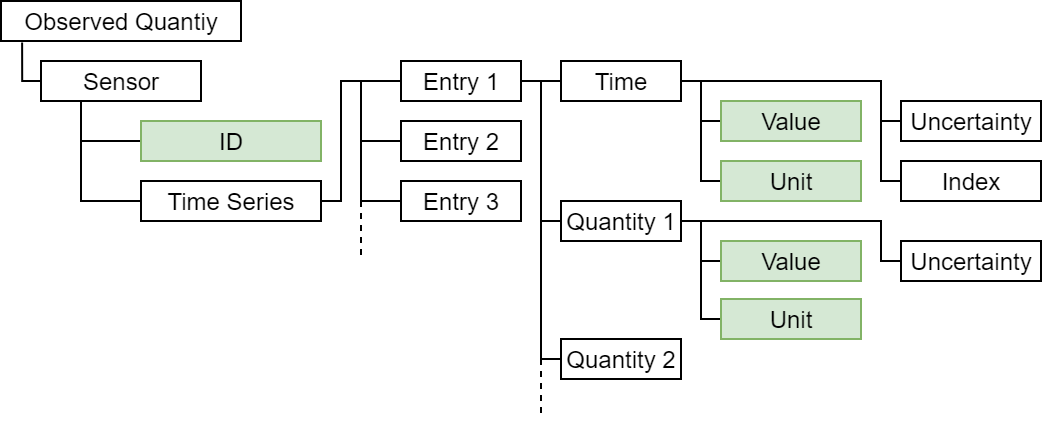
The scheme contains all metadata to interpret the actual time and quantity values.
It is comprised of a dictionary containing the following keys with (default) values of the specified type:
metadata = {
    "device_id": string (default: ""),
    "time_name": string (default: "time"),
    "time_unit": string (default: "om:second"),
    "quantity_names": string or list of strings (default: ""),
    "quantity_units": string or list of strings (default: ""),
    "misc": optional, any other data you want to provide (default: None),
}
Example use
We illustrate the use of the scheme assuming you already have a project set up.
Installation
First you need to install the scheme with the usual command into your project's Python virtual environment:
pip install time-series-metadata
Import scheme
Inside your project's code import the scheme at the top of your module.
from time_series_metadata.scheme import MetaData
Assign initial values
After importing the package you can make use of it and assign initial values.
vs_description = MetaData(
    device_id="my_virtual_sensor",
    time_name="time",
    time_unit="s",
    quantity_names=("pressure_1", "pressure_2"),
    quantity_units=("Pa","mPa"),
    misc="additional information"
)
Read out metadata
You can access the metadata as a whole or time and quantity metadata separately. Quantity metadata can be either accessed for all quantities at once or individually via index or name. If you do not specify name or index, the first's quantity metadata is returned. This might be especially convenient, if there is only one quantity.
>>> vs_description.metadata
{"device_id": "my_virtual_sensor", "time_name": "time", "time_unit": "s", "quantity_names": ["pressure_1", "pressure_2"], "quantity_units": ["Pa", "mPa"], "misc": None}
>>> vs_description.time
{'time_name': 'time', 'time_unit': 's'}
>>> vs_description.quantities
{'quantity_names': ('pressure_1', 'pressure_2'), 'quantity_units': ('Pa', 'mPa')}
>>> vs_description.get_quantity(1)
{'quantity_names': 'pressure_2', 'quantity_units': 'mPa'}
>>> vs_description.get_quantity(name="pressure_1")
{'quantity_names': 'pressure_1', 'quantity_units': 'Pa'}
>>> vs_description.get_quantity()
{'quantity_names': 'pressure_1', 'quantity_units': 'Pa'}
Maintainers
The package is developed and maintained at the "Physikalisch-Technische Bundesanstalt" by Maximilian Gruber and Björn Ludwig.
1 maintainer

Metadata
1 maintainer
Release files for time-series-metadata 0.1.1
For a detailed explanation of source distributions (sdists) and built distributions (wheels), please see the package formats documentation.
Source distribution (sdist)
| File | Size | Uploaded | Provenance | Actions |
|---|---|---|---|---|
| time_series_metadata-0.1.1.tar.gz | 18.9 kB | Without provenance | Details for time_series_metadata-0.1.1.tar.gz |
Built distribution (wheel)
| File | Interpreter | ABI | Platform | Actions Reset |
|---|---|---|---|---|
| time_series_metadata-0.1.1-py3-none-any.whl | Python 3 | none | any | Details for time_series_metadata-0.1.1-py3-none-any.whl |
Total release size: 26.9 kB
Release files / time_series_metadata-0.1.1.tar.gz
| Download URL | time_series_metadata-0.1.1.tar.gz |
|---|---|
| Size | 18.9 kB |
| Tags | Source |
|
SHA-256 checksum How to use checksums |
c5045195a9f2f21406c37b6e2b6c6992b22831bfeed24e58da648ee12ad5f689
|
|
BLAKE2b-256 checksum How to use checksums |
a845661588c538312806df23ea433aa7f8f33eb61a56e28cfc7e309f1b32432d
|
| Upload date | |
|
Uploaded using Trusted Publishing? What is trusted publishing? |
No |
| Uploaded via |
twine/3.4.1 importlib_metadata/4.0.1 pkginfo/1.7.0 requests/2.25.1 requests-toolbelt/0.9.1 tqdm/4.60.0 CPython/3.8.9
|
Release files / time_series_metadata-0.1.1-py3-none-any.whl
| Download URL | time_series_metadata-0.1.1-py3-none-any.whl |
|---|---|
| Size | 8.0 kB |
| Tags | Python 3 |
|
SHA-256 checksum How to use checksums |
fcd4e9e389d1dfe893a8e8244285c55dee8e641fd321e122a84b3d9f60c18b07
|
|
BLAKE2b-256 checksum How to use checksums |
b86e62e3c483bb3958f805b972c00b1f1af5ca77a2ce8baa5626c00927cd7a80
|
| Upload date | |
|
Uploaded using Trusted Publishing? What is trusted publishing? |
No |
| Uploaded via |
twine/3.4.1 importlib_metadata/4.0.1 pkginfo/1.7.0 requests/2.25.1 requests-toolbelt/0.9.1 tqdm/4.60.0 CPython/3.8.9
|
Security for time-series-metadata 0.1.1
Provenance
Provenance describes where a file came from. On PyPI, provenance is shared via attestations, which provide a verifiable record of the build or publishing details. View details, limitations and caveats.
No provenance found
None of the files in this release were uploaded with provenance metadata.
A note on package security
PyPI is a repository for distributing packages, not a service for auditing them. While third-party security researchers and our staff do their best to detect and remove malicious packages, PyPI cannot guarantee the quality, security or suitability of any given package.
To learn more about protecting yourself from malicious actors, visit our package security documentation.














