
Python timeframe tool for time monitoring for each event, error handling, traceback recording...

Project description
timeframe
Python timeframe tool for time monitoring for each event, error handling, traceback recording...




How to install
pip install timeframe-event
You can also copy timeframe.py from GitHub and drop it in your project
This project/file only uses standard libraries so installation of additional dependency is not required
Example
import random, time
from timeframe import TimeFrame
async def func(timeframe: TimeFrame, *args, **kwargs): # Create rt(realtime) function
    timeframe.print_mono()
    print(args, kwargs)


with TimeFrame('test args', name='Text request', rt=func, test_kwargs='test kwargs') as time_frame:
    with time_frame.create(name='Prompt') as group_prompt:
        with group_prompt.create(name='Prompt request', retries=5, ignore_retries=(TimeoutError,)) as event_frame:
            function_call = False
            for frame in event_frame:
                async with frame:
                    time.sleep(random.uniform(0, 0.4))  # Stimulate doing network operation
                    if random.random() < 0.2:
                        raise ValueError  # Stimulate a complete random chance of a network error occur
                    if random.random() < 0.3:
                        raise TimeoutError # Stimulate a complete internet breakdown
                    if random.random() < 0.9:
                        function_call = True
        if function_call:
            with group_prompt.create(name='Function call `mul`', retries=0):
                time.sleep(random.uniform(0, 0.01))  # Stimulate doing network operation
            with group_prompt.create(name='Function Response', retries=5) as event_frame:
                for frame in event_frame:
                    async with frame:
                        time.sleep(random.uniform(0, 0.4))  # Stimulate doing network operation
                        if random.random() < 0.7:
                            raise ValueError  # Stimulate a complete random chance of a network error occur
>>> print(time_frame.traceback_format())
[596869.233s] Error raised on Attempt 'Attempt #1' from parent 'Prompt request' at TimeFrame 'Text request':
Traceback (most recent call last):

  File "...\timeframe.py", line 260, in test
    raise ValueError  # Stimulate a complete random chance of a network error occur
    ^^^^^^^^^^^^^^^^

ValueError

[596869.397s] Error raised on Attempt 'Attempt #2' from parent 'Prompt request' at TimeFrame 'Text request':
Traceback (most recent call last):

  File "...\timeframe.py", line 260, in test
    raise ValueError  # Stimulate a complete random chance of a network error occur
    ^^^^^^^^^^^^^^^^

ValueError

[596870.032s] Error raised on Attempt 'Attempt #1' from parent 'Function Response' at TimeFrame 'Text request':
Traceback (most recent call last):

  File "...\timeframe.py", line 271, in test
    raise ValueError  # Stimulate a complete random chance of a network error occur
    ^^^^^^^^^^^^^^^^

ValueError

[596870.171s] Error raised on Attempt 'Attempt #2' from parent 'Function Response' at TimeFrame 'Text request':
Traceback (most recent call last):

  File "...\timeframe.py", line 271, in test
    raise ValueError  # Stimulate a complete random chance of a network error occur
    ^^^^^^^^^^^^^^^^

ValueError
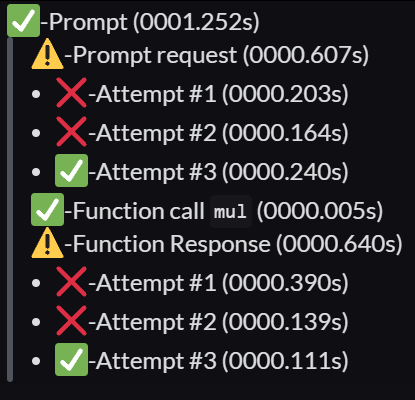
>>> print(time_frame.frame_format_dc(limit=1024)) #Character limit of discord embed field value
Total: 0001.252s (Total Frames: 11)
✅-Prompt (0001.252s)
> ⚠️-Prompt request (0000.607s)
> - ❌-Attempt #1 (0000.203s)
> - ❌-Attempt #2 (0000.164s)
> - ✅-Attempt #3 (0000.240s)
> ✅-Function call `mul` (0000.005s)
> ⚠️-Function Response (0000.640s)
> - ❌-Attempt #1 (0000.390s)
> - ❌-Attempt #2 (0000.139s)
> - ✅-Attempt #3 (0000.111s)
Example:
>>> print(time_frame.frame_format_mono()) # Use of export as file or display on console
Total: 0001.252s (Total Frames: 11)
✅-Text request (0001.252s)
  ✅-Prompt (0001.252s)
    ⚠️-Prompt request (0000.607s)
      ❌-Attempt #1 (0000.203s)
      ❌-Attempt #2 (0000.164s)
      ✅-Attempt #3 (0000.240s)
    ✅-Function call `mul` (0000.005s)
    ⚠️-Function Response (0000.640s)
      ❌-Attempt #1 (0000.390s)
      ❌-Attempt #2 (0000.139s)
      ✅-Attempt #3 (0000.111s)
print(timeframe.frame_format_custom()) # Default with markdown
Total: 0000.826s (Total Frames: 11)
✅-Prompt (0000.826s)
- ⚠️-Prompt request (0000.690s)
- ❌-Attempt #1 (0000.135s)
- ❌-Attempt #2 (0000.020s)
- ❌-Attempt #3 (0000.126s)
- ❌-Attempt #4 (0000.349s)
- ✅-Attempt #5 (0000.060s)
- ✅-Function call
mul(0000.004s) - ✅-Function Response (0000.132s)
Release history Release notifications | RSS feed


Download files
Download the file for your platform. If you're not sure which to choose, learn more about installing packages.
Source Distribution
Built Distribution
Filter files by name, interpreter, ABI, and platform.
If you're not sure about the file name format, learn more about wheel file names.
Copy a direct link to the current filters
File details
Details for the file timeframe_event-1.1.5.tar.gz.
File metadata
- Download URL: timeframe_event-1.1.5.tar.gz
- Upload date:
- Size: 20.0 kB
- Tags: Source
- Uploaded using Trusted Publishing? No
- Uploaded via: twine/5.0.0 CPython/3.9.18
File hashes
| Algorithm | Hash digest | |
|---|---|---|
| SHA256 |
d4c68c3d66046fd52c0228565028ba1ccc2d1c62b17dcbe1c48883a9935b32d7
|
|
| MD5 |
84cfc3de95b4f3c0d56666e3491884b6
|
|
| BLAKE2b-256 |
92647784c0e153259be3b79f1828f1da5a0a4c35188f9511e3f150af90d0988c
|
File details
Details for the file timeframe_event-1.1.5-py3-none-any.whl.
File metadata
- Download URL: timeframe_event-1.1.5-py3-none-any.whl
- Upload date:
- Size: 19.1 kB
- Tags: Python 3
- Uploaded using Trusted Publishing? No
- Uploaded via: twine/5.0.0 CPython/3.9.18
File hashes
| Algorithm | Hash digest | |
|---|---|---|
| SHA256 |
1a93758ffdaa40cf6443db7f667cf9eefd8b39ebc52a3be9640cfd7d1aab9f0a
|
|
| MD5 |
6ef16c06476d30407ac63267a1dc470e
|
|
| BLAKE2b-256 |
1ec4f9c922c2163fd74b0d294db6e1602523d2d6a0175aa5beddb19afe52f160
|






