
timeglance












Config-driven time planning at a glance - one web UI controls two tools:
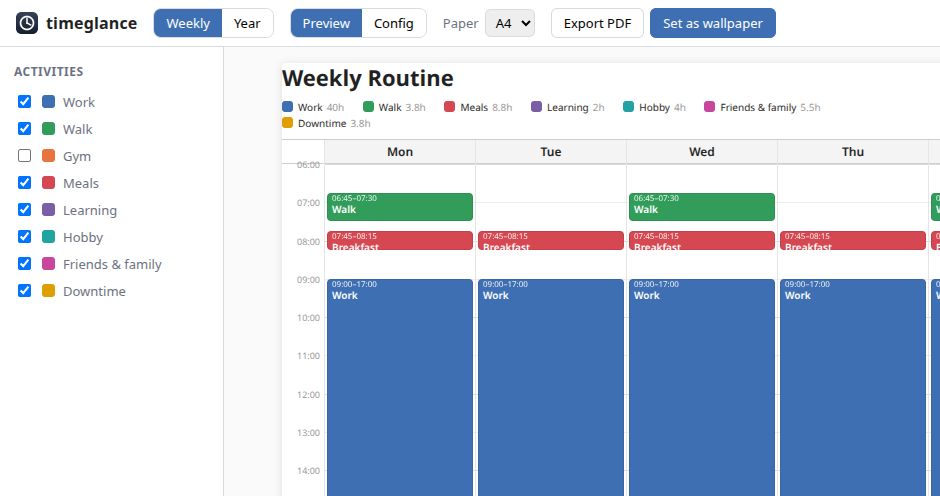
- Weekly - your routine sheet with activity layers. Print it or set it as a desktop wallpaper.
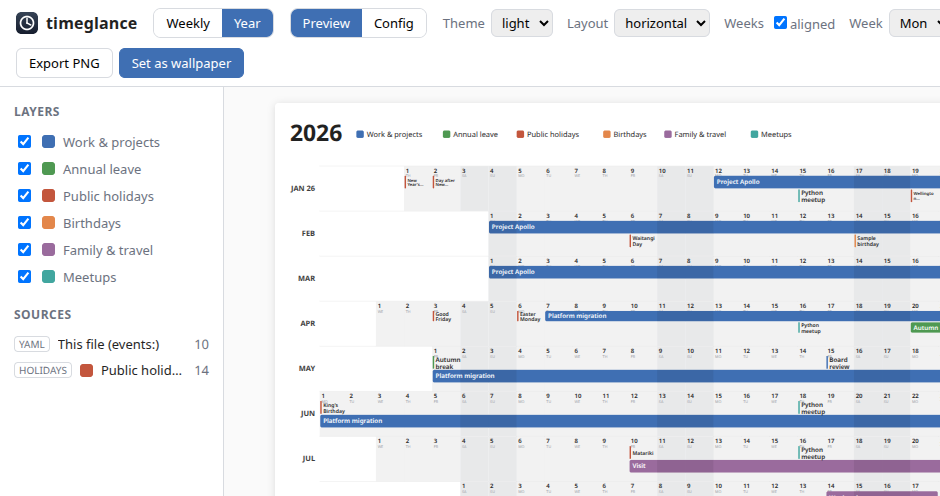
- Year - a wide year-at-a-glance planner, with layers fed by your own calendars, public holidays, and manually added events. Print it or set it as a desktop wallpaper.
Quick start (Docker)
docker compose run --rm timeglance timeglance-init   # first run: scaffold year/ + weekly/ config.yaml
docker compose up                                    # then open http://localhost:8753
Config, outputs and scheduler state are bind-mounted under ./year, ./weekly and ./state, so the UI edits
files on your host. Outputs are written as your host user — the compose file defaults to 1000:1000 (the usual
first Linux user), so it just works for most; if your uid differs, run UID=$(id -u) GID=$(id -g) docker compose up.
Wallpaper-setting needs a live Plasma session, so it works only with the local install (next section), not in Docker; the container UI auto-hides it.
Quick start (local)
Needs Python 3.13 and uv. WeasyPrint and CairoSVG load native libraries (Cairo, Pango, GDK-PixBuf) at runtime; most Linux desktops already have these, but on a minimal or server install add them first (Debian/Ubuntu):
sudo apt-get install libcairo2 libpango-1.0-0 libpangocairo-1.0-0 libgdk-pixbuf-2.0-0
uv sync
uv run timeglance-init     # scaffold year/ + weekly/ config.yaml from the templates
uv run timeglance          # the control panel at http://localhost:8753
Headless renders (each flag has a YAML equivalent):
uv run timeglance-year --theme light --layout vertical   # -> year/out/
uv run timeglance-weekly --format both                   # -> weekly/out/
Docs
- Motivation - why this exists, and how it fits a GTD/calendar setup
- The control panel - preview, config editor, scheduler & activity log
- Configuration - year & weekly YAML, calendar (
.ics) sources - Reference - every CLI flag and YAML key
- Wallpaper - KDE Plasma, per-screen native-resolution rendering
- Use as a library - import and render PNG/PDF/SVG from Python
- Contributing - setup, CI, releasing
Limitations
- Wallpaper-setting is host-only. The container can't reach a Plasma session, so inside Docker the feature
self-hides and a scheduled "set wallpaper" renders the files but skips the set (logged as
wallpaper skipped (no backend)). Run the server/CLI on the host to set wallpapers. - Weekly blocks can't overlap in time. Two activities over the same slot on the same day render on top of each other, so only one reads clearly.
1 maintainer

Metadata
1 maintainer
Release files for timeglance 1.0.2
For a detailed explanation of source distributions (sdists) and built distributions (wheels), please see the package formats documentation.
Source distribution (sdist)
| File | Size | Uploaded | |
|---|---|---|---|
| timeglance-1.0.2.tar.gz | 423.7 kB | Details |
Built distribution (wheel)
| File | Interpreter | ABI | Platform | Reset |
|---|---|---|---|---|
| timeglance-1.0.2-py3-none-any.whl | Python 3 | none | any | Details |
Total release size: 484.2 kB
Release files / timeglance-1.0.2.tar.gz
| Download URL | timeglance-1.0.2.tar.gz |
|---|---|
| Size | 423.7 kB |
| Tags | Source |
|
SHA-256 checksum How to use checksums |
d1c92047398c86bc0c2e426638d5d7bdaf89b4eea5854ac1b84d95dcaf1de386
|
|
BLAKE2b-256 checksum How to use checksums |
b0dd75a38cd7eee7c043f17863cf2d3e3180660eec96fdc27ed00e7658435c61
|
| Upload date | |
|
Uploaded using Trusted Publishing? What is trusted publishing? |
Yes |
| Uploaded via |
twine/7.0.0 CPython/3.13.14
|
Provenance
Provenance describes where a file came from. On PyPI, provenance is shared via attestations, which provide a verifiable record of the build or publishing details. View details, limitations and caveats.


PyPI Publish Attestation
PyPI verified that this artifact, at this checksum, originated from the publisher listed below.
Signed by GitHub Actions, verified by PyPI on Oct 3, 2026.
Transparency logRelease files / timeglance-1.0.2-py3-none-any.whl
| Download URL | timeglance-1.0.2-py3-none-any.whl |
|---|---|
| Size | 60.5 kB |
| Tags | Python 3 |
|
SHA-256 checksum How to use checksums |
fe7fc30e94a3d9fe5bd00d7a7f1fd452abe1ef3a191eecef3a6685a8bd41697f
|
|
BLAKE2b-256 checksum How to use checksums |
44311e045252811598c1632c434f4de3c7d69cbd9a59da4a1e299ddc5848350f
|
| Upload date | |
|
Uploaded using Trusted Publishing? What is trusted publishing? |
Yes |
| Uploaded via |
twine/7.0.0 CPython/3.13.14
|
Provenance
Provenance describes where a file came from. On PyPI, provenance is shared via attestations, which provide a verifiable record of the build or publishing details. View details, limitations and caveats.
PyPI Publish Attestation
PyPI verified that this artifact, at this checksum, originated from the publisher listed below.
Signed by GitHub Actions, verified by PyPI on Oct 3, 2026.
Transparency log













