
📋 Prerequisite:
Requires Python >= 3.10
TimeProfiler makes use of new features from Python's typing module.
🛠️ Installation:
pip install timer-module
🖥️ Timer Usage:
Example Usage:
import time
from timer_module import TimerModule

timer_module = TimerModule().start()

timer_module.pause()
time.sleep(0.2)

timer_module.start()
time.sleep(0.5)

seconds = timer_module.get_time()
print(seconds)
Get the current time
# Seconds
TimerModule().get_time() # float

# Milliseconds
TimerModule().get_time_ms() # float

# Nanoseconds
TimerModule().get_time_ns() # float
Set the starting time
# Seconds
TimerModule().set_time(1.0)

# Milliseconds
TimerModule().set_time_ms(1.0)

# Nanoseconds
TimerModule().set_time_ns(1.0)
Pause timer:
TimerModule().pause()
Refresh timer (preserves timer run state):
TimerModule().refresh()
Reset timer (resets everything)
TimerModule().reset()
🖥️ Profiler Usage:
TimeProfiler also includes a "function_profiler" and "async_function_profiler", in a class the asynchronous methods are handled automatically, but for functions you need to select the appropriate decorator.
import time
from timer_module import TimeProfiler

# You only need this line to profile the entire class
# The program is run normally, this decorator will wrap
# The class and its methods in order to track execution time
@TimeProfiler().class_profiler
class ExampleClass:
    def __init__(self):
        time.sleep(0.1)

    def method_1(self):
        time.sleep(0.5)
        self.method_2()

    def method_2(self):
        time.sleep(1)
        self.method_3()

    def method_3(self):
        time.sleep(1)
        self.method_4()

    def method_4(self):
        time.sleep(0.1)
        self.method_5()

    def method_5(self):
        time.sleep(0.1)


ec = ExampleClass()
ec.method_1()
Output:
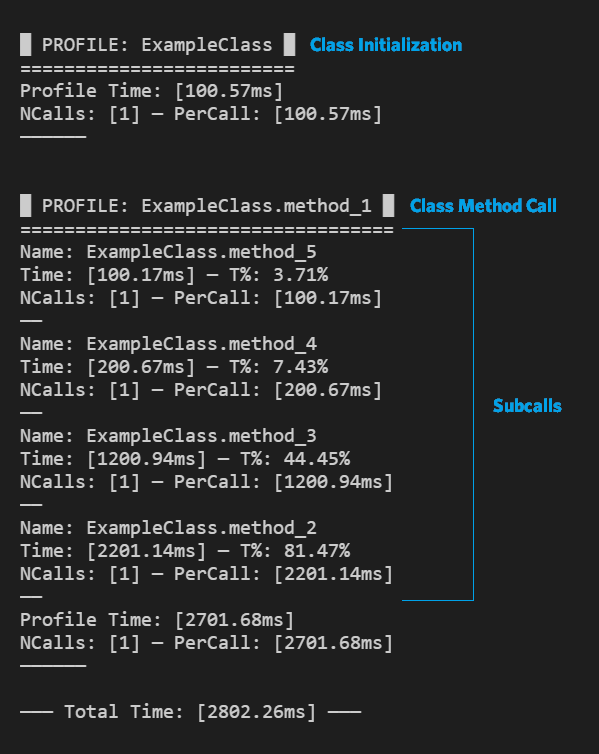
1 maintainer

Metadata
1 maintainer
Release files for timer-module 1.3.0
For a detailed explanation of source distributions (sdists) and built distributions (wheels), please see the package formats documentation.
Source distribution (sdist)
| File | Size | Uploaded | Provenance | |
|---|---|---|---|---|
| timer-module-1.3.0.tar.gz | 8.5 kB | Without provenance | Details |
Built distribution (wheel)
| File | Interpreter | ABI | Platform | Reset |
|---|---|---|---|---|
| timer_module-1.3.0-py3-none-any.whl | Python 3 | none | any | Details |
Total release size: 17.6 kB
Release files / timer-module-1.3.0.tar.gz
| Download URL | timer-module-1.3.0.tar.gz |
|---|---|
| Size | 8.5 kB |
| Tags | Source |
|
SHA-256 checksum How to use checksums |
3f2bd4de7ab19e5eaeb10966d89ad956adaab649c1abe8e526dc7356172df663
|
|
BLAKE2b-256 checksum How to use checksums |
e4f7e99fa0fa3d7df42370a3fe986bd07973a3308d9292019f3b4efee703b44f
|
| Upload date | |
|
Uploaded using Trusted Publishing? What is trusted publishing? |
No |
| Uploaded via |
twine/4.0.2 CPython/3.11.0
|
Release files / timer_module-1.3.0-py3-none-any.whl
| Download URL | timer_module-1.3.0-py3-none-any.whl |
|---|---|
| Size | 9.1 kB |
| Tags | Python 3 |
|
SHA-256 checksum How to use checksums |
c531b697701928f72218303f588c19128505e6f5a771f1329176812b209ea6b0
|
|
BLAKE2b-256 checksum How to use checksums |
b7975e1df44233c9a896a8a24b903b826f0fb1b58d3afa227eab10b2f0a2d148
|
| Upload date | |
|
Uploaded using Trusted Publishing? What is trusted publishing? |
No |
| Uploaded via |
twine/4.0.2 CPython/3.11.0
|
Security for timer-module 1.3.0
Provenance
Provenance describes where a file came from. On PyPI, provenance is shared via attestations, which provide a verifiable record of the build or publishing details. View details, limitations and caveats.
No provenance found
None of the files in this release were uploaded with provenance metadata.
A note on package security
PyPI is a repository for distributing packages, not a service for auditing them. While third-party security researchers and our staff do their best to detect and remove malicious packages, PyPI cannot guarantee the quality, security or suitability of any given package.














