
TimeWatcher
Automatically update hours card on TimeWatch
Python CLI program to help you automate filling up Timewatch card. Integrate with launchd to make this fully automated process every month. NOTE: This program should only be used on MacOS currently.
Usage
First install the package to your machine
pip install timewatcher
And execute the program when you want to fill the time
timewatcher
The first time you run it, you will go through the process of setting up the configuration file.
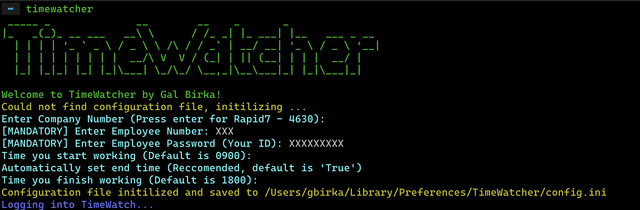
~/Library/Preferences/TimeWatcher/config.ini and it can be changed in any time.
Furthermore, if you set the auto_execute parameter to True it will also add a launchdagent to automatically execute the program at specific date and time.
Configuration
This is the list of the user configuration options:
company_number- Mandatory, your company number in Timewatchemployee_number- Mandatory, you employee number used in Timewatchemployee_password- Mandatory, password used to Timewatch, by default this is your ID numberauto_execute- Do you want to automatically execute this program at specific date and time? Default is 'True'day_to_execute- If you chose 'True' to the previous one, you can set the day of the month to run on. Input only digit. E.g:12will make the program execute on the 12th day of each month.hour_to_execute- If you chose 'True' to the previous one, you can set the time in the day you want to execute the program. Input only digit. E.g:11will make the program execute on 11 A.M.start_time- Optional, the time to set as your start time in Timewatch. Default to 0900 (9 A.M)end_time- Optional, the time to set as your end time in Timewatch. Default to 1800 (6 P.M)auto_end_time- Optional, if set toTrueit will calculate theend_timebased on the needed hours for each date in Timewatch. This mean the program can handle half days automatically using this option. The default isTrue.
Development
If you want to run this program locally, clone the repo to your machine
https://github.com/birkagal/timewatcher
cd timewatcher
Initialize environment using poetry
poetry install --no-root && pre-commit install
You can make any changes you want.
To execute run the timewatcher command inside the directory
timewatcher
1 maintainer

Metadata
1 maintainer
Release files for timewatcher 2.2.1
For a detailed explanation of source distributions (sdists) and built distributions (wheels), please see the package formats documentation.
Source distribution (sdist)
| File | Size | Uploaded | Provenance | |
|---|---|---|---|---|
| timewatcher-2.2.1.tar.gz | 9.0 kB | Without provenance | Details |
Built distribution (wheel)
| File | Interpreter | ABI | Platform | Reset |
|---|---|---|---|---|
| timewatcher-2.2.1-py3-none-any.whl | Python 3 | none | any | Details |
Total release size: 19.2 kB
Release files / timewatcher-2.2.1.tar.gz
| Download URL | timewatcher-2.2.1.tar.gz |
|---|---|
| Size | 9.0 kB |
| Tags | Source |
|
SHA-256 checksum How to use checksums |
b8e565f0b087cfecee1edf9c69cf0c13baa31c12de519cfc5f7615f260a2a821
|
|
BLAKE2b-256 checksum How to use checksums |
082b5f5ed8b4a6a55ff15d58781023142c0e195bdf9e6ccad47263bce5049511
|
| Upload date | |
|
Uploaded using Trusted Publishing? What is trusted publishing? |
No |
| Uploaded via |
poetry/1.8.3 CPython/3.12.1 Linux/6.5.0-1023-azure
|
Release files / timewatcher-2.2.1-py3-none-any.whl
| Download URL | timewatcher-2.2.1-py3-none-any.whl |
|---|---|
| Size | 10.2 kB |
| Tags | Python 3 |
|
SHA-256 checksum How to use checksums |
23f95a125013962899332686500f0bc458d39a00c851cc8ff16bcba85412a32b
|
|
BLAKE2b-256 checksum How to use checksums |
3073aad73fb6ac781112007a3ddce11ca72043a5983268ead5f6d2414f39de05
|
| Upload date | |
|
Uploaded using Trusted Publishing? What is trusted publishing? |
No |
| Uploaded via |
poetry/1.8.3 CPython/3.12.1 Linux/6.5.0-1023-azure
|
Security for timewatcher 2.2.1
Provenance
Provenance describes where a file came from. On PyPI, provenance is shared via attestations, which provide a verifiable record of the build or publishing details. View details, limitations and caveats.
No provenance found
None of the files in this release were uploaded with provenance metadata.
A note on package security
PyPI is a repository for distributing packages, not a service for auditing them. While third-party security researchers and our staff do their best to detect and remove malicious packages, PyPI cannot guarantee the quality, security or suitability of any given package.














